


 Video Converter Ultimate
 Scherm opnemer
 Videoreparatie
 Beveiligde download
Hoe u uw FLV-videobestanden naar AVI-indeling op pc / Mac kunt converteren
Deze handleiding richt zich op hoe je met desktopsoftware en online apps FLV naar AVI kunt converteren. Er zijn veel redenen waarom je je FLV‑video’s moet converteren. FLV is ontwikkeld voor het online verspreiden van videoinhoud, maar niet voor het afspelen op digitale apparaten. Wanneer je FLV op de computer wilt bekijken, moet je het omzetten naar een ander videoformaat. Bovendien is het een goed idee om je videobestanden te bewerken door FLV naar een ongecomprimeerd videoformaat te converteren.

Deel 1: Top 2 gratis manieren om FLV naar AVI te converteren
Methode 1: converteer FLV naar AVI met gratis FLV-converter
Wanneer je FLV naar AVI converteert, maak je je misschien zorgen over verschillende factoren, zoals de uitvoerkwaliteit, gebruiksgemak en meer. FVC Free FLV Converter is de beste keuze. Hoewel het gratis is, krijg je veel functies op professioneel niveau zonder veel technische kennis. Bovendien biedt het tal van extra hulpmiddelen, zoals videobewerking.
Belangrijkste kenmerken van de beste FLV-converter
- 1. Converteer FLV-video's eenvoudig naar andere multimedia-indelingen.
- 2. Ondersteuning van bijna alle videoformaten, zoals AVI, MP4, MKV, enz.
- 3. Batch verwerkt honderden FLV-bestanden per conversie.
Gratis downloadenVoor Windows 7 of hogerVeilige download
Gratis downloadenVoor macOS 10.7 of hogerVeilige download
Hoe FLV gratis naar AVI op desktop te converteren
Stap 1: FLV-bestanden toevoegen
Zodra je de beste gratis FLV‑converter op je computer hebt geïnstalleerd, start je deze. Hij is compatibel met zowel pc als Mac. Klik op het menu Bestand(en) toevoegen in de linkerbovenhoek om het dialoogvenster voor het openen van bestanden te activeren. Zoek en selecteer vervolgens de FLV‑video’s op je computer en klik op de knop Openen om ze toe te voegen.

Stap 2: Video bewerken en formaat instellen
Als je je videobestanden wilt wijzigen, selecteer je het FLV‑bestand en klik je op het menu Bewerken. Vervolgens ga je naar het venster voor videobewerking. Volg de instructies op het scherm om het te bewerken en ga daarna terug naar de hoofdinterface.
Klik op het vervolgkeuzemenu Uitvoerformaat onder aan de hoofdinterface om het profieldialoogvenster te openen. Zoek vervolgens naar AVI en selecteer het op het tabblad Algemeen video.

Stap 3: FLV naar AVI converteren
Klik op het driepuntspictogram naast het veld Uitvoermap en selecteer een specifieke map om de AVI‑bestanden op te slaan. Klik ten slotte op de knop Converteren om direct te beginnen met het converteren van FLV naar AVI.

Methode 2: Hoe FLV naar AVI te converteren met VLC
VLC is veel meer dan een simpele mediaspeler. U kunt veel handige functies vinden, waaronder videoconversie. Als een open-sourceproject stelt VLC u in staat om FLV gratis naar AVI te converteren. Bovendien kan VLC beschadigde AVI-video's repareren.
Stap 1: Open de gratis FLV‑converter. Als je VLC niet hebt, download het dan gratis van de officiële website.
Stap 2: Ga naar het menu Media op het bovenste lint en kies Converteren/opslaan. Kies Converteren/streamen in het menu Bestand op de Mac.
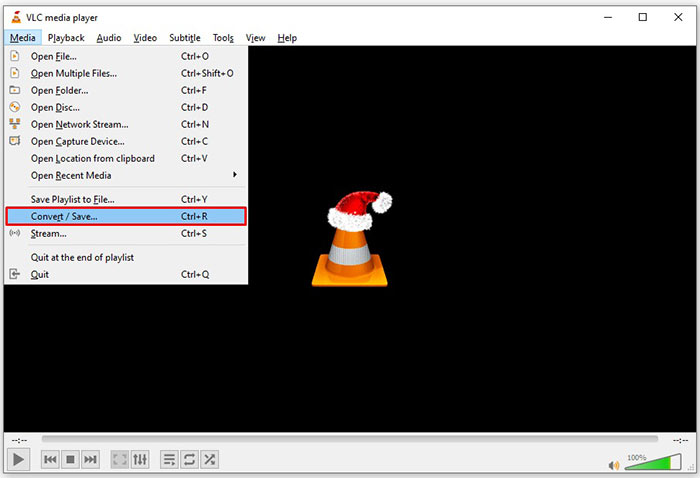
Stap 3: Klik op de knop Toevoegen in het dialoogvenster Media openen en voeg het FLV‑bestand toe dat je wilt converteren.
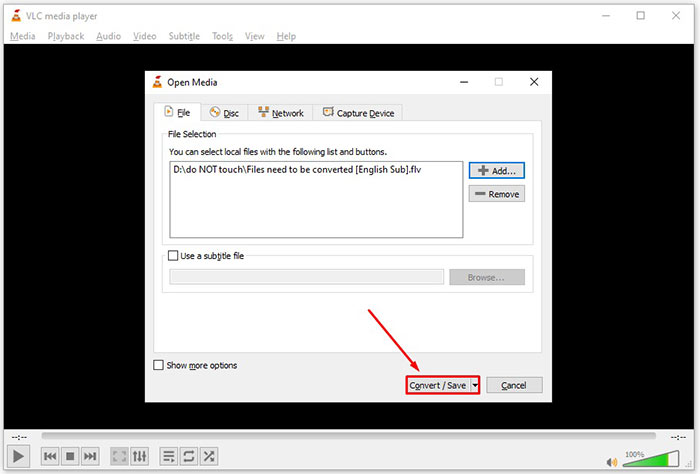
Stap 4: Klik vervolgens op de knop Converteren/opslaan om naar het volgende dialoogvenster te gaan.
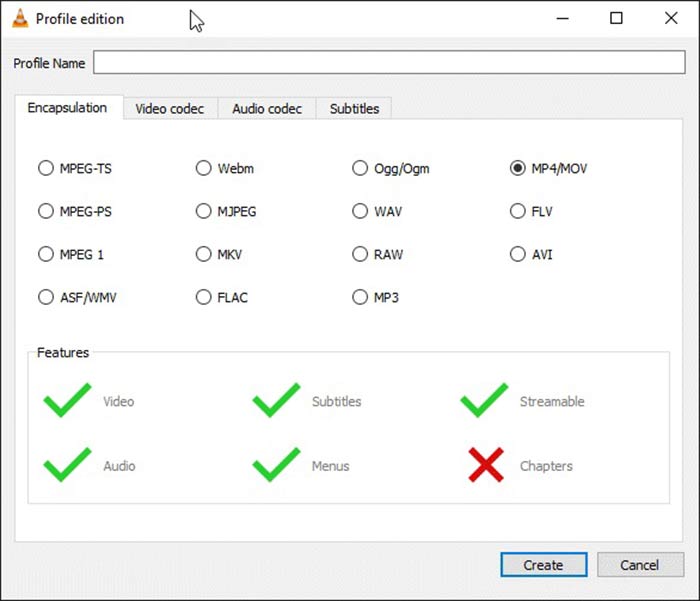
Stap 5: Open de dropdownlijst Profiel en selecteer AVI. Als je het niet kunt vinden, klik dan op de derde knop naast Profiel. Er wordt een dialoogvenster Profiel bewerken geopend. Selecteer AVI en vul een Profielnaam in. Klik op Aanmaken om te bevestigen. Selecteer vervolgens het nieuwe item uit Profiel.
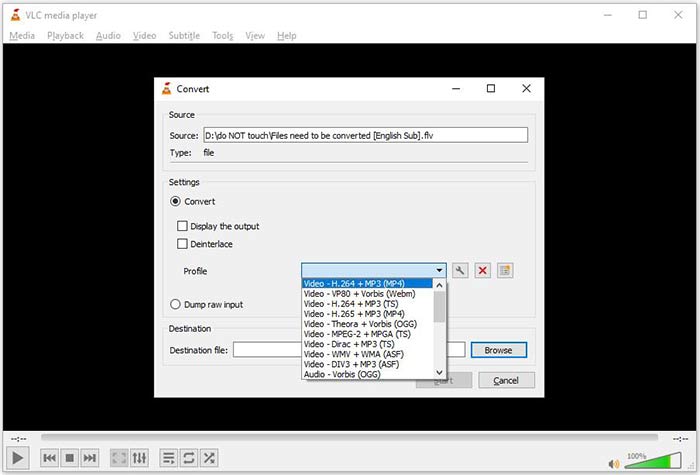
Stap 6: Stel de uitvoermap in door op de knop Bladeren te klikken. Klik op de knop Start en VLC zal de FLV naar AVI converteren.
Mis het niet:
- • Top 3 manieren om FLV naar MOV te converteren
- • Hoe u uw FLV-video's kunt converteren naar MP3-audiobestanden op desktop en online
Deel 2: Hoe FLV online naar AVI te converteren
Soms hoef je alleen af en toe FLV naar AVI online te converteren. Bovendien vinden sommige mensen het niet prettig om software te installeren. FVC Free Online Video Converter kan aan je behoefte voldoen. Het werkt online, maar is voldoende om meerdere FLV‑bestanden naar AVI te converteren. In tegenstelling tot andere webapps heeft het geen limiet voor bestandsgrootte, watermerk en meer.
Stap 1: Bezoek https://www.free-videoconverter.net/free-online-video-converter/ in een browser wanneer je video’s moet converteren. Klik op de knop Bestanden toevoegen om te converteren en download de launcher.
Download de desktopversie om bestanden in batches te converteren.
Stap 2: Na het downloaden verschijnt de launcher automatisch. Klik op de knop Bestand toevoegen linksboven en upload de FLV‑bestanden die je wilt converteren. Kies daarna AVI onderaan.
Om de resolutie, framesnelheid en andere parameters te wijzigen, klik je op het Tandwiel-pictogram om het profieldialoogvenster te openen.
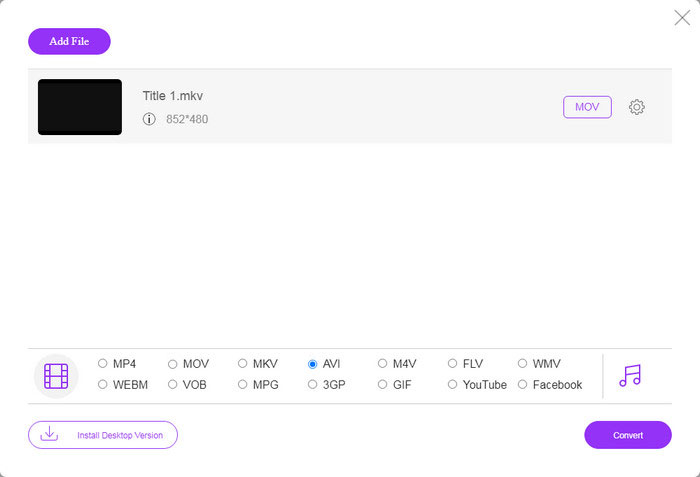
Stap 3: Zodra je op de knop Converteren klikt, zal de webapp werken zoals jij wilt. Download, wanneer hierom wordt gevraagd, de AVI‑videobestanden naar je harde schijf.
In vergelijking met andere webvideoconverters werkt Free Online Video Converter snel, maar je hebt ook een goede internetverbinding nodig.
FLV versus AVI
Adobe Flash Player gebruikte FLV om video-inhoud zoals films en tv-programma's te leveren. Tegenwoordig ontwikkelt Adobe de speler niet langer en raadt gebruikers aan deze om veiligheidsredenen te verwijderen. U kunt de FLV-indeling echter nog steeds gebruiken in veel niet-Adobe/Macromedia-programma's.
Gebaseerd op het Resource Interchange File Format (RIFF), werd het AVI-formaat geïntroduceerd door Microsoft in 1992. Het kan video/audio van hoge kwaliteit opslaan omdat het minder compressie gebruikt. Maar dat veroorzaakt ook de grote bestandsgrootte van een AVI-bestand, wat een probleem kan zijn als er beperkte ruimte is.
Deel 3: Veelgestelde vragen over FLV naar AVI
Hoe lang moet ik wachten om FLV naar AVI te converteren?
Het hangt af van uw situatie. Over het algemeen is het erg snel om video's op een desktop te converteren. Bij online tools bepaalt je internetverbinding de efficiëntie.
Is het veilig om FLV online naar AVI te converteren?
De meeste online FLV-converter-apps beloven je video's te verwijderen na het converteren. U moet echter geen privévideo's online uploaden, tenzij u zeker weet dat de web-app 100% veilig is om te gebruiken.
Is AVI beter dan FLV?
FLV is een videoformaat met verlies, terwijl AVI een niet-gecomprimeerd videoformaat is. Het betekent dat het FLV-bestand in dezelfde staat kleiner is dan AVI. AVI biedt echter een betere videokwaliteit. FLV wordt gebruikt om video's online te delen, terwijl AVI een goede keuze is om video's te bewerken.
Gevolgtrekking
Deze gids heeft drie manieren gedeeld om FLV-videobestanden naar AVI-indeling te converteren met desktopsoftware en webapp. VLC is zowel een gratis mediaspeler als een video-omzetter, hoewel het moeilijk te gebruiken is. Bovendien kunt u het werk online doen zonder software te installeren. We raden u echter aan om FVC Free FLV Converter te proberen, omdat de uitvoerkwaliteit verbluffend is. Bovendien is het vrij eenvoudig te gebruiken en te navigeren. Als je andere vragen hebt met betrekking tot het converteren van FLV naar AVI, laat dan een bericht achter onder dit bericht.
-
 3 gratis manieren om FLV naar WAV te converteren
 Hoe converteer ik een FLV-bestand? Kan VLC FLV naar WAV converteren? Dit bericht vertelt 3 gratis manieren om FLV naar WAV te converteren zonder kwaliteitsverlies.
-
 3 gratis manieren om FLV naar MPG te converteren
 Hoe FLV naar MPEG te converteren? Kan ik gratis FLV naar MPG converteren? Dit bericht deelt 3 gratis videoconverters om u te helpen FLV naar MPG te converteren zonder kwaliteitsverlies.
-
 3 gratis manieren om FLV te converteren voor spelen op Xbox
 Kun je FLV-bestanden niet afspelen op Xbox One of Xbox 360? Moet u FLV converteren naar een door Xbox ondersteund formaat zoals MP4, AVI, MOV of WMV? Dit bericht bevat 3 gratis FLV naar Xbox-converters waarmee je FLV op Xbox kunt spelen.

