


 Video Converter Ultimate
 Scherm opnemer
 Videoreparatie
Ontdek manieren om MKV-bestanden op PS4 te spelen
Not Only Xbox One S supports playback of movies. Now PS4 is trying to cope up with the trend. With the use of USB cable and via DLNA PS4 can now play MKV, MP4, AVI, and a lot more. This means MKV is part of the files you can play. To see a list of the full formats supported, visit the official website of PS4. Furthermore, you wouldn't keep on reading this article if you're not interested in playing an MKV file to PS4. Keep it going, as you progress you will discover ways on how you can play MKV on PS4.

Deel 1. Kunnen alle MKV-bestanden worden afgespeeld op PS4?
Kan ik MKV-bestanden afspelen op PS4? Dat kan je vast wel. MKV-bestandsindeling wordt ondersteund door PS4. Maar niet alle MKV-bestanden kunnen correct worden afgespeeld. Het kan zijn dat je faalt bij het spelen ervan. Dit komt omdat je moet voldoen aan de standaard die PS4 stelt. Meestal worden H.264/MPEG-4 AVC ondersteund. Dezelfde regels zijn van toepassing als u MKV-bestanden vanaf een USB-station gaat afspelen. Ondertussen worden voor audio MP3, AAC LC, AC-3 ondersteund. De meeste van die formaten zijn Dolby Digital-formaten. Als je denkt dat je aan de standaard hebt voldaan, kun je doorgaan met de stappen om MKV rechtstreeks op PS4 te spelen.
Step 1. Download and install DivX Media Server and launch the player. Then enable the sharing on your computer.
Step 2. Upload or import the MKV file to the server.
Step 3. Prior moving to the next step, make sure both the computer and PS4 are connected under the same Wi-Fi network. Next download and install the DivX media player on your PS4. Afterwards, open the media player app of the Ps4 and choose DivX media server from the list of devices that will appear.
Step 4. Finally, look for Video then tick the video you want to play and start streaming it.
Deel 2. Stap voor stap handleiding over hoe speel MKV op PS4 vanaf USB
Als u ondertussen een USB-opslag gebruikt, zorg er dan voor dat deze FAT of exFAT is geformatteerd, anders wordt deze niet gedetecteerd. Als je denkt dat je er klaar voor bent en de flashdrive compatibel is, bekijk dan de stapsgewijze handleiding hieronder.
Step 1. Turn on PS4 and insert the USB. Go to the main Menu. Now, select Video and keep looking for your USB Drive name.
Step 2. Once you see the list of the file name, click on Display All to see the entire list of files you saved on your USB. Copy the file and transfer it to the PS4.
Step 3. Finally, make sure you still have enough storage to complete the transfer.
Deel 3. Alternatieve manier om MKV op PS4 te spelen via Plex Server
Aside from the DivX there is also an alternative player that you can use to play MKV on PS4. There is a streaming media server named Plex. This media server allows you to stream high-quality videos, music, TV shows, and podcasts from your computer. Although some people experience problems in playing some MKV files, you can still use it as an alternative. Meanwhile, if you really feel like using Plex and play the incompatible file you should consider converting the video. Some converters are capable of turning your MKV files into Plex supported format. By adjusting the video codec, frame rate, bitrate and other parameters, it is possible. Is there a tool that is capable of doing that? Yes there is, you can try Video Converter Ultimate. Yes, this tool is capable of doing that. Try using it to solve this problem.
Step 1. Download and install Video converter Ultimate on your PC.
Gratis downloadVoor Windows 7 of nieuwerVeilige download
Gratis downloadVoor MacOS 10.7 of nieuwerVeilige download
Step 2. Add the files that you want to convert by clicking Add files or simply drag and drop the file in the interface.
Step 3. Afterwards, choose the format that is supported by Plex by clicking Convert to All dropdown.
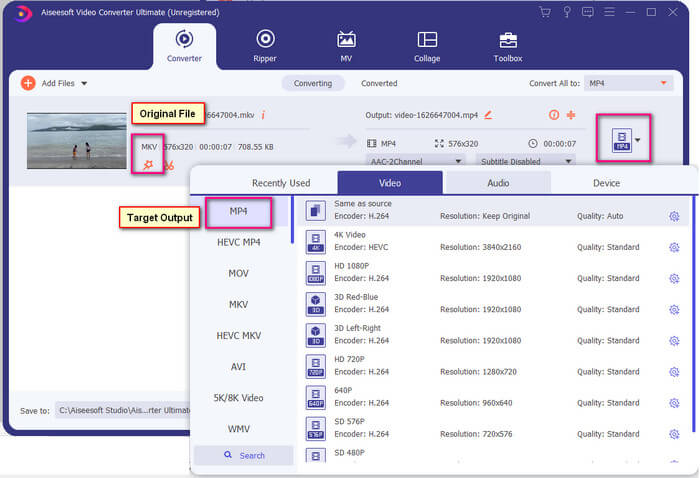
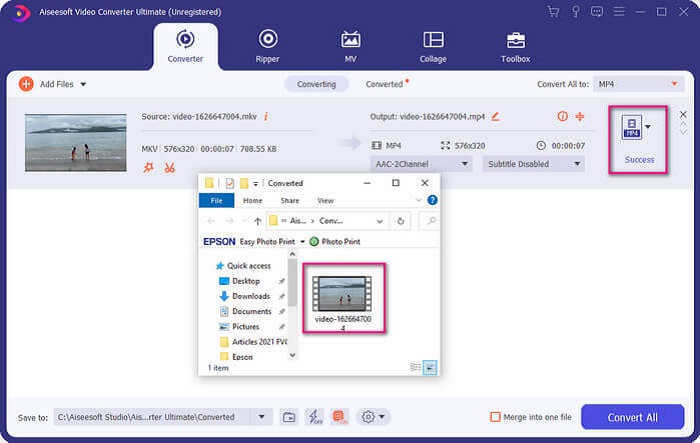
Step 4. Once format is set, click the Convert All button to start the process of conversion. Once the conversion is done, the folder where the file is saved will pop-up.
Er is meer met Ultimate video converter. U kunt de lijst met voor- en nadelen hieronder bekijken om andere goede functies te leren kennen.
● Deze tool converteert zo snel als drie seconden.
● Het heeft een versnellende technologie die het geconverteerde bestand kan verbeteren.
● Het ondersteunt HD-kwaliteit.
● Het heeft bewerkingsfuncties zoals het toevoegen van filters en basiseffecten.
● U kunt de ondertitels en audiotrack aanpassen.
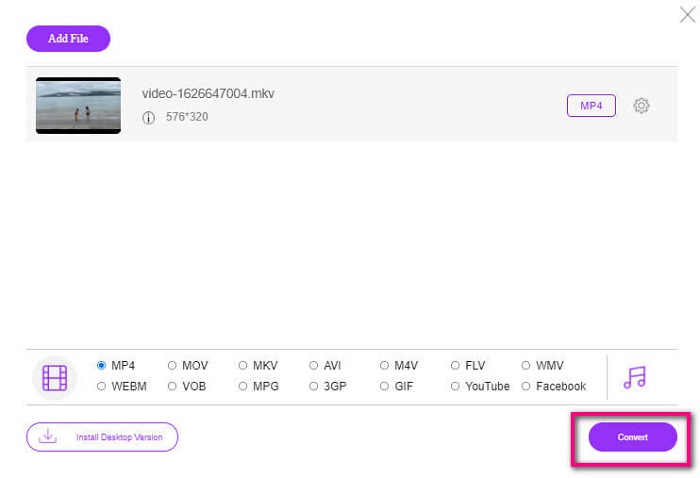
In any case that you are looking for a free converter, you can also consider FVC Free Online Video Converter. It may not be as good as the Ultimate Video Converter, it is to still cope up with it. Certainly, it can convert the file and make it compatible with Plex or DivX. All you have to do is…
Step 1. Launch the tool by visiting the official page in the description.
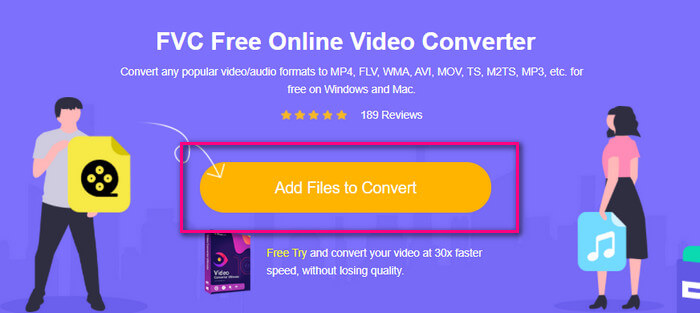
Step 2. Upload the video by clicking Add Files to Convert.
Step 3. Change the format by highlighting the circle below.
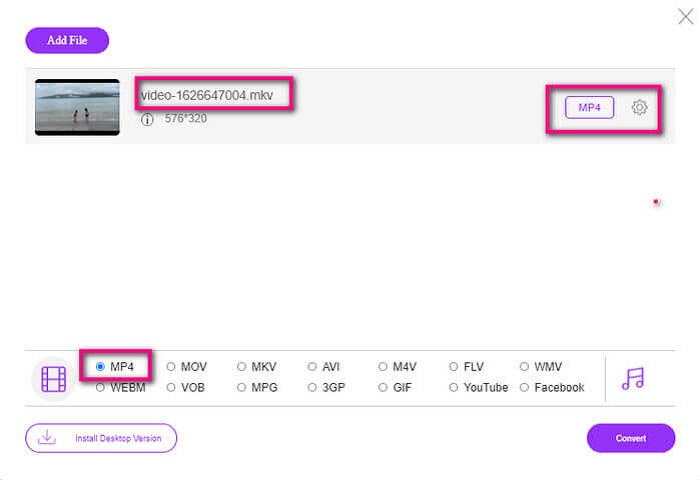
Step 4. Finally, click the Convert button and select the file location where you want the file to be saved. From there click Okay. You can click the Folder icon to see the converted file.
Further Reading
Play MKV in Windows Media Player
Deel 4. Meer informatie over het afspelen van MKV-bestanden op PS4
Hoeveel kost een PS4?
De marktverkoopprijs is 399,99 USD in de Verenigde Staten en in Canada 399,99 CAD. Prijzen kunnen variëren, afhankelijk van de verkoopprijs in uw land.
Is er een mogelijkheid om CC of Close Caption MKV op PS4 te spelen?
Yes there is. It is in the Accessibility Settings. The path is, go to your PS4 Settings, Accessibility and then select Display Closed Captions. From there click Options to activate the closed caption.
Als PS4 MKV ondersteunt, waarom worden mijn bestanden dan niet afgespeeld?
Zoals hierboven vermeld, moet u ervoor zorgen dat het MKV-bestand voldoet aan de standaard van de speler die u gebruikt. Je hoeft alleen maar de vereiste van PS4 of een andere mediastreamingserver te controleren. De meeste mediaservers hebben ook een classificatie om MKV-bestanden af te spelen.
Welke formaten worden door PS4 ondersteund?
Er zijn verschillende bestandsindelingen die PS4 ondersteunt. Maar u zult merken dat de meeste formaten niet gecomprimeerd zijn en een groot bestand bevatten. Hoewel het ook de niet-gecomprimeerde zoals Mp4 ondersteunt. Ondertussen is hier de lijst met formaten waar we het over hebben: MKV, AVI, MPEG-2 PS, MPEG-2 TS, AVCHD en XAVC en MP4.
Gevolgtrekking
Tot slot zijn er veel manieren waarop je MKV-bestanden direct of indirect op PS4 kunt afspelen. Wat werden vermeld zijn de meest gebruikte media. DivX Stream Server en Plex zijn slechts enkele alternatieven die u kunt gebruiken. Het wordt ten zeerste aanbevolen om het bestand in plaats daarvan te converteren om gedoe en te veel proces te voorkomen.
-
 [Opgelost] VLC-speler speelt MKV niet, hoe dit te repareren
 Ondersteunt de VLC-speler MKV-bestanden? Waarom speelt VLC geen MKV? Dit bericht deelt 4 handige tips voor u om te repareren VLC-speler speelt geen MKV-bestanden af.
-
 Hoe MKV-bestanden op iPad 2025 af te spelen
 Hoe speel ik MKV-bestanden af op iPad 2? Kan ik MKV naar MP4 converteren om op iPad Pro / Air / 2 te spelen? Dit bericht deelt 2 eenvoudige manieren om MKV op iPad te spelen.
-
 MKV-codec downloaden in Windows Media Player voor soepel afspelen
 Kan MKV-video niet afspelen in Windows Media Player? U kunt gratis MKV-codec downloaden voor Windows Media Player. Integendeel, converteer de MKV om deze speelbaar te maken in Windows Media Player.
