


 Video Converter Ultimate
 Scherm opnemer
 Videoreparatie
Kies de beste GIF naar AVI-converter die beschikbaar is op pc en Mac
Het converteren van je GIF naar AVI-bestandsformaat werd mogelijk met behulp van deze ongelooflijke tools. Zonder enig kwaliteitsverlies en op de een of andere manier om het beter te maken. Maar sommige van de converters die u misschien gebruikt, kunnen u niet de beste kwaliteit bieden die u wilt gebruiken. U hoeft zich dus geen zorgen te maken als u uw GIF wilt vervangen door een AVI-indeling. Converteer uw video naar een AVI-formaat zonder kwaliteitsverlies door de onderstaande stap te volgen en te kiezen wat de beste converter is die u moet gebruiken.

Deel 1. De gratis en professionele manier om GIF naar AVI te converteren met gedetailleerde stappen
1. Gratis manier - FVC gratis video naar GIF Maker
FVC Free Video to GIF Maker is de beste gratis GIF‑naar‑AVI-converter die je wordt aangeboden door FVC. Met deze tool kun je ook elke video of elk audiobestand gratis naar een nieuw formaat converteren. Deze tool biedt een van de beste converters die gratis te gebruiken is. Hoewel de meeste belangrijke functies van de premiumversie niet gratis beschikbaar zijn, is hij nog steeds net zo goed in converteren. Volg de onderstaande stappen om te weten hoe je deze gratis tool gebruikt en je GIF converteert.
Stap 1. Installeer de tool op je desktop.
Gratis downloadenVoor Windows 7 of hogerVeilige download
Gratis downloadenVoor MacOS 10.7 of hogerVeilige download
Stap 2. Dit is een voorbeeld van de interface die je zult zien zodra je de tool hebt gedownload.
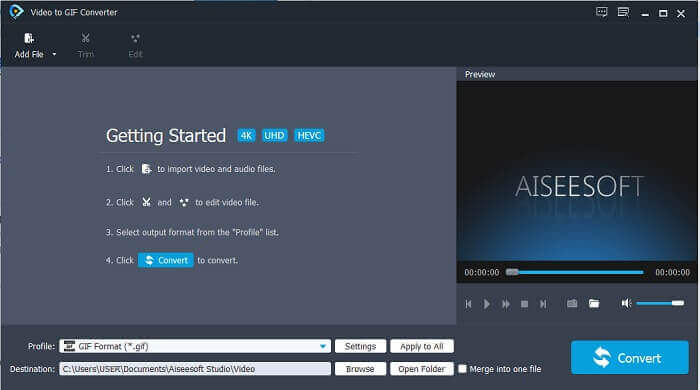
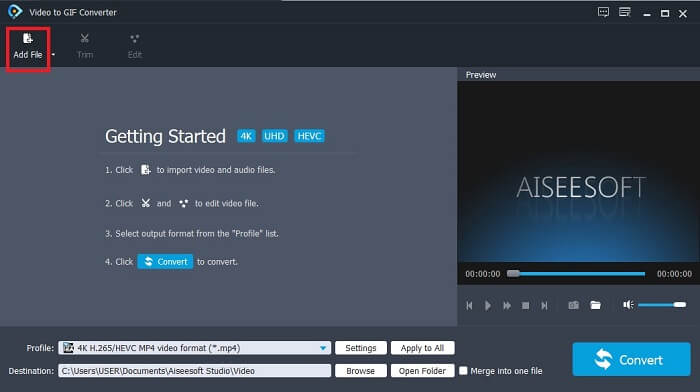
Stap 3. Klik op Add File en selecteer het GIF‑bestand dat je wilt converteren. Als het bestand al geselecteerd is, klik je op Open om het in de interface te laden.
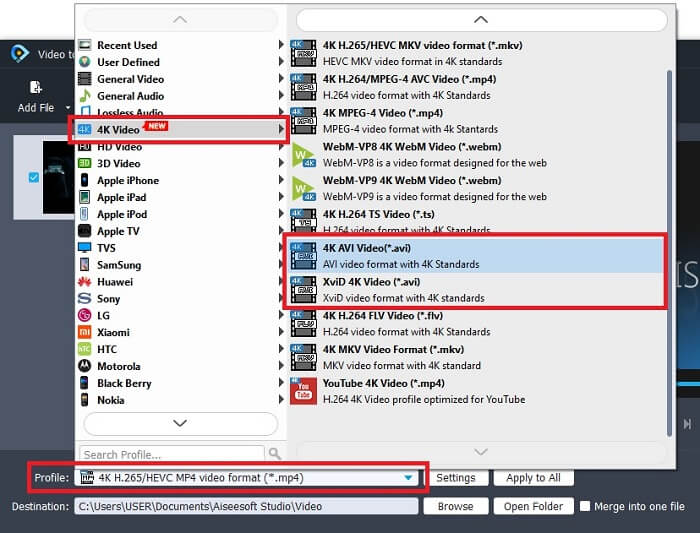
Stap 4. Verander het formaat naar AVI bij Profile. Klik onder 4K Video op het AVI-formaat. Als alles klaar is, klik je op Convert om de conversie te starten.
Stap 5. Het converteren van de GIF zal niet veel tijd kosten. Daarna kun je van je eindresultaat genieten.
2. Professionele manier - Video Converter Ultimate
Misschien vraag je je af hoe je een GIF in AVI verandert of andersom. En of er een speciale tool is die je conversie uitstekend maakt. Dat moet dan Video Converter Ultimate zijn, omdat die meer formaten ondersteunt dan de gratis tool en andere premiumconverters. Bovendien biedt hij meer functies die je kunt gebruiken om je video of audio te verbeteren. Met deze ultieme converter kun je je GIF echt tot leven brengen. Leer hoe je je GIF‑indeling naar AVI converteert zonder kwaliteitsverlies en hoe je de video verbetert als die wat korrelig wordt. Volg de onderstaande stappen om de juiste manier te leren om je favoriete GIF‑bestand te converteren.
Stap 1. Klik op de downloadknop die past bij je besturingssysteem. Installeer de tool op je harde schijf en pas de voorkeuren aan voordat je de tool start.
Gratis downloadVoor Windows 7 of nieuwerVeilige download
Gratis downloadVoor MacOS 10.7 of nieuwerVeilige download
Stap 2. Als de tool al draait, zie je deze mini‑ultimate‑interface op je scherm; dat betekent dat hij al is gestart.
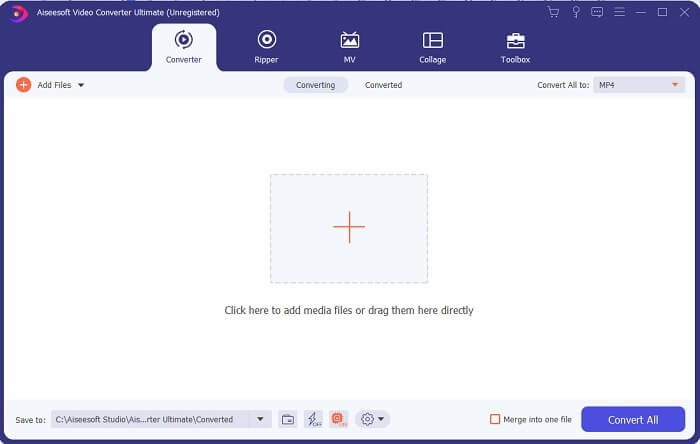
Stap 3. Klik op de knop met het plus-teken om een bestand toe te voegen, of sleep het bestand daarheen.
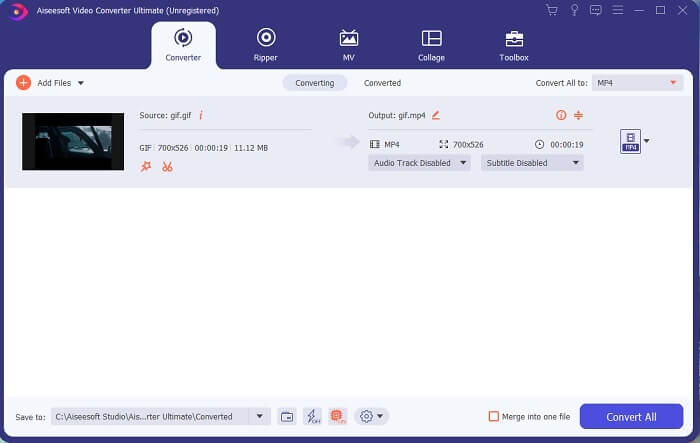
Stap 4. Klik op de drop‑down-knop om het formaat te wijzigen en AVI te kiezen. Je kunt ook de encoder, resolutie en kwaliteit van het resultaat instellen. Als alles klaar is, klik je op Convert All om het conversieproces te starten.
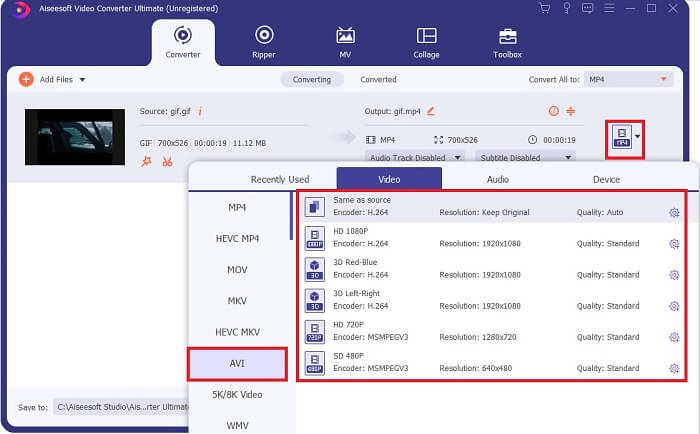
Stap 5. Deze tool biedt een 30x snellere conversie dan de gratis tool en is 100x beter dan de andere tool, dus je hoeft niet lang te wachten. Nadat de conversie is voltooid, wordt er automatisch een bestandsbeheerder op je scherm geopend.
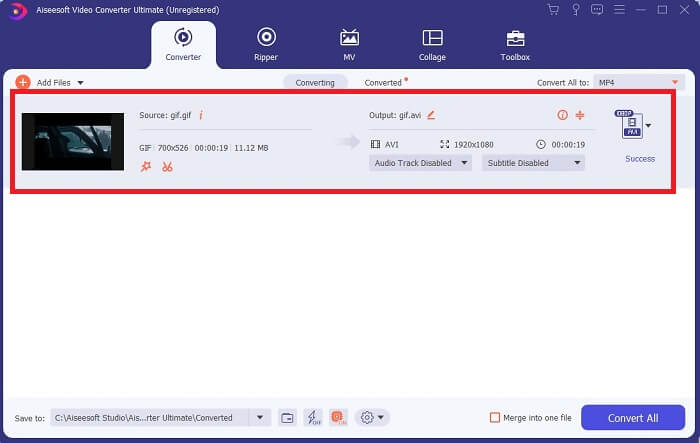
Bonustool en stappen om de video te verbeteren
Niet alle premiumconverters bieden dit soort functie. In sommige gevallen, als je GIF naar AVI converteert, wordt de video wat wazig omdat de fps‑snelheid van de GIF lager is dan die van AVI. Maar er is een manier om je video te verbeteren voor een beter resultaat. Volg deze stappen om de video te verbeteren die je al hebt geconverteerd.
Stap 1. Klik in de Toolbox van de software op Video Enhancer.
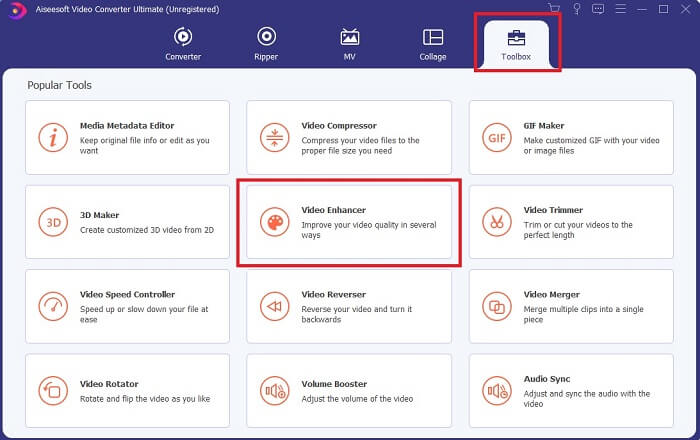
Stap 2. Klik op de plus-knop en selecteer de video die je wilt verbeteren. Klik op Upscale Resolution om de kwaliteit van de video te verhogen; je kunt ook de andere opties aanvinken om de videokwaliteit verder te verbeteren. Klik vervolgens op Enhance om het proces te starten.
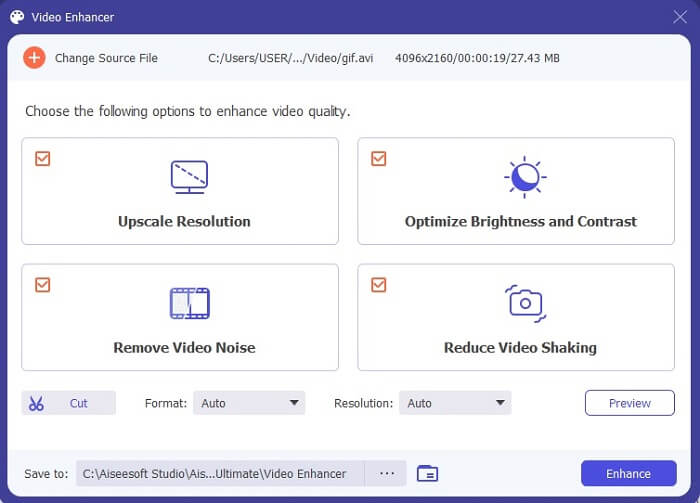
Stap 3. Het verbeteren van de video zal snel klaar zijn. Na het verbeteren wordt de bestandsbeheerder automatisch geopend, zodat je op de video kunt klikken om een veel betere versie te bekijken.
Deel 2. Top 3: Beste online converters beschikbaar op het web.
1. CloudConvert
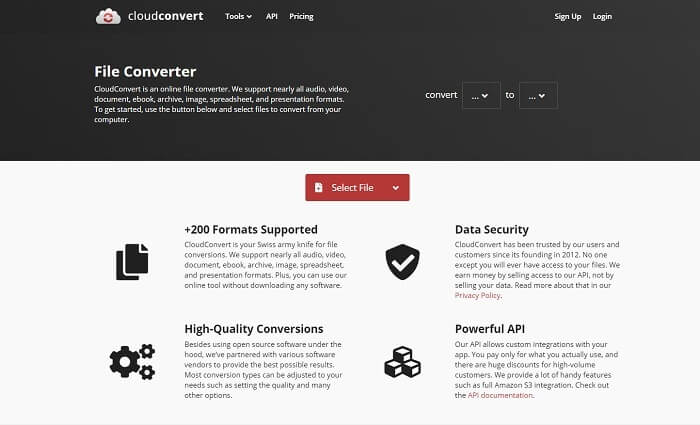
De beste GIF‑naar‑AVI onlineconverter is Cloud Convert. Deze tool ondersteunt vrijwel alle verschillende formaten voor video, audio, documenten, e‑books, spreadsheets, presentaties en ook afbeeldingen. Je kunt deze tool gebruiken zonder iets te installeren, omdat het een online tool is; dat betekent echter ook dat je hem niet kunt gebruiken als je geen internetverbinding hebt, in tegenstelling tot de twee andere tools hieronder. Deze webinterface is veel informatiever dan AnyConv. Ook heeft hij een betere interface, die erg prettig en interactief is in gebruik.
2. AnyConv
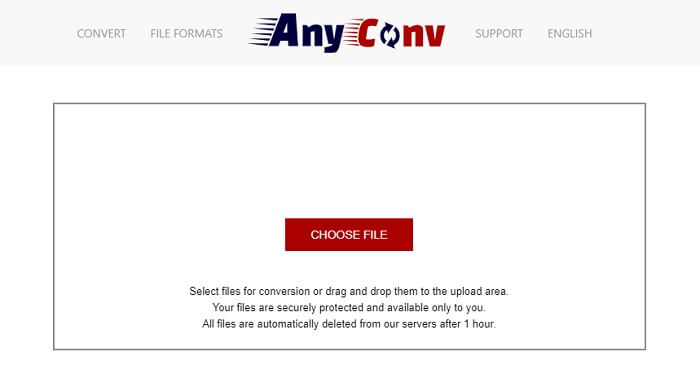
De veiligste manier om je video te converteren is door AnyConv te gebruiken. Je kunt er met gemak je geanimeerde GIF naar AVI mee omzetten. Het staat bekend als de veiligste converter omdat jij de enige bent die toegang heeft tot je geconverteerde bestanden. En alle bestanden die met deze online tool zijn geconverteerd, worden automatisch verwijderd na de conversie. De website van de tool is wat karig met informatie, waardoor het gebruik ervan verwarrend kan zijn door het gebrek aan uitleg.
3. online-convert.com
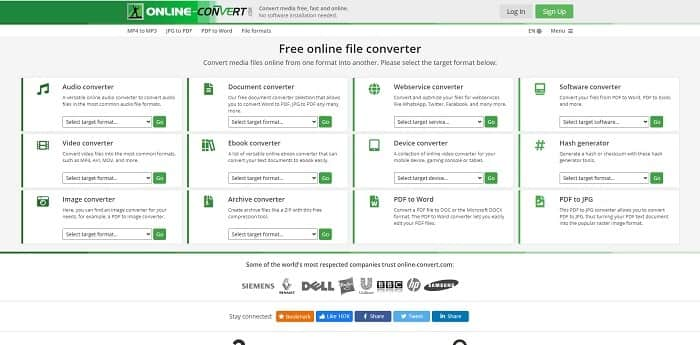
Een andere tool die je als converter kunt gebruiken is online-convert.com. Met deze tool kunnen gebruikers zoals jij vrijwel alle video‑, audio‑ en afbeeldingsbestanden en meer converteren. Ook is het mogelijk om webservices, apparaten en software te converteren met deze tool. Je kunt hem ook gebruiken om AVI naar een geanimeerde GIF te converteren of andersom. De webpagina van de tool is informatief en geeft een korte beschrijving van elke tool en hoe je die correct gebruikt. Maar de interface is nogal matig, mede door de groene kleurstelling die het voor de gebruiker minder aantrekkelijk maakt.
Deel 3. Veelgestelde vragen over GIF naar AVI
Wat is de beste GIF-cropper die beschikbaar is in alle software? en hoe het te doen?
Met de GIF‑cropper kun je je GIF tot in specifieke details bijsnijden. Klik op deze link om meer te weten te komen.
Is het AVI-formaat gecomprimeerd of niet-gecomprimeerd?
Het is algemeen bekend dat AVI een hogere videokwaliteit levert dan MPEG’s of MOV. Maar dit formaat is ongecomprimeerd, dus reken op een veel grotere bestandsgrootte. Zelfs een video van één minuut kan meer dan 1,5 GB of zelfs meer in beslag nemen. Wil je je grote AVI‑bestanden comprimeren, klik dan hier om meer te leren.
Wie heeft AVI ontwikkeld?
De ontwikkelaar van het AVI-formaat is Microsoft; de eerste release was november 1992.
Gevolgtrekking
Om de details af te ronden, het is bekend dat het kiezen van het juiste gereedschap voor de juiste klus een must is, vooral bij het converteren. Omdat het converteren van een bestand naar een nieuw formaat een beetje gevoelig is, wat betekent dat als je de verkeerde converter gebruikt, verwacht dat er wat gegevens verloren gaan. Maar als u de Ultimate Converter gebruikt, kunt u alle bestanden converteren, zelfs zonder internetverbinding en ook zonder gegevensverlies. Deze tool is de juiste keuze voor jou om te gebruiken, want het is niet alleen geweldig in het doen van één taak, maar ook de beste onder de rest.
-
 5 beste opties om GIF-indeling op te nemen met GIF-recorders voor pc en Mac
 Wat is de beste GIF-recorder die u moet gebruiken om GIF's op te nemen? De onderstaande lijst geeft aan welke de beste schermrecorder is.
-
 Hoe MPG naar GIF-formaat te converteren [Online & Offline]
 Wil je een veel betere emotie uitdrukken? Dan moet u in plaats daarvan GIF gebruiken. Dit artikel leert je hoe je een MPG-bestand naar GIF converteert om je gevoel veel beter uit te drukken.
-
 [2021 bijgewerkt] 9 beste GIF-editors voor pc, Mac, iOS en Android
 Wilt u een persoonlijk tintje aan uw GIF toevoegen, zodat deze expressiever kan worden? Lees dit artikel verder om te weten hoe u kunt bewerken en wat de beste tool voor de klus is.
