


 Video Converter Ultimate
 Scherm opnemer
 Videoreparatie
 Beveiligde download
FlexClip AI Review: maak kennis met deze AI-mediatool
Technologie heeft het landschap van digitale contentcreatie voortdurend veranderd, van handmatige en traditionele montage naar automatische en probleemloze processen. De zaken zijn inderdaad aanzienlijk veranderd. Onder alle AI‑tools die we momenteel op de markt zien, is FlexClip AI uitgegroeid tot een van de gamechangers in zijn vakgebied. Met de integratie van kunstmatige intelligentie belooft deze videobewerkingstool een revolutionaire manier om boeiende en professionele video’s te maken. Maar er is meer dan dat, dus laten we ingaan op de belangrijkste aspecten die het laten opvallen in het competitieve videobewerkingslandschap.

Deel 1. Wat als FlexClip
FlexClip AI is een gratis online videomaker en -editor die de mogelijkheden van kunstmatige intelligentie benut om het maken en bewerken van AI‑video’s te stroomlijnen en te verbeteren. Gebruikers kunnen moeiteloos online video’s bewerken en genereren en profiteren van een naadloze en efficiënte bewerkingservaring. Het platform biedt een verscheidenheid aan AI‑videosjablonen die bedoeld zijn om creatieve videoprojecten te inspireren. Opvallend is dat deze tool een tekst‑naar‑video‑functie bevat, waarmee gebruikers geschreven content binnen enkele minuten kunnen omzetten in visueel aantrekkelijke beelden en animaties.
Belangrijkste functies:
◆ AI-inhoudcreatie.
◆ Tekst-naar-video-conversie.
◆ Natuurlijke taalverwerking voor tekstanalyse.
◆ Personalisatie- en aanbevelingsfuncties.
◆ Drag & drop-interface voor eenvoudig bewerken.
◆ Sjablonen voor snelle videocreatie.
◆ Mediabibliotheek met diverse inhoud.
◆ Ondersteuning voor meerdere formaten voor veelzijdige uitvoer.
◆ Stemgenerator voor dynamische audio.
◆ Privacyopties en watermerken voor veiligheid.
Voordelen
- Gebruiksvriendelijke interface.
- 4000+ sjablonen.
- Cloudgebaseerde video-oplossingen.
- Efficiënte aanpassingsfuncties.
- Geavanceerde bewerkingstools.
Nadelen
- Geen offline functies.
- Potentieel verlies van werk als gevolg van cloudproblemen.
- Ontbreekt 4K-ondersteuning.
- Beperkte/gratis versie heeft beperkingen.
Prijzen
| Vrij | Plus | Bedrijf |
| 0$ | 9.99$ per maand | 19.99$ per maand |
| Inclusie: | Inclusie: | Inclusie: |
| ✅720p HD-downloads ✅1 stockvideo per project ✅1 stockaudio per project ✅Gratis AI-credits ✅Maximaal 12 projecten ✅Videoduur tot 10 minuten | ✅1080p Full HD-downloads ✅5 stockvideo's per project ✅5 stockaudio per project ✅Plus AI-credits ✅Bewaar een onbeperkt aantal projecten online ✅Onbeperkte videolengte ✅Aangepaste branding ✅30 GB cloudopslag ✅100 GB videohostingruimte ✅Upload aangepaste lettertypen ✅Bewaar maximaal 100 sjablonen ✅Geen FlexClip-watermerk | ✅1080p Full HD-downloads ✅Onbeperkt stockvideo's ✅Onbeperkte voorraadaudio ✅Zakelijke AI-credits ✅Bewaar een onbeperkt aantal projecten online ✅Onbeperkte videolengte ✅Aangepaste branding ✅100 GB cloudopslag ✅1TB videohostingruimte ✅Upload aangepaste lettertypen ✅Bewaar maximaal 200 sjablonen ✅Geen FlexClip-watermerk |
Is het veilig om te gebruiken?
FlexClip AI is een vertrouwd videobewerkingsplatform dat uw privacy voorop stelt. Uw videobestanden en persoonlijke informatie worden veilig bewaard. Deze tool maakt gebruik van encryptietechnologie om ervoor te zorgen dat uw gegevens veilig worden verzonden.
Vergeet niet om sterke wachtwoorden te gebruiken en wees voorzichtig bij het online delen van persoonlijke gegevens.
Deel 2. FlexClip gebruiken voor het genereren van AI-video's
FlexClip AI heeft een gebruiksvriendelijke interface, waardoor het gemakkelijk te gebruiken is, ongeacht of u een tech-professional of een nieuweling bent. Om hiervan gebruik te maken, volgt u de onderstaande stappen:
Stap 1. Maak een account aan op hun officiële website.
Stap 2. Klik op de knop Create a Video.
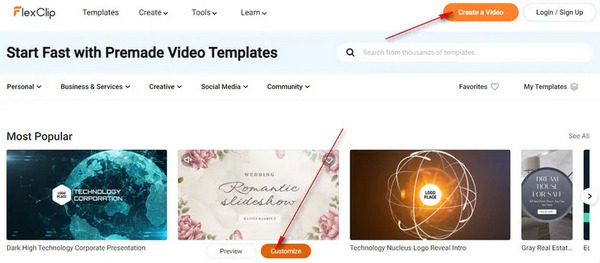
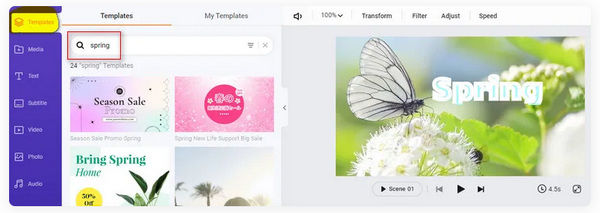
Stap 3. Om sjablonen toe te voegen, klik je op Templates in het linkertabblad; hetzelfde geldt voor het toevoegen van media, ondertitels, video’s, foto’s, audio en elementen. Deze functies zijn te zien op het tabblad Left, en om ze te gebruiken hoef je er alleen maar op te klikken.
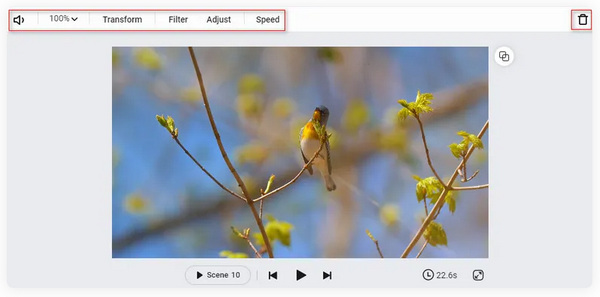
Stap 4. Om de video te bewerken, klik je op de Video Scene op de tijdlijn. Van daaruit kun je allerlei handige functies zien, zoals Volume, Zoom, Transform, Filter, Adjust, Speed, enzovoort. Vergeet niet hier je creativiteit de vrije loop te laten. Als je tijd wilt besparen, kun je een tekst‑naar‑video‑generator gebruiken om met AI een video te maken.
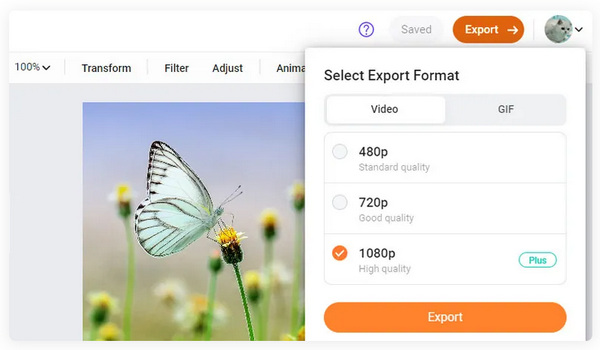
Stap 5. Tot slot, wanneer je klaar bent met het aanpassen van je video, klik je op de knop Export om deze op te slaan.
Daar ben je! FlexClip AI kan uw favoriete AI-videobewerkingsmaatje zijn. Met eenvoudige stappen kunt u verbluffende video's maken binnen uw bereik. Om echter alle functies te kunnen gebruiken, moet u zich op hun abonnement abonneren. Niettemin is het nog steeds een goed hulpmiddel dat we kunnen gebruiken om onze bewerkingservaring te benutten.
Deel 3. Tips: beste hulpmiddel om gegenereerde AI-video's aan te passen
FlexClip AI gebruiken is soms niet genoeg, zeker wanneer sommige functies die we willen toevoegen niet beschikbaar zijn. Daarom volgt hier de bonustool die je kunt gebruiken om je gegenereerde AI‑video van FlexClip of welke andere tool dan ook verder aan te passen. In dat geval is de softwaretool FVC Video Converter Ultimate de beste keuze voor jou. Het is een veelzijdige AI‑videomaker die je kunt gebruiken om je gegenereerde video’s te personaliseren en die allerlei elementen en functies bevat die je kunt inzetten. Hier volgt een korte uitleg over hoe je hem gebruikt
Stap 1. Download eerst het programma van hun website en installeer het op je computer.
Gratis DownloadVoor Windows 7 of hogerBeveiligde download
Gratis DownloadVoor MacOS 10.7 of hogerBeveiligde download
Stap 2. Verken nu de tabbladen. Je ziet de tabbladen Converter, MV en Collage. Voel je vrij om ze te verkennen en te gebruiken. De tab Converter is er om video’s in niet‑ondersteunde formaten te converteren, en de tab MV is bedoeld om je video’s te bewerken en te personaliseren.

Stap 3. Om de gegenereerde video toe te voegen, klik je nu op de knop Add File.
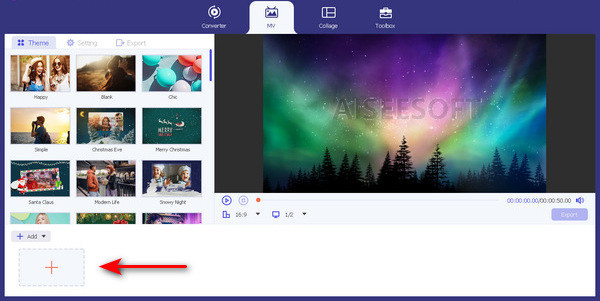
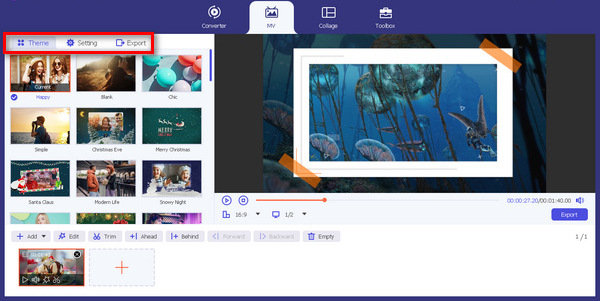
Stap 4. Verken nu het thema, het sjabloon en andere bewerkingsfuncties, zodat je je video volledig kunt aanpassen.
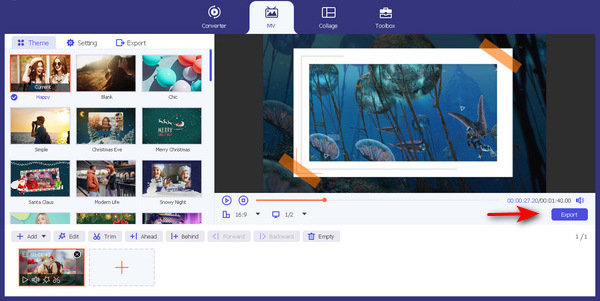
Stap 5. Als je klaar bent, klik je tot slot op de knop Exporteren.
Met deze eenvoudige stappen kan FVC Video Converter Ultimate uw gegenereerde video's aanpassen of personaliseren. U hoeft alleen maar deze stappen te volgen. Bovendien kunt u enkele van hun functies ook gebruiken als u iets nodig heeft om te converteren of te collageren. Maar gebruik het voor nu om je creativiteit de vrije loop te laten.
Deel 4. Veelgestelde vragen over FlexClip AI
Laat FlexClip een watermerk achter?
Nee. FlexClip AI laat geen watermerk achter op je video's. Je kunt video's maken en bewerken zonder enige branding vanaf het platform. Als u echter een watermerk wilt toevoegen om uw video's te personaliseren, kunt u dit eenvoudig op hun platform doen.
Kan ik FlexClip voor YouTube gebruiken?
Ja. FlexClip AI is een uitstekende keuze voor het maken van inhoud voor YouTube. Met de functies van hun platform kunt u uw video's eenvoudig bewerken en verbeteren. Bovendien zijn er kant-en-klare YouTube-videosjablonen die je kunt gebruiken.
Wat is beter dan FlexClip?
Hoewel FlexClip AI een fantastisch videobewerkingsplatform is, bieden alternatieven zoals Adobe Premiere Pro en iMovie meer geavanceerde functies voor professionele videobewerking. Het is echter noodzakelijk om rekening te houden met uw behoeften en kennisniveau om de tool te kiezen die het beste bij u past.
Hoe veilig zijn mijn gegevens op FlexClip?
FlexClip AI geeft prioriteit aan de privacy en veiligheid van gebruikersgegevens. Uw videobestanden en persoonlijke gegevens worden beschermd en met zorg behandeld. De tool is ingebed met een encryptietechnologie om de veilige overdracht van gegevens te garanderen. Het is echter raadzaam om sterke wachtwoorden te gebruiken en voorzichtig te zijn bij het online delen van persoonlijke informatie.
Is FlexClip geschikt voor beginners?
Ja. FlexClip AI is ontworpen om gebruiksvriendelijk te zijn, waardoor het een uitstekende keuze is voor beginners. Dankzij de intuïtieve interface en handige functies van het platform hebben gebruikers van alle vaardigheidsniveaus er gemakkelijk toegang toe.
Gevolgtrekking
Deze FlexClip AI‑review bespreekt grondig de noodzakelijke zaken die je moet weten. Als al deze punten aan jouw wensen voldoen, kun je deze tool zeker op elk moment gebruiken. Hoewel deze AI‑tool veel belooft op het gebied van videobewerking, mag je de kans niet missen om FVC Video Converter Ultimate te gebruiken om je gegenereerde video verder te personaliseren. Door ze allebei te gebruiken, kun je het montageproces niet alleen stroomlijnen, maar zorg je er ook voor dat je video’s van hoge kwaliteit maakt.
-
 Hoe je YouTube-shorts maakt met AI Video Maker
 Op zoek naar een AI-videomaker om YouTube Shorts te maken? Nou, dit bericht is voor jou. We zullen u bespreken en begeleiden bij het maken ervan met behulp van verschillende AI-tools.
-
 Beste 3 AI Audio naar Video Converter-tools om films te genereren
 Heeft u moeite met het vinden van een AI-audio-naar-video-omzetter? Die strijd eindigt vandaag omdat we u in deze review de beste AI-converter bieden die u kunt gebruiken.
-
 Beste 5 AI-ondertitelgeneratoren om bijschriften en ondertitels te maken
 De traditionele manier van ondertiteling toevoegen kost veel tijd en werk. Deze recensie leert je de vijf beste AI-ondertitelgeneratoren die je vandaag kunt gebruiken.
