


 Video Converter Ultimate
 Scherm opnemer
 Videoreparatie
Hoe AMV op betrouwbare en betrouwbare manieren naar FLV te converteren
Voor wie het niet kent: AMV staat voor Anime Music Video. De bestandsextensie .amv gebruikt gecomprimeerde videobestanden. Draagbare mediaspelers die in China zijn geproduceerd, gebruiken het vaakst AMV-bestanden. Video’s met een lage resolutie passen op het scherm van de mediaspeler waarop de video wordt afgespeeld. Adobe Systems heeft echter het FLV‑bestandstype (Flash Video File) ontwikkeld. Dit formaat bevat een korte header, afwisselend audio‑, video‑ en metagegevenspakketten en audio‑ en videogegevens die in SWF‑bestanden zijn opgeslagen. Videostreams kunnen met Flash Video worden ingesloten in Adobe‑toepassingen en via Flash‑plug‑ins. Nu je een korte introductie over deze twee formaten hebt gekregen, kun je je voorbereiden om in de converters te duiken. Het is aan te raden om te overwegen om AMV naar FLV te converteren.

Deel 1. De meest uitstekende converter om te gebruiken bij het converteren van AMV naar FLV
Video Converter Ultimate is een professioneel programma dat je videoconversies kan afhandelen. Het ondersteunt moeiteloze, verliesvrije conversie van FLV naar MOV op zowel Windows‑ als Mac‑computers, en is gratis beschikbaar. Daarnaast kan de tool converteren tussen meer dan 100 verschillende formaten, inclusief high‑definition bestanden. Er is ook een volledige video‑editor beschikbaar, waarmee je kunt bijsnijden, trimmen, knippen, watermerken toevoegen en speciale effecten gebruiken. Naast videoconversie ondersteunt Video Converter Ultimate ook videodownload, video‑overdracht en andere functies. Om te leren hoe je deze software gebruikt, moet je de instructies in deze sectie goed doornemen.
Stap 1: Om toegang te krijgen tot de software, moet je deze eerst op je computer downloaden. Klik hiervoor op de knop Gratis downloaden onderaan deze stap. Zoals je ziet, heb je twee keuzes bij het downloaden van de software: voor Windows of voor Mac. Installeer de software na het downloaden op je computer en start het programma vervolgens.
Gratis downloadVoor Windows 7 of nieuwerVeilige download
Gratis downloadVoor MacOS 10.7 of nieuwerVeilige download
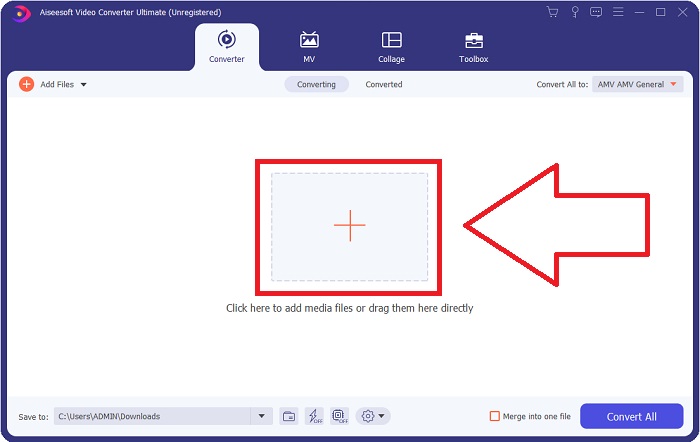
Stap 2: Na het starten van de software verschijnt er een venster. De Converter-interface wordt op je scherm weergegeven, net als het uploadgebied. Klik op de +‑knop of sleep een videobestand vanaf je bureaublad om verder te gaan.
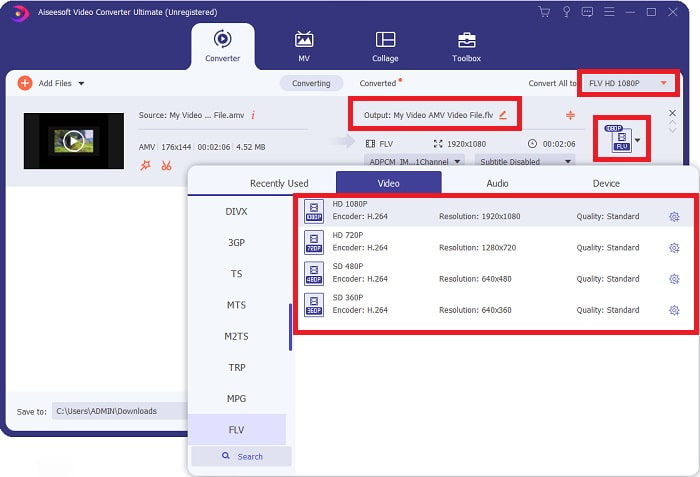
Stap 3: Om het AMV‑videoformaat naar FLV te converteren, moet je na het uploaden van een bestand in de software het gewenste uitvoerformaat opzoeken en FLV kiezen. Daarna kun je ook de gewenste videokwaliteit selecteren.
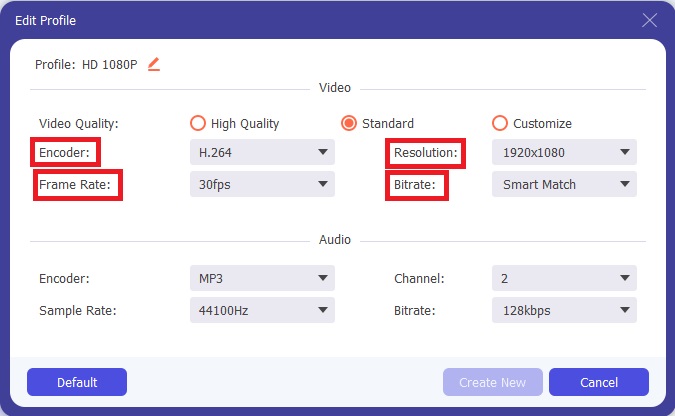
Stap 4: Als je een aangepaste of geheel nieuwe videokwaliteit wilt aanmaken, kun je op het tandwiel‑icoon klikken naast de lijst met videokwaliteiten.
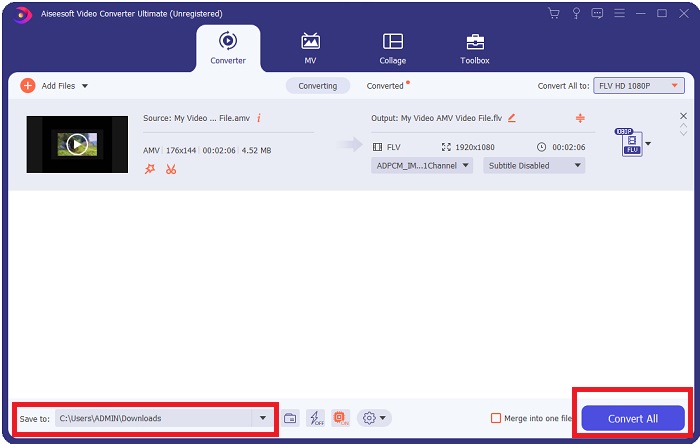
Stap 5: Je bent er bijna! Nu je alle specificaties en instellingen naar wens hebt aangepast, kun je de opslaglocatie van je geconverteerde bestand kiezen door op het map‑icoon naast het veld Opslaan in rechtsonder in het venster te klikken. Daarna kun je je videobestand converteren door op de knop Alles converteren te klikken.
Deel 2. Online tool om te gebruiken bij het converteren van AMV naar FLV
Online converters zijn eenvoudig te gebruiken, omdat je geen software hoeft te downloaden of installeren. Free Video Converter Online is een uitstekend voorbeeld van een programma dat AMV snel en eenvoudig naar FLV kan converteren. Met dit programma kun je een groot aantal audio‑ en videoformaten converteren, en het is volledig gratis. Je kunt twee bestanden uploaden om te converteren, en zodra het proces is voltooid, wordt het geconverteerde bestand automatisch op je harde schijf opgeslagen. Hieronder vind je alle stappen die je moet kennen om deze handige online tool te gebruiken.
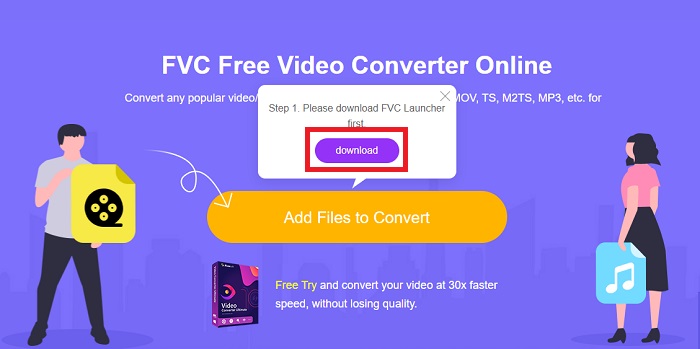
Stap 1: Klik op deze link om naar de hoofdpagina van de online tool te gaan. Nadat je bent doorverwezen, kun je een bestand gaan converteren door op Bestanden toevoegen om te converteren te klikken. Daarna verschijnt de downloadknop in de bovenhoek van je scherm. Zodra de launcher is geïnstalleerd, kun je een bestand vanaf je computer naar deze tool uploaden.
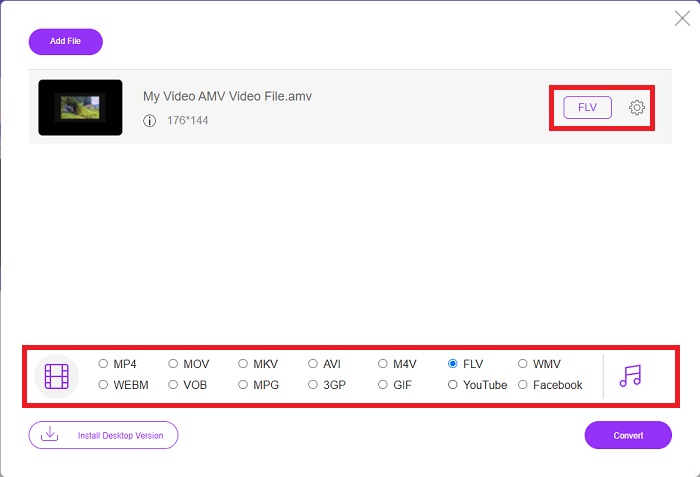
Stap 2: Nu je geïmporteerde bestand klaarstaat, klik je op het FLV‑videoformaat dat eronder wordt weergegeven. Net als in de desktopsoftware kun je ook hier alle specificaties van je uitvoervideo aanpassen door op het tandwiel‑icoon te klikken.
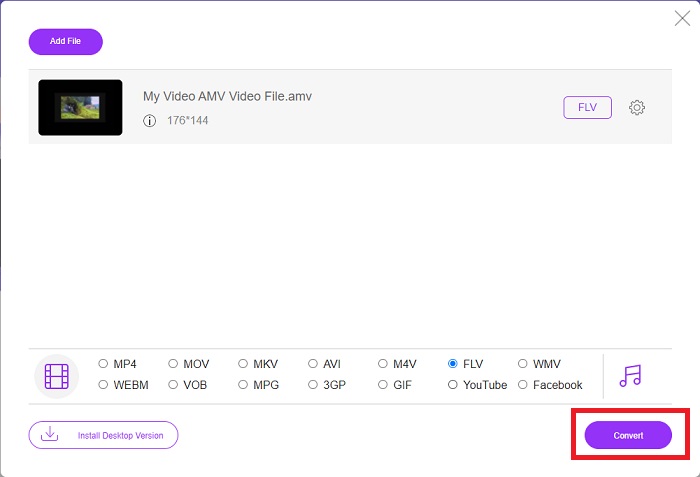
Stap 3: Klik tot slot op de knop Converteren om je AMV‑bestanden naar het FLV‑formaat om te zetten.
Gerelateerd:
Deel 3. Uitgebreide kennis over AMV & FLV
AMV optimaliseert lage veelzijdige mediaspelers met trage CPU's en kleine schermen, zoals de S1 MP3-speler. De videocodec is Motion JPEG met vaste kwantiseringstabellen. De audiocodec is IMA ADPCM, waarbij de eerste 8 bytes van elk frame de bron (16 bits), index (16 bits) en het aantal versleutelde 16-bits samples (32 bits) zijn. Decoderingsoverhead voor deze vereenvoudigde codecs is verwaarloosbaar. De videocompressie is laag (4 pixels/byte vs. meer dan 10 pixels/byte voor MPEG-2), maar de bestandsgroottes zijn klein vanwege de verminderde resolutie (96x96 hoger dan of gelijk aan 208x176) en fps (10, 12, of 16 beelden/s). Een video van 30 minuten gecomprimeerd tot 128x96 pixels en 12 frames/s is 80 MB.
Wel een videobestand met de extensie.flv dat u de FLV-bestandsextensie kunt gebruiken als u video of audio van Adobe Flash Player of Adobe Air via internet wilt streamen. Lange tijd was Flash Video het standaard videoformaat voor bijna alle online video's, inclusief die op sites als YouTube, Hulu en talloze andere. Om deze reden gebruiken streamingdiensten en softwareontwikkelaars niet langer het eigen Flash-formaat van Adobe. Met al deze vergelijking vermeld, hier is een beetje hulp voor u, dit artikel heeft u een vergelijkingstabel gegeven:
| Bestandsextensie | AMV | FLV |
| Bestandsnaam | Anime-muziekvideo | Flash-videobestand |
| Ontwikkeld door | Jim Kaposztas | Adobe System Incorporated |
| Voordelen | ◆ AMV is een van de meest populaire door fans gemaakte anime-muziekvideo's tot nu toe. ◆ De bestandsgrootte is klein. | Adobe Flash voor dynamische en interactieve webpagina's kan een enorm voordeel zijn. Hoewel dit een eenvoudig proces is, kunnen de resultaten aanzienlijk zijn. Flash was ooit ook een populaire keuze voor eenvoudige videogames. |
| Nadelen | ◆ Incompatibel met de meeste mediaspelers en apparaten; lage kwaliteit. | De daling van de populariteit van FLV was een nadeel. Het maken van FLV-content kan tijdrovend en duur zijn. Het gebrek aan ondersteuning voor Flash op iOS-apparaten beperkt het vermogen om nieuwe gebruikers aan te trekken ernstig. |
| Programma's die het bestand ondersteunen | ◆VLC-mediaspeler ◆iOrgsoft AMV Converter | ◆RealPlayer ◆ Apple QuickTime Player ◆VLC-mediaspeler ◆ MP-speler |
Deel 4. Veelgestelde vragen over AMV naar FLV-conversie
Wat is het doel van een AMV?
Synchronisatie en eenheid in een AMV kunnen verschillende videobewerkingsstijlen bereiken. Het is mogelijk om onbewerkte bewerkingen te bereiken met eenvoudig in- en uitzoomen van 'effecten' en eenvoudige overgangsovergangen. Onder de vele voorbeelden zijn de volgende.
Hoe worden AMV's gemaakt?
Om een AMV succesvol te laten zijn, moet het een nummer gebruiken dat nauw verwant is aan het onderwerp en het bijna perfect beschrijft. Iedereen die dit leest, kan reageren door te zeggen: 'Wauw, dit is geweldig! Dit nummer is van hem, haar themalied. Hierdoor heb je een goed stuk uitgekozen.
Is FLV van betere kwaliteit?
Het FLV-formaat en MP4 kunnen hoogwaardige digitale video- en audiocodering opslaan. De kwaliteit van FLV-bestanden is een punt van discussie, maar de voor- en nadelen van FLV kunnen het bestandsformaat bespreken. Hogere compressieverhoudingen in MP4 resulteren in minder kwaliteitsverlies.
Gevolgtrekking
Tot slot weet u hoe belangrijk het is om de beste converter te kiezen bij het converteren van AMV naar FLV. Anderen zullen video's van lage kwaliteit en niet-gesynchroniseerde video's produceren nadat de video is geconverteerd. Maar de twee converters die in dit artikel worden aanbevolen, zijn de eersteklas converters waarvan u zich geen zorgen hoeft te maken over de kwaliteit die het zal geven.
-
 Beste methode om te gebruiken bij het converteren van AMV naar AVI [Goedgekeurd]
 Heeft u moeite om uw videobestand in AMV-formaat naar AVI te converteren? Hier zijn enkele tips die u alleen in dit artikel kunt vinden.
-
 3 nieuwste AMV-converters beschikbaar om AMV naar MOV-formaat te converteren [2022]
 Weet u niet hoe u uw AMV-bestanden naar MOV-formaat moet converteren? Dan gaat dit artikel over de 3 AMV naar MOV-converters die u online of offline kunt gebruiken.
-
 4 geverifieerde methoden om TS naar FLV op desktop / online te converteren
 U kunt TS standaard niet openen op uw computer of mobiel. De enige manier om de videobestanden te bekijken, is door TS naar FLV of andere formaten te converteren met onze concrete gids.
