


 Video Converter Ultimate
 Scherm opnemer
 Videoreparatie
 Beveiligde download
Hoe u uw DAT-videobestanden gratis naar FLV-indeling kunt converteren
Omdat er zoveel videoformaten zijn, kan het nodig zijn het ene formaat naar het andere te converteren. Dit artikel richt zich erop hoe je DAT naar FLV kunt converteren op desktop en online, gratis. Een bestand met de extensie DAT is geen standaardbestand, maar een databestand dat informatie opslaat. Daarom is er geen specifiek programma dat verantwoordelijk is voor het openen van DAT‑bestanden. Als er op deze manier een videobestand wordt opgeslagen, kan een goede DAT‑naar‑FLV‑converter je helpen het te openen.

Deel 1: Beste gratis manieren om DAT naar FLV te converteren
Manier 1: converteer DAT naar FLV met gratis FLV-converter
FVC Free FLV Converter is een krachtige videoconverter, hoewel het freeware is. Dat betekent dat je functies krijgt die vergelijkbaar zijn met professionele software, zonder ook maar een cent te betalen.
Belangrijkste functies van de beste gratis DAT-naar-FLV-converter
- 1. Batch converteer DAT-bestanden snel naar FLV-formaat.
- 2. Produceer uitvoer van hoge kwaliteit met behulp van geavanceerde technologie.
- 3. Voeg een breed scala aan bonustools toe, zoals videobewerking.
Gratis downloadenVoor Windows 7 of hogerVeilige download
Gratis downloadenVoor macOS 10.7 of hogerVeilige download
Hoe DAT gratis naar FLV te converteren
Stap 1: DAT-bestanden openen
Start de beste gratis DAT-naar-FLV-converter zodra je deze op je computer hebt geïnstalleerd. Om je gegevens veilig te houden, kun je het het beste van de officiële website downloaden. Klik op de grote knop Bestand(en) toevoegen in de startinterface, zoek en selecteer de DAT‑videobestanden en open ze. Vervolgens verschijnen ze in het bibliotheekgedeelte.

Stap 2: Stel FLV in als uitvoerformaat
Ga naar de onderste balk, klik op de optie Uitvoerformaat en vouw deze uit. Ga in de lijst naar het tabblad Algemene video, scroll naar beneden en selecteer FLV of een verwant formaat. Je kunt ook de framesnelheid, resolutie en andere parameters opnieuw instellen door op het Tandwiel-pictogram bij elke titel te klikken.

Stap 3: converteer DAT naar FLV
Klik vervolgens op de knop Map openen en wijzig de doelmap naar wens. Standaard slaat de DAT‑naar‑FLV‑converter de uitvoer op in je videobibliotheek. Klik ten slotte op de knop Converteren om direct op je desktop te beginnen met het converteren van DAT naar FLV. Het duurt slechts een paar minuten om het converteren te voltooien.

Manier 2: Hoe DAT naar FLV te converteren door VLC
VLC is een andere manier om DAT gratis naar FLV te converteren. De open-source mediaspeler kan een videobestand met de extensie DAT openen en converteren naar standaard videobestanden. Gezien de gecompliceerde procedure, delen we de basisstappen hieronder.
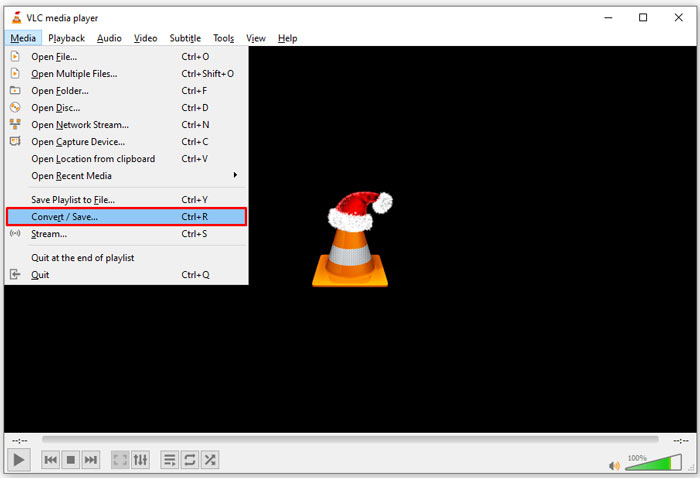
Stap 1: Open VLC en klik op Converteren/opslaan in het Media-menu op het lint bovenaan. Vervolgens zie je het dialoogvenster voor mediabestanden openen.
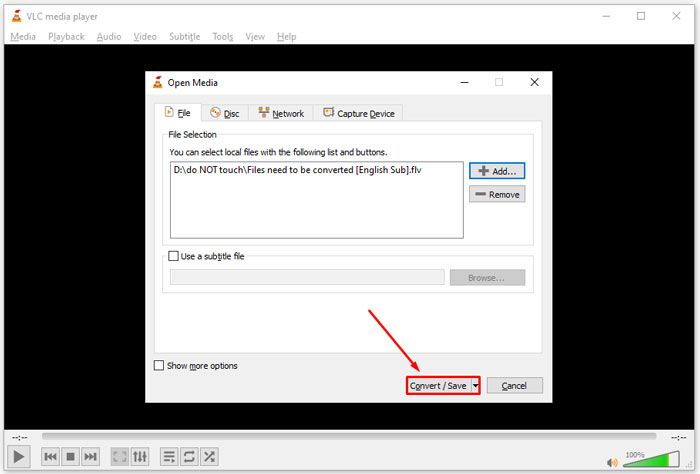
Stap 2: Klik op de knop Toevoegen en open de DAT‑videobestanden in VLC. Klik op de knop Converteren/opslaan om verder te gaan.
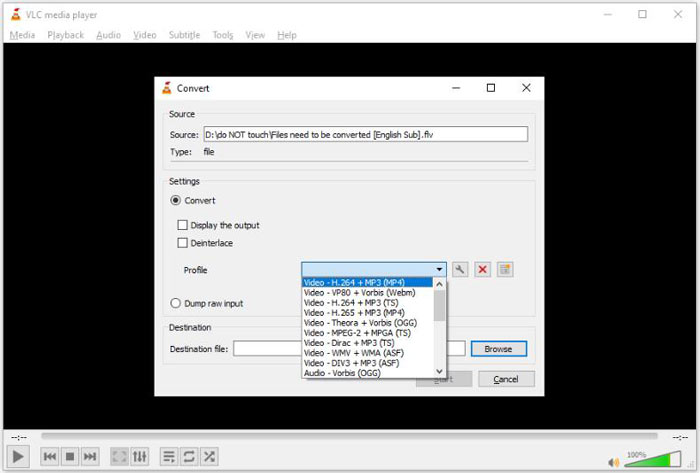
Stap 3: Klap de vervolgkeuzelijst Profiel uit en stel FLV in als uitvoerformaat. Klik op de knop Bladeren om een uitvoermap te selecteren in de sectie Bestemming.
Stap 4: Klik op de knop Start om het converteren van DAT naar FLV te starten. Het duurt in VLC ongeveer even lang als de afspeelduur van je videobestand om het te converteren.
Deel 2: Hoe DAT online naar FLV te converteren
FVC Free Online Video Converter is een eenvoudige manier om DAT online gratis naar FLV te converteren. In vergelijking met andere online videoconverters kun je hiermee de taak uitvoeren zonder enige beperking, zoals bestandsgrootte, registratie, watermerk, enzovoort.
Stap 1: Open een browser en ga naar https://www.free-videoconverter.net/free-online-video-converter/. Klik op de knop Bestanden toevoegen om te converteren om de launcher te downloaden.

Stap 2: Klik op de knop Bestand toevoegen in de launcher en upload de DAT‑videobestanden vanaf je computer. Ga vervolgens naar de formaatsectie onderaan en selecteer FLV.

Stap 3: Druk op de knop Converteren om online te beginnen met het converteren van DAT naar FLV. Wanneer dit klaar is, download je de videobestanden naar je harde schijf.
Misschien vind je dit ook interessant:
Converteer je TS‑bestanden naar FLV-formaat
Deel 3: Veelgestelde vragen over DAT naar FLV
Kan ik DAT-bestanden naar FLV converteren vanuit Internet Explorer?
Als de DAT-bestanden van IE video-inhoud opslaan, kunt u deze converteren naar standaardvideo's. DAT slaat echter niet alleen videogegevens op, maar ook andere informatie. Voor andere gegevens kunt u niet converteren naar video's.
Hoe DAT-bestanden openen?
Een DAT-bestand is een gegevensbestand dat informatie bevat over het programma waaraan het is gekoppeld. U kunt proberen een DAT-bestand te openen door erop te dubbelklikken. Uw systeem kan het juiste programma distribueren.
Kan ik DAT naar QuickTime converteren?
Het hangt af van uw situatie. Ten eerste moeten de DAT-bestanden videogegevens opslaan. Dan heb je ook nog een videoconverter nodig die DAT en QuickTime ondersteunt.
Gevolgtrekking
Deze gids heeft drie manieren gedeeld om uw DAT naar FLV te converteren op uw desktop of online. VLC is een gratis manier om het werk te doen op Windows, Mac en Linux. FVC Free FLV Converter biedt echter meer pro-level functies met het vragen van een betaling. Als je andere vragen hebt, laat dan een bericht achter onder dit bericht.
-
 MP4 naar FLV | Top 3 gratis converter (online / Mac / Windows)
 Dit bericht is de gedetailleerde gids voor conversie van MP4 naar FLV. U kunt de top 3 gratis converters gebruiken om MP4 gemakkelijk online naar FLV te wijzigen, op een Windows- of Mac-computer.
-
 3 Oplossingen om MTS gratis en online naar FLV te converteren
 Wilt u MTS naar FLV converteren? Hier zijn 3 gratis MTS naar FLV-conversiesoftware die u kunt proberen om MTS naar FLV te converteren op Mac OS X en Windows 10/8/7.
-
 Top 4 gratis manieren om FLV-video's naar MP4 op desktop en online te converteren
 Deze gids deelt vier gratis methoden om uw FLV-videobestanden naar MP4-indeling te converteren op Windows 10/8/7 / XP en Mac OS X, zodat u op elk apparaat van de video's kunt genieten.
