


 Video Converter Ultimate
 Scherm opnemer
 Videoreparatie
Ontdek wat de beste 3 FLV naar MKV-converters zijn om uw FLV-bestanden naar MKV te converteren
Ben je het zat om eindeloos op internet te zoeken naar de beste manier om FLV gratis naar MKV te converteren? Het is misschien toeval, maar vandaag hebben wij de beste FLV-converters gevonden die je kunt gebruiken; natuurlijk hebben we alleen de beste geselecteerd. Om je zoektocht een stuk eenvoudiger te maken, moet je vooral blijven lezen in het artikel hieronder, want je komt veel te weten over FLV en MKV en over de converters die je kunt gebruiken.

Deel 1. 2 manieren om FLV gratis naar MKV te converteren
1e manier. Gebruik de online converter om FLV naar MKV te converteren
Deze online converter is zonder twijfel een van de grote transcoders om FLV online naar MKV te converteren. FVC Free Video Converter Online is een eenvoudige en overzichtelijke converter die je online kunt gebruiken. Maar deze tool is afhankelijk van internet, wat betekent dat dit je laatste redmiddel is als je geen internetverbinding hebt. Hoewel de tool webgebaseerd is, bevat de interface geen advertenties die je kunnen irriteren en is hij vrij van malware. Als je deze tool nu zelf wilt uitproberen, volg dan de onderstaande stappen.
Stap 1. Klik op deze link om FVC Free Video Converter Online in een nieuw tabblad te openen.
Stap 2. Klik op de knop Add Files to Convert om de map op de computer die je gebruikt te openen. Kies het FLV-bestand dat je wilt converteren en druk op Open om het bestand te uploaden.
Download de desktopversie om bestanden in batches te converteren.
Stap 3. Kies het MKV-formaat in de lijst met formaten hieronder.
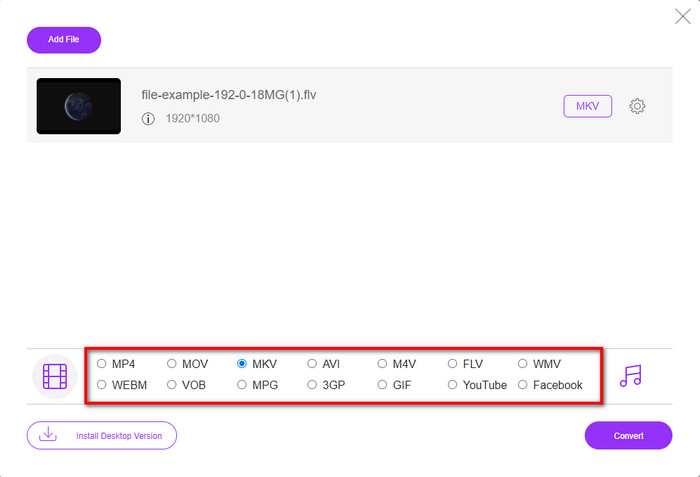
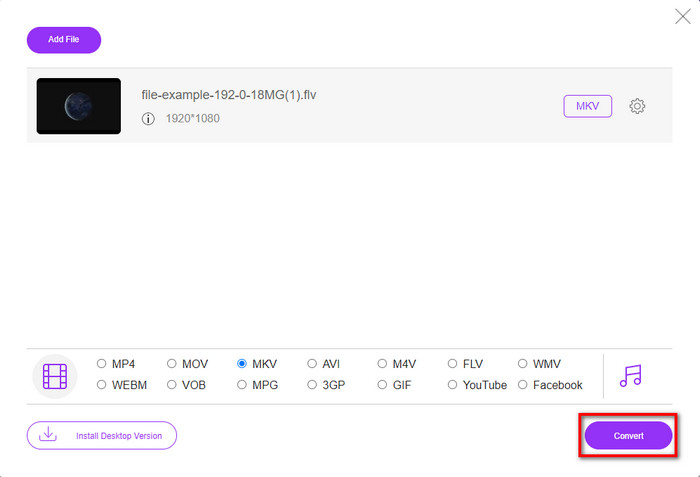
Stap 4. Start het conversieproces door op de knop Convert te klikken; het geconverteerde bestand wordt daarna automatisch op je schijf opgeslagen.
2e weg. Gebruik de gratis converter die beschikbaar is om te downloaden op Windows en Mac
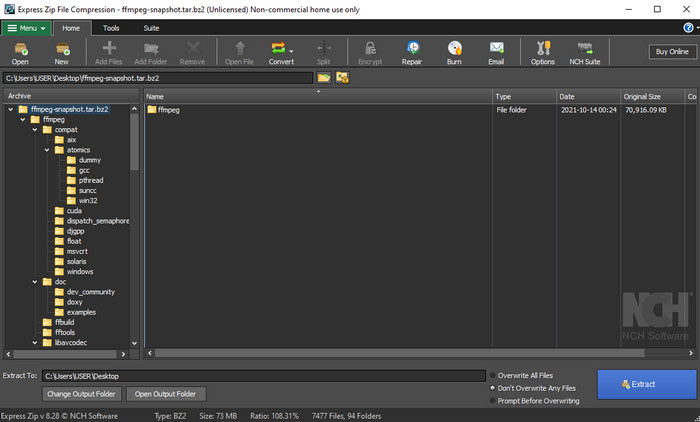
FFmpeg is niet de klassieke converter die je al gewend bent. Ook al is het geen gebruikelijke converter, het kan je FLV-bestand nog steeds converteren. Wat deze tool anders maakt, is dat hij een CLI-gebaseerde interface gebruikt, wat betekent dat je vóór het converteren opdrachten moet geven door te encoderen of, eenvoudiger gezegd, te typen. Als je deze converter interessant vindt, lees dan de details hieronder om deze FFmpeg FLV-naar-MKV-converter te gebruiken door de stappen te volgen.
Stap 1. Download en open FFmpeg.exe.
Stap 2. Open de opdrachtprompt (Command Prompt) op je computer.
Stap 3. Blader naar het FLV-bestand via de CMD. Kopieer vervolgens deze code en plak die in de opdrachtprompt: ffmpeg -i input.flv -vn -ar 44100 -ac 2 -b:a 192k output.mkv en druk daarna op Enter op je toetsenbord om het proces te starten.
Deel 2. Converteer FLV naar MKV met de beste FLV naar MKV-converter zonder verlies
3e manier. Gebruik de professionele converter om FLV naar WMV te converteren
Ben je nog steeds niet tevreden met de eerste twee converters hierboven? Probeer dan zeker de FVC Video Converter Ultimate. Waarom? Omdat hij een professioneel resultaat levert, zelfs als je zelf niet veel moeite steekt in het converteren. Bovendien ondersteunt hij meer formaten, zodat je je FLV-bestand kunt omzetten naar MKV, AVI, MOV, AVI, MP4 en meer dan 200 andere formaten. Nog steeds niet onder de indruk? Wil je misschien wat extra magie aan je video toevoegen? Dan heb je geluk met deze converter, want hij biedt geavanceerde videobewerkingsfuncties die je kunt gebruiken. Twijfel je omdat de tool misschien te ingewikkeld is om mee te werken? Volg dan de onderstaande stappen om te ervaren en te leren hoe je deze FLV-naar-MKV-converter gebruikt.
Stap 1. Voordat je deze converter gebruikt, moet je hem eerst downloaden door op de downloadknop hieronder te klikken. Volg na het downloaden de installatie-instructies en start het programma.
Gratis downloadVoor Windows 7 of nieuwerVeilige download
Gratis downloadVoor MacOS 10.7 of nieuwerVeilige download
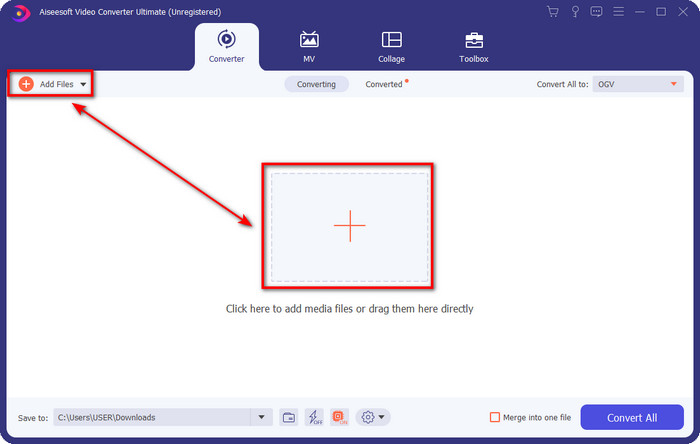
Stap 2. Om het FLV-bestand toe te voegen dat je wilt converteren, druk je op de +-knop. Blader naar het FLV-bestand in de map die op je scherm wordt geopend en klik op Open om verder te gaan naar de volgende stap.
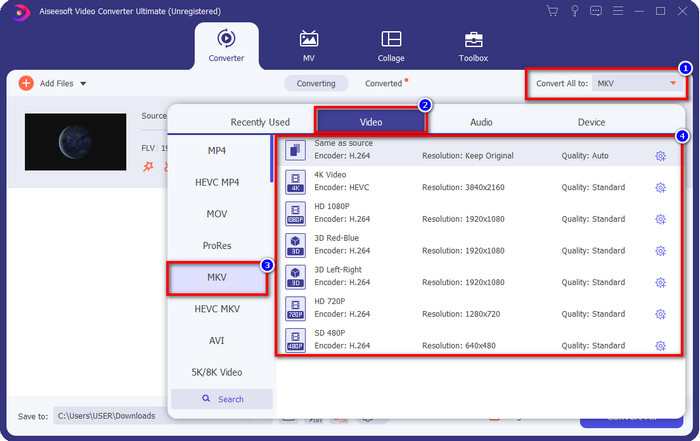
Stap 3. Laten we daarna het formaat wijzigen naar MKV door op de drop-down-knop aan de rechterbovenkant van de gebruikersinterface te klikken.
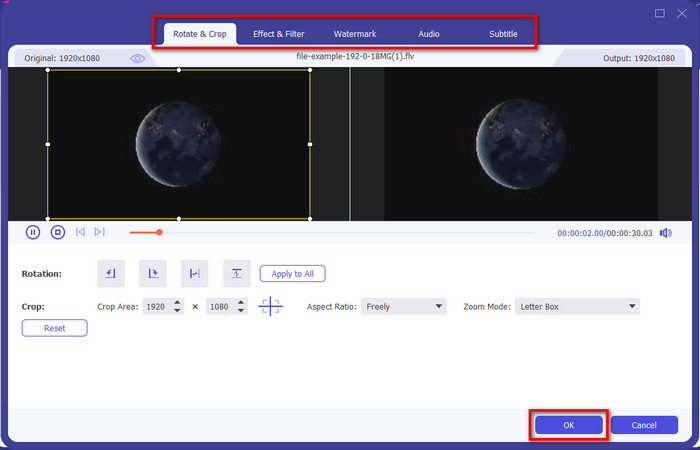
Optioneel. Misschien wil je de video bewerken; dan kun je, als je dat wilt, op de toverstok-knop klikken. Er verschijnt een nieuw venster waarin je kunt Roteren, Bijsnijden, Effecten, Filter, Watermerk, Audio en Ondertitel aanpassen. Beperk je verbeelding niet, doe wat je maar wilt en klik op OK om alle aangebrachte effecten toe te passen.
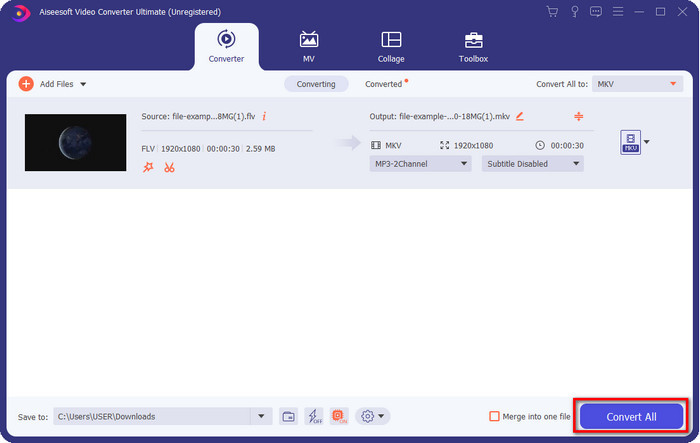
Stap 4. Klik tenslotte op Convert All om FLV naar MKV te converteren. Het proces duurt minder dan een minuut, dus je hoeft niet lang te wachten. Er verschijnt een map op je scherm met het geconverteerde FLV-bestand.
Gerelateerd:
Deel 3. Wat is het verschil tussen FLV en MKV
FLV en MKV staan bekend als de beste containers die iedereen kent. Maar laten we eerst eens kijken naar meer gedetailleerde informatie over de twee formaten.
FLV is op alle websites bekend omdat het populair is op webpagina's, vooral omdat Adobe het heeft gemaakt. Bovendien speelt .flv videostreams online af omdat ze veel gemakkelijker te laden zijn dan het andere formaat. Ook heeft dit formaat een plug-in-play nodig voordat je de video in dit formaat kunt bekijken of bekijken, of je kunt eenvoudig de Flash Player downloaden. Hoewel het formaat uitstekend is, zijn de plug-in-plays die het gebruikt al van de grond gekomen, wat betekent dat het formaat niet de beste keuze is. Veel mediaspelers ondersteunen dit formaat echter nog steeds en gebruikers die het nog steeds gebruiken.
MKV staat bekend als het meest toekomstgerichte formaat dat beschikbaar is. Dit formaat zou in veel opzichten niet op elk ander formaat lijken als we het zouden vergelijken. De structuur die in dit formaat is gebouwd, is bijvoorbeeld niet hetzelfde als de MP4 of AVI, maar het is anders. Het ontwerp en de unieke opslag van mediabestanden maken het nog indrukwekkender. Tegenwoordig is het moeilijk om te kiezen welk formaat verouderd is, en een daarvan is de MKV.
Als we meer in details duiken, zullen we veel redenen vinden waarom u FLV naar MKV moet converteren. Hoewel de twee formaten media-inhoud bevatten, is MKV krachtiger dan FLV. Dus als u de unieke kracht van MKV wilt hebben, moet u uw bestand naar dit formaat converteren.
FLV versus MKV
Adobe Flash Player gebruikte FLV om video-inhoud zoals films en tv-programma's te leveren. Tegenwoordig ontwikkelt Adobe de speler niet langer en raadt gebruikers aan deze om veiligheidsredenen te verwijderen. U kunt de FLV-indeling echter nog steeds gebruiken in veel niet-Adobe/Macromedia-programma's.
Het Matroska multimedia containerformaat, uitgebracht in 2002, is een open-source formaat dat een aantal video-, audio-, beeld- en ondertiteltracks kan bevatten. U kunt het dus gebruiken om eenvoudig korte videoclips, tv-programma's en films op te slaan. Het is vrij populair voor het ondertitelen van anime-fans.
Deel 4. Veelgestelde vragen over FLV naar MKV-conversie
Is het veilig om FLV online naar MKV te converteren?
Welnu, het converteren van het formaat zou veilig moeten zijn als u een webtool gebruikt. Niet alle online converters zijn echter veilig om uw bestandsformaat te converteren. Omdat er enkele tendensen zijn, zullen er veel onverwachte fouten zijn wanneer u de verkeerde converter gebruikt. Kwaliteitsverlies is bijvoorbeeld een wijdverbreid probleem, virussen bij het downloaden van het bestand na het converteren, meerdere pop-upadvertenties, besmettelijke malware en nog veel meer. Dus als u een veilig online conversieproces wilt hebben, moet u in plaats daarvan de FVC Free Video Converter Online gebruiken.
Kost het converteren van FLV tijd?
Het conversieproces is afhankelijk van veel factoren, en een daarvan is de tool die u gebruikt en de bestandsgrootte. Als je een groot FLV-bestand hebt, moet je FVC Video Converter Ultimate gebruiken, vooral als je haast hebt. Omdat deze tool een razendsnel proces biedt, heb je geen internetverbinding nodig om hem te gebruiken. En nu, als u op zoek bent naar een converter die uw formaat sneller kan verwerken, dan is de ultieme tool de keuze.
Waarom kan ik mijn FLV-bestand niet openen?
Er zijn verschillende redenen waarom u uw FLV-bestanden niet kunt openen. Maak een notitie; dit volgende detail is een van de honderdste redenen waarom u het FLV-bestand niet kunt openen. Allereerst kun je een FLV niet openen als het bestand gekraakt is of een virus bevat. Ten tweede is het meest voorkomende probleem dat het videobestand niet wordt ondersteund in de app die u gebruikt. Ten derde, als u een FLV-bestand op internet downloadt, kan het gebeuren dat het bestand essentiële informatie verliest om het af te spelen. Hoewel dit een probleem is, kunnen we u nog steeds helpen door uw FLV naar een ander formaat te converteren. Maar onthoud dat u de FLV niet kunt herstellen door de indeling te wijzigen als deze beschadigd of onvolledig is.
Gevolgtrekking
We hebben geleerd wat we moeten weten om FLV op verschillende manieren naar MKV te converteren. De bovenstaande tools zijn uitstekend te gebruiken als we het formaat naar een nieuwe versie omzetten. Nu is het aan jou om te kiezen welke tool volgens jou het beste bij je past voor het omzetten van je formaat. Elk van de drie tools hierboven garandeert je succes, maar als je een professioneel resultaat wilt en het beste uit je videobestand wilt halen, moet je kiezen voor FVC Video Converter Ultimate. Uitleg is overbodig, want deze tool vult precies aan waar jij behoefte aan hebt.
-
 3 oplossingen om FLV verliesloos naar PSP te converteren
 Hoe FLV naar PSP te converteren? Hier vindt u de stapsgewijze handleiding voor het converteren van Flash-video's naar door PSP ondersteunde formaten (WMV, MP4, AVI, FLV, enz.) op Windows en Mac.
-
 2 methoden om FLV naar WMA-audio te converteren [gratis en online]
 Wilt u WMA-audio extraheren uit FLV-video? Hier zijn 2 gratis WMA-audio-extractors om FLV (Flash Video) naar WMA (Windows Media Audio) te converteren met hoge conversiesnelheid op Mac OS X en Windows 10/8/7.
-
 [Opgelost] FLV-video's gratis converteren naar geanimeerde GIF-bestanden
 Als u GIF's van de FLV-videosegmenten wilt maken voor een betere verzending, kunt u in dit artikel meer leren over hoe u FLV-video's eenvoudig naar GIF-bestanden kunt converteren.

