


 Video Converter Ultimate
 Scherm opnemer
 Videoreparatie
 Beveiligde download
3 efficiënte methoden om FLV gratis naar VOB te converteren
If you download a video from YouTube and you want to save it to a DVD, you may notice the video from the Internet is in FLV format. To burn it into a DVD, you need to convert FLV files to VOB. So, this article introduces you 3 methods to convert FLV to VOB for free and you can easily realize it on desktop devices.

Deel 1. Hoe VOB gratis van FLV te exporteren
FVC Free FLV Converter is an ideal tool to change FLV to VOB. As an all-in-one video converter, it allows you to convert, merge, and customize FLV files in high quality and speed. You can also add themes to decorate your videos and share them on various devices including iPhone and iPad.

- Converteer FLV gratis naar VOB en andere formaten met één klik.
- Hiermee kunt u audiotracks selectief uitschakelen of bewerken.
- Voeg vóór de conversie een thema toe voor uw FLV-video.
- Bied een gratis, snelle en eenvoudige manier om FLV-bestanden in batches te converteren.
Gratis downloadenVoor Windows 7 of hogerVeilige download
Gratis downloadenVoor macOS 10.7 of hogerVeilige download
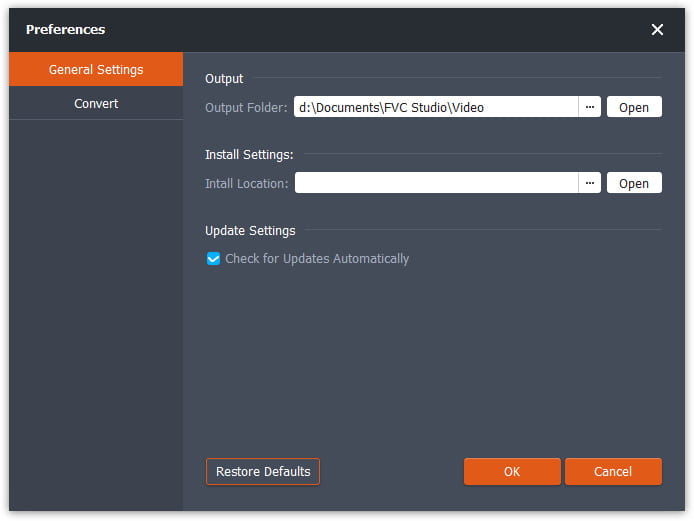
Step 1. After downloading and launching Free FLV Converter, you can select a folder to save the VOB file. Click the Menu option on the top of the interface and go to the Preference. In the General Settings, you can choose the output folder.
Step 2. To add FLV files, you should click the Add Files button on the interface. Then you can select files in the browse window. Then you should click the Output Format field and select the VOB format.

Step 3. You can add themes for your video file before the conversion. Click the Edit button on the interface and go to Select Theme. You can choose the theme like birthday, family, and landscape for your FLV video. Then you can preview the effects of the video and save it.
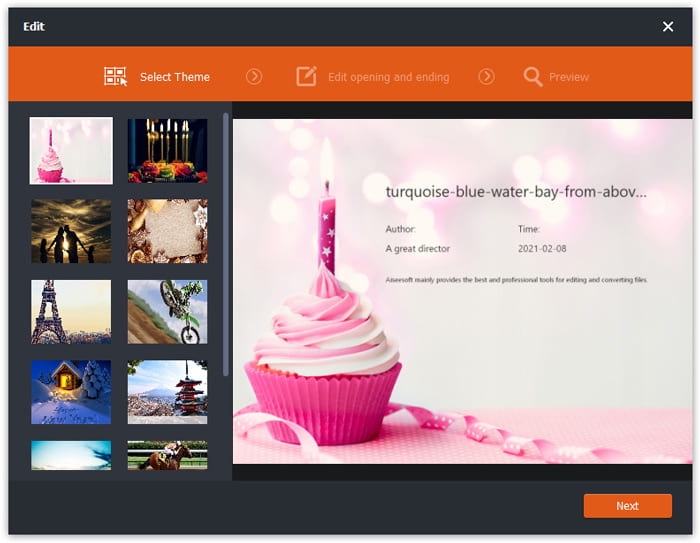
Step 4. To start convert, you need to click the Convert button in the main interface. It will open the folder automatically and you and find the VOB file in it.
Free FLV Converter is een veelzijdige software om FLV-video's te transformeren en je kunt je video's upgraden met geavanceerde bewerkingsfuncties.
Deel 2. Hoe u FLV online kunt wijzigen in VOB
FVC Free Online Video Converter is an online free tool to convert FLV to VOB. It has a well-organized and clear interface that is friendly to all users. Since it's an online tool, you don't have to download and install anything.
- 1. Eén klik om FLV binnen enkele seconden naar VOB te converteren zonder kwaliteitsverlies.
- 2. Pas het FLV-bestand aan vóór de conversie.
- 3. Veilig en stabiel in gebruik.
Step 1. Go to the website of Free Online Video Converter. You need to click the Add Files to Convert button. The browse window will pop up to let you add FLV files.
Download de desktopversie om bestanden in batches te converteren.
Step 2. After adding files, you need to select the format to export the files. There are several formats listed at the bottom of the window. Find VOB and click the circle next to it.
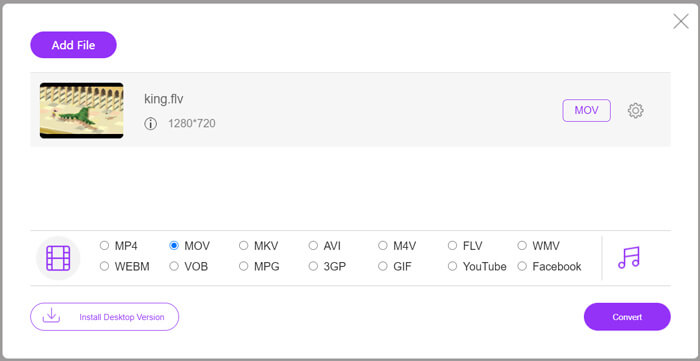
Step 3. Before conversion, you can click the Gear icon to adjust parameters like video resolution, encoder, audio volume, and channel of the FLV file.
Step 4. Click the Convert button to start the conversion. You can find the VOB file in the folder you set when the converting is finished.
To sum up, Free Online Video Converter is a convenient and efficient tool to change FLV to VOB online for free. Also, you can compress FLV files here.
Deel 3. Handrem gebruiken om FLV naar VOB te transcoderen?
Handbrake is een gratis en open-source transcoder die je kunt gebruiken om FLV naar VOB te converteren. Het ondersteunt Windows- en Mac-systemen. Hier zijn de stappen om FLV naar VOB te converteren met Handbrake.
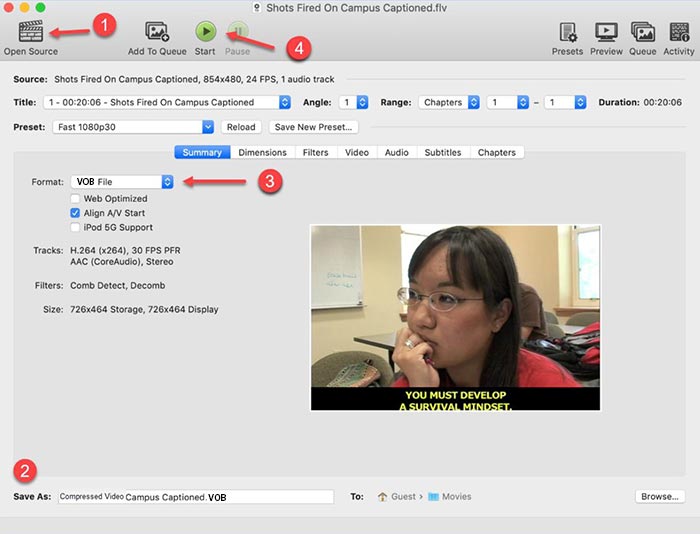
Step 1. Download and launch Handbrake. To add FLV files, you need to click the Open Source button. You can find the FLV file in the browse window.
Step 2. Then set the folder to save the output VOB file by clicking the Save As field at the bottom of the interface.
Step 3. Then select VOB format in the Format field.
Step 4. Click the Start button to begin the conversion.
FLV versus VOB
Adobe Flash Player gebruikte FLV om video-inhoud zoals films en tv-programma's te leveren. Tegenwoordig ontwikkelt Adobe de speler niet langer en raadt gebruikers aan deze om veiligheidsredenen te verwijderen. U kunt de FLV-indeling echter nog steeds gebruiken in veel niet-Adobe/Macromedia-programma's.
Het VOB-formaat wordt vaak gebruikt voor het opslaan van filmgegevens van een dvd-schijf, die video, audio, ondertitels, dvd-menu's en andere inhoud bevat. Het is meestal geformatteerd als MPEG-2-systeemstreams. U kunt VOB-bestanden openen met verschillende hulpmiddelen voor het afspelen van video's.
Deel 4. Veelgestelde vragen over het converteren van FLV naar VOB
1. Wat is het FLV-formaat?
FLV (Flash Video) is a file that uses Adobe Flash Player to transmit video or audio over the Internet. It's the standard format for video on the platforms and websites like YouTube and Hulu. (Find FLV player here)
2. Waarom zou ik FLV naar VOB converteren?
Als u video's van internet op een dvd wilt opslaan, moet u FLV naar VOB converteren. VOB is een indeling die videostreaming in MPEG-2-indeling en audiostreaming in verschillende indelingen op dvd bevat.
3. Hoe kan ik het FLV-bestand knippen voordat ik het converteer?
U kunt professionele videobewerkingssoftware gebruiken om FLV-bestanden zoals Video Converter Ultimate te knippen. Hiermee kunt u het begin- en eindpunt op de tijdlijn instellen om de video te knippen.
Gevolgtrekking
This article provides you 3 verified ways to convert FLV to VOB. You can use FVC Free FLV Converter and Free Online Video Converter to convert easily for free. There is some freeware you can use to convert like Handbrake or VLC Media Player. you can download and try them and see if they can solve your problem. If you have any questions about changing FLV to VOB or want to know more about it, please leave your comment below.
Gratis downloadenVoor Windows 7 of hogerVeilige download
Gratis downloadenVoor macOS 10.7 of hogerVeilige download
-
 VLC speelt geen dvd af, hoe dit te verhelpen?
 Kan VLC een dvd afspelen? Waarom speelt 't VLC mijn dvd niet af? Hoe zorg ik ervoor dat VLC een dvd afspeelt op Windows 10? Dit bericht deelt 3 tips om het probleem met VLC op te lossen die geen dvd afspeelt.
-
 Top 3 gratis manieren om MP4 snel naar VOB te converteren
 Hoe MP4 naar VOB converteren op Windows PC en Mac? Om dit probleem op te lossen, deelt dit bericht 3 beste manieren om u te helpen MP4 gratis naar VOB te converteren.
-
 De beste manieren om VOB naar FLV te converteren
 Wilt u een VOB-bestand converteren naar een FLV-bestand? U kunt de taak eenvoudig voltooien met desktop- of online-converters. Lees deze gids en leer hoe u VOB gemakkelijk en snel naar FLV kunt transformeren.

