


 Video Converter Ultimate
 Scherm opnemer
 Videoreparatie
Offline en online conversieproces: de beste manier om OGV naar FLV te converteren
Bij het gebruik van OGV‑video’s kan dit videoformaat met verliesgevende compressie je irriteren, omdat de beelden na aanpassingen wazig worden. De situatie verbetert echter als je OGV eerst naar het FLV‑formaat converteert voordat je de video online deelt; de enige uitdaging is dan nog het vinden van een gebruiksvriendelijk maar krachtig videoconversieprogramma. Gelukkig hebben wij de beste oplossing voor zowel offline als online gebruik om eenvoudig het OGV‑formaat naar FLV te converteren. Volg gewoon de stappen in dit artikel voor jouw gemak.

Deel 1. Hoe OGV met gemak naar FLV te converteren [Offline]
Eerlijk gezegd zijn er online veel videoconverters beschikbaar, maar slechts een paar daarvan ondersteunen een OGV‑conversie. Omdat dit formaat niet gebruikelijk is voor de meeste videokijkers, nemen veel converters het niet op in de lijst met ondersteunde bestandsformaten. Om die reden komt Video Converter Ultimate goed van pas. Het ondersteunt OGV‑bestanden volledig en stelt je in staat OGV‑videobestanden snel naar FLV‑formaten te converteren. Het is ook het vermelden waard dat het je OGV‑video’s kan omzetten én ze kan bewerken met praktische tools. Alles wat je nodig hebt zit in Video Converter Ultimate. Daarom geven we je de meest eenvoudige stappen om te volgen:
Stap 1: Voordat je de software kunt gebruiken, moet je die eerst op je desktop installeren. Dit doe je door op een van de onderstaande Gratis downloaden‑knoppen te klikken, afhankelijk van het besturingssysteem dat je gebruikt. Wacht tot het .exe‑ of .dmg‑bestand klaar is met downloaden en open het vervolgens om het installatieproces te starten. Tot slot kun je de software direct na afloop starten door op Nu starten te klikken.
Gratis downloadVoor Windows 7 of nieuwerVeilige download
Gratis downloadVoor MacOS 10.7 of nieuwerVeilige download
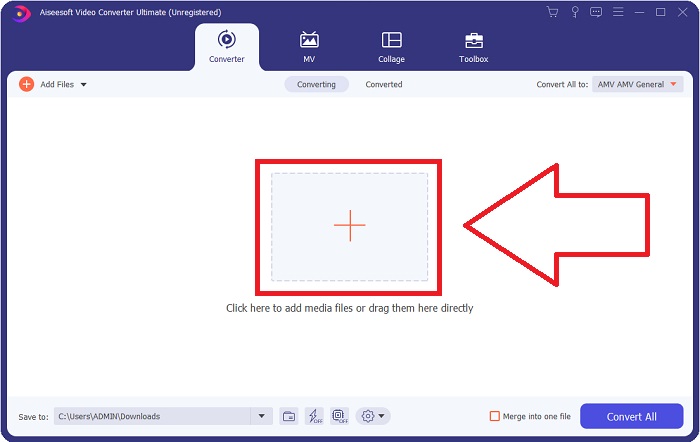
Stap 2: Zodra het venster verschijnt, zie je een interface met een +-knop in het midden. Klik daarop om het videobestand dat je wilt converteren te importeren, of sleep het bestand rechtstreeks naar het programma.
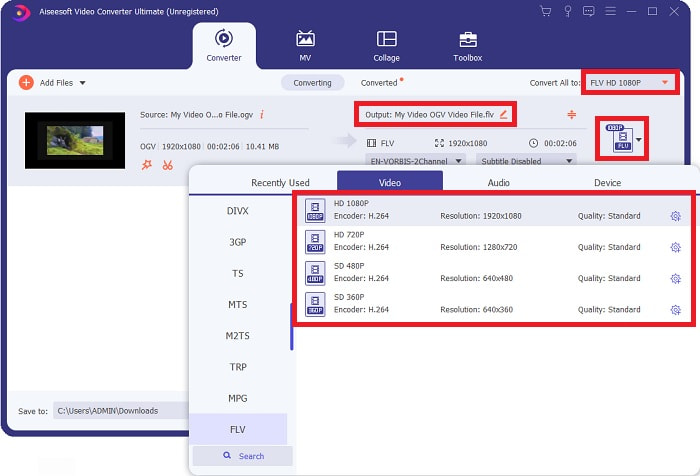
Stap 3: Aan de rechterkant zie je in welk bestandsformaat je video zich momenteel bevindt. Klik daarop en je krijgt een overzicht van alle formaten waaruit je kunt kiezen. Scroll in dit geval naar beneden en selecteer FLV, of zoek het via de zoekbalk eronder. Aan de rechterkant van het tabblad kun je ook kiezen welke videokwaliteit je voor je geconverteerde bestand wilt hebben.
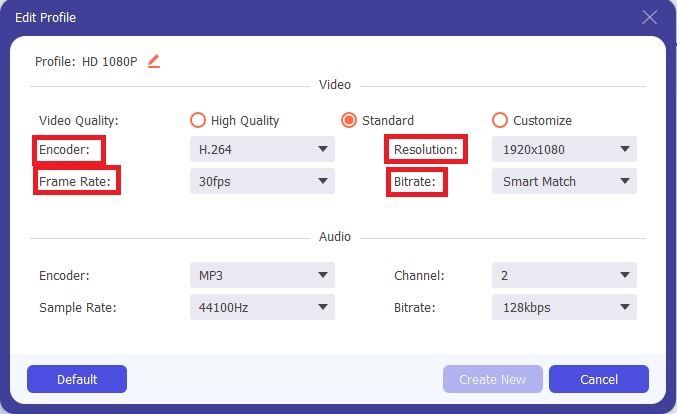
Stap 4: Als je naar meer opties op zoek bent, kun je die vinden door op het tandwielpictogram naast de geselecteerde videokwaliteit te klikken. Hiermee kun je de videoresolutie en andere opties, zoals frame‑rate, sample‑rate, bitrate en encoder, verder aanpassen. Zodra je tevreden bent, klik je rechtsonder op de knop Nieuwe maken om de wijzigingen op te slaan.
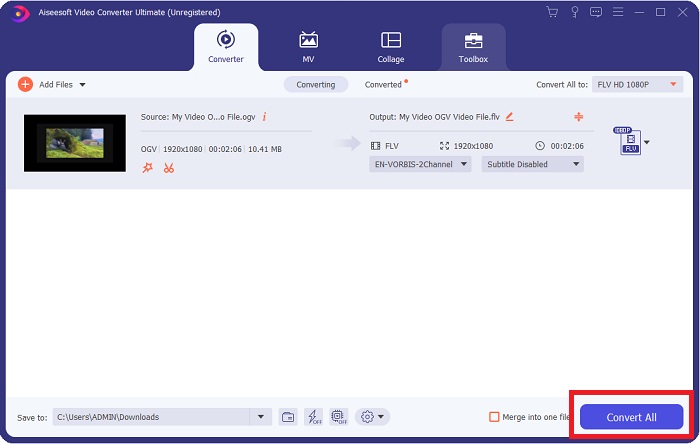
Stap 5: Wanneer je alle aanpassingen hebt voltooid, kun je de conversie daadwerkelijk starten door rechtsonder op de knop Alles converteren te klikken en te wachten tot het proces is afgerond.
Deel 2. Een andere beschikbare methode om OGV naar FLV te converteren [Online]
Als je weinig tijd hebt en je OGV‑bestand zo snel mogelijk naar FLV moet converteren, hoef je je geen zorgen te maken, want ook dan helpen we je verder. Je kunt de online tegenhanger van de genoemde software gebruiken, die je nog steeds optimaal gebruiksgemak biedt met een soepel conversieproces. FVC Free Video Converter Online is een webtool die OGV‑bestanden eenvoudig naar FLV kan omzetten en toch dezelfde opties voor resolutie en geluidskwaliteit biedt. Volg de onderstaande stappen om het te gebruiken:
Stap 1: Klik op deze link; je wordt dan doorgestuurd naar de online converter zelf. In het midden van de pagina staat een knop met de tekst Bestanden toevoegen om te converteren. Klik hierop om de launcher te downloaden die je nodig hebt om het videobestand dat je wilt converteren te importeren.
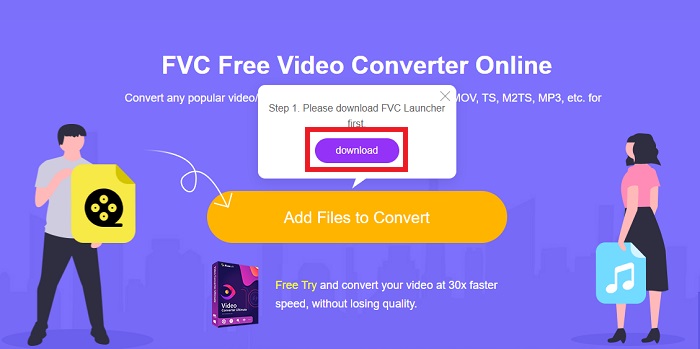
Stap 2: Zodra dit klaar is, kun je je bestand uploaden door opnieuw op dezelfde knop te klikken. Er verschijnt een venster als het uploaden is gelukt. Van daaruit kun je nu FLV selecteren uit de andere formaten die onderaan het venster worden aangeboden.
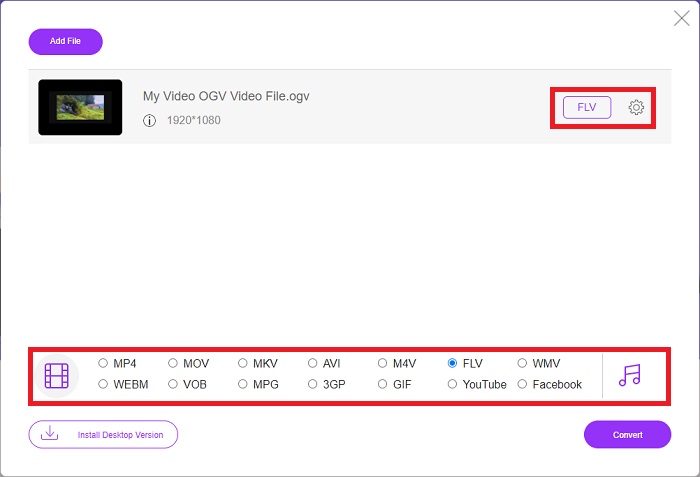
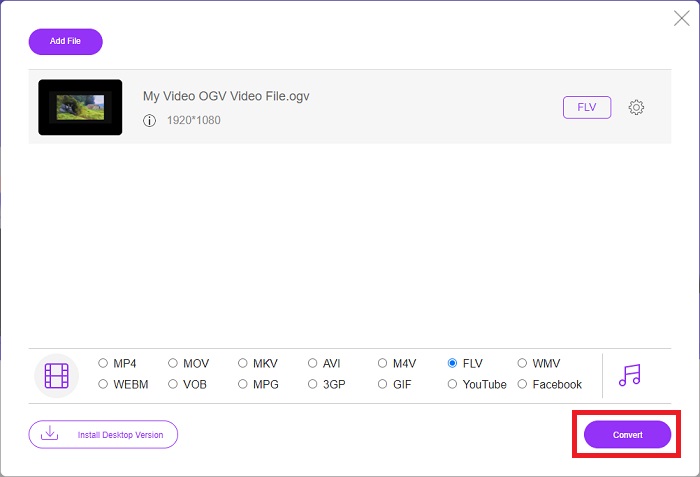
Stap 3: Evenzo vind je helemaal rechts een tandwielpictogram waarmee je je video verder kunt bewerken. Door hierop te klikken, krijg je toegang tot de video‑ en audio‑instellingen waarmee je encoders, resolutie, frame‑rate en meer kunt aanpassen. Klik op OK en vervolgens rechtsonder op de knop Converteren om het conversieproces te starten.
Deel 3. Uitgebreide kennis over OGV en FLV
Als u meer wilt weten over de twee bestanden die worden vergeleken, geven we u hier alle benodigde informatie die u misschien wilt lezen:
De videocoderingsmethode van Ogg Vorbis kan meestal worden gekoppeld aan bestanden met de bestandsextensie .ogv. Ogg Vorbis is een open-source, niet-gepatenteerd audiocompressieformaat. Het containerformaat voor audio-, video- en informatiebestanden staat bekend als Ogg, terwijl de audiocompressietechnologie Vorbis naar is vernoemd. Het OGV-bestandsformaat is een container voor videobestanden. Videostreams die zijn gekoppeld aan een of meer videocodecs, zoals Theora en DivX, kunnen worden gevonden in OGV-bestanden. Gebruikers kunnen het opgenomen materiaal in het inhoudsbestand op verschillende media-apparaten afspelen met behulp van deze bestanden.
Aan de andere kant is een videobestand dat is opgeslagen in de Adobe Flash Video (FLV)-containerindeling, een FLV-bestand. Adobe Flash Player gebruikt het voornamelijk om online video-inhoud aan te bieden, zoals films en tv-afleveringen. Het is ook essentieel om op te merken dat het een open formaat is dat wordt ondersteund door verschillende niet-Adobe/Macromedia-apps. Voor een meer specifieke vergelijking van de twee hebben we speciaal voor jou een tabel gemaakt.
| Ogg Vorbis (OGV) | Adobe Flash-video (FLV) | |
| Bestandsextensie | .ogv | .flv |
| Ontwikkelaar | Stichting Xiph.Org | Geïntegreerde adobe systemen |
| Ondersteunende programma's | MPlayer Classic, VLC Media Player, Jriver Media Center, MPUI | RealPlayer, Apple QuickTime Player, Mplayer, VLC Media Player |
| Voordelen: | OGG heeft het voordeel dat het patentvrij is, algemeen wordt erkend en standaard wordt ondersteund door de meeste browsers. Als u dus een film naar uw website wilt uploaden, is dit formaat een goede optie. | Het mooie van Flash is dat het websites kan helpen die beweging en interactieve inhoud willen opnemen. De procedure is eenvoudig en kan uiteindelijk een aanzienlijke impact hebben. Iedereen gebruikte Flash in zijn bloei ook voor rudimentaire games. |
| nadelen | Ondanks het wijdverbreide gebruik, heeft het OGG-videoformaat een paar nadelen. Safari en Internet Explorer ondersteunen het bijvoorbeeld maar gedeeltelijk; het is dus mogelijk dat gebruikers uw video in deze browsers niet correct bekijken. | Het nadeel is natuurlijk dat het FLV-formaat de laatste jaren minder populair is geworden. Het maken van FLV-inhoud kan lang duren en duur zijn. Een ander nadeel is dat Flash-materiaal niet kan worden afgespeeld op iOS-apparaten, waardoor het vermogen om nieuwe volgers aan te trekken ernstig wordt beperkt. |
Deel 4. Veelgestelde vragen over OGV- en FLV-conversie
Zijn OGG en OGV hetzelfde?
Het is een geschikte subset van het Ogg-videomediatype video/Ogg met de bestandsextensie. ogv. Andere Ogg-apps gebruiken de bestandsextensie. ogv met het mediatype application/ogg sinds. ogx is een superset van video/ogg.
Is de kwaliteit van FLV beter dan MP4?
Van MP4 wordt gezegd dat het hoogwaardige digitale video‑ en audiocodering bevat. De publieke opinie over FLV is minder duidelijk, hoewel de voor‑ en nadelen van FLV zelden echt op de kwaliteit van het bestandsformaat zelf zijn gericht. Dankzij sterkere compressie heeft MP4 minder kwaliteitsverlies. Hier kun je bekijken hoe je FLV‑bestanden naar MP4 kunt converteren.
Is FLV lossless of lossy zoals OGV?
De FLV-bestandsindeling voor Flash Video ondersteunt twee versies van de screenshare-codec (schermvideo), een methode voor screencast-codering. Deze formaten zijn gebaseerd op bitmap-tegels en zijn verliesgevend wanneer kleurdiepten worden verkleind en gecomprimeerd met Zlib.
Gevolgtrekking
Ongeacht hoeveel tijd je hebt om je videobestanden te converteren, zowel de software als de tegenhanger van de online tool zullen je het meest geschikt zijn. Kortom, Video Convert Ultimate en Free Video Converter zijn het eerste waar u aan denkt als het gaat om videoconversie, zodat u tijd kunt besparen op internet en de beste kunt vinden. Hier geven we u het beste.
-
 De beste manieren om VOB naar FLV te converteren [gratis en online inbegrepen]
 Wilt u een VOB-bestand converteren naar een FLV-bestand? U kunt de taak eenvoudig voltooien met desktop- of online-converters. Lees deze gids en leer hoe u VOB gemakkelijk en snel naar FLV kunt transformeren.
-
 Top 4 gratis RMVB naar FLV Converter-apps op desktop of online
 Dit artikel vertelt je de beste RMVB naar FLV-conversiesoftware en web-apps die RMVB-bestanden (RealMedia Variable Bitrate) naar FLV-video kunnen converteren.
-
 Hoe een OGV-bestand te comprimeren zonder kwaliteitsverlies
 Kunt u geen grote OGV-bestanden naar anderen verzenden? Welnu, dit artikel introduceert 2 eenvoudige manieren om u te helpen OGV-bestanden eenvoudig te comprimeren.
