


 Video Converter Ultimate
 Scherm opnemer
 Videoreparatie
Offline en online tools voor het converteren van TRP naar FLV die u moet kennen
TRP is een bestandsformaat voor het opslaan van opgenomen televisie-uitzendingen. Omdat maar weinig spelers dit bestandstype in de oorspronkelijke vorm kunnen afspelen, moet u het mogelijk naar een ander formaat converteren voordat u het kunt bekijken. Om de conversie van TRP-bestanden naar FLV-bestanden te ondersteunen, hebt u de juiste softwaretool nodig. Gelukkig is dit veel eenvoudiger met onze software of de online tegenhanger daarvan, die u tijdens het hele conversieproces geen enkel ongemak zal bezorgen. Volg de stappen die we geven om uw TRP-video’s met succes naar FLV-formaat te converteren.

Deel 1. Offline methode om TRP naar FLV te converteren
Een TRP-bestandsformaat is voor de meeste videogebruikers vrij ongewoon en wordt ook niet vaak gebruikt door makers. Hierdoor ondersteunen de meeste softwareprogramma’s en online tools dit type videobestand niet. Daarom is Video Converter Ultimate een goede optie wanneer u video’s van het ene naar het andere formaat moet converteren. Met deze software kunt u uw TRP-bestand met één klik naar elk gewenst formaat converteren.
Deze videoconversietool biedt geavanceerde bewerkingsfuncties en heeft een grafische interface die eenvoudig te gebruiken is, zelfs als je geen technische kennis of vaardigheden hebt. Met behulp van deze applicatie kunt u bestanden converteren en profiteren van supersnelle conversietijden en hoogwaardige uitvoer. Hier bieden we u de eenvoudige stappen die u moet volgen:
Stap 1: Download het .exe-bestand door hieronder op de Gratis downloaden-knop te klikken die overeenkomt met het besturingssysteem dat u gebruikt. Wanneer het downloaden is voltooid, opent u het bestand en start u het installatieproces. Wacht tot de installatie is voltooid en start daarna de software.
Gratis downloadVoor Windows 7 of nieuwerVeilige download
Gratis downloadVoor MacOS 10.7 of nieuwerVeilige download
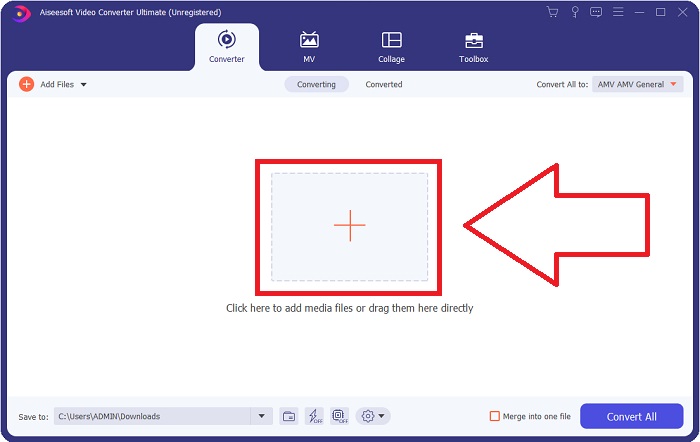
Stap 2. Zodra de software is gestart, verschijnt er een interface. Klik daar op de +-knop in het midden om het videobestand dat u wilt converteren te importeren, of sleep het bestand er eenvoudig naartoe.
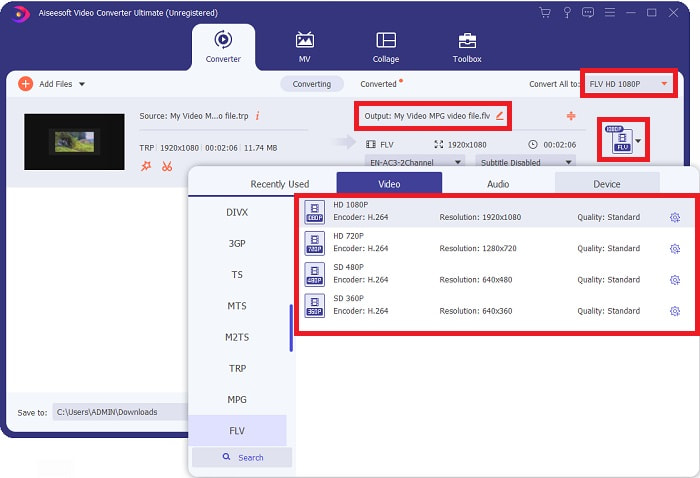
Stap 3: U ziet het huidige formaat van uw video aan de rechterkant van het bestand. Om te kiezen naar welk formaat de video wordt geconverteerd, klikt u erop en verschijnen alle beschikbare formaten. Zoek naar FLV of typ dit gewoon in de zoekbalk. Rechts staan ook opties voor videokwaliteit voor u klaar.
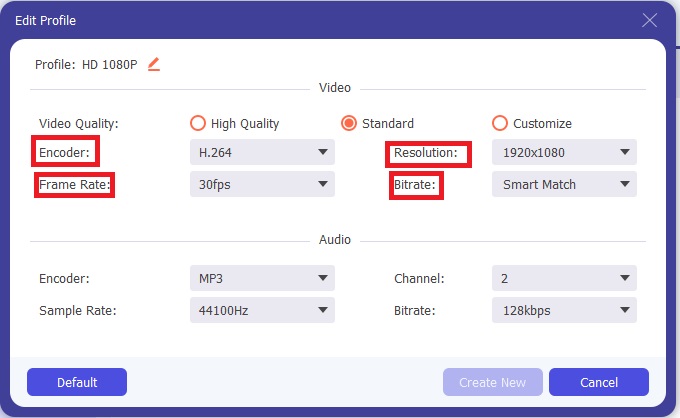
Stap 4: Voor de extra functies waar we het over hebben, klikt u op het tandwielpictogram rechts van de door u gekozen videokwaliteit, waarna er een nieuw venster verschijnt. Daar kunt u allerlei video- en audio-instellingen bewerken die aan uw wensen voldoen. Klik op de knop Nieuw maken om de wijzigingen op te slaan.
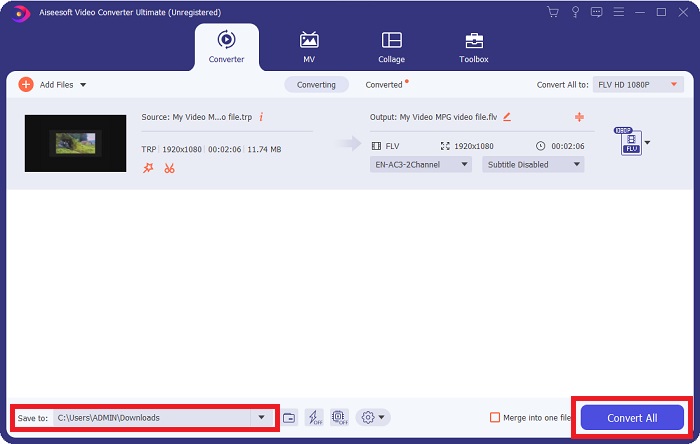
Stap 5: Zodra u klaar bent met alle bewerkingen, klikt u op de knop Alles converteren rechtsonder in de interface om het conversieproces te starten en wacht u tot dit is voltooid.
Deel 2. Online methode om TRP naar FLV te converteren
Het converteren van videobestanden is ook een optie als u de taak liever uitvoert via een webtool in plaats van de volledige software te installeren. In dat geval hebben we ook de online tegenhanger van de software: FVC Free Video Converter Online. Deze biedt nog steeds extra opties zoals de software, maar niet alle functies. Toch doet hij wat hij moet doen binnen een redelijke tijd. Volg de onderstaande stappen om deze webtool te gebruiken:
Stap 1: Ga naar de converter door op deze link te klikken. Vanaf daar kunt u beginnen met het downloaden van de launcher die u nodig hebt om uw bestanden te importeren. Klik op de knop Bestanden toevoegen om te converteren in het midden van de pagina om het proces te starten.
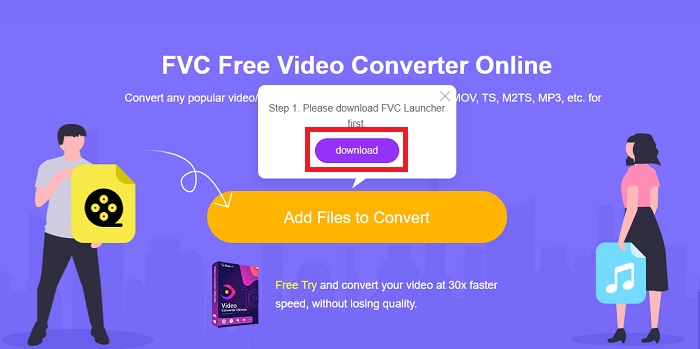
Stap 2: Klik nogmaals op de genoemde knop en upload het videobestand dat u wilt converteren. Nadat u een bestand hebt geïmporteerd, verschijnt er een nieuw venster waarin alle beschikbare formaten worden weergegeven waaruit u kunt kiezen. Kies in dit geval FLV.
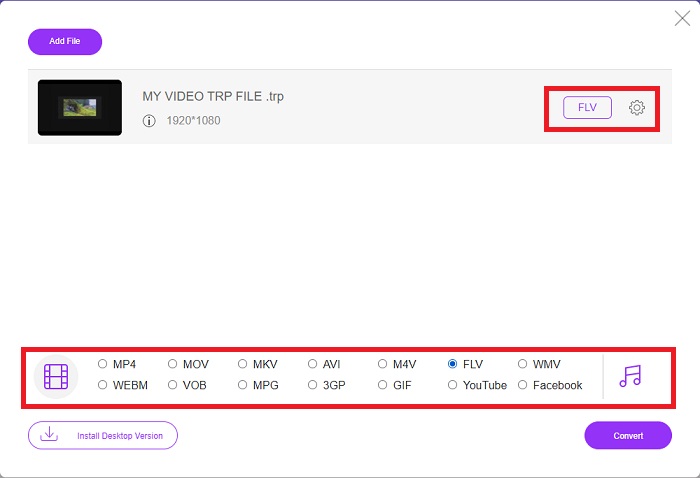
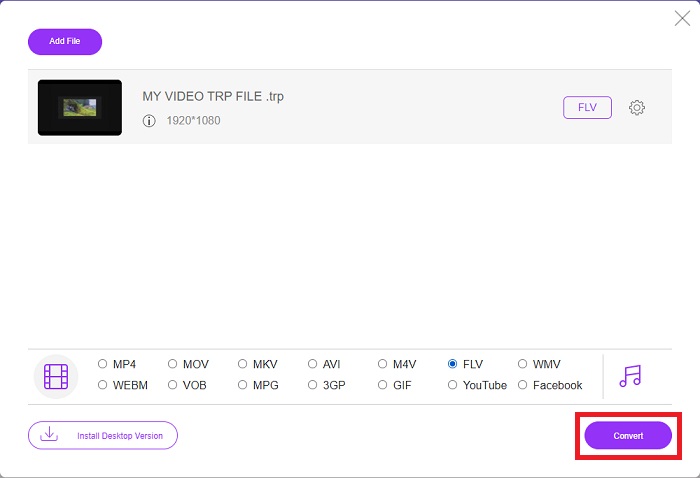
Stap 3: Voor de extra opties, net als in de software zelf, klikt u op het tandwielpictogram aan de rechterkant. De video- en audio-instellingen verschijnen, zodat u uw video verder kunt bewerken op het gebied van resolutie, framesnelheid en nog veel meer. Klik, zodra u klaar bent, op OK om de wijzigingen op te slaan. Start ten slotte het conversieproces door op de knop Converteren rechtsonder te klikken.
Gerelateerd:
Deel 3. Uitgebreide kennis van TRP en FLV
Om meer te weten te komen over de twee genoemde formaten, geven we u korte informatie en een vergelijking van de twee.
TRP-bestanden worden meestal geassocieerd met VLC van VideoLAN. De TRP-bestandsnaamextensie kan verzamelen met MPEG-2 Part 1 met high-definition films. TRP-bestanden kunnen datapakketten bevatten en opslaan die als digitale video en audio worden verzonden via digitale video-uitzendnetwerken, radiofrequenties of lineaire opnameapparaten zoals videorecorders. Meerdere audio- en videostreams, evenals foutcorrigerende code, zijn opgenomen in een TRP-bestand. Gebruikers kunnen ook metadata zoals opnametijd, camera-ID en bron opnemen in de inhoud van het bestand.
Aan de andere kant staat een bestand met de extensie .flv voor Flash Video. De FLV-bestandsextensie verwijst naar een video- of audiobestand dat via internet wordt verzonden met Adobe Flash Player of Adobe Air. Flash Video is lange tijd het primaire videoformaat geweest voor bijna alle ingesloten video's op internet, inclusief video's op YouTube, Hulu en verschillende andere sites. Aan de andere kant hebben streamingproviders en softwareontwikkelaars Flash verlaten ten gunste van HTML5 en andere formaten sinds Adobe's formele stopzetting.
| TRP | FLV | |
| Bestandsextensie | .trp | .flv |
| Ontwikkelaar | VideoLAN-projectteam | Geïntegreerde adobe systemen |
| Ondersteunende programma's | ◆ SMP-speler ◆VLC-mediaspeler ◆ Apple QuickTime Player | ◆RealPlayer ◆ Apple QuickTime Player ◆ Mplayer ◆VLC-mediaspeler |
Deel 4. Veelgestelde vragen over TRP naar FLV-conversie
Hoe het TRP-videoformaat te openen met VLC?
Zodra de VLC Media Player op uw computer is geïnstalleerd, zoekt u het TRP-videobestand op uw harde schijf en selecteert u het met de rechtermuisknop. Selecteer 'VLC-mediaspeler' in het vervolgkeuzemenu 'Openen met'. Het systeem opent het videobestand dat vanuit dit programma wordt afgespeeld zodra het wordt gestart.
Hoe converteer ik een FLV-bestand naar Windows Media Player?
U moet eerst het FLV-bestand selecteren dat u wilt converteren. U kunt WMV kiezen als het formaat waarnaar u uw FLV-bestand wilt converteren. Om uw FLV-bestand te converteren, selecteert u 'Converteren' in het vervolgkeuzemenu.
Kan ik TRP overal spelen?
Het converteren van TRP naar algemeen bekende MP4, AVI, MOV, MKV, FLV, WMV en andere formaten is een aanbevolen optie als u TRP-bestanden overal en op of op elk apparaat of mediaspeler wilt afspelen.
Gevolgtrekking
Over het algemeen is Video Converter Ultimate en zijn tegenhanger van de online tool degene die u zoekt om het hele conversieproces te voltooien en tegelijkertijd alle noodzakelijke functies te bieden die u nodig hebt. Het veroorzaakt geen overlast en is bovendien op elk moment van de dag beschikbaar als je de software op je desktop hebt geïnstalleerd. Je weet nooit wanneer je een converter als deze nodig hebt, dus we raden je aan deze software voor je gemak te gebruiken.
-
 Eenvoudigste handleiding voor het converteren van TRP naar AVI op Windows en Mac
 Misschien ben je niet bekend met het TRP-videoformaat en vraag je je af hoe je TRP naar AVI gaat converteren? Lees dit artikel verder om de details te kennen die betrekking hebben op het probleem.
-
 3 Oplossingen om MTS gratis en online naar FLV te converteren
 Wilt u MTS naar FLV converteren? Hier zijn 3 gratis MTS naar FLV-conversiesoftware die u kunt proberen om MTS naar FLV te converteren op Mac OS X en Windows 10/8/7.
-
 De beste manieren om VOB naar FLV te converteren [gratis en online inbegrepen]
 Wilt u een VOB-bestand converteren naar een FLV-bestand? U kunt de taak eenvoudig voltooien met desktop- of online-converters. Lees deze gids en leer hoe u VOB gemakkelijk en snel naar FLV kunt transformeren.
