


 Video Converter Ultimate
 Scherm opnemer
 Videoreparatie
 Beveiligde download
Hoe BMP naar PNG en JPG te converteren met behulp van online en offline converters
De bitmap- of BMP-indeling is niet optimaal voor kleurenafbeeldingen met verlopen of gradaties. Je ziet er tegenwoordig niet veel foto’s meer in. Technisch gezien is BMP een verouderd formaat met vrijwel geen compressie. Daarom moet je BMP omzetten naar gangbare afbeeldingsformaten als je BMP‑afbeeldingen zonder beperkingen wilt openen. Je kunt op talloze manieren tussen verschillende afbeeldingsformaten converteren. In dit artikel bespreken we de eenvoudigste en meest rechttoe‑rechtaan methoden. Wil je weten hoe je het bestandsformaat BMP naar JPG of PNG kunt converteren, lees dan dit artikel. We stellen een aantal uitstekende beeldconverters voor die je daarbij kunnen helpen.

Deel 1. BMP versus JPG versus PNG
| Bestandsformaat | BMP | JPG | PNG |
| Bestandsnaam Extensie | .bmp | .jpg | .png |
| Ontwikkeld door | Microsoft | Joint Photographic Experts Group | PNG-ontwikkelingsgroep |
| Beschrijving | EEN BMP bestand is een afkorting van bitmap en wordt uitgesproken als bump. Microsoft heeft het BMP-bestandsformaat gemaakt voor zijn Windows-besturingssysteem. Het is om de resolutie van digitale afbeeldingen op verschillende schermen en gadgets te behouden. Zowel kleur als zwart-wit tweedimensionale foto's kunnen worden opgeslagen. BMP-bestanden zijn tegenwoordig niet langer alleen compatibel met Windows-apparaten. Ze zijn nu compatibel met een groot aantal Mac- en Android-apparaten. | De JPG afbeeldingsbestandsindeling is de meest effectieve voor beeldcompressie. Gebruikers gebruiken veel JPG-bestanden. Het wordt ook wel JPEG- of JPG-bestanden genoemd. De Joint Experts Group is de volledige naam van JPEG. Bovendien hebben de meeste bitmapafbeeldingen de bestandsextensie.jpg. Het primaire doel is om de bestanden kleiner te maken. Omdat JPG een lossy formaat is, heeft overmatige compressie invloed op de kwaliteit van de afbeeldingen. | Draagbare netwerkafbeeldingen, een PNG extensie voor de rasterfamilie, die compressie zonder verlies uitvoert. Het is ontwikkeld om GIF, het Graphics Interchange Format, te vervangen en is niet gepatenteerd. Ze kunnen gebaseerd zijn op een palet en typisch grijswaardenafbeeldingen die transparantie bieden. PNG is compressie zonder verlies. Het houdt in dat het informatie, details en kwaliteit bewaart. |
Deel 2. Online methoden om BMP naar JPG/PNG te converteren
Converteer BMP naar JPG/PNG met behulp van FVC Free Image Converter
Om BMP gratis online naar JPG te converteren, kun je de FVC Free Image Converter gebruiken. Deze online tool biedt de meest eenvoudige procedure om BMP naar PNG of JPG om te zetten. Dankzij de intuïtieve interface is de converter geschikt voor zowel gevorderde als niet‑professionele gebruikers. Je kunt afbeeldingen in slechts drie stappen converteren. Bovendien kun je allerlei afbeeldingen met verschillende bestandsindelingen uploaden. Ondersteunde invoerformaten zijn onder andere PNG, JPG, BMP, GIF, TIFF en meer. Daarnaast ondersteunt de FVC afbeeldingsconverter batchconversie. Je kunt dus meerdere afbeeldingen tegelijk omzetten. Dat is veel efficiënter en praktischer dan veel andere converters op de markt. Hij is handig voor alle gebruikers, omdat je tot wel 40 afbeeldingsbestanden tegelijkertijd kunt converteren.
FVC Free Image Converter garandeert een afbeelding van hoge kwaliteit. Na de conversie ziet de afbeelding er nog steeds hetzelfde uit als het origineel. Bovendien zie je geen storende advertenties op je scherm, ook al is het een online beeldconvertor. Op deze manier kunt u zich meer concentreren op het converteren van uw afbeeldingen. Deze converter is beschikbaar in bijna alle browsers. Het omvat Chrome, Safari, Edge, Firefox en meer. U kunt de onderstaande eenvoudige stappen volgen om BMP naar JPG- en PNG-indeling te converteren.
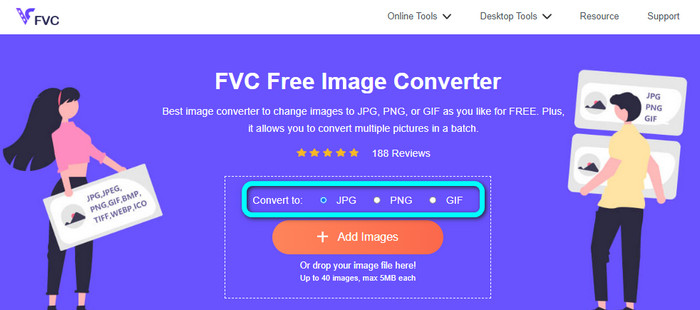
Stap 1: Ga in je browser naar de website van FVC Free Image Converter. Zoek de optie Convert to en kies het gewenste formaat. Je kunt op JPG of PNG klikken.
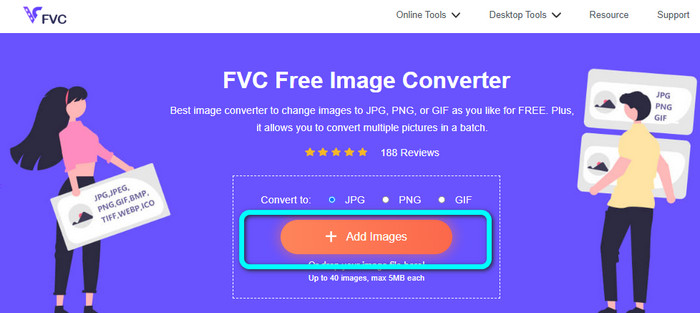
Stap 2: Voeg de BMP‑afbeelding toe door op de knop Add Images te klikken. Je computerbestanden verschijnen op het scherm. Kies het BMP‑afbeeldingsbestand dat je wilt converteren.
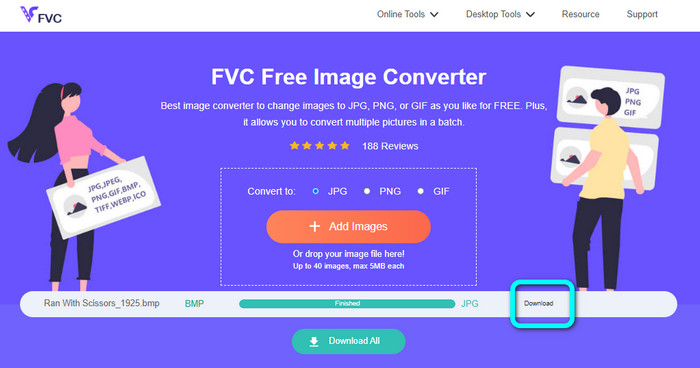
Stap 3: Na het uploaden wordt de foto automatisch geconverteerd. Klik voor de laatste stap op de knop Download om je afbeelding op je computer op te slaan.
Converteer BMP naar JPG/PNG met behulp van Convertio
Convertio is een andere online tool om BMP naar JPG of PNG te converteren. Het is een bestandsconverter waarmee je uiteenlopende formaten kunt omzetten. Daaronder vallen BMP, JPG, PNG, GIF, SVG en meer. Met behulp van deze tool is het eenvoudig om meerdere afbeeldingen te converteren. Ook deze tool biedt batchconversie. Zo kun je BMP‑bestanden in één keer naar JPG omzetten en daarmee tijd besparen. Bovendien garandeert Convertio je privacy. Na het converteren van je afbeeldingen worden je gegevens na 24 uur automatisch verwijderd. Je kunt deze converter ook in verschillende browsers gebruiken, zoals Google Chrome, Mozilla Firefox, Edge, enzovoort.
Convertio heeft echter nadelen. U kunt alleen een afbeelding uploaden tot 100 MB. Als u een onbeperkte bestandsgrootte wilt uploaden, koop dan een abonnement. Je hebt ook een internetverbinding nodig om deze converter te gebruiken.
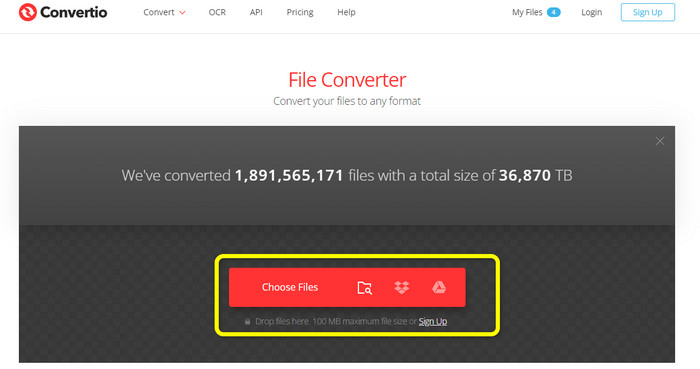
Stap 1: Bezoek de website van Convertio. Klik op de knop Choose Files om het BMP‑afbeeldingsbestand toe te voegen.
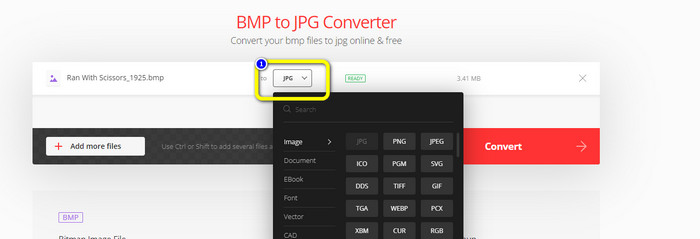
Stap 2: Kies het JPG‑ of PNG‑bestandsformaat uit de formaatopties. Als je meer afbeeldingen wilt toevoegen, klik je op de knop Add more files.
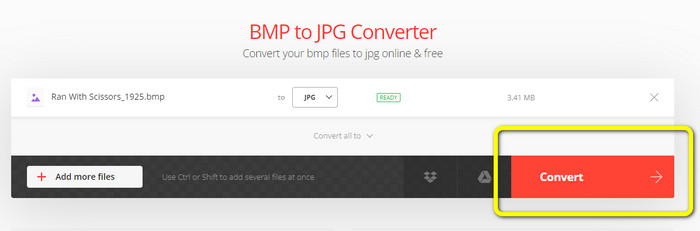
Stap 3: Klik, nadat je het gewenste bestandsformaat hebt gekozen, op de knop Convert. Wacht tot het conversieproces is voltooid en download vervolgens je afbeeldingen naar je computer.
Deel 3. Offline methoden om BMP naar JPG/PNG te converteren
Je kunt ook Video Converter Ultimate gebruiken om BMP naar JPG te converteren. Deze offline converter hanteert een duidelijke, begrijpelijke conversiemethode. De interface is bovendien intuïtief, waardoor het programma geschikt is voor alle gebruikers, in het bijzonder voor beginners. Video Converter Ultimate ondersteunt batchconversie, wat betekent dat je meerdere afbeeldingen tegelijk kunt omzetten. Het programma biedt ook een snel conversieproces. Dankzij deze functie kun je veel bestanden in korte tijd converteren. Bovendien worden diverse afbeeldingsformaten ondersteund, waaronder JPG, BMP, PNG, GIF, TIFF en meer. Naast converteren kun je ook de kwaliteit van je foto aanpassen in de uitvoerinstellingen. Zo kun je de beeldkwaliteit wijzigen op basis van je eigen voorkeur. Daarnaast kun je deze downloadbare converter zowel op Mac‑ als op Windows‑computers gebruiken. Volg de onderstaande instructies om je BMP‑bestand naar het JPG‑ of PNG‑formaat te converteren.
Stap 1: Download Video Converter Ultimate op je Mac of Windows‑computer. Start het programma na de installatie. We hebben de converter ook beschikbaar gemaakt via de Download-knop hieronder.
Gratis downloadVoor Windows 7 of nieuwerVeilige download
Gratis downloadVoor MacOS 10.7 of nieuwerVeilige download
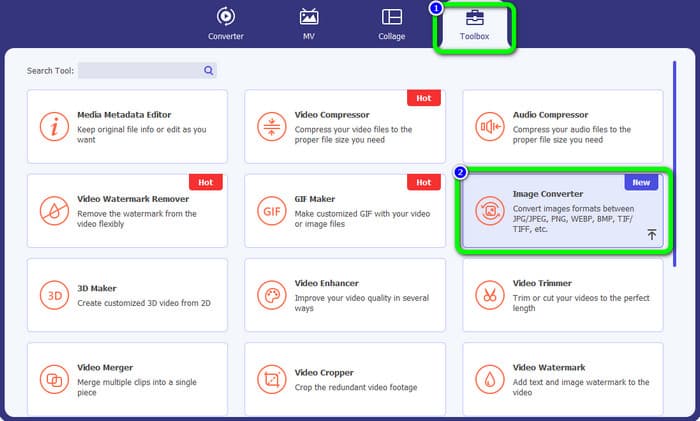
Stap 2: Ga naar het paneel Toolbox en selecteer de tool Image Converter. Er verschijnt een nieuw venster.
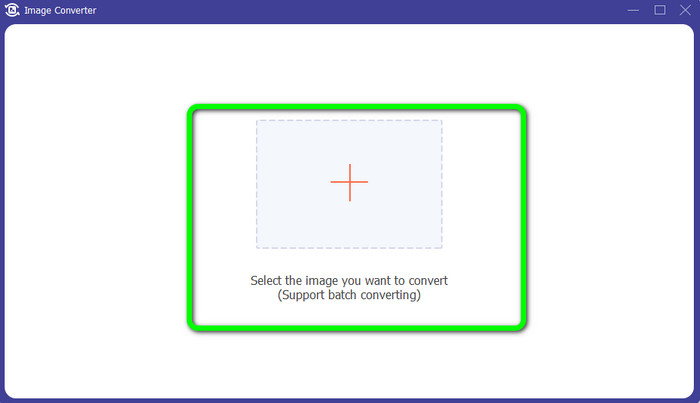
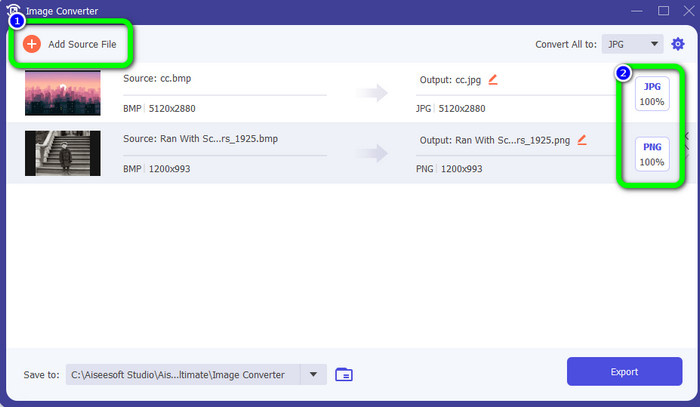
Stap 3: Klik op het Plus-symbool. Kies vervolgens in je bestandsmap de BMP‑foto die je wilt converteren.
Stap 4: Klik op de knop Add Source File om meer bestanden toe te voegen. Ga daarna naar de formaatoptie om het gewenste uitvoerformaat te kiezen. Je kunt de formaten PNG en JPG selecteren.
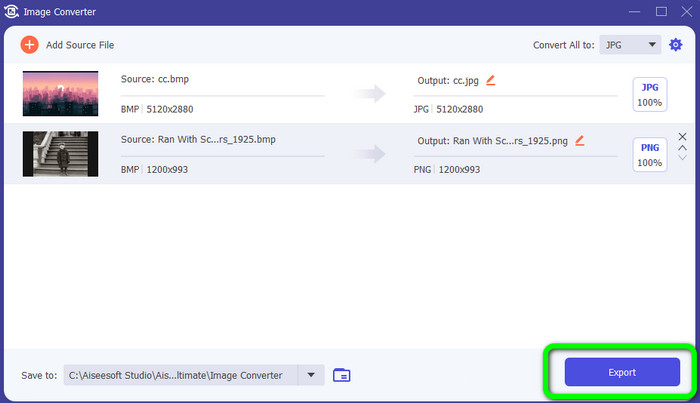
Stap 5: Klik voor de laatste stap op de knop Export. Wacht tot de conversie is voltooid. Open daarna je geconverteerde afbeeldingen in je map.
Deel 4. Veelgestelde vragen over het converteren van BMP naar JPG/PNG
1. Hoe BMP batchgewijs naar PNG converteren?
Als je een batchconversie wilt uitvoeren, gebruik dan de FVC Free Image Converter. Kies eerst het PNG‑formaat bij de optie Convert to. Klik daarna op de knop Add Images. Je kunt meerdere afbeeldingsbestanden toevoegen; tot wel 40 afbeeldingen tegelijk. Na het uploaden converteert de tool je bestanden automatisch. Klik ten slotte op de knop Download All om alles op je computer op te slaan.
2. Kan een BMP-bestand worden geanimeerd?
Helaas niet. Animatie is vaak niet compatibel met BMP-bestanden. Denk in plaats van Flash te gebruiken aan het gebruik van het GIF-bestandsformaat. Het kan korte, eenvoudige animaties maken die kunnen worden gedeeld en opgeslagen.
3. Wat is groter, een BMP-bestand of een JPEG-bestand?
Een BMP zal bij vergelijkbare foto's groter zijn. Maar een BMP kan slechts zo groot zijn als 4 GB vanwege groottebeperkingen. De grootte van een JPEG is onbeperkt. Zo zijn bepaalde satellietbeelden beschikbaar in JPEG-formaat.
Gevolgtrekking
Omdat een BMP‑bestand een grotere bestandsgrootte heeft, is het nodig om het naar andere formaten zoals JPG en PNG te converteren. Gelukkig heeft dit artikel uitstekende methoden aangereikt om BMP naar JPG en PNG te converteren. Wil je echter een eenvoudige en gratis manier om afbeeldingen te converteren, gebruik dan de FVC Free Image Converter.
-
 Volledige manieren om JPG naar PNG online en offline te converteren
 Op zoek naar handige methoden om JPG naar PNG-bestandsindeling te converteren? Deze wegwijzer heeft het antwoord dat je nodig hebt. Lees het artikel om deze methoden te ontdekken
-
 Converteer JPEG efficiënt naar JPG [vijf vermelde methoden]
 Kom en ontvang de meest eenvoudige tutorials over het converteren van JPEG naar JPG-afbeeldingsbestandsindeling. Klik op deze wegwijzer en begin met het leren van uw voorkeursmethoden
-
 Top 5 toonaangevende tutorials om PNG snel naar JPG te converteren
 Als u uw PNG-bestand naar JPG-indeling moet converteren, kunt u hier de beste manieren leren. U leert ook het verschil tussen PNG- en JPG-bestandsindelingen
