


 Video Converter Ultimate
 Scherm opnemer
 Videoreparatie
 Beveiligde download
Hoe ICO direct naar PNG te converteren [Volledige methoden]
ICO is een afbeeldingsbestand voor computergrafische pictogrammen, vooral op Microsoft Windows. Het wordt gebruikt om een pictogrambestand te bevatten. ICO is echter niet populair op andere programma’s en apparaten. Dus als je je afbeeldingen met andere programma’s wilt bekijken, moet je ze naar een ander formaat converteren. Als je de voorkeur geeft aan een afbeeldingsbestand met een kleinere bestandsgrootte, is PNG een van de beste keuzes. Het PNG‑formaat heeft een kleinere bestandsgrootte en je kunt afbeeldingen in bijna alle programma’s bekijken. In dat geval biedt dit artikel de beste oplossing voor jou. Met behulp van afbeeldingsconverters leer je de beste methoden om ICO naar PNG te converteren.

Deel 1. ICO versus PNG
| Bestandsformaat | ICO | PNG |
| Bestandsnaam Extensie | .ico | .png |
| Voor-en achternaam | Icoon | Draagbare netwerkafbeelding |
| Ontwikkeld door | Microsoft | PNG-ontwikkelingsgroep |
| Beschrijving | ICO is een type afbeeldingsbestand waarin afbeeldingspictogrammen kunnen worden opgeslagen. Microsoft Windows-besturingssystemen gebruiken de ICO-bestandsextensie om pictogrambestanden op te slaan. Het bevat bitmapafbeeldingen. Bovendien gebruiken websites ICO-bestanden als hun favorieten. Afbeeldingen met 24-bits kleuren worden ondersteund. Bovendien slaat Windows alleen pictogrammen op voor uitvoerbare bestanden in het ICO-formaat. Afbeeldingen in Windows ICO-bestanden variëren in grootte van 16×16 tot 256×256 pixels. Oudere ICO-bestanden kunnen alleen afbeeldingen van 48 × 48 pixels opslaan. | Een rasterafbeeldingsbestandstype is een draagbare netwerkafbeelding of PNG. Het GIF-formaat is geëvolueerd naar dit formaat. Oliver Fromme ontwikkelde het PNG-formaat in 1995 om taken uit te voeren die GIF's niet kunnen. In tegenstelling tot GIF is het PNG-formaat patentvrij en biedt het een breder scala aan kleuren. PNG is momenteel een van de meest gebruikte afbeeldingsindelingen. U kunt PNG zonder licentie openen in elk beeldbewerkingsprogramma omdat een patent het bestand niet beschermt. Dit formaat maakt ook gebruik van compressie zonder verlies. |
Deel 2. Converteer ICO naar PNG gratis online
FVC Free Image Converter is een van de beste online tools om ICO naar PNG te converteren. Deze webgebaseerde afbeeldingsconverter kan elk afbeeldingsbestandformaat naar JPG converteren. De invoertypen die deze app aankan, omvatten JPG, PNG, JPEG, TIFF, BMP, WEBP, ICO en meer. Hij biedt ook een overzichtelijke lay‑out en duidelijke opties. Zo kunnen zowel experts als beginners met dit programma foto’s converteren. Bovendien is het gemakkelijker te gebruiken omdat er slechts een paar eenvoudige stappen nodig zijn om afbeeldingen te converteren. Alle browsers ondersteunen FVC Free Image Converter. Daaronder Safari, Microsoft Edge, Internet Explorer, Google Chrome en Mozilla Firefox. Ook biedt FVC Free Image Converter volledig gratis fotoconversie. Deze tool is webgebaseerd, dus je hoeft geen software of plug‑ins te downloaden. Afbeeldingen kunnen eenvoudig worden geconverteerd voor gebruik in browsers.
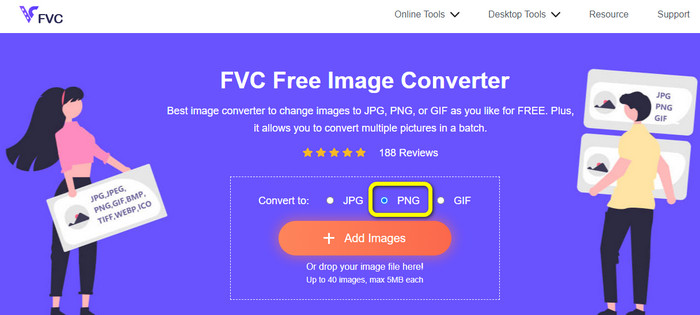
Stap 1: Ga naar de website van FVC Free Image Converter. Ga vervolgens naar de optie Converteren naar en selecteer het PNG‑bestandsformaat.
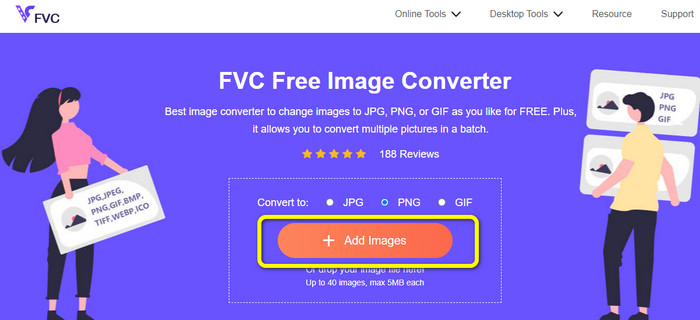
Stap 2: Klik daarna op de knop Afbeeldingen toevoegen. Je computerbestanden verschijnen op het scherm. Kies het ICO‑formaat dat je wilt converteren en klik op Openen. Klik opnieuw op de knop Afbeeldingen toevoegen om meer bestanden toe te voegen en een batchconversie uit te voeren.
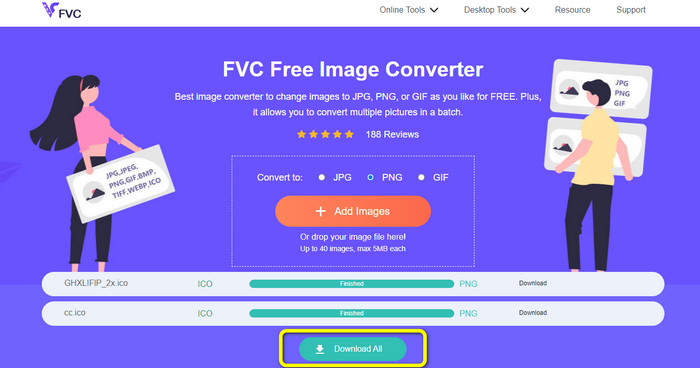
Stap 3: Je afbeelding wordt automatisch naar PNG geconverteerd. Klik na het conversieproces op de knop Alles downloaden om de afbeeldingen op te slaan. Daarna kun je je geconverteerde afbeelding al openen.
Deel 3. Hoe ICO eenvoudig naar PNG op Mac te converteren
Voorvertoning is een ingebouwd programma op de Mac. Naast het bekijken van afbeeldingen kun je er ook afbeeldingsbestanden mee converteren. Zo kun je het ICO‑bestand direct naar het PNG-formaat converteren. Bovendien verloopt het conversieproces snel. Je kunt afbeeldingen in slechts enkele seconden converteren, wat het handig maakt voor alle gebruikers. Daarnaast biedt het een batchconversieproces. Zo kun je meerdere afbeeldingsbestanden in één keer converteren. Bovendien zijn er, naast converteren, nog meer functies waar je van kunt profiteren. Het programma kan foto’s van formaat veranderen en bijsnijden. Het conversieproces is echter lastig, vooral voor niet‑professionele gebruikers. De opties zijn verwarrend om te volgen. Als je ICO naar PNG wilt converteren met dit programma, is het aan te raden om hulp te vragen aan professionals. Volg de onderstaande stappen om ICO naar PNG te converteren op een Mac.
Stap 1: Ga naar je map en klik op het ICO‑afbeeldingsbestand. Klik met de rechtermuisknop op de afbeelding en ga naar Openen met > Voorvertoning (standaard).
Stap 2: Ga in Voorvertoning naar de optie Archief in de bovenste interface en selecteer Exporteer.
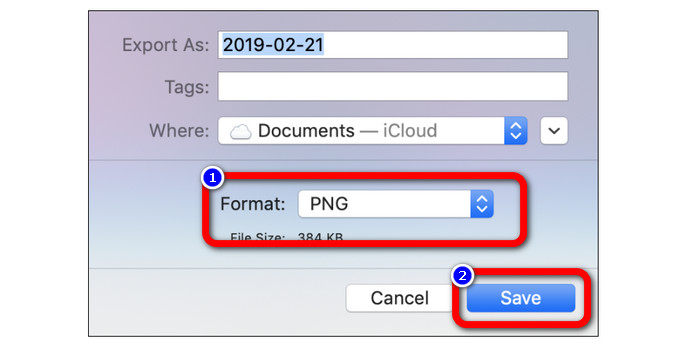
Stap 3: Selecteer vervolgens bij de optie voor het bestandsformaat je gewenste uitvoerformaat, namelijk PNG. Klik daarna op de knop Bewaar. Op deze manier wordt je afbeelding van ICO naar PNG geconverteerd.
Deel 4. ICO naar PNG converteren op Windows
Een van de beste offline afbeeldingsconverters is Video Converter Ultimate. Met deze uitstekende converter kun je snel van ICO naar PNG converteren. Bovendien kun je veel bestanden converteren dankzij de hoge conversiesnelheid. Het biedt ook een batchconversiemethode om meerdere bestanden tegelijkertijd te converteren. Video Converter Ultimate ondersteunt bovendien diverse afbeeldingsformaten, waaronder PNG, BMP, WEBP en TIF. Deze offline afbeeldingsconverter heeft een gebruiksvriendelijke interface en eenvoudige conversieprocedures. Gebruikers van elk niveau kunnen met deze methode eenvoudig afbeeldingen omzetten. Het conversieproces in deze converter is ook snel. In korte tijd kun je veel foto’s converteren. Daarnaast is deze converter beschikbaar voor zowel Mac als Windows‑pc.
Stap 1: Installeer Video Converter Ultimate op je Windows‑computer. Start vervolgens het programma na het installatieproces. Klik op de knop Download hieronder om snel toegang te krijgen tot de converter.
Gratis downloadVoor Windows 7 of nieuwerVeilige download
Gratis downloadVoor MacOS 10.7 of nieuwerVeilige download
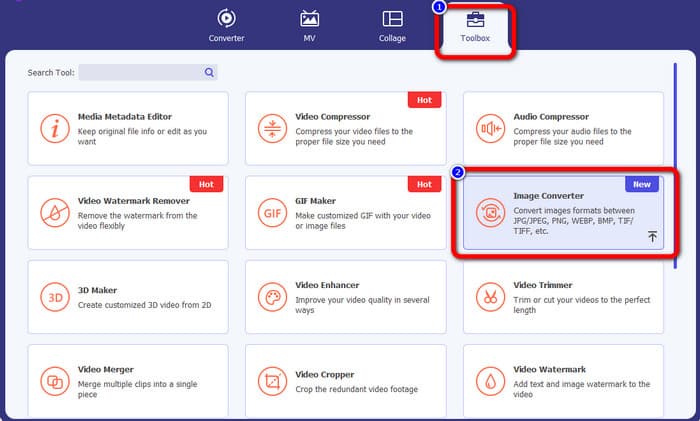
Stap 2: Ga na het starten van het programma naar de bovenste interface en selecteer het paneel Toolbox. Klik daarna op de functie Afbeeldingsconverter. Er verschijnt een andere interface op je scherm.
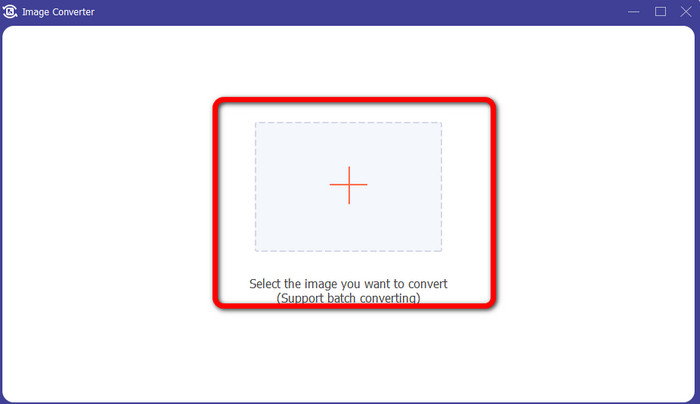
Stap 3: Wanneer de nieuwe interface verschijnt, klik je op het Plus-pictogram. Wanneer de map wordt geopend, klik je op de ICO‑afbeelding die je wilt converteren en klik je op Openen.
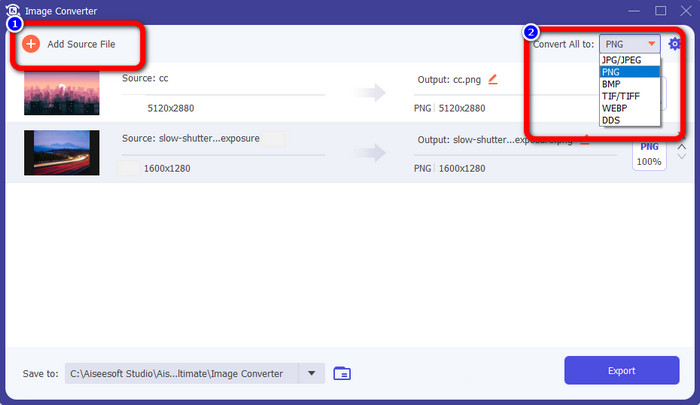
Stap 4: Als je meer bestanden wilt toevoegen om een batchconversie uit te voeren, klik je op Bronbestand toevoegen. Ga naar de rechterbovenhoek van de interface en klik op de optie Alles converteren naar. Selecteer het PNG‑formaat als gewenst uitvoerformaat.
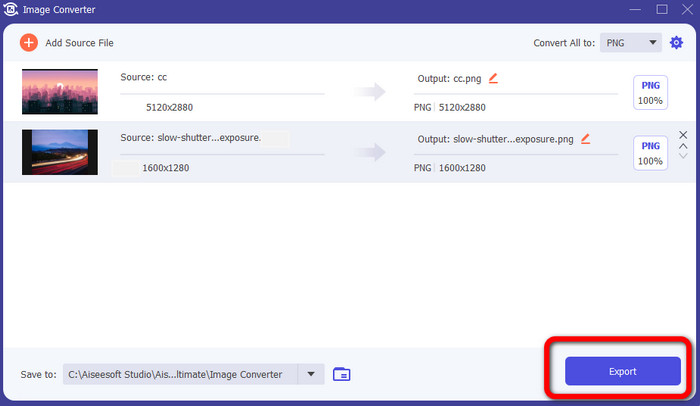
Stap 5: Ga ten slotte verder met het conversieproces door op de knop Exporteren te klikken. Daarna worden je bestanden opgeslagen op de door jou gekozen bestandslocatie vanuit deze afbeeldingsconverter.
Deel 5. Veelgestelde vragen over het converteren van ICO naar PNG
1. Hoe kan ik een ICO opslaan in PNG in Photoshop?
Helaas kun je ICO niet als PNG opslaan in Photoshop. Dat komt omdat Photoshop het ICO‑afbeeldingsbestandsformaat niet ondersteunt. Als je ICO als PNG wilt opslaan, kun je een afbeeldingsconverter gebruiken, zoals FVC Free Image Converter. Met deze online converter kun je ICO eenvoudig naar PNG converteren.
2. Is het mogelijk om PNG als ICO te gebruiken?
Ja dat is zo. Voor aanvullende informatie kunnen de ICO-bestanden PNG-bestanden zijn. ICO kan tegelijkertijd een PNG-bestand en bitmap + alpha bevatten.
3. Wat is de beste ICO naar PNG-converter die ik kan gebruiken?
De beste ICO‑naar‑PNG‑converter is FVC Free Image Converter. Deze converter kan je bestand direct omzetten. Bovendien kun je deze converter gratis gebruiken.
Gevolgtrekking
Nu heb je de eenvoudigste manieren geleerd om snel ICO naar PNG te converteren. Maar als je op zoek bent naar een afbeeldingsconverter die gratis en eenvoudig is, gebruik dan FVC Free Image Converter.
-
 Meest eenvoudige methoden om SVG naar PNG te converteren
 Weet hoe u uw afbeeldingsbestand kunt wijzigen van SVG naar PNG met behulp van handige afbeeldingsconversieprogramma's. Lees deze wegwijzer om alles te weten te komen over converteren
-
 Volledige manieren om JPG naar PNG online en offline te converteren
 Op zoek naar handige methoden om JPG naar PNG-bestandsindeling te converteren? Deze wegwijzer heeft het antwoord dat je nodig hebt. Lees het artikel om deze methoden te ontdekken
-
 Volledige details over verschillen tussen JPEG versus JPG versus PNG
 Dit bericht geeft je voldoende informatie over de verschillen tussen JPEG versus JPG versus PNG. Daarnaast leer je hoe je afbeeldingen converteert naar deze bestanden
