


 Video Converter Ultimate
 Scherm opnemer
 Videoreparatie
 Beveiligde download
Hoe JPG naar SVG te converteren: het beste programma om JPG naar SVG te converteren
Het SVG-formaat doet alles wat het JPG-formaat niet kan. Het belangrijkste voordeel van SVG is dat het op vectoren in plaats van op pixels is gebaseerd. Daardoor verliezen afbeeldingen in SVG-formaat geen kwaliteit wanneer ze worden geschaald. Het heeft in het dagelijks leven veel toepassingsmogelijkheden. SVG werkt het best met afbeeldingen die vormen en duidelijke randen hebben zonder kleine details. SVG is nuttig voor grafieken, diagrammen en andere grafische documenten. Bovendien zijn alle SVG-bestanden code en hebben ze een kleine bestandsgrootte, waardoor ze uitstekend geschikt zijn voor het werken met visuele elementen. Het omvat pictogrammen en logo’s, maar ook het bouwen van websites. Dit stelt je in staat om zowel de inhoud als het visuele aspect van de website te optimaliseren. Als je dus de beste manier wilt leren om JPG naar SVG te converteren, ben je hier aan het juiste adres. Lees deze handleiding, waarin we je alle noodzakelijke details geven over het omzetten van je JPG-bestanden naar het SVG-formaat.

Deel 1. JPG versus SVG
| Bestandsformaat | JPG/JPEG | SVG |
| Bestandsnaam Extensie | .jpg / .jpeg | .svg |
| Voor-en achternaam | Joint Photographic Experts Group | Schaalbare vectorafbeeldingen |
| Ontwikkeld door | Joint Photographic Experts Group | Wereldwijde web consortium |
| Beschrijving | De Joint Photographic Experts Group creëerde eind 1980 het JPG-formaat. Het omvat ook het opslaan van foto's op digitale camera's en andere reproductietools. De lossy compressiemethode die JPEG-bestanden gebruiken voor maximaal 24-bits kleuren en meer beeldopslag. | Scalable Vector Graphics-bestanden zijn hoogstwaarschijnlijk bestanden met de SVG-bestandsextensie. Dit type bestand gebruikt een op XML gebaseerd tekstformaat om aan te geven hoe de afbeelding eruit moet zien. Een SVG-bestand kan worden geschaald naar vele formaten zonder kwaliteitsverlies, aangezien de tekst wordt gebruikt om de afbeelding uit te leggen. Met andere woorden, het formaat is onafhankelijk van de resolutie. |
| Compressie | Lossy | Lossless |
| Bijbehorende programma's / browsers | Paint Adobe Photoshop GIMP Paint Google Chrome Internet Explorer Microsoft Edge | Google Chrome SafariMicrosoft Edge Mozilla Firefox |
Deel 2. Eenvoudige methode om JPG online naar SVG te converteren
Als je een website wilt gebruiken om JPG online naar SVG te converteren, gebruik dan de JPG to SVG Converter. Deze online tool biedt je eenvoudige methoden om je afbeeldingsbestanden te converteren. Daarnaast is de JPG to SVG Converter geschikt voor alle gebruikers, in het bijzonder voor beginners. Je kunt de bestanden met slechts een paar klikken omzetten. Ook kun je deze online converter in vrijwel alle browsers gebruiken. Daaronder vallen Google Chrome, Mozilla Firefox, Internet Explorer en meer. Bovendien ondersteunt hij verschillende formaten zoals PNG, EPS, PDF en meer. Tot slot kun je je afbeeldingsbestanden gratis converteren. Je kunt de tool gebruiken zonder ook maar een cent uit te geven. Er zijn echter momenten waarop de online tool niet goed werkt. Na het conversieproces kan het resultaat fouten vertonen. De prestaties van deze converter zijn dus inconsistent. Ook kun je geen bestanden converteren zonder internetverbinding.
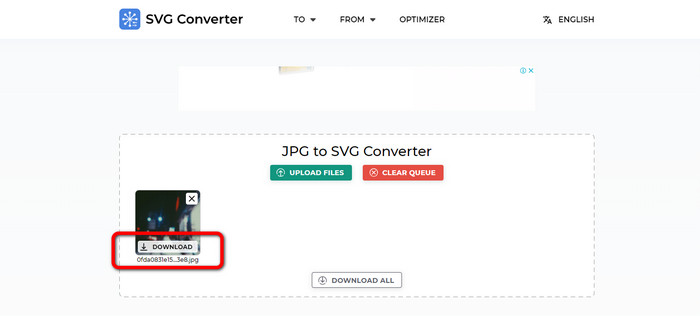
Stap 1. Open je browser en ga naar de hoofdwebsite van de JPG to SVG Converter. Zodra je op de hoofdpagina bent, klik je op de knop Upload Files om het JPG‑afbeeldingsbestand toe te voegen. Een andere manier om de afbeelding te uploaden is door het afbeeldingsbestand rechtstreeks in het vak te slepen.
Stap 2. Klik na het uploaden van de JPG‑afbeelding op de knop Download. Vervolgens zal de tool de JPG automatisch naar SVG converteren. Na het downloaden kun je je SVG‑afbeelding bekijken in je map Download.
Deel 3. Offline manier om JPG naar SVG te converteren op Mac en Windows
Wanneer u afbeeldingsbestanden offline probeert te converteren, kunt u JPG naar SVG converteren met Photoshop. Dit offline programma is een van de meest populaire tools voor het bewerken van afbeeldingen die je kunt krijgen. Maar naast het bewerken van foto's is Photoshop ook in staat om afbeeldingen om te zetten. Met behulp van deze downloadbare converter kunt u uw JPG-afbeeldingen effectief converteren. Bovendien heeft Photoshop meer functies waarvan u kunt genieten naast het converteren. Omdat het software voor het bewerken van afbeeldingen is, kunt u uw afbeeldingen vrij knippen, bijsnijden, filters toevoegen en uw afbeeldingen roteren. Het is beschikbaar op Mac en Windows, waardoor het handiger is voor gebruikers. Als u echter van plan bent dit offline programma te downloaden en op uw computer te installeren, kunt u dit slechts binnen een paar dagen gebruiken. Photoshop kan alleen een gratis proefversie van 7 dagen aanbieden. Na zeven dagen brengt de software kosten in rekening voor een abonnement.
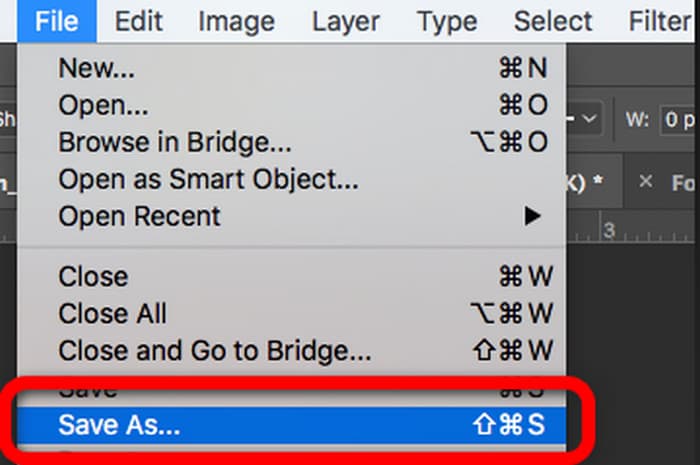
Stap 1. Download Photoshop op Windows of Mac. Start vervolgens het programma na het installatieproces. Wanneer de interface verschijnt, klik je linksboven in de interface op het menu File. Kies daarna de optie Open om het JPG‑formaat te importeren.
Stap 2. Daarna kun je, als je je foto’s vóór het converteren wilt bewerken, dat doen. Gebruik gewoon de bewerkingstools in de interface om je afbeelding te verbeteren.
Stap 3. Ga naar het menu File en kies de optie Save as. Ga vervolgens naar de bestandsindelingen en kies het SVG‑formaat. Op deze manier kun je je JPG‑afbeeldingsbestand opslaan en omzetten naar SVG‑formaat. Je kunt deze tool ook gebruiken om SVG naar PNG te wijzigen.
Deel 4. Bonus: gratis online afbeeldingsconverter
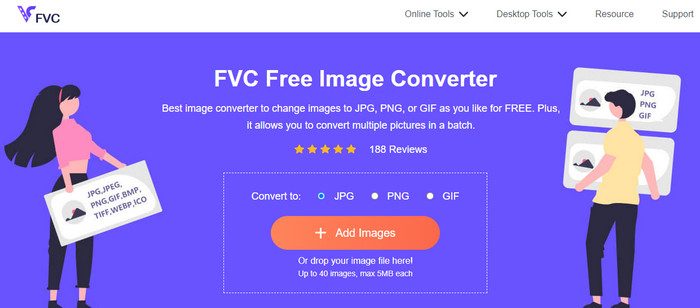
Als je op zoek bent naar een andere uitstekende online afbeeldingsconverter, gebruik dan de FVC Free Image Converter. Deze fotoconverter biedt je eenvoudige methoden om afbeeldingsbestanden te converteren. Hij heeft een eenvoudige interface, waardoor hij gemakkelijk te begrijpen is. Daarnaast kun je een batchconversie uitvoeren. Zo kun je meerdere afbeeldingsbestanden tegelijk converteren. Hij heeft ook een snel conversieproces, zodat je veel afbeeldingsbestanden kunt omzetten zonder al te veel tijd te verliezen. FVC Free Image Converter is in vrijwel alle browsers toegankelijk, wat handig is voor gebruikers.
Deel 5. Veelgestelde vragen over het converteren van JPG naar SVG
1. Waarom gebruiken fotografen nog steeds JPG's?
Het JPG-formaat kan 16,8 miljoen kleuren weergeven terwijl het een klein formaat behoudt. Het is een van de redenen waarom sommige fotografen en editors JPG meer gebruiken dan andere afbeeldingsindelingen.
2. Waarom een SVG-bestand gebruiken?
SVG-bestand is een perfect afbeeldingsformaat als u logo's wilt gebruiken. SVG is ook perfect als u van plan bent illustraties zoals grafieken, diagrammen en diagrammen te maken. Het kan de hoogste kwaliteit geven met behoud van zijn grootte.
3. Hoe converteer ik JPG naar SVG op Inkscape?
Download de Inkscape op uw computer. Ga vervolgens naar het menu Bestand en selecteer de optie Openen om de JPG-afbeelding in te voegen. Nadat u de afbeelding hebt ingevoegd, navigeert u naar het menu Bestand en klikt u op de optie Opslaan als. Ga daarna naar de optie Opslaan als type. Selecteer de SVG uit de indelingsopties en klik op Opslaan.
4. Hoe converteer ik JPG naar SVG met Cricut?
Selecteer Uploaden in de linkerzijbalk. Selecteer een afbeeldingscomplexiteit met behulp van de beschrijvingen van Cricut. De magische gum, een gumpenseel en een bijsnijdgereedschap zijn uw drie bewerkingsopties op het bewerkingsscherm dat volgt. Wijzig de afbeelding naar wens. U kunt kiezen tussen een print-then-cut afbeelding of een geknipte afbeelding zodra u klaar bent met het verwijderen van de ongewenste delen van uw afbeelding. Ga daarna naar de optie en sla de afbeelding op in SVG-indeling.
Gevolgtrekking
Nu heb je de beste methoden geleerd om JPG naar SVG te converteren met behulp van online en offline programma’s. Ook heb je als extra een andere online converter leren kennen om meer afbeeldingsformaten te converteren. Gebruik FVC Free Image Converter om formaten zoals JPG, PNG, GIF en meer te converteren.
-
 4 betrouwbare benaderingen om JFIF met gemak naar JPG te converteren
 Deze wegwijzer zal je alles vertellen over het online en offline converteren van JFIF naar JPG. Als je de meest effectieve methoden wilt leren, lees dan onmiddellijk dit bericht!
-
 Hoe GIF naar JPG te converteren zonder kwaliteitsverlies
 Lees en krijg de meest effectieve methoden om GIF professioneel naar JPG te converteren. U leert afbeeldingsbestanden converteren met de gids van perfecte afbeeldingsconverters.
-
 Matchless stappen om NEF effectief naar JPG-indeling te converteren
 Op zoek naar een uitstekende manier om uw NEF-indeling te wijzigen in een JPG-bestand? Klik op deze wegwijzer en bekijk alle essentiële details over het converteren van NEF naar JPG.
