


 Video Converter Ultimate
 Scherm opnemer
 Videoreparatie
 Beveiligde download
Effectieve manieren om TIFF naar JPG en PNG te converteren
TIFF is een afbeeldingsbestandsindeling die veel wordt gebruikt door fotografen en grafisch ontwerpers. Het formaat biedt hoge kwaliteit, flexibiliteit en vrijwel universele compatibiliteit. Maar de bestandsgrootte is groter, waardoor het lastiger is om met anderen te delen of online te gebruiken. In dat geval is een van de beste oplossingen om dit bestand naar andere formaten te converteren. JPG- en PNG-bestandsindelingen hebben een kleinere bestandsgrootte dan TIFF. Daarom is het beter om TIFF naar JPG en PNG te converteren. Dit artikel laat je de beste methoden zien om TIFF naar JPG/PNG te converteren. Ook kom je alle informatie te weten die je nodig hebt over deze afbeeldingsbestandsindelingen. Laten we dus zonder verder omhaal deze post lezen, waarin we de oplossing geven waar je naar op zoek bent.

Deel 1. TIFF versus JPG versus PNG
| Bestandsformaat | TIF/TIFF | JPG | PNG |
| Bestandsnaam Extensie | .tif / .tiff | .jpg | .png |
| Ontwikkeld door | Aldus (overgenomen door Adobe) | Joint Photographic Experts Group | PNG-ontwikkelingsgroep |
| Beschrijving | In 1992 werd het Tag Image File Format (TIFF) was ontwikkeld. Ontwikkelaars kunnen dit flexibele bestandstype uitbreiden om aan veel behoeften te voldoen. TIF- en TIFF-bestanden zijn beide afbeeldingsbestandsindelingen die worden gebruikt om afbeeldingen op te slaan. Maar er zijn enkele verschillen tussen deze formaten. TIFF-afbeeldingsbestanden kunnen meer dan één afbeelding in een bestand opslaan. Aan de andere kant kunnen TIF-bestanden slechts één afbeelding opslaan. Ook kunnen de TIFF-bestanden metadata over de afbeelding opslaan, maar de TIF-bestanden niet. | JPG en JPEG zijn gelijke extensies die verwijzen naar hetzelfde digitale beeldformaat. Er zijn geen verschillen tussen de JPEG- en JPG-indelingen. Het enige verschil is het aantal gebruikte tekens. JPG-bestanden worden opgeslagen met de bestandsextensie .jpg en JPEG-bestanden worden opgeslagen met de extensie .jpeg. JPEG is een acroniem voor de Joint Photographics Experts Group. | De afkorting van PNG staat voor Portable Network Graphic. U kunt foto's van hoge kwaliteit opslaan en delen in PNG-indeling. PNG's kunnen maar liefst 16 miljoen kleuren aan. Het ondersteunt ook transparante en semi-transparante achtergronden. PNG-afbeeldingsbestand is een open indeling, wat betekent dat u een PNG-bestand kunt opslaan en openen vanuit elke software voor het bewerken van afbeeldingen. |
Deel 2. Uitstekende methoden om TIF/TIFF online naar JPG/PNG te converteren
FVC Free Image Converter is de ultieme converter die je kunt gebruiken om TIFF online naar JPG/PNG om te zetten. De conversieprocedure is ook heel eenvoudig. Afbeeldingen kunnen in drie makkelijke stappen worden geconverteerd. Er is daarnaast een batchconversieprocedure beschikbaar. Meerdere foto’s kunnen in één keer worden geconverteerd. Dat betekent dat je je afbeeldingen in minder tijd kunt omzetten. De tool is eenvoudig te begrijpen en biedt een intuïtieve gebruikersinterface met overzichtelijke instellingen. Bovendien ondersteunt FVC Free Image Converter een groot aantal invoerformaten. Hij ondersteunt diverse formaten, waaronder JPG, PNG, BMP, TIFF, WEBP en GIF. Verder is deze converter volledig gratis. Ook beschermt hij de privacy van de gebruiker. Je gegevens worden onmiddellijk verwijderd zodra je foto’s zijn geconverteerd en opgeslagen. Het feit dat je deze online toepassing met alle soorten browsers kunt gebruiken, vergroot de toegankelijkheid voor gebruikers. Volg de eenvoudige instructies hieronder om deze TIFF‑naar‑JPG‑converter te gebruiken.
Converteer TIF/TIFF naar JPG
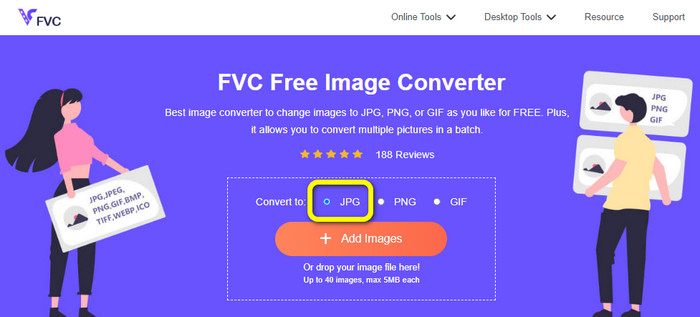
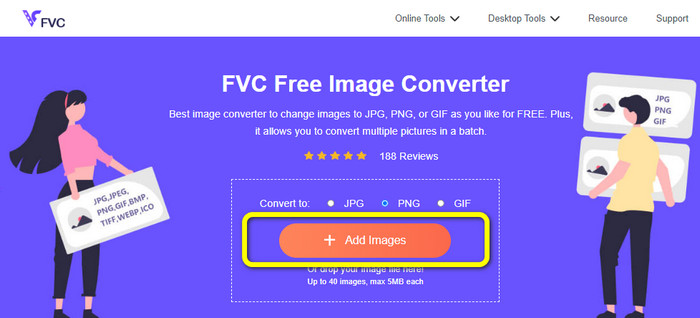
Stap 1: Bezoek de website van FVC Free Image Converter via je browser. Selecteer vervolgens het bestandsformaat JPG bij de optie Converteren naar.
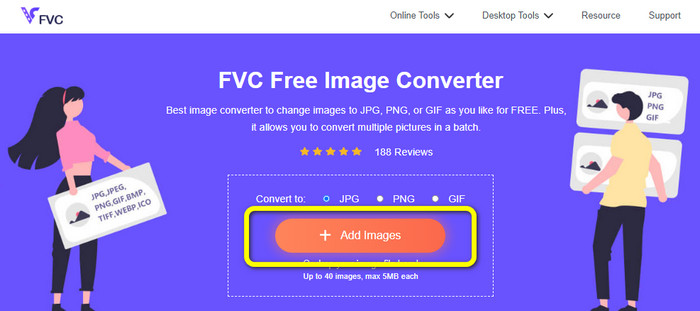
Stap 2: De volgende stap is klikken op de knop Afbeeldingen toevoegen. Na het klikken verschijnt de bestandsmap op je computerscherm. Kies het afbeeldingsbestand en klik op Openen.
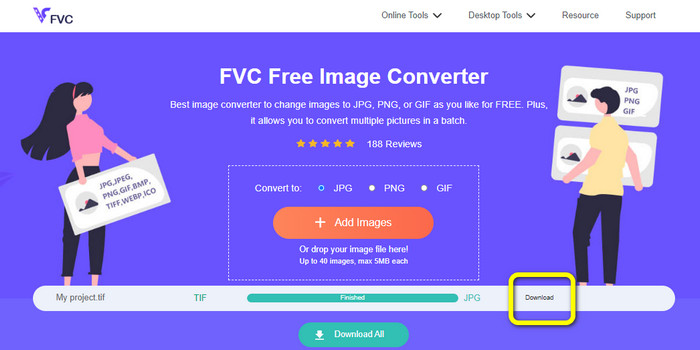
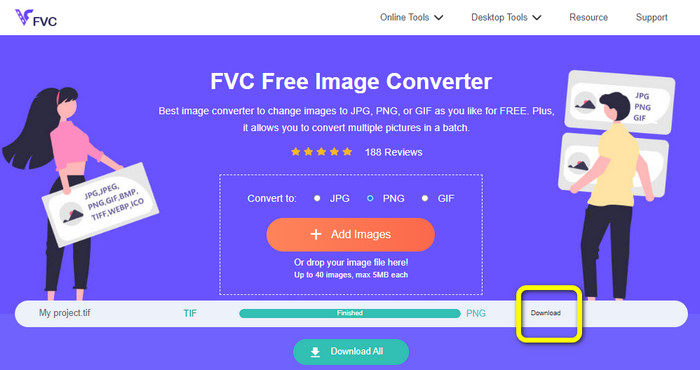
Stap 3: De afbeeldingsconverter zet je afbeelding automatisch om na het uploaden. Klik op de knop Downloaden om je geconverteerde afbeelding op je computer op te slaan en te downloaden.
Converteer TIFF/TIF naar PNG
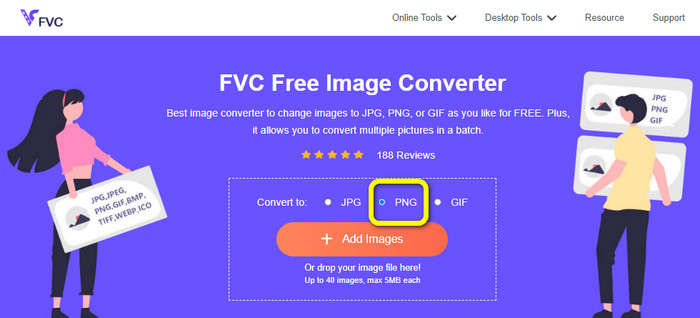
Stap 1: Kies op de webpagina het bestandsformaat PNG in de formaatoptie.
Stap 2: Klik op de knop Afbeeldingen toevoegen. Wanneer de bestandsmap vervolgens op het scherm verschijnt, selecteer je het PNG‑bestand dat je wilt converteren. Open het daarna.
Stap 3: Klik na het conversieproces op de knop Downloaden. Wacht tot het opslaan is voltooid en open daarna je afbeelding in je map. Klik hier om te leren hoe je BMP naar JPG of PNG converteert.
Deel 3. Beste manieren om TIF/TIFF offline naar JPG/PNG te converteren
Video Converter Ultimate is een van de beste offline manieren om een TIF‑bestand naar JPG en PNG te converteren. Je kunt dit programma downloaden op zowel macOS als Windows. Met deze offline afbeeldingsconverter kun je je TIF‑bestand naar JPG en PNG omzetten. Daarnaast ondersteunt hij andere formaten zoals WEBP, BMP, GIF, TIFF, JPG, PNG en meer. De converter biedt een gebruiksvriendelijke interface, waardoor hij perfect is voor zowel professionals als beginners. Bovendien kun je, als je meerdere bestanden tegelijk wilt converteren, dat ook doen. Een van de opvallende functies is de mogelijkheid tot batchconversie. Daardoor wordt het handig voor alle gebruikers die graag afbeeldingsbestanden converteren. Bovendien kun je tijdens het converteren van afbeeldingen nog meer doen. Via het instellingenpictogram kun je je afbeeldingen in- en uitzoomen. Je kunt ook de afbeeldingskwaliteit aanpassen op basis van je voorkeur. Op deze manier krijg je het resultaat dat je wenst. Volg de basisstappen hieronder om TIF naar JPG en PNG te converteren.
Converteer TIFF naar JPG
Stap 1: Download Video Converter Ultimate op je computer. Voer daarna de applicatie uit na het installatieproces. Bekijk de knop Downloaden hieronder en klik erop om snel toegang te krijgen tot de converter.
Gratis downloadVoor Windows 7 of nieuwerVeilige download
Gratis downloadVoor MacOS 10.7 of nieuwerVeilige download
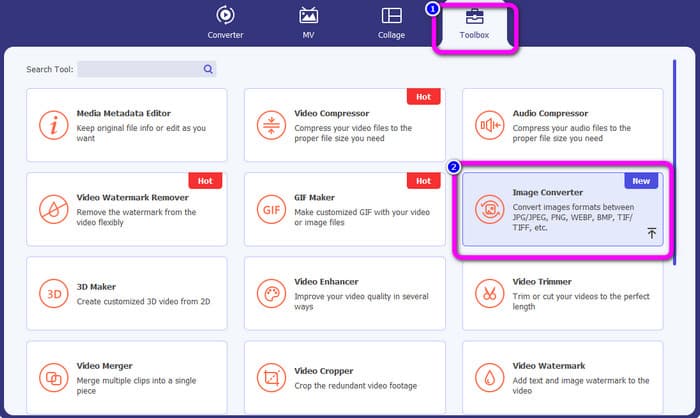
Stap 2: Klik op het paneel Toolbox in het bovenste gedeelte van de interface. Selecteer de functie Afbeeldingsconverter.
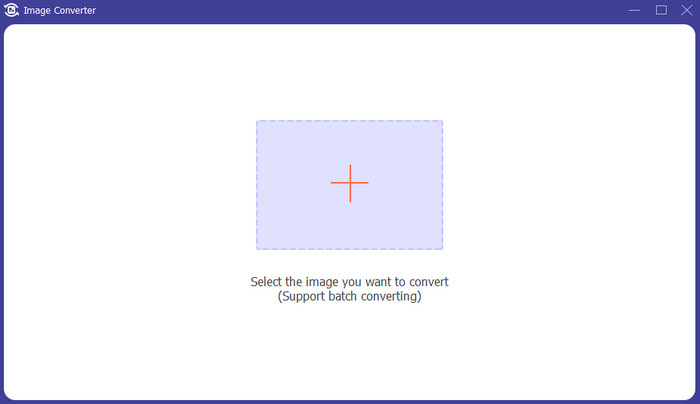
Stap 3: Klik vervolgens op de knop met het plusteken in het midden van de interface. Selecteer het TIFF‑afbeeldingsbestand in je bestandsmap en open het.
Stap 4: Als je meer afbeeldingen wilt, klik je op de knop Bronbestand toevoegen. Ga daarna naar de optie Alles converteren naar en selecteer het bestandsformaat JPG.
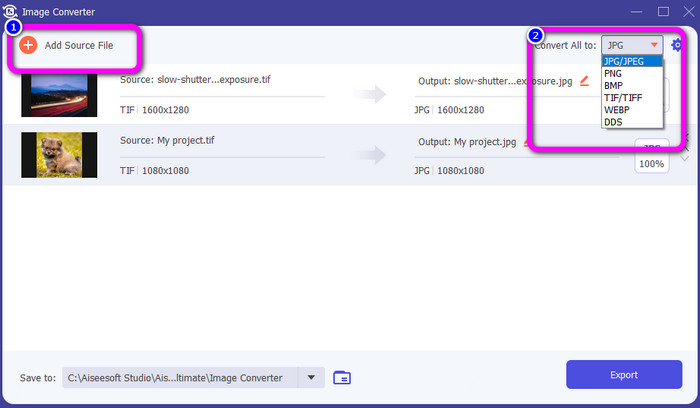
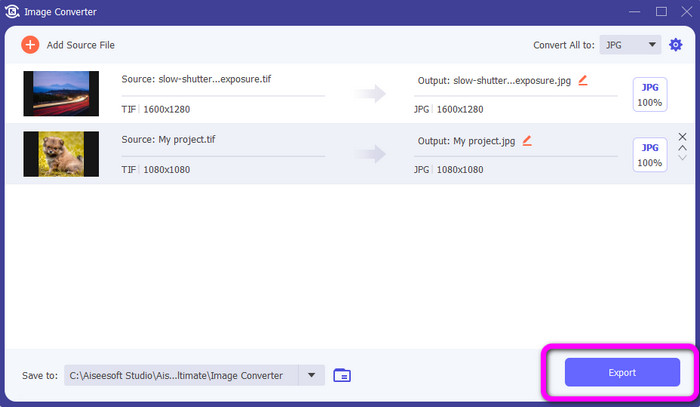
Stap 5: Klik ten slotte op de knop Exporteren nadat je JPG als uitvoerformaat hebt geselecteerd. Na het conversieproces kun je je geconverteerde afbeelding openen in je bestandsmap.
Converteer TIFF naar PNG
Stap 1: Je kunt hetzelfde proces als hierboven volgen. Ga naar het paneel Toolbox en selecteer de functie Afbeeldingsconverter.
Stap 2: Klik op het plus-pictogram om de TIFF toe te voegen die je wilt converteren.
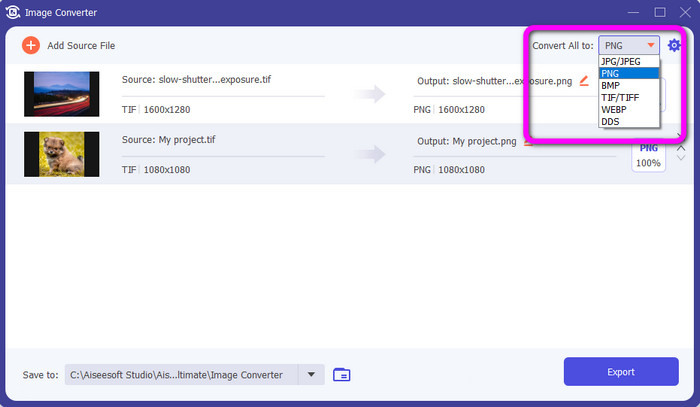
Stap 3: Nadat je je TIFF‑afbeeldingen hebt toegevoegd, ga je naar de optie Alles converteren naar. Selecteer het bestandsformaat PNG als je uitvoerformaat.
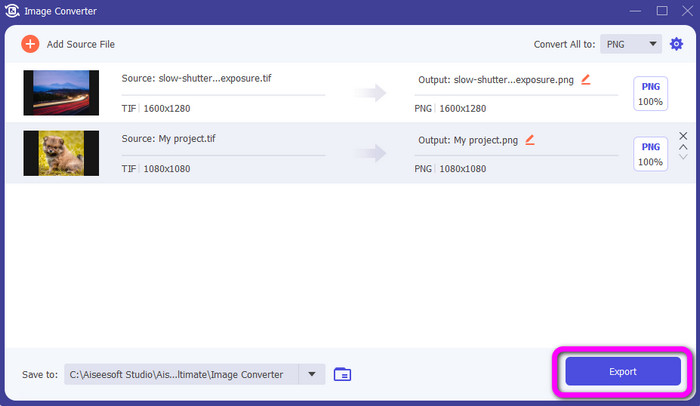
Stap 4: Klik voor de laatste stap op de knop Exporteren in de linkerbenedenhoek van de interface. Je kunt deze software ook gebruiken om JPG naar PNG te converteren.
Deel 4. Veelgestelde vragen over het converteren van TIF/TIFF naar JPG/PNG
1. Hoe TIFF naar PNG op Mac te converteren?
Een van de effectieve manieren om TIFF naar PNG op een Mac te converteren is met FVC Free Image Converter. Open Safari op je Mac en ga naar deze online afbeeldingsconverter. Selecteer op de hoofdpagina het formaat PNG in de formaatoptie. Klik op de knop Afbeeldingen toevoegen om het TIFF‑bestand toe te voegen dat je wilt converteren. Tijdens het uploaden wordt het bestand automatisch geconverteerd. Klik vervolgens op de downloadknop om de geconverteerde afbeelding op je Mac op te slaan.
2. Wat zijn de voordelen van het converteren van TIF naar PNG?
Als u uw bestand kleiner wilt maken, is het noodzakelijk om uw TIF-bestand naar andere formaten te wijzigen. Het converteren van TIF naar een PNG-bestand is het beste omdat PNG een kleinere bestandsgrootte heeft. Het geeft je een beheersbare bestandsgrootte voor webbrowsers en apparaten.
3. Welk bestand is makkelijker te versturen, JPG of TIFF?
Het JPG-bestandsformaat heeft een kleinere bestandsgrootte. Het maakt het gemakkelijker om een afbeelding online of via e-mail te verzenden. TIFF heeft een grotere bestandsgrootte, waardoor het traag is om een afbeelding te verzenden.
Gevolgtrekking
Nu weet je dat een TIFF‑afbeeldingsbestand een grotere bestandsgrootte heeft. Dus als je een afbeelding sneller online wilt versturen, is het beter om deze te converteren naar andere formaten met kleinere bestandsgroottes. Daarom heeft dit artikel je de beste oplossing gegeven om TIFF naar JPG en PNG te converteren. Als je een eenvoudigere manier wilt om afbeeldingsbestanden te converteren, gebruik dan FVC Free Image Converter. Het biedt een duidelijke interface met eenvoudige methoden voor het converteren van afbeeldingsbestanden.
-
 Converteer JPEG efficiënt naar JPG [vijf vermelde methoden]
 Kom en ontvang de meest eenvoudige tutorials over het converteren van JPEG naar JPG-afbeeldingsbestandsindeling. Klik op deze wegwijzer en begin met het leren van uw voorkeursmethoden
-
 Top 5 toonaangevende tutorials om PNG snel naar JPG te converteren
 Als u uw PNG-bestand naar JPG-indeling moet converteren, kunt u hier de beste manieren leren. U leert ook het verschil tussen PNG- en JPG-bestandsindelingen
-
 Volledige details over verschillen tussen JPEG versus JPG versus PNG
 Dit bericht geeft je voldoende informatie over de verschillen tussen JPEG versus JPG versus PNG. Daarnaast leer je hoe je afbeeldingen converteert naar deze bestanden
