


 Video Converter Ultimate
 Scherm opnemer
 Videoreparatie
 Beveiligde download
3 manieren om eenvoudig foto's te comprimeren voor e-mail [Handleiding]
E-mail is een geweldig platform voor het verzenden van berichten met fotobijlagen en andere benodigde bestanden. Sommige gebruikers ondervinden echter problemen bij het verzenden van grote fotobestanden, omdat ze leiden tot trage uploadtijden, mislukte leveringen of het overschrijden van de bijlagegroottelimieten die door e-mailproviders worden opgelegd. Om deze problemen te voorkomen, is het essentieel om uw foto's te verkleinen voordat u ze verzendt.
Daarmee gaan we je in dit artikel 3 methoden laten zien voor hoe je foto’s kunt comprimeren voor e‑mail, zodat je foto‑bijlagen makkelijk te verzenden en te ontvangen zijn, zonder dat dit ten koste gaat van de kwaliteit.

Deel 1. Voordelen van het comprimeren van foto's voor e-mail
Het comprimeren van foto's heeft over het algemeen veel voordelen, ook voor e-mailgebruik. Hieronder staan de dingen waar u van kunt genieten bij het aanpassen van de grootte van foto's voor e-mail:
• Omdat beeldcompressie betekent dat de foto wordt verkleind naar een kleiner formaat, kun je in één e‑mail eenvoudig meerdere foto’s als bijlage meesturen vergeleken met ongecomprimeerde foto’s.
• Vaak hanteren e‑mailproviders een limiet voor de grootte van bijlagen die je kunt versturen. Door je foto’s voor e‑mail te comprimeren, blijf je binnen deze limieten en zorg je ervoor dat je e‑mail zonder problemen wordt afgeleverd. Dit is handig wanneer je e‑mails naar meerdere ontvangers stuurt of wanneer je naast je foto’s ook andere soorten bijlagen wilt meesturen.
• Wanneer foto’s worden gecomprimeerd, betekent dit simpelweg dat ze minder ruimte innemen, waardoor je je opslagquota voor e‑mail beter kunt benutten.
• Grote e‑mailbijlagen kunnen soms door mailservers worden gemarkeerd, wat kan leiden tot afleveringsfouten of ertoe kan leiden dat e‑mails als spam worden aangemerkt. Door je foto’s voor e‑mail te comprimeren, voorkom je deze problemen en zorg je ervoor dat je bijlagen zonder problemen bij de beoogde ontvangers aankomen.
• In bepaalde situaties waarin gebruikers hun e‑mails op hun mobiele telefoon bekijken, zijn gecomprimeerde foto’s makkelijker te downloaden en te bekijken op mobiele apparaten dan ongecomprimeerde afbeeldingen.
Deel 2. Comprimeer foto's voor e-mail door het converteren van het afbeeldingsformaat
Als u foto's wilt comprimeren voor e-mail, is de eerste methode die u kunt proberen een image converter tool te gebruiken. Hiermee converteert u uw afbeelding naar een formaat dat u wenst, waarbij het conversieproces uw foto ook optimaliseert naar een wenselijk en beter hanteerbaar formaat.
FVC Free Image Converter is een gratis conversietool waarmee gebruikers hun foto’s kunnen omzetten naar verschillende bestandsindelingen voor afbeeldingen, zoals JPG, PNG en GIF. Dus als je in een e‑mail een afbeeldingsbestand verstuurt in een formaat dat meer gegevens bevat en daardoor een grotere bestandsgrootte heeft, kun je zeker profiteren van deze tool. Bovendien is hij ideaal wanneer je meerdere grote bestanden wilt verzenden, omdat hij in één keer tot 40 afbeeldingen in batch kan converteren. Zo gebruik je deze tool om je foto’s te comprimeren voor e‑mail:
Stap 1. Zoek eerst in je browser naar FVC Free Image Converter om toegang te krijgen tot de online tool.
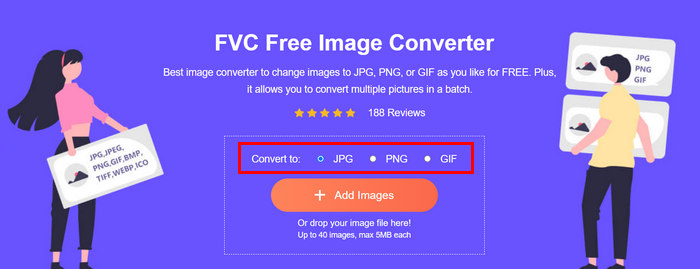
Stap 2. Kies vervolgens het gewenste uitvoerbestandsformaat bij de optie Convert to. Klik daarna op de knop Add Images om de afbeeldingen te importeren die je wilt converteren.
Stap 3. Klik, zodra je klaar bent, op de knop Download All.
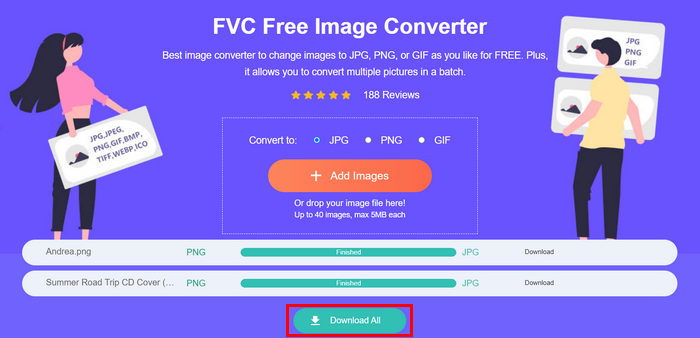 Met de gratis FVC Image Converter-tool bent u er zeker van dat uw geconverteerde foto's gecomprimeerd zijn en kleiner zijn geworden. Dit is ideaal voor gebruik via e-mail.
 Deel 3. Foto's verkleinen voor e-mail met online compressietool
FVC Free Image Compressor is een gratis online compressietool die het comprimeren van foto’s voor e‑mail eenvoudig maakt. Je hoeft alleen maar de afbeeldingsbestanden te uploaden of te importeren en de tool laat ze automatisch comprimeren. Als je je zorgen maakt over kwaliteitsverlies: deze tool maakt gebruik van optimale instellingen en geavanceerde compressie‑algoritmen. Dit zorgt ervoor dat de kwaliteit van je afbeelding behouden blijft wanneer je deze comprimeert voor e‑mail.
Ook als u een afbeelding batchgewijs moet comprimeren, kunt u met deze tool 40 afbeeldingen tegelijk comprimeren. Tot slot ondersteunt het verschillende populaire afbeeldingsformaten zoals JPEG, PNG, SVG en geanimeerde GIF's.
Stap 1. Ga in je browser naar hun officiële website.
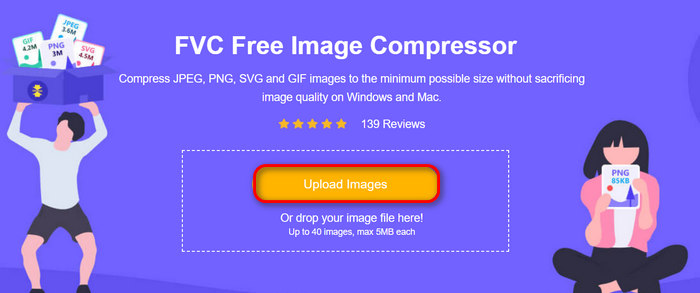
Stap 2. Klik daarna op Upload Images om de afbeeldingen te importeren die je voor je website wilt comprimeren. Let op: deze tool comprimeert je foto’s automatisch zodra je ze hebt geselecteerd en op ‘Openen’ hebt geklikt.
Stap 3. Nadat je afbeeldingen zijn gecomprimeerd, kun je ze bekijken door hun nieuwe bestandsgrootte na de compressie te controleren. Klik tot slot op Download All om je afbeelding op te slaan.
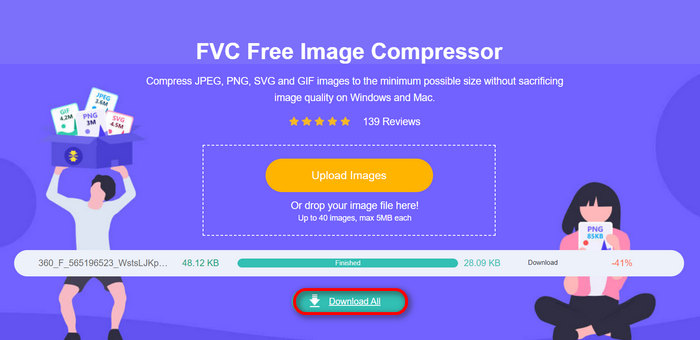
Deze methode kan u echt helpen foto's te comprimeren voor e-mail zonder ingewikkelde stappen en abonnementskosten. Bovendien maakt de gebruiksvriendelijke en intuïtieve interface het een ideaal hulpmiddel voor elk gebruikersniveau. Dus als u uw foto's wilt optimaliseren voor e-mailgebruik, probeer dan nu deze methode.
Deel 4. Foto's voor e-mail verkleinen naar een opgegeven formaat
Als u foto's voor e-mail wilt verkleinen naar een bepaald formaat, kunt u de IMGonline-tool proberen. Met deze tool voor het comprimeren van afbeeldingen kunt u uw afbeelding verkleinen naar een formaat naar keuze. Zo doet u dat:
Stap 1. Klik op hun website op de knop Choose File om de foto toe te voegen die je wilt comprimeren.

Stap 2. Stel vervolgens de instellingen in voor JPEG‑compressie. Voer de gewenste grootte in, in KB of MB, afhankelijk van je keuze.

Stap 3. Kies in het menu Size Reducing in Megapixel hoeveel je je foto wilt comprimeren of hoe je de compressie van je foto wilt beperken.
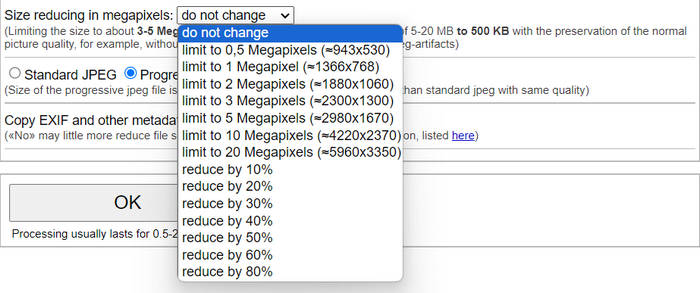
Stap 4. Kies daarna tussen Standard JPG of Progressive JPG.

Stap 5. Klik, zodra je klaar bent, gewoon op de knop OK.
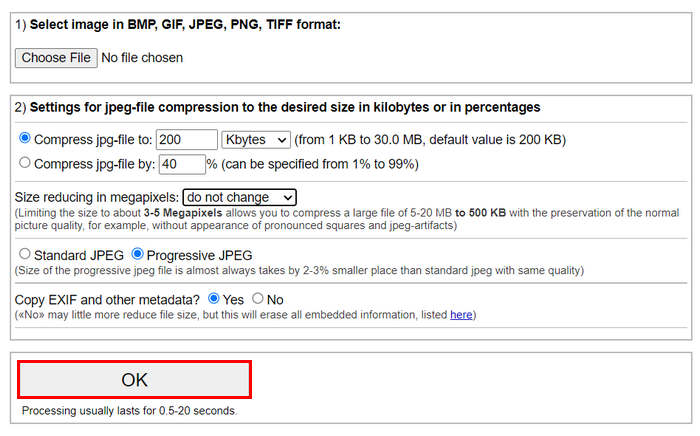
Houd er bij de keuze tussen standaard JPG en progressieve JPG rekening mee dat de bestandsgrootte van een progressief JPG-bestand altijd 2-3% kleiner is dan die van een standaard JPG-bestand met dezelfde kwaliteit.
Deel 5. Veelgestelde vragen over het comprimeren van foto's voor e-mail
Hoe groot moet ik mijn foto's aanpassen voor e-mail?
Als het aankomt op de ideale grootte voor het versturen van foto's in e-mail, is er geen beperking, maar het wordt over het algemeen aanbevolen om uw foto's te verkleinen tot maximaal 1024x768 pixels. Ook helpt het om uw afbeeldingsgrootte onder de 1 MB te houden om problemen met bijlagelimieten te voorkomen en maakt het voor ontvangers gemakkelijker om de afbeeldingen te downloaden en te bekijken.
Hoe comprimeer ik afbeeldingen voor Gmail?
Afbeeldingen comprimeren voor Gmail kan op verschillende manieren. Een van de eenvoudigste manieren is het gebruik van online compressietools zoals de gratis FVC image compressor tool. Om deze te gebruiken hoef je alleen je afbeeldingsbestanden te uploaden; daarna worden ze automatisch gecomprimeerd.
Welk type afbeelding is het beste voor e-mails?
De beste afbeeldingsindelingen voor e‑mails zijn JPEG en PNG. JPEG wordt veel gebruikt vanwege de goede compressieverhouding en de balans tussen bestandsgrootte en kwaliteit, waardoor het ideaal is voor foto’s en afbeeldingen met veel kleuren. PNG heeft de voorkeur voor afbeeldingen die transparantie nodig hebben of tekst, logo’s of grafische elementen met scherpe randen bevatten, omdat het voor deze elementen een hogere kwaliteit behoudt, al kan de bestandsgrootte groter zijn dan bij JPEG.
Gevolgtrekking
Het is erg belangrijk om te weten hoe je foto’s kunt comprimeren voor e‑mail om trage uploadtijden, mislukte bezorgingen en beperkingen op de grootte van bijlagen te voorkomen. Door de methoden te volgen die in dit artikel uitgebreid zijn uiteengezet, kun je ervoor zorgen dat je foto‑bijlagen hanteerbaar blijven en snel te versturen en te ontvangen zijn.
Waar wacht je nog op? Begin vandaag nog met het optimaliseren van je e-mailbijlagen met deze 3 eenvoudige manieren.
-
 Te gecomprimeerde foto: zo los je ze eenvoudig op
 Vraagt u zich af wat u moet doen als uw afbeelding te gecomprimeerd is? Lees dit artikel en ontdek waarom dit afbeeldingsprobleem optreedt en leer 2 methoden om het op te lossen.
-
 Afbeelding verkleinen naar 100 KB: 3 beste manieren voor efficiënte compressie
 Op zoek naar een tool om je te helpen de grootte van een afbeelding te wijzigen naar 100 KB? Lees dit artikel en leer 3 methoden om je afbeeldingen te verkleinen tot de gewenste bestandsgrootte.
-
 Afbeeldingen comprimeren in Word [Windows en Mac]
 Vraagt u zich af hoe u uw Word kunt gebruiken voor beeldcompressie? Deze gids leert u hoe u afbeeldingen in Word kunt comprimeren voor naadloze compressie.
