


 Video Converter Ultimate
 Scherm opnemer
 Videoreparatie
Laat uw creativiteit de vrije loop: uitgebreide Luminar Neo-recensie
Ben je op zoek naar een alles-in-één oplossing voor beeldverbetering en het verwijderen van achtergronden? Zoek dan niet verder, Luminar Neo zou wel eens het perfecte hulpmiddel voor je kunnen zijn. Met zijn gebruiksvriendelijke interface en krachtige, door AI aangestuurde functies springt deze tool eruit als een veelzijdig fotobewerkingsprogramma voor elk type gebruiker. Of je nu de levendigheid van je kleuren wilt versterken, achtergronden naadloos wilt vervangen of simpelweg details in je foto’s wilt verfijnen, deze tool biedt een breed scala aan efficiënte tools en functies om aan je creatieve behoeften te voldoen. In deze review van Luminar Neo bekijken we hoe deze krachtige tool moeiteloos je fotografieniveau kan verhogen en je de informatie geeft om het volledige potentieel van je beelden te ontgrendelen. Ga met ons mee terwijl we de functies en mogelijkheden verkennen die Luminar Neo tot een opvallende keuze maken in de wereld van beeldverbetering.

Deel 1. Luminar Neo-recensie
Luminar Neo, innovatieve fotobewerkingssoftware ontwikkeld door Skylum, is een gamechanger voor fotografen en visuele kunstenaars die op zoek zijn naar een uitgebreide set tools om hun beelden naar een hoger niveau te tillen. In de kern maakt deze tool gebruik van geavanceerde AI‑technologie om complexe bewerkingsprocessen te vereenvoudigen, waardoor hij toegankelijk is voor gebruikers van elk vaardigheidsniveau. Hoewel het een breed scala aan creatieve bewerkingstools en presets biedt, zijn het vooral de uitzonderlijke functies voor beeldopwaardering en achtergrondverwijdering die Luminar Neo onderscheiden. De image upscaler zorgt ervoor dat je foto’s scherp en gedetailleerd blijven, zelfs wanneer ze worden vergroot, terwijl de background remover een naadloze oplossing biedt om achtergronden moeiteloos te wijzigen en te verfijnen.
Belangrijkste kenmerken
◆ Gebruik geavanceerde AI voor nauwkeurige verbeteringen, inclusief gespecialiseerde tools voor lucht en huid.
◆ Diverse tools en voorinstellingen om unieke accenten aan uw foto's toe te voegen.
◆ Integratie met populaire bewerkingssoftware zoals Photoshop voor een soepele workflow.
◆ Snelle verwerking voor het moeiteloos verwerken van grote bestanden en complexe bewerkingen.
◆ Behoud uw originele afbeelding terwijl u experimenteert met bewerkingen.
◆ Gebruiksvriendelijke interface.
◆ Achtergrondverwijderaar.
Voordelen
- Aanpasbare werkstroom.
- Sterke AI-mogelijkheden.
- Betaalbare prijzen.
- Gemakkelijk voor beginners.
- Kortingen voor Skylum-gebruikers.
- 24/7 klantenondersteuning.
Nadelen
- Sommige functies behoeven verbetering.
- Geen mobiele app voor fotobewerking.
Deel 2. Luminar Neo versus Luminar AI
Hier is een vergelijkingstabel tussen Luminar Neo en Luminar AI.
| Functie | Luminaire Neo | Luminaire AI |
| AI-aangedreven bewerken | Ja | Ja |
| Koppel | Geavanceerd en aanpasbaar | Gebruiksvriendelijk en vereenvoudigd |
| Bewerkingstools | Uitgebreid assortiment tools en presets | AI-gestuurde sjablonen en slimme tools |
| Integratie | Naadloze integratie met andere bewerkingssoftware | Efficiënte prestaties, geoptimaliseerd voor AI-verwerking |
| Doelgroep | Professionele fotografen en gevorderde gebruikers | Beginners en casual fotografen |
Het is belangrijk om te onthouden dat de keuze tussen Luminar Neo en Luminar AI neerkomt op uw individuele voorkeuren en bewerkingsvereisten. Of u nu neigt naar de geavanceerde en aanpasbare functies van Luminar Neo of de voorkeur geeft aan de gebruiksvriendelijke eenvoud van Luminar AI, beide tools zijn krachtige oplossingen op het gebied van fotobewerking.
Deel 3. Hoe Luminar Neo gebruiken?
Zo kunt u Luminar Neo gebruiken om afbeeldingen op te schalen:
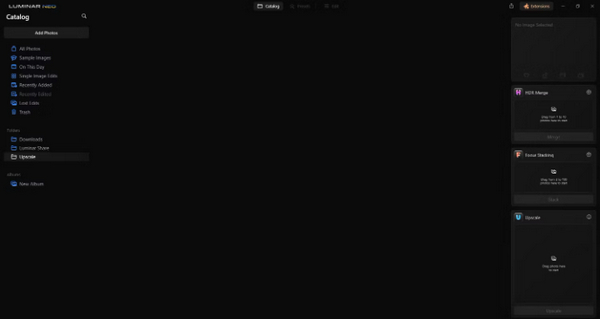
Stap 1. Open Luminar Neo als een zelfstandig programma.
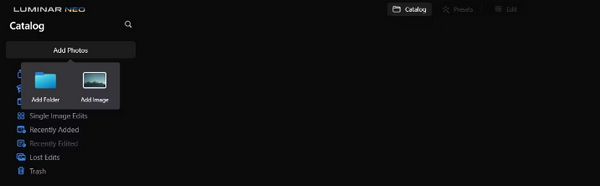
Stap 2. Klik op Add Photos en selecteer vervolgens Add Image.
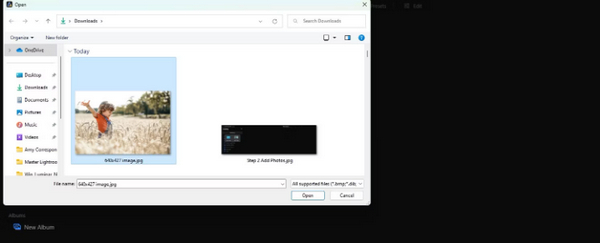
Stap 3. Kies het gewenste bestand en klik op Open.
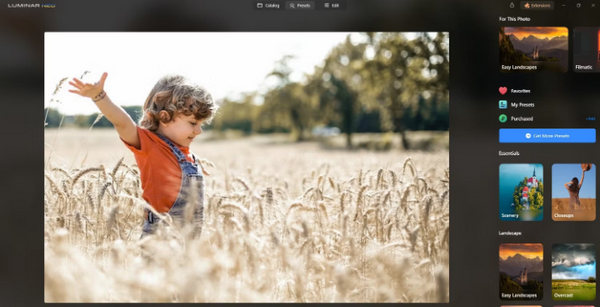
Stap 4. Klik nu bovenaan het menu op Catalog.
Stap 5. Sleep de afbeelding omlaag naar het vak Upscale AI onderaan, met het label Drag photo here to start.
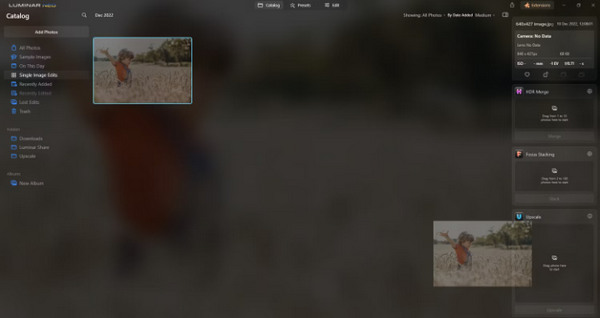
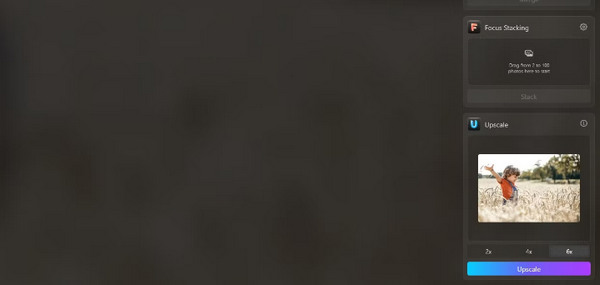
Stap 6. Rond het proces af door de mate van upscaling te kiezen die je verkiest; in deze demonstratie kozen we bijvoorbeeld voor een verhoging van 6x.
Stap 7. Klik ten slotte op Upscale om het gekozen niveau van upscaling op je afbeelding toe te passen.
Breng uw vers opgeschaalde afbeelding moeiteloos over van uw computer naar uw telefoon met behulp van Luminar Share.
Zo kunt u Luminar Neo gebruiken om de achtergrond van de afbeelding te verwijderen:
Stap 1. Importeer eerst de foto die je wilt bewerken. Zoek en klik op de knop Add Photos linksboven in het scherm. Nadat je je afbeelding hebt geselecteerd, klik je op Open.
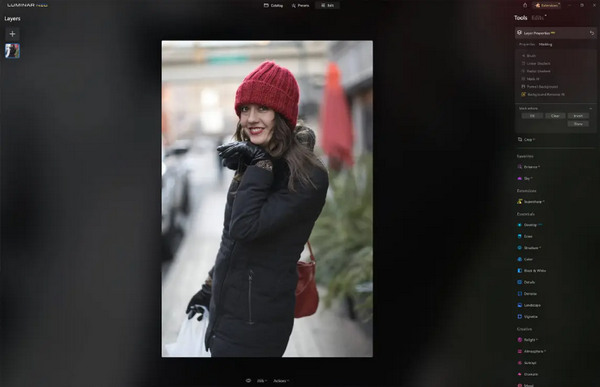
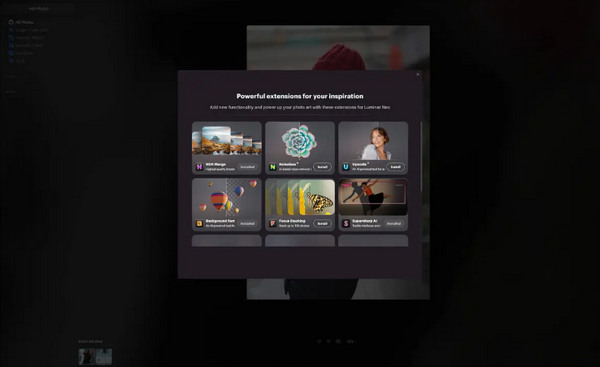
Stap 2. Dit is cruciaal voor eerste gebruikers. Je moet de Background Removal AI-extensie downloaden via het tabblad Extensions rechtsboven in je scherm. Na het downloaden dubbelklik je op je foto, klik je op Edit en begin je met bewerken.
Stap 3. Ga in de bewerkingsbalk aan de rechterkant van je scherm naar Layer Properties, vervolgens naar Masking en selecteer Background Removal AI. Hiermee kun je je onderwerp kiezen. Zodra het in het rood is gemarkeerd, druk je op Remove om de achtergrond als bij toverslag te verwijderen. Gebruik de refinements brush voor eventuele nabewerkingen op plekken die de AI mogelijk heeft gemist.
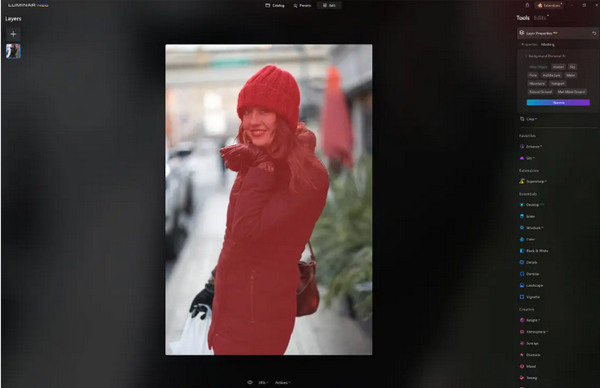
Het enige aan Luminar Neo is dat de gratis versie deze functie niet bevat. Niettemin, als je een beperkt budget hebt en je foto naar een hoger niveau wilt tillen, dan is deze tool iets voor jou.
Deel 4. 2 beste gratis alternatieven voor Luminar Neo
Luminar Neo kan voor sommigen duur zijn en te complex om gemakkelijk te kunnen navigeren, dus als je op zoek bent naar alternatieve tools voor Luminar Neo, zijn hier de beste tools die je kunt bekijken.
FVC Online beeldopschaler
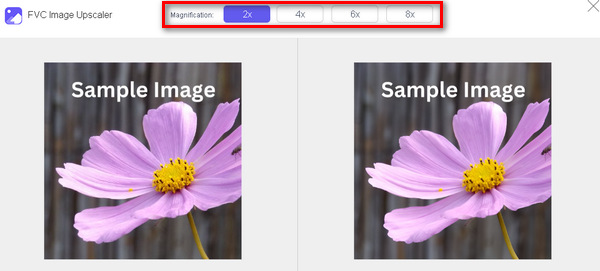
FVC Online Image Upscaler is een gratis online tool voor beeldopwaardering. Ja, je leest het goed. Hij is gratis, maar onderschat zijn mogelijkheden niet. Deze tool is geïntegreerd met AI‑technologie om het verbeteringsproces naadloos te automatiseren. Bovendien kun je de afbeelding tot 8x vergroten zonder concessies te doen aan de kwaliteit.
Hier leest u hoe u deze tool kunt gebruiken
Stap 1. Ga naar hun officiële website.
Stap 2. Klik op Upload Photo en selecteer de afbeelding die je wilt opwaarderen.
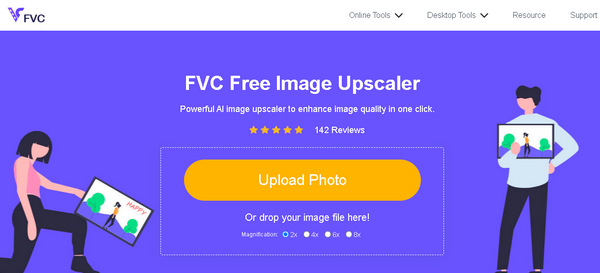
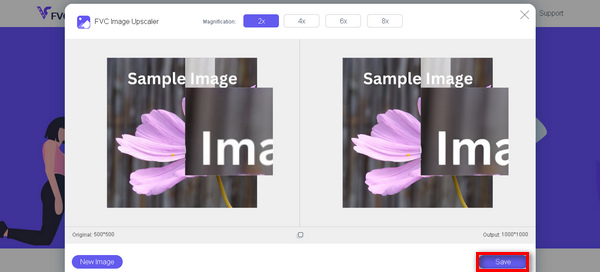
Stap 3. Daarna toont de tool een voorbeeld van je afbeelding. Je kunt de optie Magnifier gebruiken om de kwaliteit van de afbeelding te controleren.
Stap 4. Klik op Save om je afbeelding te downloaden.
FVC Free Image Upscaler is het beste alternatief voor Luminar Neo als het gaat om het opschalen van afbeeldingen. Bovendien kunnen gebruikers met deze tool eenvoudig hun afbeeldingen verbeteren. Geen complexe interface, u heeft slechts een paar klikken nodig om uw foto's perfect te verbeteren.
FVC Online Achtergrondverwijderaar
Ondertussen kun je FVC Online Background Remover gebruiken als alternatief voor het verwijderen van afbeeldingsachtergronden. Deze veelzijdige tool is gemaakt om het proces van achtergrondverwijdering te automatiseren. Hij ondersteunt meerdere populaire afbeeldingsindelingen zoals PNG, JPG en JPEG. Bovendien kun je het resultaat van je afbeelding aanpassen: je kunt de achtergrond veranderen in effen kleuren, het onderwerp spiegelen, verplaatsen en uitsnijden.
Hier volgen de stappen waarmee u deze tool eenvoudig kunt gebruiken:
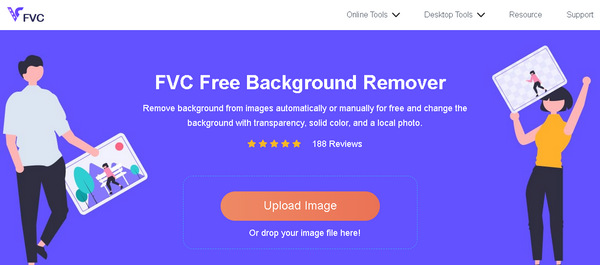
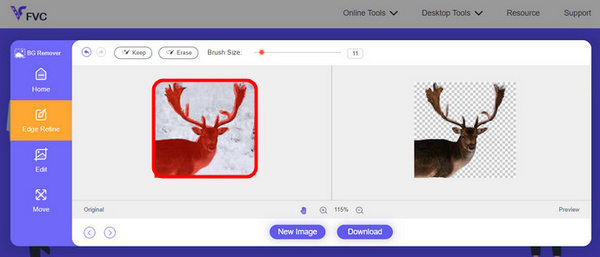
Stap 1. Ga eerst naar hun officiële website en klik op Upload Image.
Stap 2. Na het resultaat kun je de afbeelding bewerken door de randen te verfijnen en het onderwerp te verplaatsen.
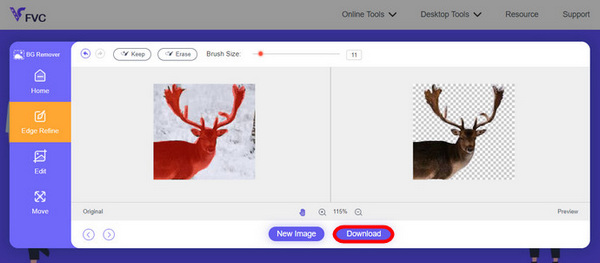
Stap 3. Om het resultaat op te slaan, klik je op de knop Download.
FVC Image Background Remover is echt een hulpmiddel voor het uitsnijden van een afbeelding en het beste alternatief voor Luminar Neo. En behalve dat het gratis is, is de tool gemakkelijk te navigeren. Geen gedoe, alleen kwaliteitsresultaten.
Deel 5. Veelgestelde vragen over Luminar Neo Review
Is Luminar Neo beter dan Lightroom?
De vergelijking tussen Luminar Neo en Lightroom hangt vaak af van individuele voorkeuren en specifieke behoeften. Lightroom staat bekend om zijn naadloze integratie met Adobe's Creative Cloud, waardoor het een favoriet is onder professionele fotografen. Aan de andere kant biedt Luminar Neo geavanceerde AI-functies en een flexibele workflow. De keuze tussen de twee hangt uiteindelijk af van de bewerkingsstijl en workflowvereisten van de gebruiker.
Is Luminar Neo net zo goed als Photoshop?
Luminar Neo en Photoshop dienen verschillende doeleinden op het gebied van fotobewerking. Photoshop is een industriestandaard en biedt een uitgebreide reeks geavanceerde tools voor ingewikkelde bewerking en grafisch ontwerp. Luminar Neo is weliswaar krachtig, maar richt zich meer op fotografen met zijn AI-gestuurde functies. De geschiktheid van de een boven de ander hangt af van de specifieke behoeften van de gebruiker.
Is Luminar Neo goed voor beginners?
Ja, Luminar Neo is gebruiksvriendelijk ontworpen, waardoor het een uitstekende keuze is voor beginners. Dankzij de intuïtieve interface, gekoppeld aan geavanceerde AI-mogelijkheden, kunnen gebruikers indrukwekkende resultaten behalen zonder een steile leercurve. Dankzij het uitgebreide aanbod aan voorinstellingen en creatieve tools van de software kunnen beginners hun foto's gemakkelijk verkennen en verbeteren.
Is Luminar Neo een eenmalige aankoop of een abonnementsmodel?
Luminar Neo volgt een eenmalig aankoopmodel. Gebruikers kunnen de software kopen en toegang krijgen tot de functies ervan zonder dat ze een terugkerend abonnement nodig hebben. Deze prijsstructuur biedt een eenvoudige en kosteneffectieve aanpak voor gebruikers die de voorkeur geven aan een eenmalige betaling voor hun fotobewerkingsbehoeften.
Gevolgtrekking
Kort samengevat heeft deze review van Luminar Neo je waardevolle inzichten gegeven in deze krachtige maar gebruiksvriendelijke fotobewerkingstool. Met geavanceerde functies zoals door AI aangestuurde upscaling en achtergrondverwijdering is hij geschikt voor zowel professionals als beginners. Hoewel er nog ruimte is voor verbetering, maken zijn veelzijdigheid, sterke AI en betaalbare prijsstelling het tot een aantrekkelijke keuze om je fotografische vaardigheden te verbeteren. Of je nu maatwerk of eenvoud zoekt, Luminar Neo biedt een complete oplossing voor het transformeren van je beelden.
-
 Achtergrond toevoegen aan foto op iPhone, Android, computer, online
 Kan ik een witte achtergrond aan de foto toevoegen? Hoe doe je dat? Leer 3 manieren om achtergrond toe te voegen aan foto's online, op de computer, iPhone of Android.
-
 Canva Image Enhancer: de nieuwe beeldkwaliteitbooster? [Beoordeling]
 Ontdek hoe Canve Image Enhancer uw foto's naar een hoger niveau kan tillen. Bekijk onze gedetailleerde recensie die alle functies, voor- en nadelen van deze tool behandelt.
-
 Vance AI Image Enhancer: een diepgaande evaluatie [2024]
 Op zoek naar een krachtige en efficiënte tool voor beeldverbetering? Lees onze diepgaande recensie van Vance AI Image Enhancer en zie hoe het uw foto's kan transformeren.
