


 Video Converter Ultimate
 Scherm opnemer
 Videoreparatie
 Beveiligde download
Top 5 geweldige Photo Resizer-apps die je moet proberen
Andere mensen vinden het moeilijk om een foto te verkleinen omdat ze geen tool kunnen vinden die verliesvrij kan comprimeren. En veel mensen passen het formaat van hun foto’s aan om de kwaliteit van hun afbeeldingen te verbeteren. Hoewel het wijzigen van de afmetingen van een afbeelding de kwaliteit beïnvloedt, is het de beste keuze als je niet genoeg opslagruimte op je apparaat hebt. Bovendien is het aanpassen van het formaat van een afbeelding ook een goede manier om een wazige foto te verbeteren. Het goede nieuws is dat er online en offline apps zijn, en apps voor Android en iPhone, waarmee je het formaat van je afbeelding kunt wijzigen zonder kwaliteitsverlies. Lees daarom dit artikel uit om de vijf beste foto-resizer-apps te leren kennen.

Deel 1. Photo Resizer-app gratis online
Veel mensen willen een online resizer voor foto's gebruiken omdat u niets op uw apparaat hoeft te downloaden. Een online tool is de beste keuze als u opslagruimte voor uw apparaat wilt besparen. Ook zijn online applicaties vaak gratis te gebruiken, net als de tool die veel gebruikers aanbevelen, namelijk FVC Free Image Upscaler.
FVC Free Image Upscaler is een online resizer-app die toegankelijk is in alle webbrowsers, waaronder Google, Firefox en Safari. Deze geweldige app kan je afbeelding bovendien opschalen met een vergroting van 2x, 4x, 6x en 8x. Daarnaast ondersteunt hij bijna alle afbeeldingsformaten, zoals PNG, JPG, JPEG en BMP. Wat dit hulpmiddel nog beter maakt, is de intuïtieve gebruikersinterface, waardoor het zeer geschikt is voor beginners. Bovendien gebruikt FVC Free Image Upscaler AI‑technologie (Artificial Intelligence) die automatisch de wazige delen van je afbeelding detecteert en ze direct verbetert. Naast het vergroten van je afbeelding door de gewenste vergrotingsfactor te kiezen, staat deze tool bekend om zijn AI‑verbeteringsmogelijkheden. En omdat het een online applicatie is, hoef je niets op je apparaat te downloaden, wat opslagruimte bespaart. Waar wacht je nog op? Bezoek nu deze beste gratis app om foto’s te verkleinen.
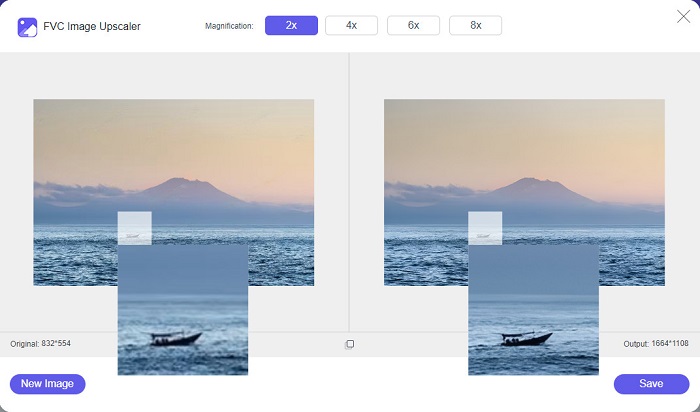
Voordelen
- Het heeft een snel opschalingsproces.
- U hoeft zich niet aan te melden voor een account.
- Het heeft een gebruiksvriendelijke software-interface.
- U kunt het openen op uw Windows- of Mac-apparaat.
Nadelen
- Het is een internetafhankelijke tool.
Deel 2. Beste Photo Resizer-app voor uw computer
U kunt veel apps op uw computer gebruiken als u op zoek bent naar een resizer of upscaler voor afbeeldingen. Niet alle downloadbare applicaties zijn echter gratis te gebruiken. Vaak zijn softwaretoepassingen voor uw pc niet gratis. Gelukkig hebben we een app voor je computer gevonden die gratis te downloaden is. Lees dit gedeelte voor meer informatie over deze beste gratis app voor het wijzigen van het formaat van foto's voor uw Windows-pc.
PNGOUTWin is een offline tool om foto’s te verkleinen die je gratis kunt downloaden op je Windows-computer. Deze foto-resizer-app ondersteunt gangbare afbeeldingsformaten, zoals PNG en JPG. Bovendien verkleint hij je foto automatisch nadat je de afbeelding hebt geüpload die je wilt comprimeren. Hoewel hij gemakkelijk te gebruiken is, zijn de functies lastig te navigeren. Maar na veelvuldig gebruik krijg je deze tool zeker onder de knie. Hij beschikt over een batch‑resizingproces, waardoor je meerdere afbeeldingen tegelijk kunt verkleinen en in één map kunt opslaan.
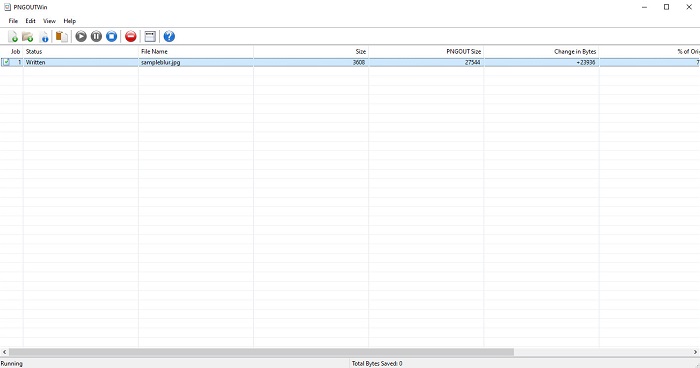
Voordelen
- Het is gratis te downloaden.
- Het is veilig en gemakkelijk te gebruiken.
- Biedt batch-opschalingsproces.
Nadelen
- Alleen beschikbaar op Windows-apparaten.
- U kunt geen voorbeeld van uw opgeschaalde afbeelding bekijken.
Deel 3. Beste app om het formaat van foto's op Android te wijzigen
Tegenwoordig gebruiken veel mensen Android-telefoons. En als u een afbeelding van lage kwaliteit in uw galerij heeft, wilt u deze misschien verbeteren met een app voor het wijzigen van foto's. Gelukkig zijn er veel gratis apps voor het wijzigen van foto's die u kunt downloaden in de PlayStore om u te helpen uw afbeelding van lage kwaliteit te verbeteren.
Photo & Picture Resizer verschijnt als eerste in de lijst wanneer je in de PlayStore naar foto-resizer-apps zoekt. Het is een van de beste apps om het formaat van afbeeldingen aan te passen die je op je Android-apparaat kunt downloaden. Verder biedt het een batch‑upschaalproces, waarmee je twee of meer afbeeldingen tegelijk kunt comprimeren. Bovendien kun je via de vooraf ingestelde afmetingen kiezen welk formaat je voor je afbeelding wilt. Daarnaast kun je ook de bestandsgrootte en resolutie van je afbeelding wijzigen. Met de app Photo & Picture Resizer kun je zelfs je video’s comprimeren. Het nadeel van Photo & Picture Resizer is dat je de premiumversie moet aanschaffen voordat je toegang krijgt tot de speciale bewerkingsfuncties.
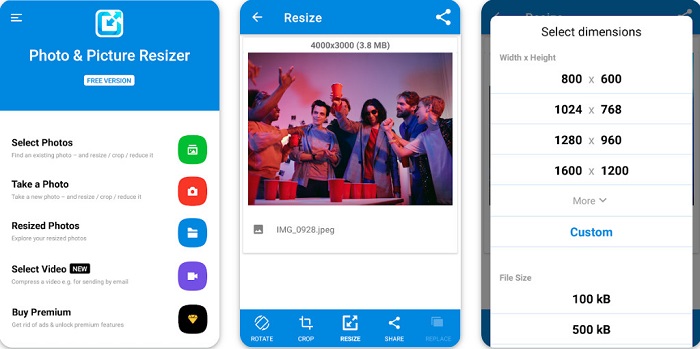
Voordelen
- Het is gratis en veilig te downloaden.
- Het heeft een snel formaatproces.
- U kunt uw output exporteren naar andere sociale mediaplatforms.
Nadelen
- Koop de premium-versie om speciale functies te gebruiken.
- Het bevat vervelende advertenties.
Deel 4. Beste Photo Resizer-apps voor iPhone
Veel mensen gebruiken tegenwoordig iPhones, en wist je dat? U kunt veel gratis foto-resizer-apps op uw iPhone downloaden om het formaat van uw afbeelding te wijzigen of te verbeteren. En als je wilt weten wat je het beste kunt gebruiken, lees dan dit deel helemaal door.
Herinneringen
Remini is de beste foto-resizer-app voor iPhone. Remini is gratis te downloaden in de AppStore en is veilig in gebruik. Ook maakt de app gebruik van AI‑technologie (Artificial Intelligence) die je afbeelding automatisch verkleint en verbetert. Daarnaast kun je met deze app de aangebrachte wijzigingen aan je afbeelding bekijken voordat je deze op je apparaat opslaat. Je kunt je resultaat ook exporteren naar populaire sociale mediaplatforms zoals Facebook, Instagram en TikTok. En in de Pro‑versie zijn er nog meer bewerkingsfuncties beschikbaar om je afbeelding te verbeteren. Dus als je wilt dat je afbeelding er scherp en helder uitziet, is deze app wellicht precies waar je naar op zoek bent.
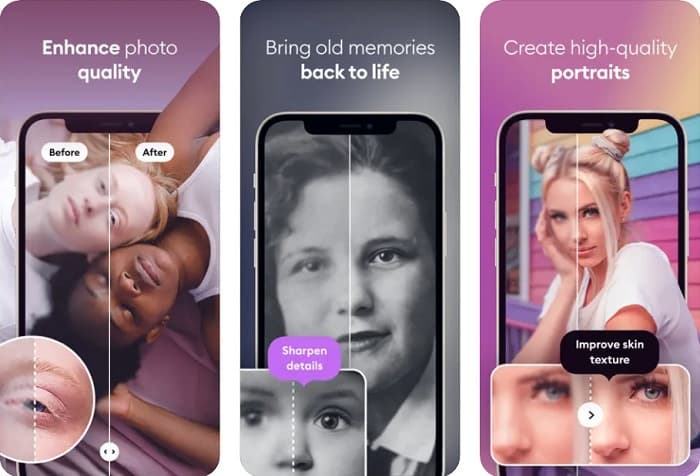
Voordelen
- Het ondersteunt de beeldformaten voor de iPhone.
- Het heeft een eenvoudige gebruikersinterface.
- Kan afbeeldingen met een lage resolutie repareren.
Nadelen
- U moet de app kopen om afbeeldingen te verbeteren.
Formaat van afbeelding wijzigen
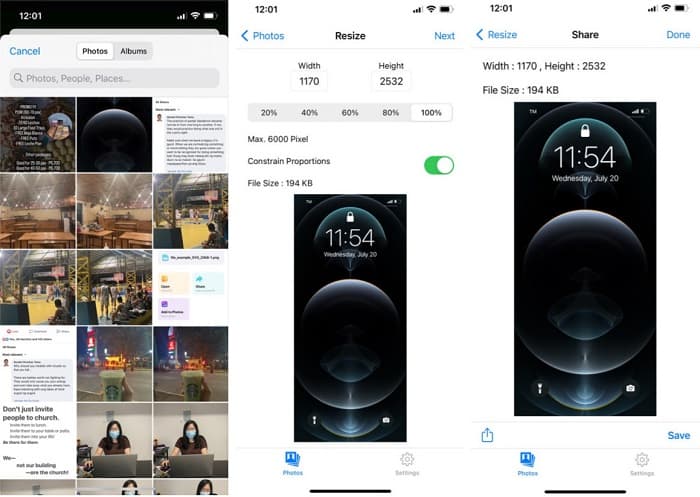
Een andere uitstekende app om het formaat van een afbeelding aan te passen is Image Resize. Image Resize is ook gratis te downloaden op je iPhone. Met deze app kun je je afbeelding verkleinen of vergroten door het percentage te kiezen dat je wilt. Daarnaast kun je met deze app de breedte en hoogte van je afbeelding aanpassen. Wat deze app nog fantastischer maakt, is het snelle resizingproces, dat veel gebruikers zeer handig vinden.
Voordelen
- Het ondersteunt HEIC-, Exif- en PNG-afbeeldingen.
- Het is een gebruiksvriendelijke app.
Nadelen
- Het kan alleen het formaat van de frames van uw afbeelding wijzigen, maar verbetert het niet.
Gerelateerd aan:
Hoe de afbeeldingskwaliteit eenvoudig verbeteren op Windows en Mac
Hoe de resolutie van een afbeelding verhogen [5 manieren om te verbeteren]
Deel 5. Veelgestelde vragen over de beste app voor het aanpassen van foto's
Kan ik het formaat van een foto wijzigen zonder kwaliteitsverlies?
Het formaat van een afbeelding wijzigen betekent niet noodzakelijk dat dit de kwaliteit van uw afbeelding verslechtert. Hoewel het de grootte van uw afbeelding beïnvloedt, kunnen apps meestal het formaat van een afbeelding wijzigen zonder kwaliteitsverlies.
Kan ik het formaat van een afbeelding wijzigen met Adobe Photoshop?
Ja. Adobe Photoshop is de meest indrukwekkende fotobewerkingsapplicatie met een functie waarmee je het formaat van je afbeelding kunt wijzigen. Om dit te doen, open je Adobe Photoshop, selecteer je de afbeelding die je wilt verkleinen of vergroten en ga je vervolgens naar de hoofdmenubalk > Kies Afbeelding > Afbeeldingsgrootte om het dialoogvenster Afbeeldingsgrootte te openen en de grootte van je afbeelding aan te passen.
Welke afbeeldingsindelingen ondersteunt Adobe Photoshop?
Adobe Photoshop ondersteunt bijna alle bekende afbeeldingsindelingen, zoals JPG, JPEG, PNG, GIF, TIFF en meer.
Gevolgtrekking
Nu je de beste foto-resizer-app kent, kun je kiezen welke je verkiest. Er zijn verschillende apps voor online, offline, Android en iPhone, en het hangt af van welk apparaat je gebruikt. Maar als je niets op je apparaat wilt downloaden, gebruik dan nu FVC Free Image Upscaler.
-
 Maak iPhone-fotoresolutie beter met de beste versterkers
 Wilt u de iPhone-fotoresolutie verbeteren? Welnu, in dit artikel behandelen we de beste tools die je kunt gebruiken en andere trucs die je moet kennen!
-
 Oude fotorestauratie online en offline [eenvoudige stappen]
 Wilt u een oude foto herstellen? Met deze tools ken je het oude fotoherstelproces. Lees dit bericht om de meest eenvoudige methoden te leren.
-
 Top 7 Pixels Enhancer voor alle webbrowsers die u moet gebruiken
 Als je wilt weten welke pixelverbeteraars je het beste kunt gebruiken, kun je dit bericht beter bekijken. Dit artikel somt zeven beste fotopixelversterkers op voor alle webbrowsers.
