


 Video Converter Ultimate
 Scherm opnemer
 Videoreparatie
 Beveiligde download
Hoe het WOW Slider-watermerk gratis te verwijderen
WOW Slider is een van de populairste diavoorstellingsmakers waarmee je prachtige beeldsliders kunt maken. Deze applicatie is gratis te downloaden en neemt niet veel opslagruimte in op je apparaat. Bovendien heeft het een intuïtieve gebruikersinterface, waardoor het eenvoudig is om diavoorstellingen te maken. In tegenstelling tot andere beeldplatforms gebruikt WOW Slider geen Flash en zijn er geen plug-ins nodig. WOW Slider plaatst echter wel watermerken op de diavoorstelling die je maakt. Daarom zoeken veel gebruikers naar een methode om het WOW Slider-watermerk gratis te verwijderen. Lees verder om te ontdekken hoe je het WOW Slider-watermerk kunt verwijderen zonder kosten.

Deel 1. Hoe het WOW Slider-watermerk te verwijderen zonder te kopen?
Je zou het watermerk kunnen verwijderen met de app als je de WOW Slider hebt gekocht. Maar als dat niet het geval is, kunt u hulpmiddelen gebruiken om het WOW Slider-watermerk op uw diavoorstelling te verwijderen. Lees daarom dit deel uitgebreid om te leren hoe u de WOW Slider kunt verwijderen zonder deze aan te schaffen.
FVC gratis watermerkverwijderaar
FVC Free Watermark Remover is een van de meest populaire online watermerkverwijderaars die toegankelijk is in alle webbrowsers, zoals Google, Firefox en Safari. Deze online tool is veilig, gratis en vereist geen abonnement. Bovendien is het een beginnersvriendelijke app dankzij de intuïtieve gebruikersinterface. Ook ondersteunt het veel afbeeldingsformaten, waaronder PNG, JPG, JPEG, BMP, enzovoort. Wat indrukwekkend is aan deze tool, is dat je uit verschillende selectietools kunt kiezen om het watermerk op je afbeelding te verwijderen. Als je deze gratis watermerkverwijderaar wilt gebruiken, volg dan de onderstaande stappen.
Hoe het WOW Slider-watermerk te verwijderen met de FVC Free Watermark Remover:
Stap 1. Open eerst je browser en zoek naar FVC Free Watermark Remover. Voor snelle toegang kun je op de meegeleverde link klikken.
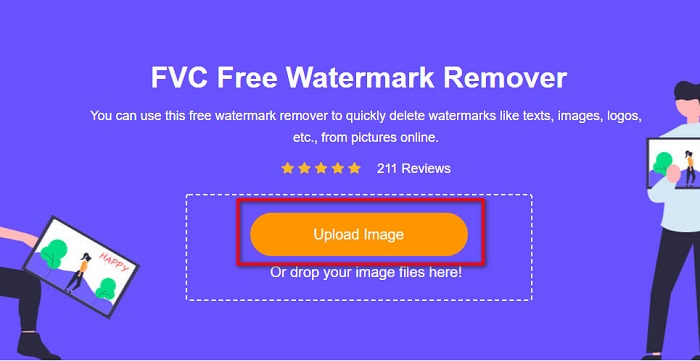
Stap 2. Klik vervolgens op de knop Upload Image om de WOW Slider-afbeelding te uploaden waarvan je het watermerk wilt verwijderen.
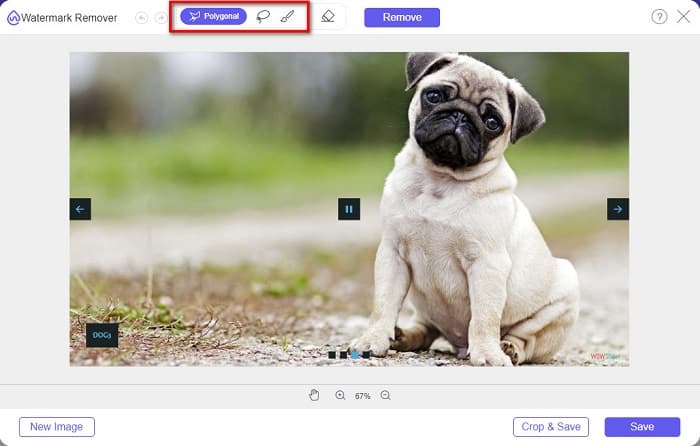
Stap 3. Nadat je je afbeelding hebt geüpload, kies je de selectietool die je wilt gebruiken om het watermerk te verwijderen. Je kunt kiezen uit Lasso, Polygonal of Brush.
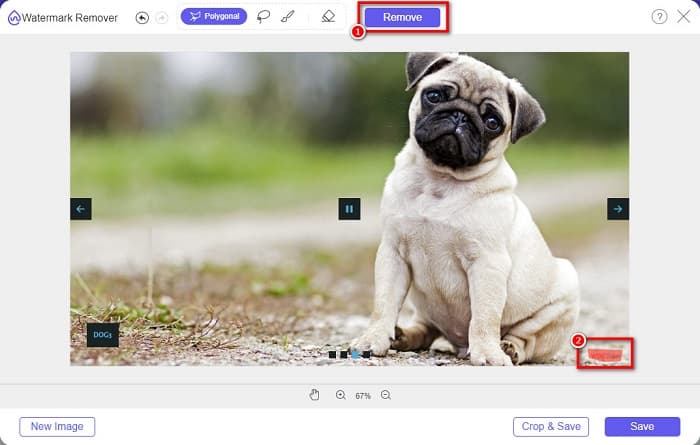
Stap 4. Teken daarna het gebied waar het WOW Slider-watermerk zich bevindt. Klik vervolgens op Remove om het watermerk op je afbeelding te wissen.
Stap 5. Klik ten slotte op de knop Save om je afbeelding op je computer op te slaan.
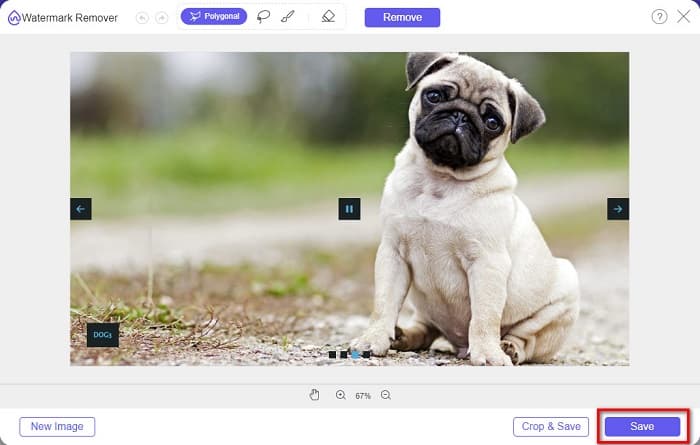
En dat is het! U kunt nu uw WOW Slider-afbeelding bekijken zonder het WOW Slider-watermerk.
Bitwar-watermerkexpert
Bitwar Watermark Expert is een watermerkverwijderaar die het WOW Slider-watermerk op je diavoorstelling kan verwijderen. Deze offline watermerkverwijderaar heeft een eenvoudige gebruikersinterface en is daardoor een gebruiksvriendelijke tool voor beginners. Bovendien kun je er watermerken mee verwijderen of toevoegen aan je afbeeldingen of video’s. In de VIP-versie kun je video’s die je van een watermerk wilt ontdoen, in batch verwerken. Je kunt deze software op je Windows-computer downloaden. Je moet de app echter aanschaffen voordat je toegang krijgt tot de andere functies. Desondanks is Bitwar Watermark Expert een uitstekende tool om watermerken van je WOW Slider-diavoorstelling te verwijderen.
Verwijder het WOW Slider-watermerk op uw diavoorstelling met Bitwar Watermark Expert:
Stap 1. Download Bitwar Watermark Expert op je apparaat en open het nadat de download is voltooid.
Stap 2. In de hoofdinterface van de software zie je vier opties. Klik op Photo Watermark Remover.
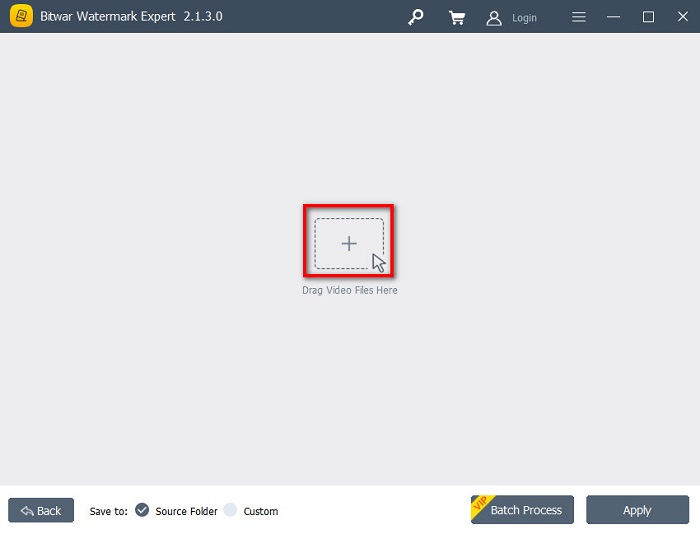
Stap 3. Klik vervolgens op het +-teken in het midden van je scherm om de WOW Slider-afbeelding te uploaden.
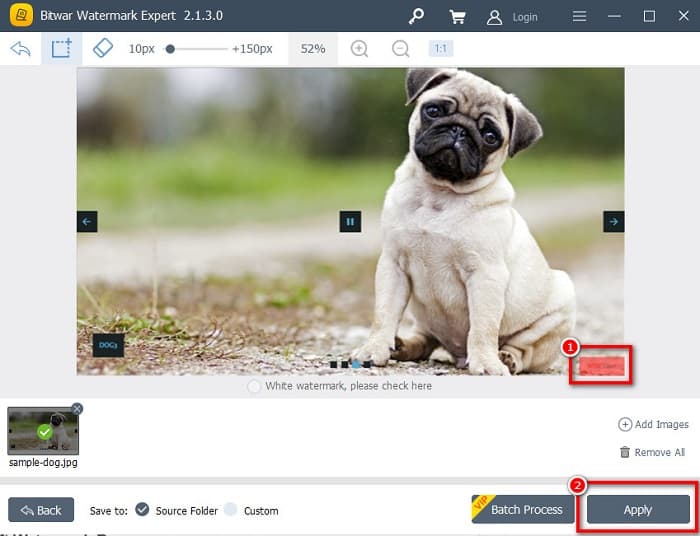
Stap 4. Kies daarna een selectietool die je wilt gebruiken om het watermerk op je afbeelding te verwijderen. Selecteer vervolgens het watermerkgebied op je afbeelding.
Stap 5. Klik ten slotte op de knop Apply om het watermerk van je WOW Slider-diavoorstelling te verwijderen. Met deze stappen kun je ook watermerken verwijderen van Placeit.
Apowersoft Watermerk Verwijderaar
Een andere offline watermerkverwijderaar die je kunt gebruiken is Apowersoft Watermark Remover. Met deze watermerkverwijderaar kun je eenvoudig allerlei watermerken (logo, tekst, afbeelding) van je video’s verwijderen. Je kunt het bovendien downloaden op bijna alle mediaplatforms, waaronder Windows en Mac. Daarnaast heeft het een functie waarmee je watermerken op je afbeelding kunt verwijderen en toevoegen. Het beschikt ook over drie watermerkselectietools om het WOW Slider-watermerk op je diavoorstelling te verwijderen. Verder is het een gebruiksvriendelijke tool met een eenvoudig te gebruiken software-interface. Het nadeel van deze tool is dat hij maar weinig bewerkingsfuncties heeft.
Hoe het WOW Slider-watermerklogo te verwijderen met Apowersoft Watermark Remover:
Stap 1. Download op je apparaat de Apowersoft Watermark Remover. Volg het installatieproces en open vervolgens de app.
Stap 2. Klik daarna op de optie Watermerk van afbeelding verwijderen. Sleep vervolgens de foto waarvan je het watermerk wilt verwijderen naar het programma.
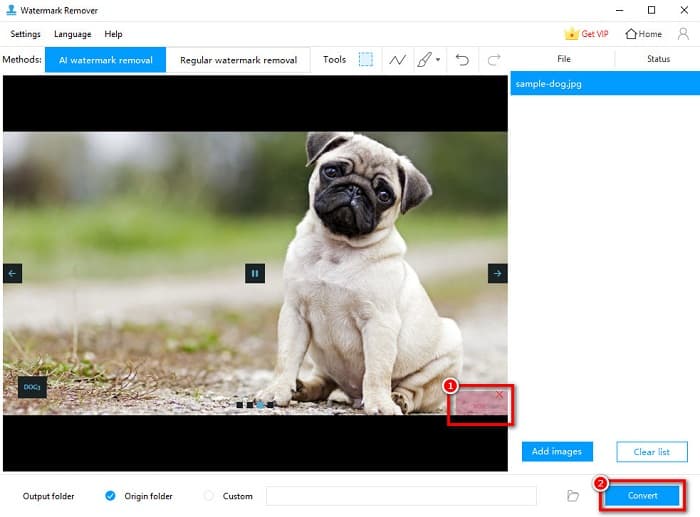
Stap 3. Je ziet de watermerkverwijderingshulpmiddelen in het Tools-paneel. Klik dan op de selectietool die je wilt gebruiken. Teken of selecteer vervolgens het watermerk op je afbeelding.
Stap 4. Als je klaar bent, klik je op de knop Convert om je resultaat op te slaan.
Deel 2. Hoe watermerk van WOW Slider te verwijderen door te kopen
Misschien wilt u dit deel lezen als u zoekt naar het verwijderen van het watermerk van WOW Slider.
Met WOW Slider kun je geweldige diavoorstellingen maken met een verbluffende kwaliteit. Met de gebruiksvriendelijke software-interface kunt u diavoorstellingen van hoge kwaliteit maken die u met uw vrienden kunt delen. Bovendien, als je een aandenken voor je beste vriend wilt maken, is het een goed idee om een diavoorstelling te maken met WOW Slider.
Het nadeel van het maken van een diavoorstelling met WOW Slider is dat er een watermerk op je resultaat wordt geplaatst. Maar als je de WOW Slider-app hebt gekocht, hoef je geen watermerk meer te verwijderen, omdat je resultaten dan geen WOW Slider-watermerk bevatten. Daarom laten we je zien hoe je het watermerk kunt verwijderen door een licentie te kopen.
Stap 1. Download WOW Slider op je apparaat en zorg ervoor dat je direct na het downloaden betaalt en je licentiecode invoert om te registreren.
Stap 2. Schakel na de registratie het watermerk uit via Menu panel > Slider > Properties.
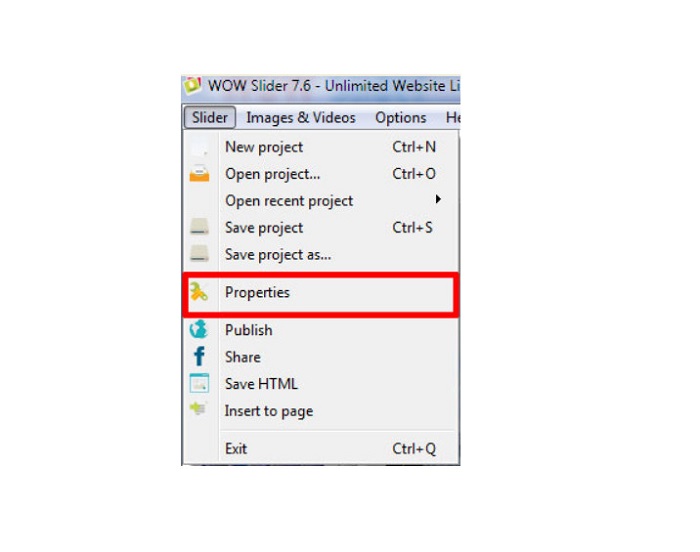
Stap 3. Er verschijnt een venster met eigenschappen; klik vervolgens op Design. keuze.
Stap 4. In het tabblad Design zie je een selectievakje met de tekst Watermark. Haal het vinkje weg om het watermerk in je diavoorstelling uit te schakelen.
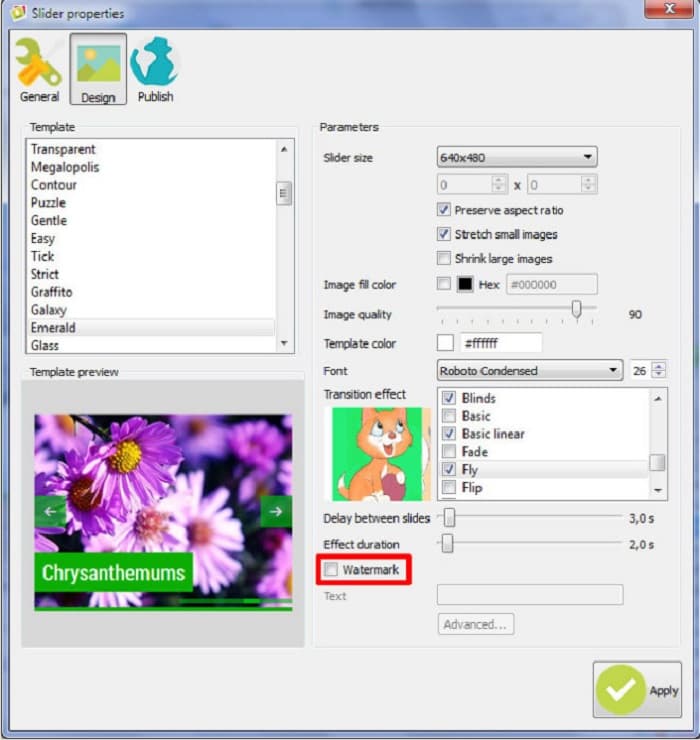
Stap 5. Je kunt je diavoorstelling nu op je website publiceren zonder het WOW Slider-watermerk.
Deel 3. Veelgestelde vragen over het verwijderen van het WOW-schuifregelaarwatermerk
Waarom plaatst WOW Slider watermerken op geproduceerde diavoorstellingen?
WOW Slider sluit een watermerk in op de output van hun diavoorstelling, zodat gebruikers worden aangemoedigd om de versie zonder watermerk te gebruiken. De app laat geen watermerk achter op je output als je de app koopt.
Kun je meerdere watermerken uit je video verwijderen?
Ja. Met watermerkverwijderaars kun je twee of meer watermerken op je video verwijderen. Als u meerdere watermerken op uw video wilt verwijderen, gebruikt u FVC Video Converter Ultimate.
Wat is de beste online watermerkverwijderaar om te gebruiken?
Er zijn veel online watermerkverwijderaars die je op internet kunt vinden. Maar veel mensen bevelen FVC Free Watermark Remover aan omdat het veilig en gratis is.
Gevolgtrekking
Nu is je probleem over hoe je het WOW Slider-watermerk kunt verwijderen opgelost! Met de hierboven genoemde watermerkverwijderaars kun je eenvoudig het WOW Slider-watermerk van je diavoorstelling verwijderen. Maar als je een gratis en veilig te gebruiken online applicatie wilt, gebruik dan FVC Free Watermark Remover.
-
 Gratis manieren om het VideoShop-watermerk op video's te verwijderen [moeiteloos]
 Om het VideoShop-watermerk te verwijderen, heeft uw apparaat een watermerkverwijderaar nodig. Om te weten wat dit zijn, lees dit artikel.
-
 3 benaderingen om het Viva-videowatermerk op video's te verwijderen [snelste manier]
 U hebt een speciale watermerkverwijderaar nodig om het Viva Video-watermerk op video's te verwijderen. Lees dit artikel om er meer over te weten!
-
 Ultieme tools om watermerk te verwijderen uit door Renderforest geëxporteerde video's
 Om het watermerk uit Renderforest te verwijderen, heb je een watermerkverwijderaar op je apparaat nodig, alle tools die je kunt gebruiken vind je hier.
