


 Video Converter Ultimate
 Scherm opnemer
 Videoreparatie
 Beveiligde download
Opmerkelijke manieren om watermerken van foto's te verwijderen
Wil je leren hoe je watermerken uit foto’s verwijdert? Soms hebben de afbeeldingen die je wilt opslaan watermerken die storend zijn voor het oog, waardoor je niet van de volledige schoonheid van de beelden kunt genieten. Gelukkig kun je softwareapplicaties gebruiken om die onnodige watermerken te verwijderen op je computer, iPhone en Android. Zo kun je de gewenste foto’s bewaren door deze toepassingen met een watermark remover te gebruiken. Dit artikel lezen is de beste keuze om meer te leren over eenvoudige methoden om watermerken te verwijderen.

Deel 1. Hoe verwijder je een watermerk van een foto op je computer
1. FVC gratis watermerkverwijderaar
Als je gratis online een watermerk uit een foto wilt verwijderen, kun je FVC Free Watermark Remover gebruiken. Deze applicatie kan elk watermerk uit je afbeeldingen verwijderen, zoals logo’s, teksten, beelden en meer. Bovendien ondersteunt het verschillende afbeeldingsformaten, zoals JPG, PNG, JPEG, BMP en meer. Daarnaast is deze software eenvoudig te gebruiken en te begrijpen, omdat hij een overzichtelijke interface, een gedetailleerde handleiding en simpele knoppen heeft. Voor het daadwerkelijk verwijderen van watermerken laat FVC Free Watermark Remover je met de muis een veelhoekige lijn of lasso over de afbeelding tekenen om het watermerk te selecteren dat je wilt verwijderen. De penseeltool is ook een andere optie om watermerken uit je foto’s te verwijderen. Als je het watermerk gratis uit de foto wilt verwijderen, volg dan de eenvoudige stappen hieronder.
Stap 1: Ga naar de website van FVC Free Watermark Remover en klik op Upload Image. Voeg vervolgens de afbeelding met het watermerk toe dat je wilt verwijderen.

Stap 2: Nadat je je afbeelding met watermerken hebt geopend, kun je de watermark remover‑opties gebruiken, zoals de Polygonal tool, Lasso en Brush-tool, om de watermerken te verwijderen.
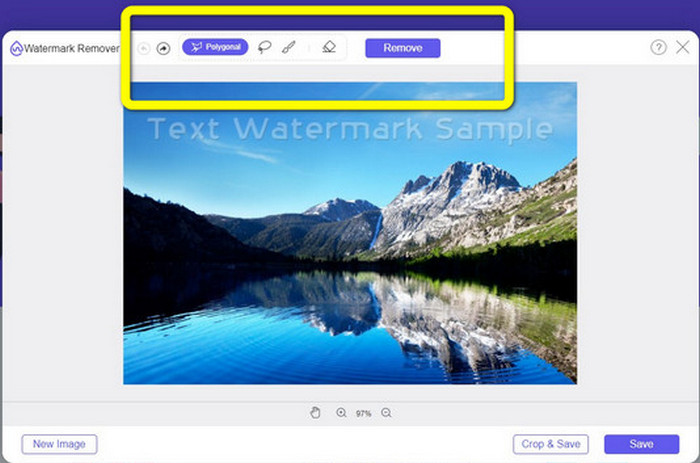
Stap 3: Gebruik de Brush-tool, Lasso of opnieuw de Brush-tool om de watermerken op je foto te markeren.
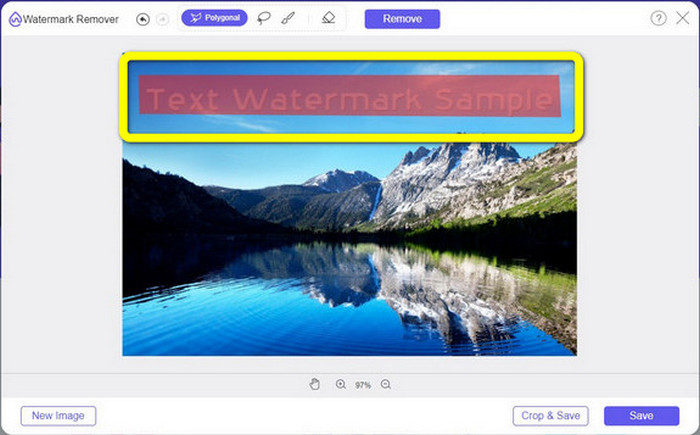
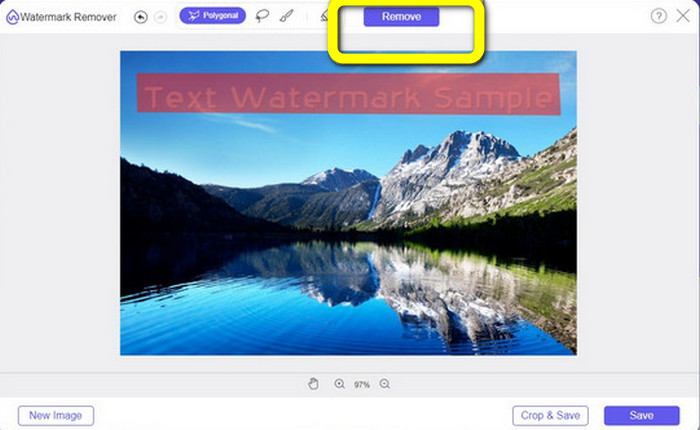
Stap 4: Als je klaar bent met het markeren van de watermerken op je foto, klik je op de knop Remove.
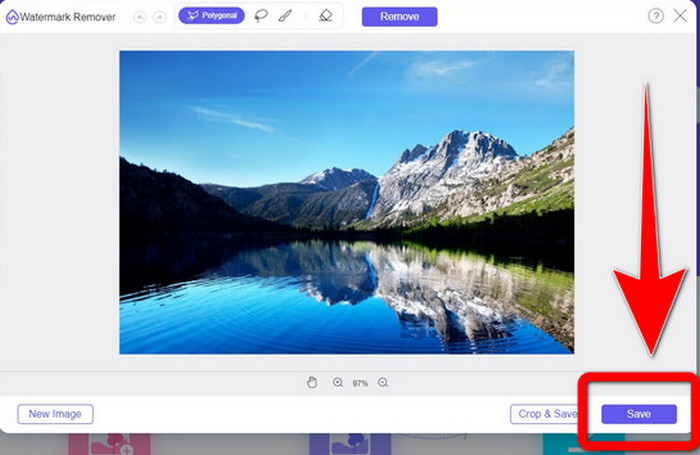
Stap 5: Als het watermerk al uit je foto verwijderd is, klik je op de knop Save om je afbeelding te downloaden, en kun je nu van je foto’s genieten zonder je te ergeren aan de watermerken.
2. Photoshop
Als je ook op zoek bent naar een uitstekende en betrouwbare applicatie die je op je computer wilt downloaden, dan is Adobe Photoshop een van de betrouwbare applicaties die je kunt gebruiken. In dit deel laten we je zien hoe Photoshop watermerken uit foto’s verwijdert. Deze applicatie is geschikt voor fotografen, webdesigners, grafisch ontwerpers, meme-makers, enzovoort. Je moet Adobe Photoshop echter wel aanschaffen, omdat het slechts een gratis proefperiode van zeven dagen heeft. Ook is Photoshop minder geschikt voor batchverwerking van foto’s en heeft het een steile leercurve. Als je de meest eenvoudige manier wilt weten om watermerken uit je afbeeldingen te verwijderen, volg dan de onderstaande eenvoudige stappen.
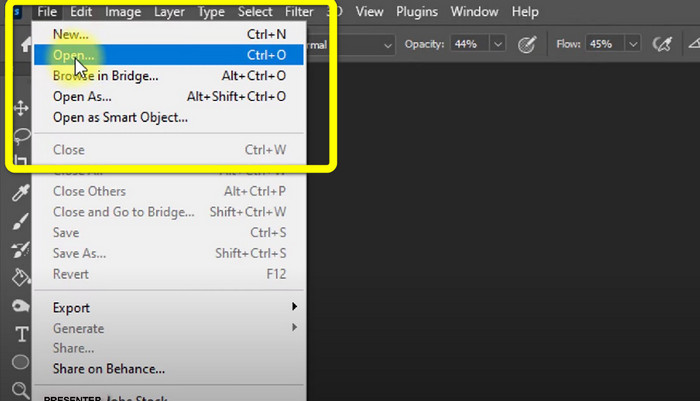
Stap 1: Open je Adobe Photoshop. Kies File > Open en voeg je foto met watermerken toe.
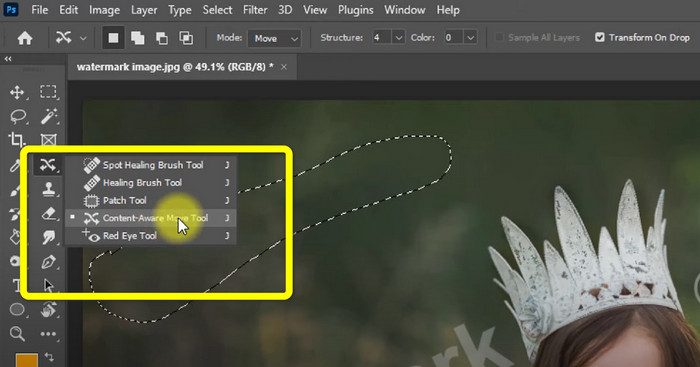
Stap 2: Klik op de Content-Aware Move Tool in de bewerkingstools.
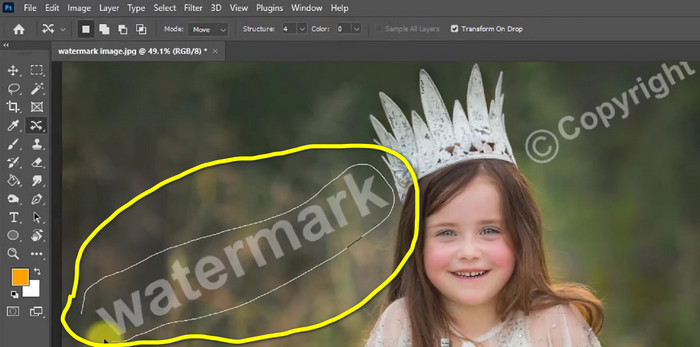
Stap 3: Nadat je op de Content-Aware Move Tool hebt geklikt, selecteer je het watermerkgedeelte in je foto’s en druk je op Delete op je toetsenbord.
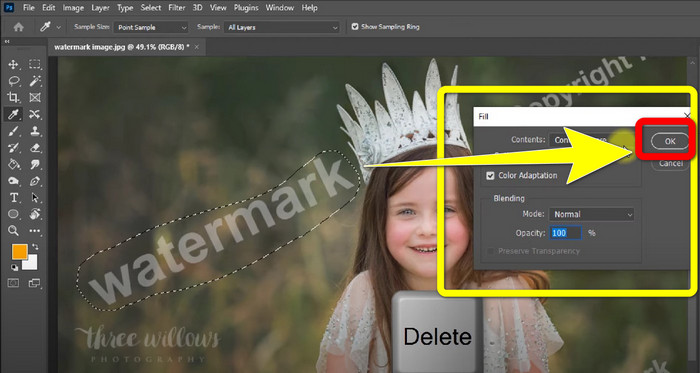
Stap 4: Zodra je op Delete hebt gedrukt, verschijnt er een kleine interface. Klik vervolgens op OK.
3. GIMP
Een andere geschikte applicatie om watermerken op je foto’s te verwijderen is GIMP. Het is een open‑source rastergrafische editor die wordt gebruikt om afbeeldingen te bewerken en te manipuleren, waardoor het een handig hulpmiddel is voor beeldbewerking. Daarnaast ondersteunt het veel bestandsformaten, zoals JPG, PNG, TIFF, GIF en meer. Er zijn echter momenten waarop het plotseling crasht en het is ook lastig om lagen te ordenen. Als je wilt weten hoe je watermerken van je foto’s verwijdert met GIMP, volg dan de eenvoudige stappen hieronder.
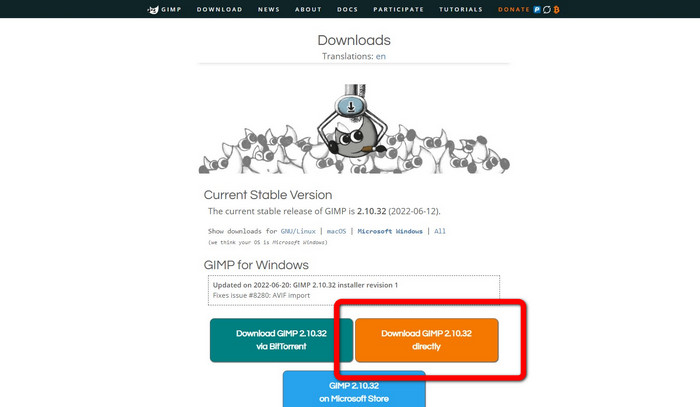
Stap 1: Als je op de website van GIMP bent, klik je op Download Directly om de applicatie te downloaden en volg je het installatieproces.
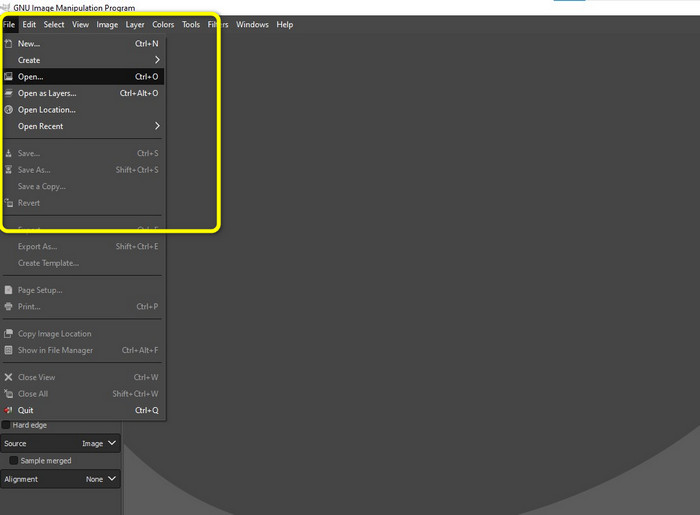
Stap 2: Open de applicatie en klik op File > Open om je foto met watermerken toe te voegen.
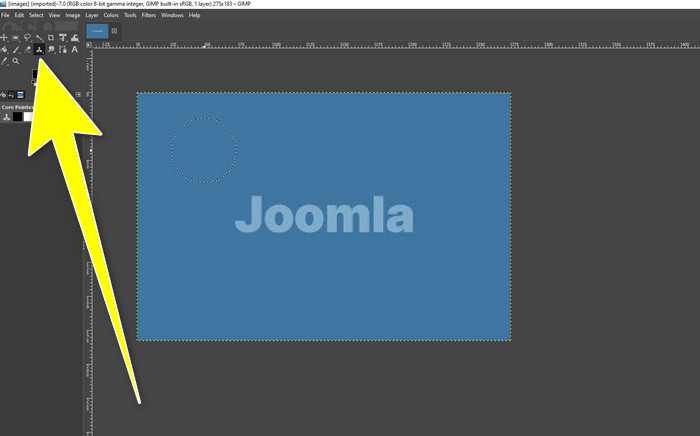
Stap 3: Klik op de Clone tool en plaats de cursor op een lege (schone) plek. Druk op Ctrl en klik op het lege gebied.
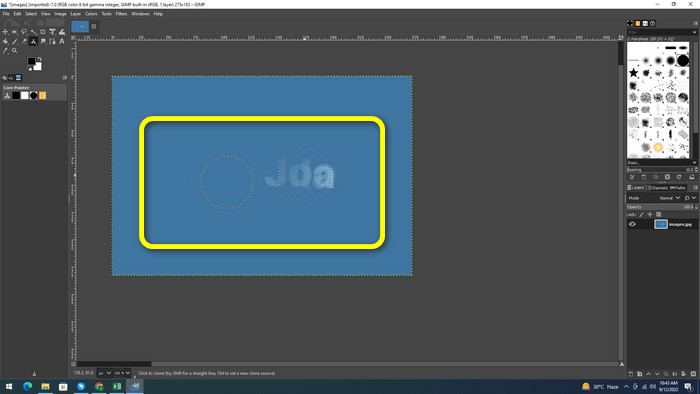
Stap 4: Sleep je cursor over de watermerken om ze te verwijderen. Je watermerk is nu verdwenen. Je kunt je foto nu opslaan.
4. Aiseesoft gratis watermerkverwijderaar online
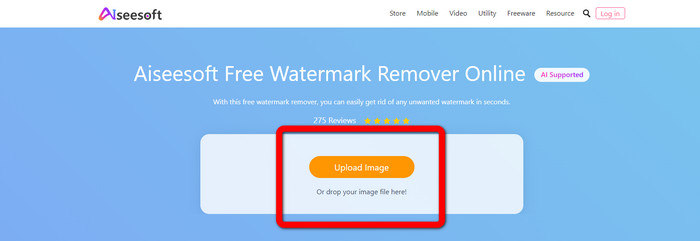
Als je de beste online foto‑watermerkverwijderaar wilt, is Aiseesoft Free Watermark Remover Online iets voor jou. Deze applicatie kan meerdere watermerken, teksten, datums, logo’s en meer op je foto’s verwijderen. Bovendien is hij gemakkelijk te gebruiken, wat perfect is voor beginners. Ook ondersteunt hij verschillende afbeeldingsformaten, zoals PNG, JPEG, BMP, JPG en meer. Deze applicatie is echter niet 100% gratis; je moet een licentie aanschaffen om van geavanceerde functies te kunnen genieten. Als je watermerken op je afbeeldingen wilt verwijderen, volg dan deze stappen.
Stap 1: Ga naar de website van Aiseesoft Free Watermark Remover Online. Klik vervolgens op Upload Image om je foto met watermerken toe te voegen.
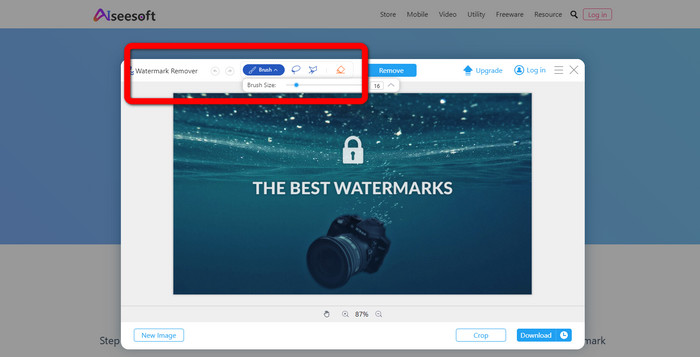
Stap 2: Als je je foto al hebt toegevoegd, ga je naar de watermark remover tool. Dan zie je de verwijdertools, zoals Brush, Polygonal en Lasso-tools.
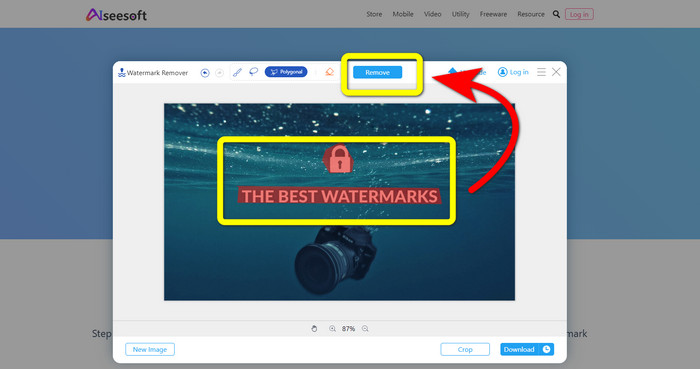
Stap 3: Gebruik deze tools en markeer de watermerken op je foto en klik op Remove.
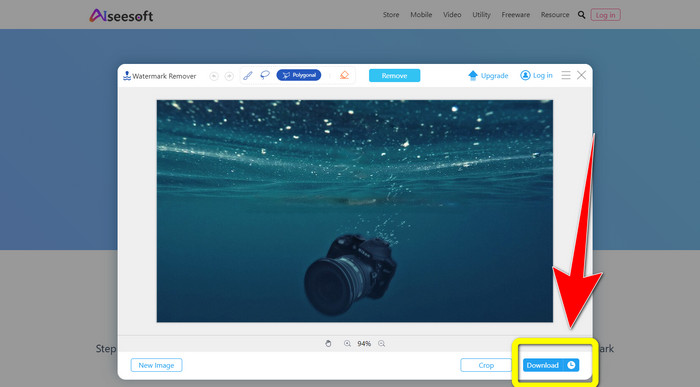
Stap 4: Als je al tevreden bent met het resultaat, klik je op Download om je foto op te slaan.
5. Pixlr
Pixlr is een andere online tool die je kunt gebruiken om watermerken op je foto’s te verwijderen. Hij is eenvoudig in gebruik en geschikt voor beginners. Hij ondersteunt verschillende afbeeldingsformaten, zoals PSD, PNG, JPEG, WEBP en PXZ. Bovendien kun je deze applicatie gebruiken op je apparaten, zoals iPhone, Android, desktop en laptop. Maar hij heeft niet zoveel opties als de andere applicaties en biedt beperkte effecten. Als je wilt leren hoe je een watermerk van een afbeelding wist, volg dan de onderstaande stappen.
Stap 1: Ga naar de website van Pixlr. Klik op Open Image om de afbeelding met het watermerk toe te voegen.

Stap 2: Nadat je je foto hebt toegevoegd, ga je naar de retouch > heal-tool.
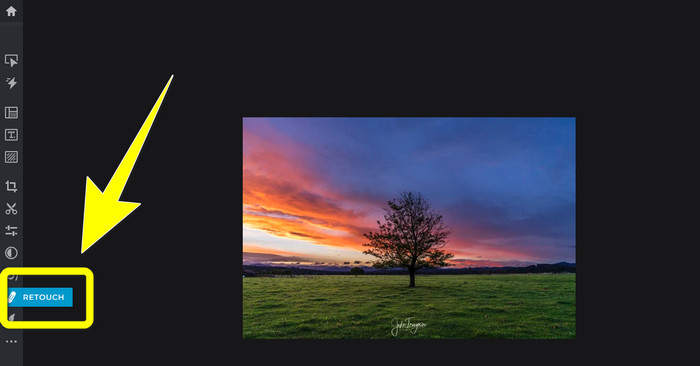
Stap 3: Nadat je op de retouch > heal-tool hebt geklikt, klik je op het watermerk op je afbeelding.
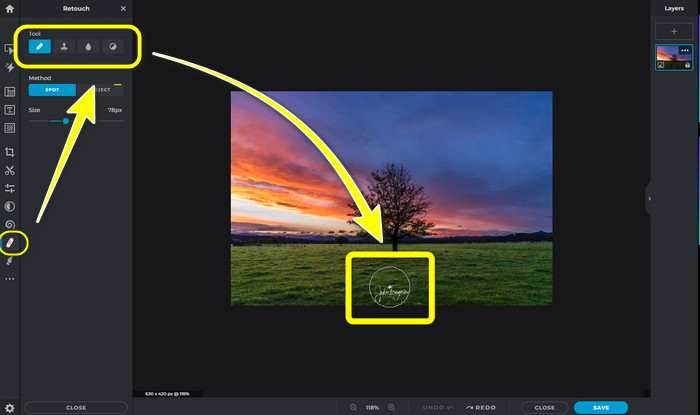
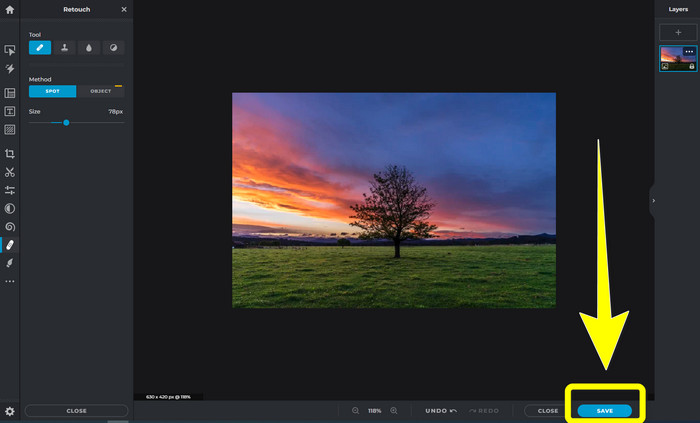
Stap 4: Als het watermerk is verdwenen, klik je op de knop Save.
6. Inverf
Inpaint is een andere online applicatie die je kunt gebruiken als je watermerken op je afbeeldingen wilt verwijderen. Niet alleen watermerken, maar ook logo’s en tekst. Het ondersteunt ook afbeeldingsformaten zoals JPG, PNG en WEBP. Als je echter afbeeldingen van hoge kwaliteit wilt krijgen, moet je de applicatie aanschaffen. Als je watermerken op je foto’s wilt verwijderen, volg dan de eenvoudige stappen hieronder.
Stap 1: Ga naar de website van Inpaint. Klik op Upload Image en upload je afbeelding met het watermerk.
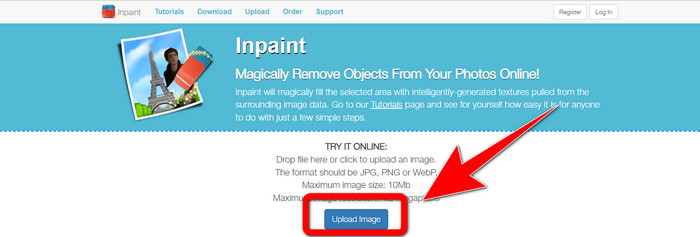
Stap 2: Wanneer je je afbeelding hebt geüpload, selecteer je de watermark remover tools zoals Marker, Polygonal, Lasso en de Eraser tool en markeer je de watermerken op je foto.
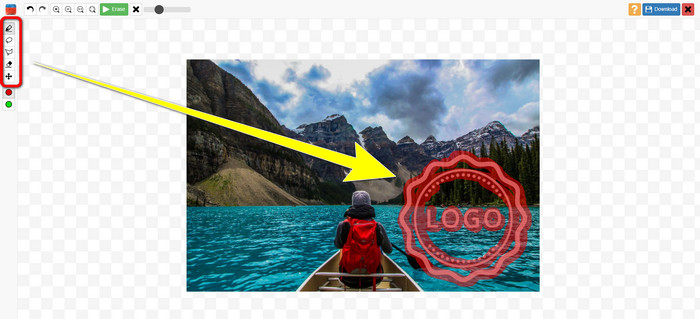
Stap 3: Als je klaar bent met het markeren van de watermerken, klik je op Erase.
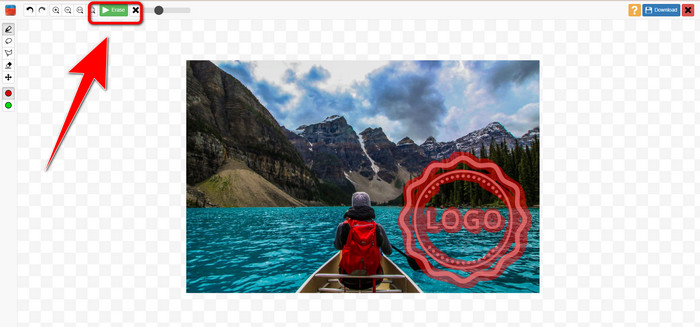
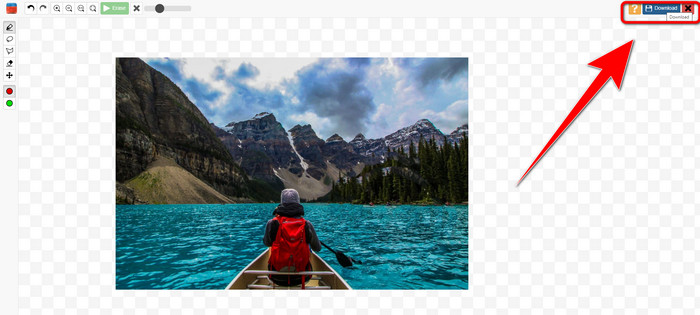
Stap 4: Als het watermerk is verdwenen, klik je op de knop Download om je afbeelding op te slaan.
7. Fotostempelverwijderaar
Photo Stamp Remover is een toepassing die u met uw computer kunt gebruiken. Je kunt het gratis downloaden. Deze applicatie kan snel onnodige objecten op uw afbeeldingen verwijderen, zoals logo's, tekst, watermerken en datums. Maar het presteert niet goed op foto's met gecompliceerde achtergronden. Bovendien kan deze software de kleuren en textuur van de originele foto herstellen om watermerken te bedekken, zodat deze er authentiek uitziet. Volg deze stappen om watermerken op uw afbeeldingen te verwijderen.
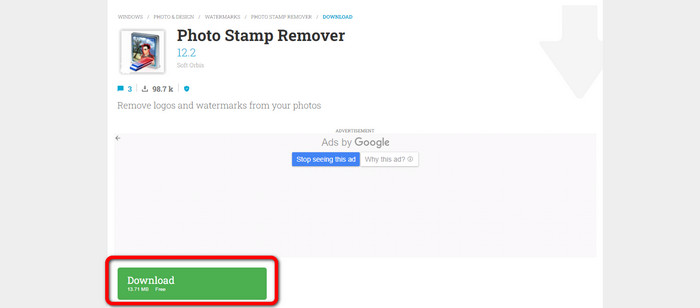
Stap 1: Klik op de knop Download om Photo Stamp Remover op je Windows-pc te downloaden en volg het installatieproces.
Stap 2: Start de applicatie en klik op Add File om je foto met de watermerken toe te voegen.
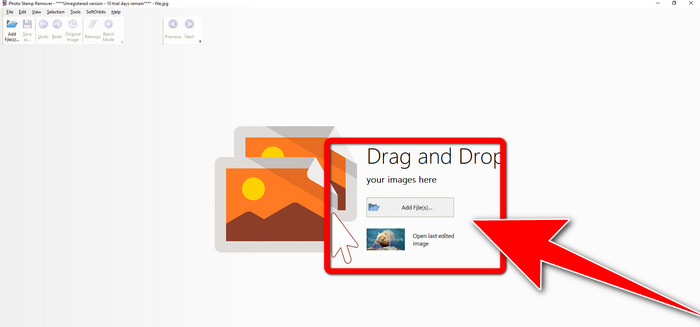
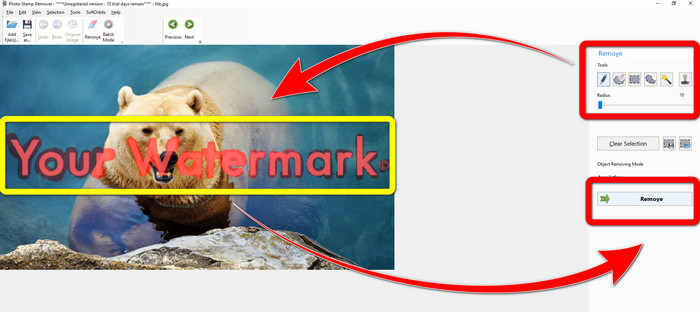
Stap 3: Ga naar Remover tools en klik op de Selection Marker. Markeer de watermerken en klik op Remove.
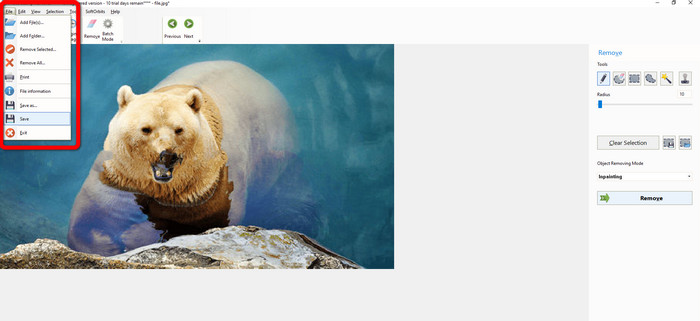
Stap 4: Als je de watermerken al van je afbeelding hebt verwijderd, klik je op File > Save. Dan ben je klaar met het verwijderen van watermerken op je afbeelding.
Deel 2. Watermerk verwijderen van foto op iPhone en Android
1. Videowisser
Als je wilt weten welke applicatie je kan helpen leren hoe je watermerken uit een foto verwijdert op Android, dan is Video Eraser iets voor jou. Deze applicatie kan onnodige objecten op je foto’s verwijderen, zoals tekst, watermerken, enzovoort. Bovendien kun je met deze applicatie ook watermerken uit je video’s verwijderen. Maar het beeld kan vlekkerig worden op de plek waar het watermerk is weggewerkt. Als je wilt leren hoe je Video Eraser gebruikt, volg dan de onderstaande stappen.
Stap 1: Installeer Video Eraser op je Android‑toestel. Open de applicatie wanneer de installatie voltooid is.
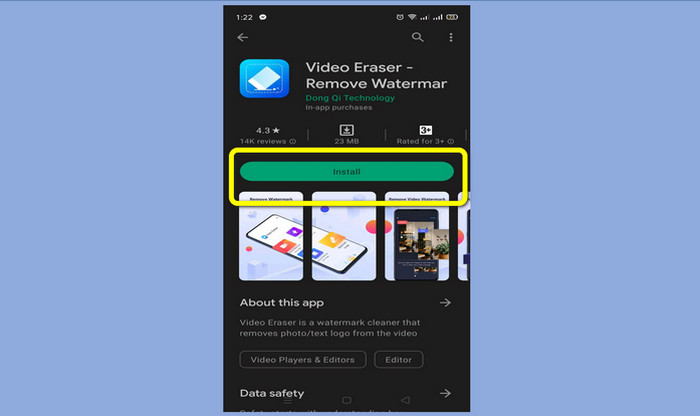
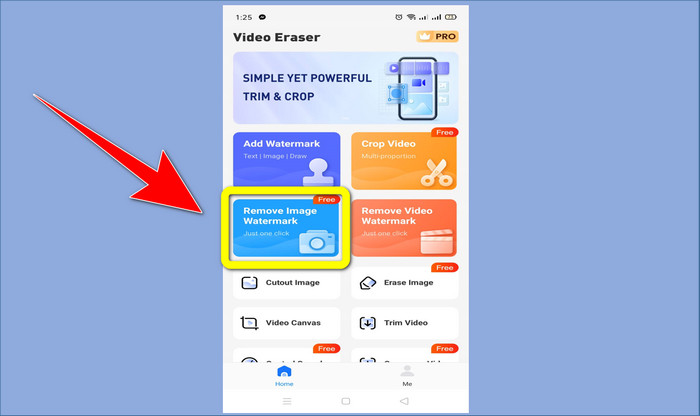
Stap 2: Klik op Remove Image Watermark om je foto met de watermerken toe te voegen.
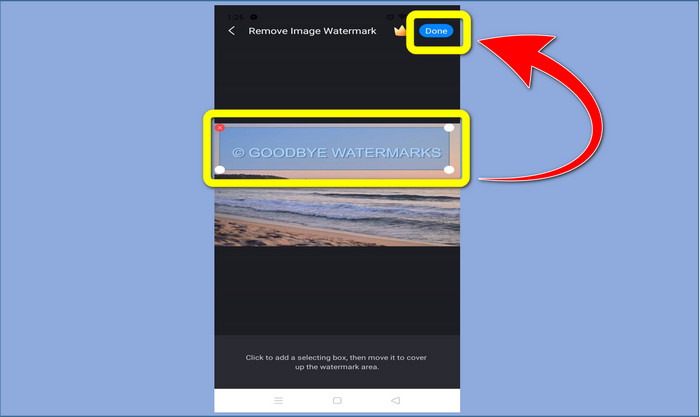
Stap 3: Markeer het watermerk op je foto en klik op Done.
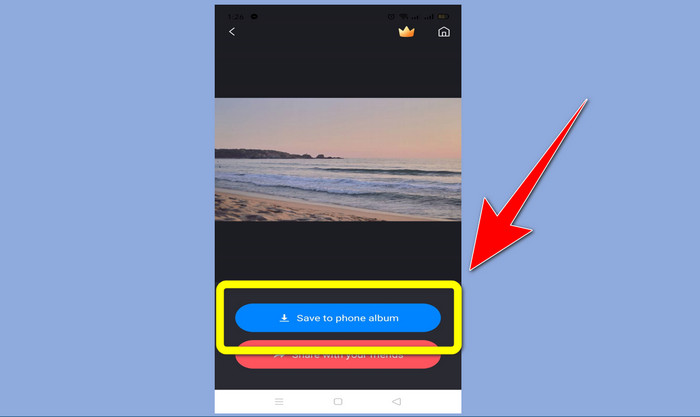
Stap 4: Na het klikken op Done zal het watermerk verdwijnen. Klik op Save to Photo Album om je foto op te slaan.
2. Snapseed
Snapseed is een uitstekende editor die je kunt gebruiken, vooral als je wilt leren hoe je een watermerk van een foto verwijdert op een iPhone. Deze applicatie is goed als je watermerken op je afbeeldingen wilt verwijderen. Daarnaast heeft hij diverse bewerkingstools die je kunt gebruiken, zoals bijsnijden, roteren en meer. Deze applicatie is echter minder geschikt voor absolute beginners, zeker wat geavanceerde bewerking betreft, en ook al is hij gebruiksvriendelijk, er is toch een kleine leercurve. Volg de onderstaande stappen om watermerken op je foto te verwijderen met deze applicatie.
Stap 1: Installeer Snapseed op je iPhone. Wanneer de installatie is voltooid, open je de software.
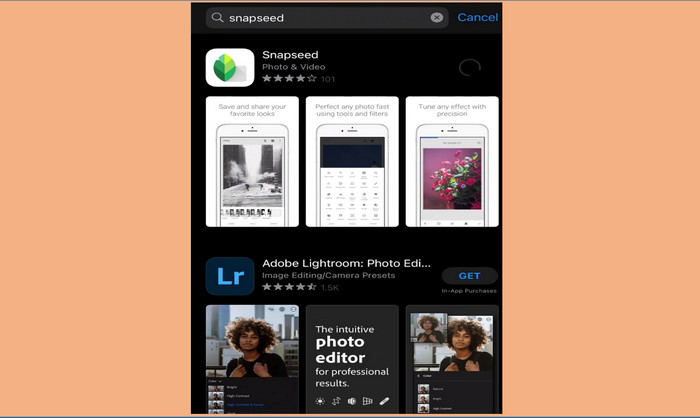
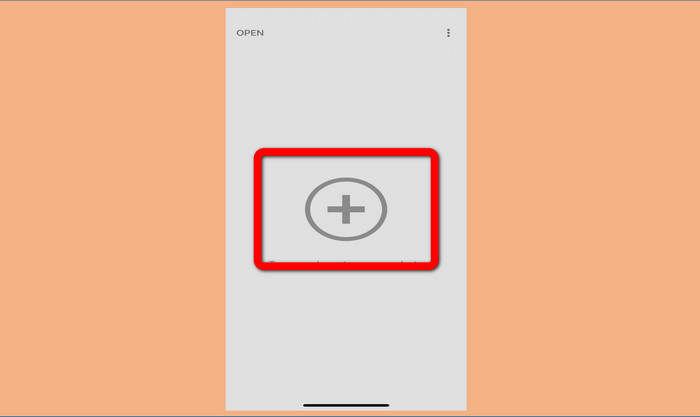
Stap 2: Klik op de knop met het Plus‑teken om je foto met de watermerken toe te voegen.
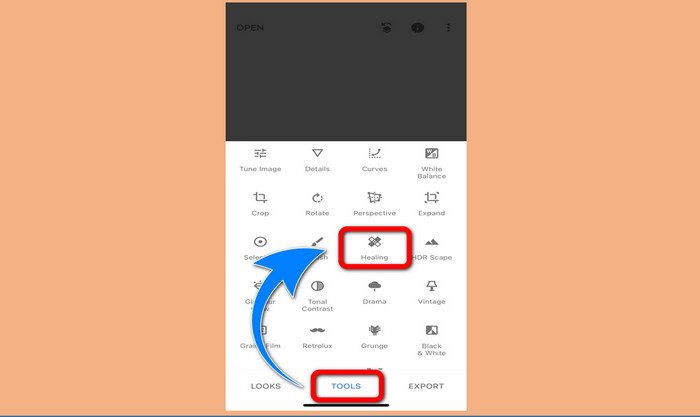
Stap 3: Wanneer je de foto hebt toegevoegd, selecteer je Tools > Healing en markeer je de watermerken op je afbeelding. Nadat je de watermerken hebt gemarkeerd, zullen ze automatisch verdwijnen.
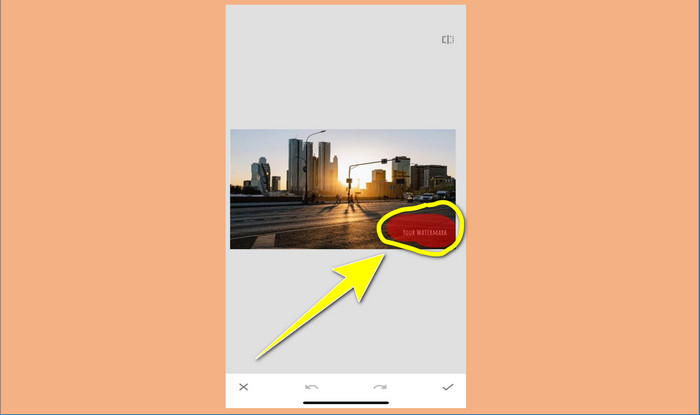
Stap 4: Nadat je de watermerken hebt gemarkeerd, zullen ze automatisch verdwijnen.
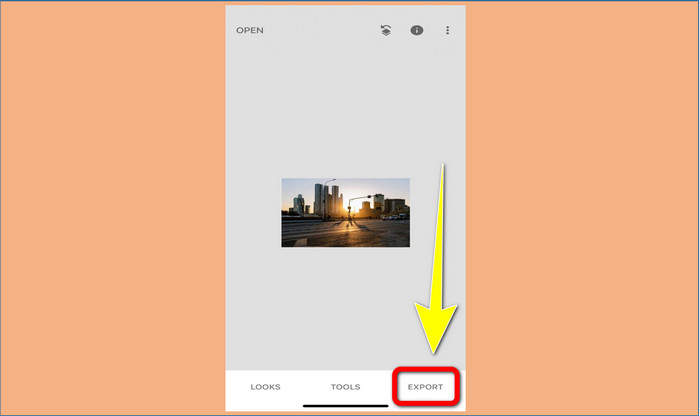
Stap 5: Wanneer je klaar bent met het verwijderen van watermerken op je foto, klik je op het Check-teken en op Export om je afbeelding op je iPhone op te slaan.
Gerelateerd aan:
Snelste truc om het Adobe Stock‑watermerk uit een video te verwijderen [ Tutorial ]
5 manieren om op professionele wijze een watermerk uit een video te verwijderen
Deel 3. Veelgestelde vragen over het verwijderen van watermerken uit foto's
Is er een watermerkverwijderaar die ik gratis kan gebruiken, vooral voor Mac?
Ja, die zijn er! Je kunt veel watermark removers op je Mac gebruiken, zoals FVC Free Watermark Remover. Dit is een online applicatie om watermerken op je Mac te verwijderen.
Is er een manier om watermerken van een video te verwijderen?
Vast en zeker! Het is gemakkelijk om te doen. Sommige van de toepassingen voor het verwijderen van watermerken die u nu kunt gebruiken, kunnen watermerken op foto's en video's verwijderen. Het enige dat u hoeft te doen, is zoeken naar de watermerkverwijderaar in het zoekvak en de resultatenpagina bekijken.
Is het gemakkelijk om watermerken te verwijderen?
Ja natuurlijk! Als u de toepassing die u gaat gebruiken al heeft, moet u op zoek gaan naar verwijderingshulpmiddelen, zoals penseel-, markerings-, lasso- en veelhoekige hulpmiddelen. Markeer vervolgens de watermerken en klaar.
Gevolgtrekking
Zoals hierboven weergegeven, biedt dit artikel uitstekende manieren om watermerken van foto’s te verwijderen. Maar als je een uitstekend hulpmiddel wilt gebruiken om watermerken te verwijderen, dan is FVC Free Watermark Remover de beste keuze voor jou.
-
 Hoe zich gratis te ontdoen van het Power Director-watermerk [Volledig]
 Hoe kom je gratis van het Power Director-watermerk af? De beste tools om het watermerk te verwijderen zijn hier, dus leer ze door dit te lezen.
-
 Beste technieken om het Canvasjs-proefversiewatermerk te verwijderen dat u moet kennen
 De beste manier om het Canvasjs-watermerk te verwijderen, is met een tool. Als je geen tool hebt gekozen, kun je deze in dit artikel kiezen.
-
 Het Animaker-watermerk verwijderen zonder kosten [Bewezen manieren]
 Hoe het Animaker-watermerk te verwijderen? Met de beste tools die we in deze blog gebruiken, kun je ze gebruiken om van het watermerk af te komen.
