


 Video Converter Ultimate
 Scherm opnemer
 Videoreparatie
 Beveiligde download
Een complete Waifu2x-recensie en de beste alternatieven die u vandaag moet gebruiken
Wanneer je een tool nodig hebt om beeldruis te verminderen en tegelijk afbeeldingen te vergroten, ben je misschien al eens de Waifu2x tegengekomen. Daarmee kun je de meest voorkomende problemen in je afbeelding oplossen zonder dat deze blokkerig of wazig wordt. Toch zijn er meerdere tools die dezelfde functies bieden als Waifu2x. Misschien vraag je je af of je deze tool wel moet gebruiken om te schalen en ruis te verminderen. In dit artikel bespreken we de app voor je en ook het alternatief waar we het over hebben, dat alles kan wat Waifu2x je biedt.

Deel 1. Waifu2x Review die u moet kennen en leren gebruiken
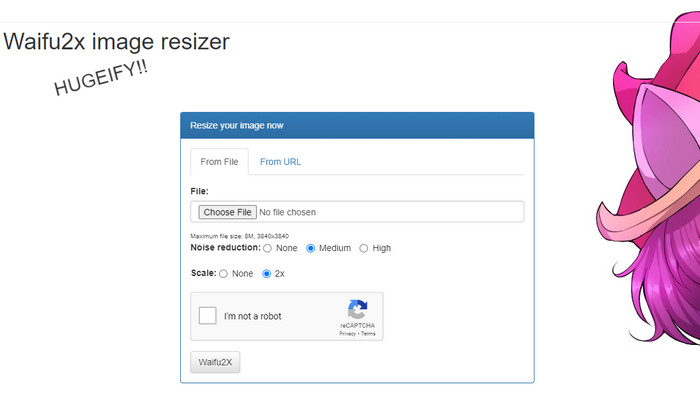
Waifu2x is een online fototool die je in de browser kunt gebruiken om afbeeldingen te vergroten en beeldruis te verminderen. Met deze tool kun je de resolutie van elke afbeelding die je uploadt verdubbelen. Hoewel de naam misschien niet direct doet vermoeden dat de software de resolutie kan verhogen en ruis kan verminderen, is hij daar wél voor gemaakt. Als je op de naam zoekt, krijg je talloze resultaten, maar ze doen in feite allemaal hetzelfde, of ze nu online of offline werken.
“Trivia: de naam komt van de Japanse term waifu, wat echtgenote betekent. Het wordt normaal gesproken gezien of gebruikt als opmerking wanneer een vrouw aantrekkelijk is; ze noemen haar een waifu.”
Voordelen
- U kunt de volledige functionaliteit van deze webtool gratis ervaren zodra u deze opent in uw webbrowser.
- U hoeft de software niet te downloaden of te installeren voordat u deze kunt gebruiken.
- Het ondersteunt populaire formaten zoals PNG en JPG.
- U kunt de afbeeldingen tot 2x opschalen.
- U kunt de ruis op uw afbeelding verminderen door deze in te stellen op gemiddeld of hoog.
Nadelen
- Het ondersteunt geen grote verscheidenheid aan uploadformaten.
- Elk proces heeft een reCAPTCHA.
- Beperkte selectie en functies.
Stappen voor het gebruik van de Waifu2x:
Nadat we hebben gekozen welke website we voor de stappen moeten gebruiken, is hier de versie die we hebben geselecteerd om waifu2x.booru als voorbeeld te gebruiken. Dus als je de Waifu2x-afbeeldingsresizer wilt gaan gebruiken, kun je de tutorial volgen die we hieronder toevoegen om het beter te leren kennen.
Stap 1. Kopieer in je webbrowser de link die wij hebben toegevoegd om de webtool te openen.
Stap 2. Klik op Choose File om de PNG- of JPG-afbeelding te uploaden die je wilt vergroten of waarvan je de ruis wilt verminderen.
Stap 3. Je kunt kiezen uit drie niveaus voor ruisonderdrukking: None, Medium of High.
Nadat je een keuze hebt gemaakt, kun je de afbeelding meteen opschalen door op 2x te klikken. Vink het vakje van de captcha aan en ga door naar de laatste stap.
Stap 4. Klik op Waifu2x om de afbeelding te verbeteren op basis van de instellingen die je zojuist hebt gekozen.
Deel 2. Beste Waifu2x-alternatief dat u gratis kunt gebruiken [webservice]
Onze keuze voor een alternatief voor Waifu2x is niemand minder dan de FVC Free Image Upscaler, omdat deze dezelfde functionaliteit heeft als de tool die we zojuist hebben besproken; alleen kan deze tool tot 8x verder opschalen dan de eerste. Deze online tool is populair omdat hij afbeeldingen efficiënt opschaalt op basis van het algoritme dat de AI toepast. Hoewel je geen optie ziet om ruisverwijdering in te schakelen, gebeurt dit automatisch tijdens de verwerking van de afbeelding.
Daarnaast ondersteunt deze tool meer formaten dan de Waifu2x; je kunt hier PNG, JPG, GIF, BMP, SVG en meer uploaden, allemaal tegelijkertijd om ze op te schalen. Het heeft ook een levendigere kleurenwebsite dan de eerste, wat gebruikers aantrekt. Dus als u deze upscaler wilt proberen, kunt u de stapsgewijze zelfstudie volgen die we hierna toevoegen.
Stap 1. Je kunt op deze link klikken om de officiële website van deze image upscaler te openen, een bekend alternatief voor de eerstgenoemde tool.
Stap 2. Klik op de Upload-knop om de afbeelding toe te voegen die je door AI wilt laten opschalen, vergroten, ontruisen en bewerken.
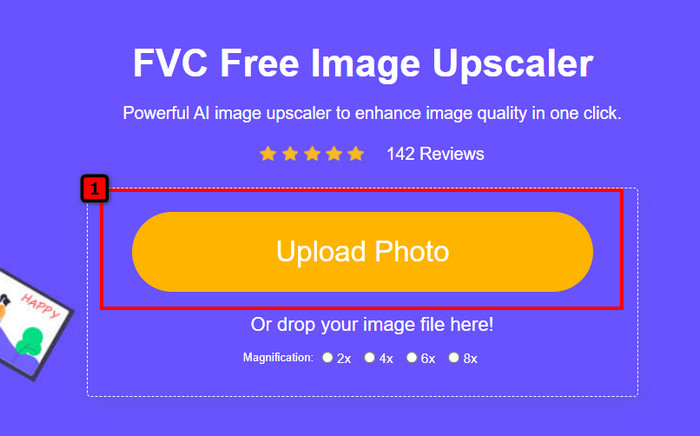
Stap 3. Nadat je de foto hebt geüpload, kies je de vergrotingsfactor die je op de afbeelding wilt toepassen. Je kunt ze allemaal uitproberen om te zien welke het beste bij je afbeelding past.
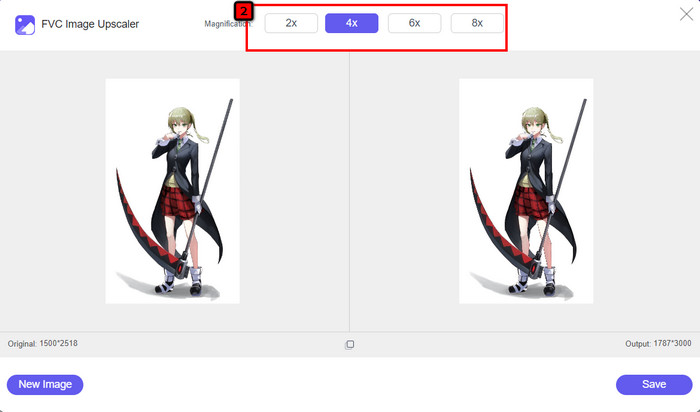
Stap 4. Tot slot, nadat je de afbeelding hebt gekozen die je wilt laten bewerken, klik je op Save, waarna het downloaden automatisch start.
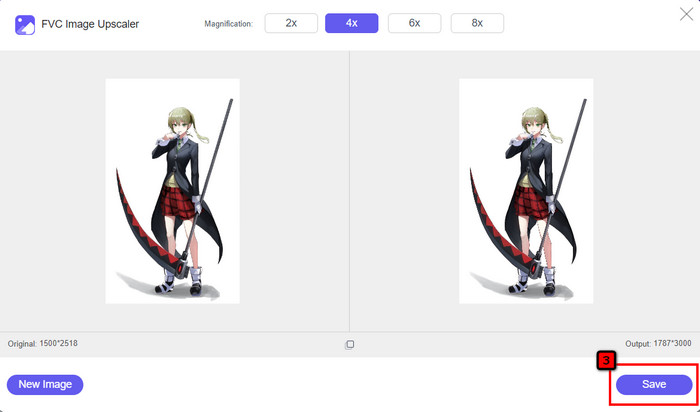
Net als andere beeldbewerkers kun je deze online gebruiken, met ondersteuning van AI-technologie. Deze pixel enhancer-tool kan ook ontbrekende pixels in de afbeelding corrigeren, zodat de details nog beter worden dan normaal. Je zou gerust kunnen zeggen dat dit het perfecte Waifu2x-alternatief is dat binnen enkele seconden een output van hoge kwaliteit levert.
Deel 3. Veelgestelde vragen over de Waifu2x Review
Is Waifu2x veilig toegankelijk?
De website die we hierboven beoordelen, waifu2x.booru, is veilig toegankelijk en heeft geen advertenties op de webinterface. We kunnen u verzekeren dat u met deze editor een soepel proces van opschalen of het verminderen van de ruis zult hebben. Er zijn echter andere websites, waifu2x, met verschillende extensies, sommige zijn niet beveiligd om toegang te krijgen, dus u kunt ze beter niet gebruiken om problemen te voorkomen.
Kan ik de foto omzetten in het kunstwerk op Waifu2x?
Ja, Waifu2x is in staat om fotografie gemakkelijk om te zetten in kunstwerken. Toch is de website die fotografie in kunstwerken kan veranderen, niet veilig toegankelijk. We raden u dus aan hier geen afbeeldingsbestanden te verwerken, omdat de meeste afbeeldingen metagegevens bevatten die de website van u zou kunnen stelen. Maar als u het wilt proberen, kunt u het beter op eigen risico gebruiken.
Kan ik de Waifu2x downloaden op mijn pc?
Waifu2x heeft een offline versie die u op uw pc kunt downloaden als u een Windows-gebruiker bent, maar als dat niet het geval is, is het jammer dat er geen andere versie wordt aangeboden. Als u deze afbeeldingseditor op uw apparaat wilt gebruiken, probeer dan de online versie, want deze is toegankelijk in verschillende webbrowsers.
Gevolgtrekking
Het is tijd om de beeldruis op te schalen en te verminderen; dan kun je niet fout gaan met het kiezen van de Waifu2x, want dat is de beste oplossing. Uit de informatie die we opnemen, kunnen we zeggen dat deze software betrouwbaar is en het vertrouwen waard is van verschillende gebruikers die hun afbeelding snel willen bewerken. Toch is het opschalen slechts 2x; wat als je hoger wilt gaan, wat moet je dan doen? In dat geval kun je beter het alternatief selecteren dat we aan deze applicatie toevoegen om de hoogste opschaling te doen die je gratis kunt krijgen.
Volg de tutorial die we ernaast toevoegen, zodat u uw afbeelding eenvoudig en effectiever kunt verbeteren dan elke andere afbeeldingseditor die u kunt gebruiken.
-
 Hoe u afbeeldingen online en offline kunt verscherpen met 4 eenvoudige manieren
 Er zijn veel methoden die u kunt gebruiken als u een afbeelding wilt verscherpen. Hieronder bespreken we de beste en gemakkelijkste manieren om afbeeldingen online en offline te verscherpen.
-
 Het formaat van een afbeelding wijzigen – Adobe Formaat van afbeelding wijzigen [Online en Offline]
 Als u op zoek bent naar Adobe Resize Image, dan hebben wij de oplossing voor u. Bekijk dit bericht grondig om te leren hoe u het formaat van afbeeldingen kunt wijzigen met Adobe op uw pc.
-
 Het formaat van foto voor Facebook wijzigen [Snelle en gemakkelijke stappen]
 Als je problemen hebt met het uploaden van een grote afbeelding op Facebook, hebben we een oplossing voor je. Voltooi dit artikel om te leren hoe u het formaat van foto's voor Facebook kunt wijzigen.
