


 Video Converter Ultimate
 Scherm opnemer
 Videoreparatie
Handige tools die u moet kennen om SWF naar MOV te converteren [opgelost]
Video- en vectorgebaseerde animaties zijn te vinden in SWF-bestanden, die worden gemaakt met Adobe Flash‑software. ShockWave Format is een andere benaming voor Small Web Format, wat de volledige afkorting is. SWF‑bestanden worden veel gebruikt om op een efficiënte manier multimediacontent via internet te verspreiden. Kleine webapplicaties profiteren van ActionScripts, die in dit formaat kunnen worden opgeslagen. Als je je afvraagt of er een gratis SWF‑naar‑MOV‑converter bestaat omdat je een bestand met dit formaat niet kunt afspelen, dan is dit het perfecte artikel voor jou, want het presenteert de beste en meest efficiënte tools die je kunt gebruiken om videobestanden te converteren. Laten we beginnen!
Deel 1. Voorwoord: SWF & MOV
SWF is een bestandstype dat wordt gebruikt om tekst, video, vectorafbeeldingen en ActionScript via internet over te dragen. Adobe Flash Player is vereist om SWF‑bestanden te gebruiken. De SWF‑bestandsindeling is bedoeld als een ressource‑efficiënt uitwisselingsformaat dat niet alleen kan worden gebruikt voor het verzenden van grafische elementen, maar ook voor onder andere anti‑aliasing en weergave op het scherm. Anti‑aliasing is essentieel voor de snelle weergave van bitmaps en de bijbehorende eigenschappen, zoals interactieve knoppen, schaduweffecten en animatie.
MOV-bestanden daarentegen worden gecodeerd volgens Apple QuickTime Movie‑coderingsrichtlijnen en datacompressiestandaarden, en videobestanden die in dit formaat zijn gemaakt hebben de extensie .mov. Standaarden en compressiecriteria voor digitale films en andere videoclips zijn exclusief door Apple ontwikkeld. Omdat deze MOV‑bestanden zijn gecodeerd met ondersteuning voor kruisplatformcompatibiliteit, kunnen ze ook worden afgespeeld op digitale videospelers voor zowel Mac als Windows. Windows Media Player biedt eveneens afspeelfunctionaliteit voor deze MOV‑bestanden, die bovendien kunnen worden geopend en bekeken met Apple QuickTime Player of VLC Media Player op zowel Mac‑ als Windows‑platforms.
| Bestandsextensie | SWF | MOV |
| Bestandstype | ShockWave Flash-film | Apple QuickTime-film |
| Ontwikkeld door | Adobe-systemen | appel |
| Voordelen | Webanimatie wordt mogelijk gemaakt door het gebruik van een vrij scriptbaar visueel formaat. Omdat de afbeeldingen op vectoren zijn gebaseerd, kunnen ze zonder problemen worden vergroot of verkleind. in korte tijd geladen; | Elk bestand heeft hoogwaardige audio- en videocomponenten die zijn opgeslagen op onafhankelijke tracks en kunnen worden bewerkt voor zowel tijd als inhoud. De bestanden kunnen door veel verschillende gratis videospelers worden bekeken. |
| Nadelen | Intensief CPU-gebruik; een SWF-video kan pas worden afgespeeld als de Flash-plug-in op de computer is geïnstalleerd; er is onder andere dure software voor nodig; | QuickTime-omgeving biedt stabielere prestaties; niettemin kan een specifieke codec nodig zijn om een.mov-bestand te openen. |
Deel 2. 3 Effectieve tools om te gebruiken bij het converteren van SWF naar MOV
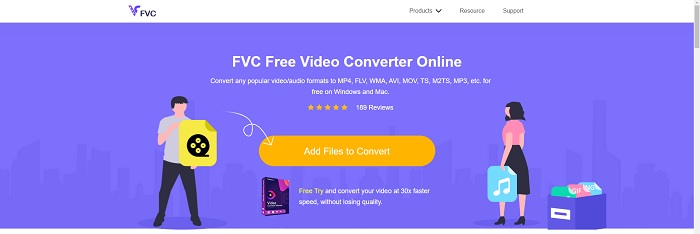
Optie 1. Gratis video-omzetter online
Met FVC Free Video Converter Online is het mogelijk een grote verscheidenheid aan video‑ en audioformaten te converteren. HD‑video kan eenvoudig worden omgezet naar codecs zoals MP4, FLV en WMV zonder kwaliteitsverlies. Je hoeft je geen zorgen te maken over kwaliteitsverlies bij het converteren van meerdere video‑ of audiobestanden. Deze gratis videoconverter is bekend om zijn conversie‑ en bewerkingsmogelijkheden, waarmee gebruikers hun video’s volledig naar wens kunnen aanpassen.
Voordelen
- Het ondersteunt tal van videobestandsformaten.
- Geconverteerde uitgangen zijn van hoge kwaliteit.
Nadelen
- Omdat het een online webtool is, heeft het een snellere verbinding nodig om video met grote bestanden te converteren.
Optie 2. Online gratis converteren
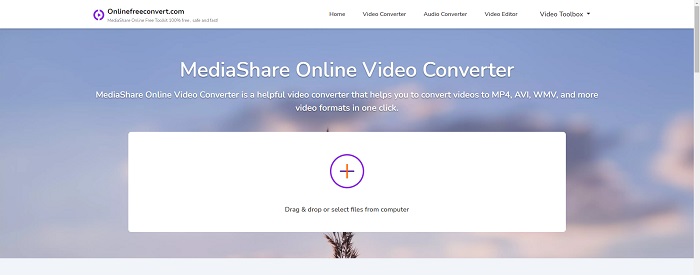
Bij het transcoderen van je video is deze gratis online applicatie de beste optie. Deze applicatie biedt twee opties om dingen eenvoudig en gebruiksvriendelijk te houden: bestandstype en resolutie. Volg de instructies op het scherm om deze online converter te gebruiken.
Voordelen
- Het heeft een toegankelijke en gebruiksvriendelijke interface.
- Het biedt andere tools die de videokwaliteit kunnen verbeteren.
Nadelen
- Het heeft niet veel videoformaten die het ondersteunt.
Optie 3. Elke conv
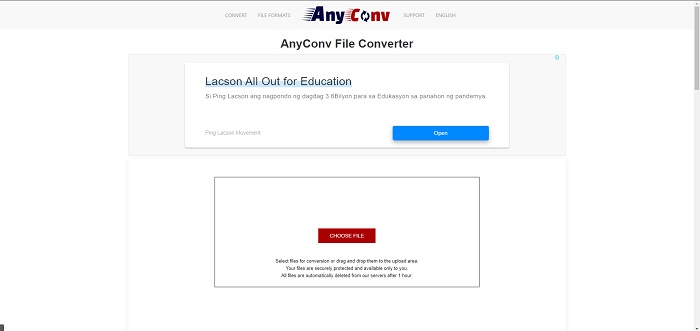
AnyConv is een online converter met een Nederlandse gebruikersinterface. Zelfs de commerciële editie van deze applicatie is gratis. AnyConv bevat ook een conversiebeperking van 60 bestanden per uur. Met behulp van de online converter kunt u bestanden tot 50 MB converteren en kiezen uit meer dan 300 verschillende uitvoerformaten.
Voordelen
- Het heeft een breed scala aan formaten; het ondersteunt zelfs de niet-video- en audioformaten zoals documenten.
- Het geeft instructies om deze converter te gebruiken.
Nadelen
- Het toont advertenties die niet helpen of passen bij het conversieproces of de inhoud zelf.
Deel 3. Hoe SWF naar MOV op Mac te converteren
Dit artikel stelt Video Converter Ultimate voor aan Mac‑gebruikers die SWF naar MOV willen converteren. Zowel Windows‑ als Mac‑versies van deze software zijn gratis te downloaden. Een brede groep gebruikers kan ermee werken, omdat het een gebruiksvriendelijke tool en een eenvoudige interface heeft. Met dit programma kun je bestanden in ongeveer één minuut van het ene videoformaat naar het andere omzetten, wat het onderscheidt van andere conversie‑apps en online hulpmiddelen. Daarnaast beschikt deze software over een aantal extra functies waarmee je je video nog verder kunt verbeteren. Stel dat je de beschrijving van de software hebt doorgenomen, laten we dan aan de slag gaan:
Stap 1. Klik met de rechtermuisknop op het pictogram Gratis Downloaden hieronder om het downloadproces te starten. Deze software is compatibel met computers die zowel op Windows als op macOS draaien. Nadat je de software hebt gedownload, kun je deze installeren en beginnen te gebruiken door op de knop Nu Starten op het hoofdscherm van de software te klikken.
Gratis downloadVoor Windows 7 of nieuwerVeilige download
Gratis downloadVoor MacOS 10.7 of nieuwerVeilige download
Stap 2. Nadat je de software hebt gedownload, moet je deze starten. Deze informatie wordt weergegeven in een venster wanneer de software voor de eerste keer wordt geopend.
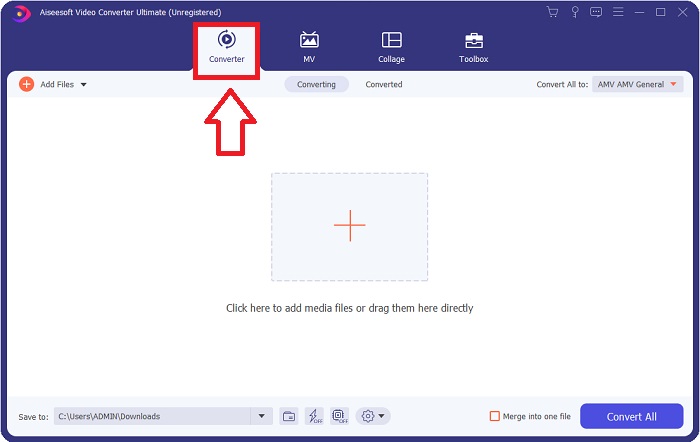
Stap 3. De conversieprocedure begint met het laden van de bestanden die je wilt converteren in de converter. Sleep de video die je wilt converteren naar het +‑teken om het conversieproces te starten.
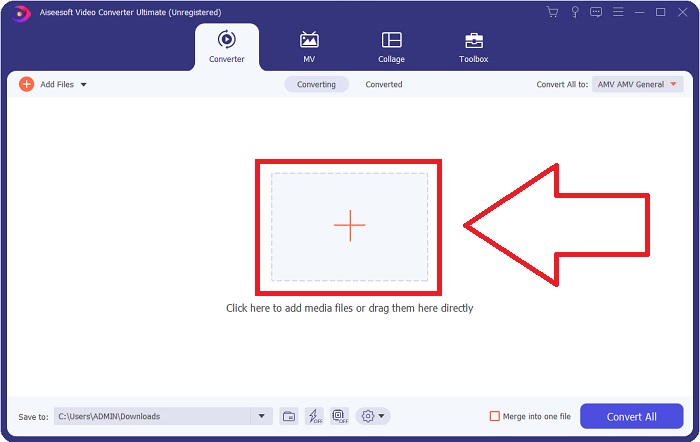
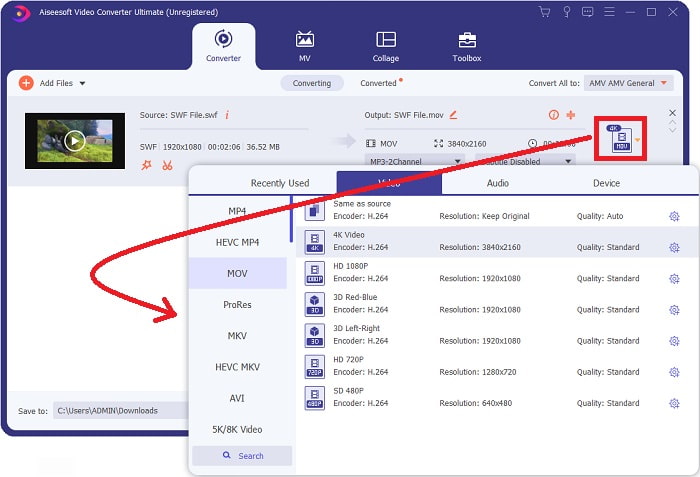
Stap 4. Rechtsboven in het scherm verschijnt een optiemenu waarin je een videoformaat kunt kiezen. Selecteer MOV als videoformaat in het uitklapmenu dat verschijnt. Afhankelijk van het MOV‑profiel dat je hebt gekozen, kun je uit verschillende videokwaliteitsopties selecteren. Als je gewenste video‑output niet beschikbaar is, kun je de kwaliteitsinstellingen in Windows aanpassen. Je kunt de beeldfrequentie en de geluidskwaliteit wijzigen door op het tandwielpictogram rechtsboven te klikken. Gebruik de knop Nieuw maken om je wijzigingen op te slaan nadat je ze hebt aangebracht.
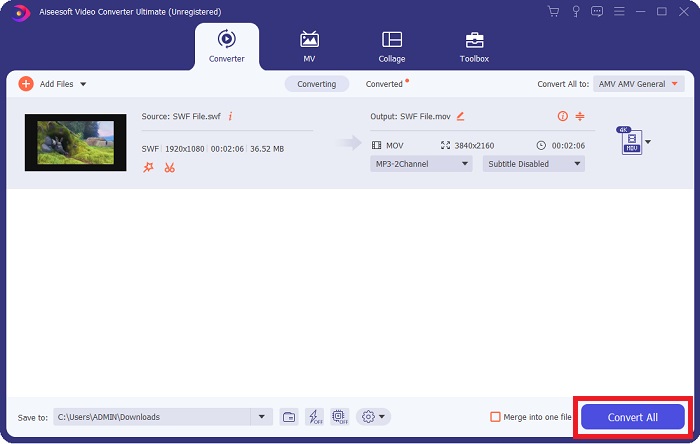
Stap 5. Wanneer je klaar bent met het bewerken van de video en deze gereed is om te worden geconverteerd, klik je op Alles converteren om het conversieproces te starten.
Gerelateerd:
Deel 4. Veelgestelde vragen over SWF naar MOV-conversie
Is SWF een videoformaat?
Video- en vectorgebaseerde animaties zijn te vinden in SWF-bestanden, die zijn gemaakt met Adobe Flash-software. Het is echter ook bekend als Shockwave Format, wat de volledige afkorting is van SWF. Oorspronkelijk ontwikkeld door Macromedia, is dit bestandsformaat nu eigendom van Adobe.
Zijn SWF-bestanden veilig?
Flash is met name vatbaar voor een breed scala aan verschillende soorten kwetsbaarheden. Omdat het SWF-bestand naar clients wordt gedownload en op hun computers wordt uitgevoerd, vormt uw server geen gevaar. Maar zelfs als u probeert de SWF-bestanden op malware te controleren, krijgt u slechts minimale bescherming.
Welke browser ondersteunt Flash 2021 nog?
Adobe Flash wordt beëindigd in Firefox 84, de volgende grote versie van de browser. Om de snelheid en veiligheid te verbeteren, zal Firefox 85 (gepland voor release op 26 januari 2021) de ondersteuning voor Adobe Flash verwijderen.
Gevolgtrekking
Tot slot moeten alle zaken die in dit artikel zijn besproken, worden geconcretiseerd door de software te gebruiken die hierboven is genoemd. Met Video Converter Ultimate kun je videobestanden eenvoudig converteren en krijg je over het geheel genomen werk van hoge kwaliteit. In tegenstelling tot andere tools of software die op internet beschikbaar zijn, geeft deze software je een toegankelijk gevoel met een resultaat dat echt gezien mag worden.
-
 SWF naar MP4: Gratis SWF naar MP4 online en pc converteren
 Hoe een SWF-bestand te openen zonder Adobe Flash Player? Neem de gratis top 3 SWF naar MP4-converter om gratis SWF naar MP4 online en op pc / Mac te wijzigen in 3 stappen.
-
 [2 Oplossingen] Hoe u SWF-bestanden gemakkelijk en gratis kunt converteren naar GIF
 Als u de GIF-indeling niet kunt exporteren via Flash-software, kunt u proberen de bestanden eerst in SWF-indeling op te slaan. Dan kunt u in dit artikel 2 eenvoudige manieren leren om SWF naar GIF-bestanden te converteren.
-
 Beste GIF-converter om geanimeerde GIF naar MOV-indeling te converteren [2021]
 Converteer uw GIF op een moeiteloze manier naar MOV-formaat zonder de kwaliteit van het videobestand aan te tasten. Ook met stappen en verschillende tools.
