


 Video Converter Ultimate
 Scherm opnemer
 Videoreparatie
Gemakkelijk toegankelijke XviD-converter: XviD-bestanden converteren naar MOV-indeling
Het XviD‑bestand is de meest bekende codec die werd gebruikt om te concurreren met DivX. Deze codec maakt ook gebruik van MPEG‑4 ASP, dat functies bevat zoals b‑frames, lumi‑masking, globale en quarter‑pixel bewegingscompensatie, trellis‑kwantisatie, aangepaste kwantisatiematrices en H.263. Alleen al daardoor werd XviD een populairdere encoder dan DivX. Stel dat je een bestand met een XviD‑codec naar je iOS‑apparaat overzet. Als het bestand niet wordt afgespeeld, hoef je niet te schrikken, want de codec ondersteunt geen mobiele apparaten zoals iOS en andere toestellen. Hoewel het onoplosbaar lijkt, is er voor elk probleem een oplossing; wij bieden een oplossing door het bestand met XviD om te zetten naar AVI‑formaat. Wil je weten hoe je XviD‑bestanden naar MOV converteert, volg dan dit artikel.

Deel 1. Introductie van XviD en MOV
Zoals we eerder zeiden, kan je bestand kleiner worden als je XviD gebruikt om het te comprimeren, zonder de kwaliteit aan te tasten, en het vervolgens snel weer kunt decomprimeren. Hoewel XviD een niet‑propriëtaire compressor is, is de compatibiliteit van deze codec beperkt op draagbare apparaten en vooral bij het bewerken. Dus als je de video met de XviD‑codec wilt bekijken of bewerken, moet je het bestand converteren naar MOV. Waarom MOV? Omdat dit formaat metadata en mediabestanden zoals audio, video en tekst of ondertitels kan bevatten. Bovendien kan dit formaat video’s afspelen op iOS‑apparaten én op andere toestellen. Dus, om je probleem met je XviD‑bestand op te lossen, gaan we nu ontdekken hoe je XviD naar MOV converteert met behulp van de tool hieronder.
Deel 2. Beste converter om XviD naar MOV te converteren op Windows en Mac
FVC Video Converter Ultimate
Ben je op zoek naar de beste XviD‑naar‑MOV‑converter die het bestand in een oogwenk kan omzetten? Dan is FVC Video Converter Ultimate precies de tool die je zoekt. Naast de tot wel 30x snellere conversie die aan gebruikers wordt geboden, kun je je video ook bewerken, samenvoegen, knippen en meer doen om hem er nog indrukwekkender uit te laten zien dan andere. Hoewel de tool geavanceerde functies biedt, hoef je geen supercomputer te bouwen om deze te downloaden en te gebruiken.
Daarnaast bevat deze software ook hardwareversnelling en snelle conversie om uw conversie-ervaring sneller en beter te maken. En als u nu wilt leren hoe u Xvid-bestanden naar MOV kunt converteren met behulp van deze tool, gaan we verder met de onderstaande zelfstudie.
Stappen om XviD naar MOV te converteren met FVC Video Converter Ultimate:
Stap 1. Deze software is te downloaden op elke pc of Mac OS, dus je hoeft alleen op de downloadknop hieronder te drukken. Nadat je de software hebt gedownload, klik je op het bestand om het te installeren, rond je de snelle installatie af en klik je op Start Now om de tool direct te openen.
Gratis downloadVoor Windows 7 of nieuwerVeilige download
Gratis downloadVoor MacOS 10.7 of nieuwerVeilige download
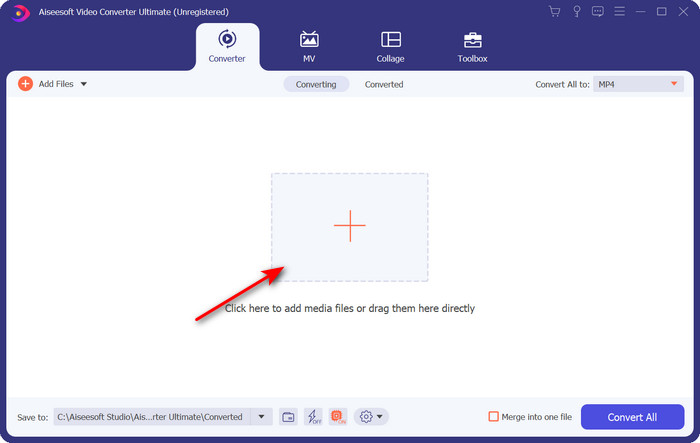
Stap 2. Om het .xvid‑bestand toe te voegen, moet je op de +-knop klikken, het in de map opzoeken en op Open klikken. Als er echter meer dan twee .xvid‑bestanden zijn, raden we aan de bestanden naar de interface te slepen en daar neer te zetten.
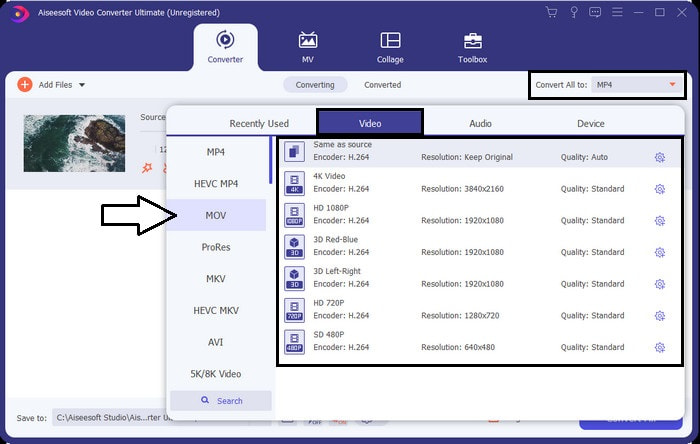
Stap 3. Klik op de drop‑down‑knop rechtsboven in de interface en zoek het MOV‑formaat in de lijst.
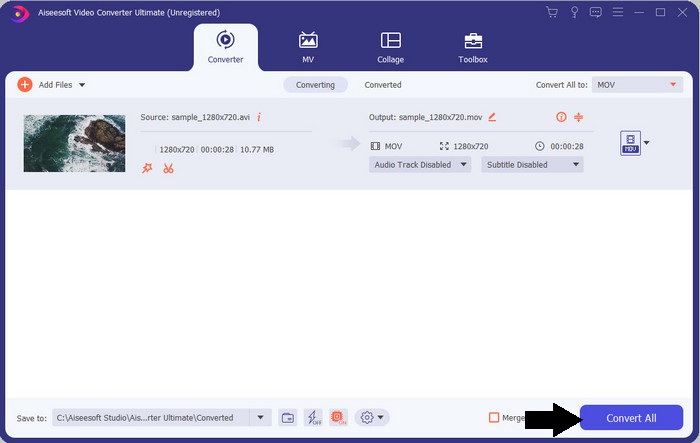
Stap 4. Laten we je XviD‑bestanden naar MOV beginnen omzetten door op Convert All te klikken.
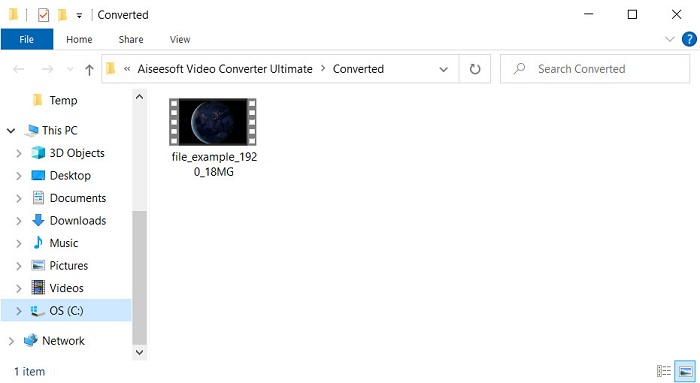
Stap 5. Wacht enkele seconden tot het proces klaar is. Er verschijnt een mapvenster op je scherm met het .mov‑bestand; klik op het bestand om het af te spelen in je lokale mediaspeler en geniet.
Deel 3. Beste online converter om Xvid naar MOV te converteren
FVC gratis video-omzetter online
Wil je geen gedoe met het downloaden van software op je schijf omdat je opslag vol is en je maar één enkel bestand online wilt converteren? FVC Free Video Converter Online is beschikbaar in alle webbrowsers. Het converteren van het XviD‑bestand met behulp van deze tool is binnen een minuut klaar. Bovendien hoef je geen account aan te maken om de tool te gebruiken en staan er geen advertenties in de interface. Dit is de meest overzichtelijke online converter die je op het web kunt gebruiken. Je kunt er echter geen gebruik van maken als je geen internetverbinding hebt, omdat deze tool volledig afhankelijk is van het netwerk. Ook ondersteunt deze tool een middelgroot bereik aan formaten waaruit je kunt kiezen en die je kunt gebruiken. Wil je daarnaast geen converter downloaden, dan moet je deze XviD‑naar‑MOV‑converter online gebruiken.
Stappen om XviD‑bestanden online naar MOV‑formaat te converteren met behulp van FVC Free Video Converter Online:
Stap 1. Om naar de hoofdwebpagina van de online converter te gaan, moet je op deze link klikken.
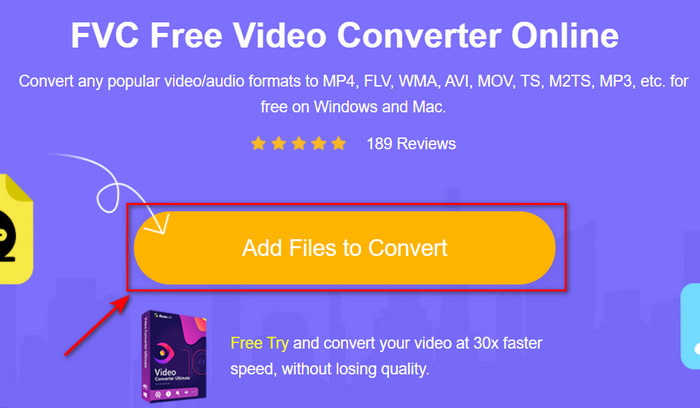
Stap 2. Klik op Add Files to Convert om de tool te starten, waarna er een map verschijnt waarin je het XviD‑bestand kunt zoeken dat je wilt converteren, en klik op Open om verder te gaan.
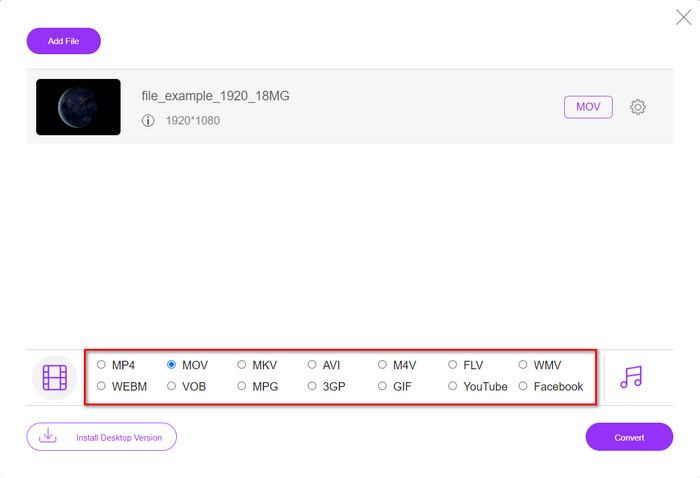
Stap 3. Er verschijnt een nieuwe interface nadat je het XviD‑bestand hebt ingevoegd; kies hieronder het MOV‑formaat of een ander gewenst formaat.
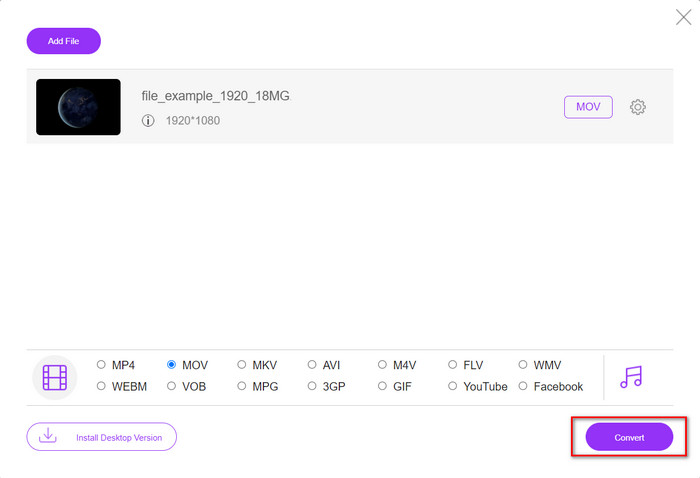
Stap 4. Klik op Convert om het veranderen van het formaat te starten.
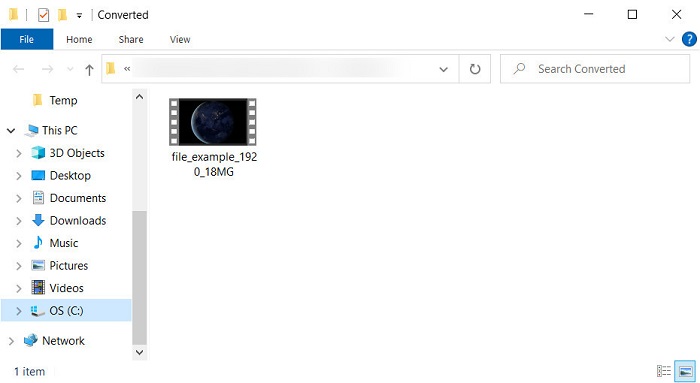
Stap 5. Het converteren van het bestand kost je minder tijd dan bij andere online converters; daarna verschijnt er een map met het geconverteerde bestand dat je hebt gemaakt.
Deel 4. Veelgestelde vragen over XviD naar MOV-conversie
Waar kan ik XviD-video's bekijken?
Je kunt de VLC‑mediaspeler gebruiken om XviD‑bestanden voor je af te spelen. Als je niets extra’s wilt downloaden, gebruik dan Windows Media Player, die op alle Windows‑systemen beschikbaar is. Voor Mac‑gebruikers is er QuickTime. Maar als je een XviD‑video in hoge kwaliteit wilt bekijken, lees dan dit artikel, want we hebben alle mogelijke XviD‑spelers verzameld die je kunt gebruiken om XviD‑bestanden te bekijken.
Is XviD gratis of niet?
XviD is gratis en is beschikbaar voor iedereen die zijn bestand wil gebruiken en comprimeren voor snelle overdracht via internet of om wat ruimte te besparen. Het is allemaal te danken aan de GPL-vrije softwarelicentie, dus het is gemaakt om gratis te zijn.
Waarom kan ik geen XviD-video's bewerken?
Een van de belangrijkste redenen waarom je geen video's kunt bewerken met dit type codec, is dat het niet wordt ondersteund. In dat geval ondersteunen minimale video-editors alleen dit type codec vanwege de complexiteit ervan. Stel dat u een video in dit formaat wilt bewerken, dan moet u overwegen deze eerst te converteren. In dat geval is het een must om een multifunctionele converter te hebben die XviD-bestanden kan converteren naar MP4, AVI, MOV of iets dergelijks. Na het converteren van het bestand, uploadt u het vervolgens naar de editor om het naar wens te bewerken.
Gevolgtrekking
Na het lezen van dit artikel is onze kennis over XviD uitgebreid en kunnen we nu de verschillende perspectieven op XviD zien. Dus als je een video op je iOS‑apparaat wilt opslaan of afspelen, moet je het bestand eerst converteren naar MOV. Zoals eerder besproken, presteren de twee genoemde converters uitstekend bij het converteren van bestanden naar MOV‑formaat. Hoewel beide tools perfect lijken, zijn de snelheid en prestaties van FVC Video Converter Ultimate ongeëvenaard en beter dan die van welke desktop‑ of webtool dan ook. Maar als je gratis en veilig online wilt converteren, kies dan voor FVC Free Video Converter Online.
-
 Hoe AVI naar MOV te converteren met eenvoudige stappen en hulpmiddelen
 Wil je weten hoe je AVI converteert naar een speelbare MOV? U moet dit artikel volgen om te weten hoe u dit moet doen en tips voor een succesvolle conversie.
-
 Importeer en converteer AVI naar door iMovie ondersteunde indeling [2021]
 Heeft u een probleem omdat u uw AVI-bestand niet in iMovie kunt importeren? Als u dit artikel leest, heeft u al de juiste remedie voor dit probleem gekozen.
-
 Hoe TS naar AVI / MKV / MOV / WMV online en gratis te converteren op Win / Mac
 Wilt u TS-bestanden snel naar AVI / MKV / MOV / WMV converteren? Dit artikel toont online en offline videoconverters met een complete gids. Misschien kun je hier de beste gratis TS-converter krijgen.
