


 Video Converter Ultimate
 Scherm opnemer
 Videoreparatie
 Beveiligde download
Naadloze conversie van café naar mp3 om de audiokwaliteit en toegankelijkheid te behouden
Het converteren van Caf naar MP3 is essentieel voor verbeterde compatibiliteit en toegankelijkheid. Het converteren van uw Caf-bestanden naar MP3 zorgt voor naadloos afspelen op verschillende platforms, waardoor compatibiliteitsproblemen worden geëlimineerd. Bovendien zijn mp3-bestanden kleiner, waardoor ze gemakkelijker kunnen worden opgeslagen, overgedragen en gedeeld. Of u nu wilt genieten van uw audiocollectie op smartphones, computers of systemen in de auto, het converteren van Caf naar MP3 geeft u meer flexibiliteit en gemak bij het openen van uw favoriete muziek, podcasts of opnames.
Door gebruik te maken van een Caf-naar-MP3-converter kun je je Caf-bestanden eenvoudig omzetten naar het populaire MP3-formaat, wat zorgt voor een bredere toegankelijkheid, kleinere bestandsgroottes en het moeiteloos delen van je audiocollectie. Ontdek hieronder welke tools je kunt gebruiken om je bestanden van Caf naar MP3 te converteren.

Deel 1. Wat is CAF en waarom CAF naar MP3 converteren
Caf of Core Audio Format is een audiobestandsindeling geïntroduceerd door Apple Inc. Het wordt vaak gebruikt op macOS- en iOS-platforms. Caf-bestanden worden vaak gemaakt en gebruikt in professionele audiotoepassingen, zoals geluidsbewerking, mixen en opnemen. Het converteren van Caf naar MP3 biedt verschillende dwingende redenen en voordelen. Hier zijn enkele van de weinige belangrijke redenen waarom u zou kunnen overwegen om uw Caf-bestanden naar het MP3-formaat te converteren:
Verbeterde compatibiliteit: MP3 is een van de meest ondersteunde audioformaten op allerlei apparaten, mediaspelers en besturingssystemen. Door je Caf-bestanden naar MP3 te converteren, zorg je voor compatibiliteit en voorkom je afspeelproblemen of beperkingen die je met Caf-bestanden kunt ondervinden.
Toegankelijkheid: Het converteren van Caf naar MP3 vergroot de toegankelijkheid van je audiocontent. MP3-bestanden kunnen worden gestreamd op meerdere apparaten, waaronder smartphones, tablets, laptops, desktopcomputers, draagbare muziekspelers en zelfs audiosystemen in de auto. Deze veelzijdigheid stelt je in staat om altijd en overal van je favoriete muziek, podcasts of opnames te genieten.
Kleinere bestandsgrootte: MP3-bestanden zijn doorgaans gecomprimeerd, waardoor ze aanzienlijk kleinere bestandsgroottes hebben dan Caf-bestanden. Deze compressie helpt opslagruimte op je apparaten te besparen zonder dat de audiokwaliteit merkbaar achteruitgaat. Bovendien wordt het eenvoudiger om je audiobestanden via e‑mail, berichtenapps of online platforms over te zetten of te delen.
Deel 2. Converteer CAF naar MP3 offline
Video Converter Ultimate is zeer efficiënte software waarmee je verschillende bestandstypen kunt omzetten naar diverse audioformaten, zoals Caf en MP3. De software biedt een batchconversiefunctie, zodat je meerdere audiobestanden tegelijk kunt converteren.
Bovendien hebben gebruikers de mogelijkheid om de kwaliteit van elk gewenst nummer te optimaliseren via de functie van het programma waarmee uitvoertechnische details kunnen worden aangepast, inclusief samplefrequentie en bitsnelheid. Voor personen die een batchconversie van audiobestanden van Caf naar MP3 of vice versa willen uitvoeren, hebben we hieronder een beknopte gids ter inzage gegeven. U kunt de onderstaande instructies raadplegen om te leren hoe u Caf naar MP3 kunt wijzigen.
Stap 1. Kies hieronder het juiste pictogram voor Gratis downloaden om het programma op je apparaat te starten. Volg de instructies op het scherm om het programma in de volgende stap te activeren. Zodra het is geïnstalleerd, is de interface gemakkelijk onder de knie te krijgen. Deze tool werkt als een Caf-naar-MP3-converter voor zowel Mac als Windows.
Gratis DownloadVoor Windows 7 of hogerBeveiligde download
Gratis downloadenVoor macOS 10.7 of laterVeilige download
Stap 2. Klik op de knop Toevoegen in de hoofdinterface om het audiobestand te importeren dat je wilt bewerken. Je wordt vervolgens naar een miniatuurweergave van het geïmporteerde bestand geleid. Je kunt ook een map toevoegen om meerdere bestanden tegelijk te converteren. Kies de locatie in je directory waar alle benodigde audiobestanden staan.
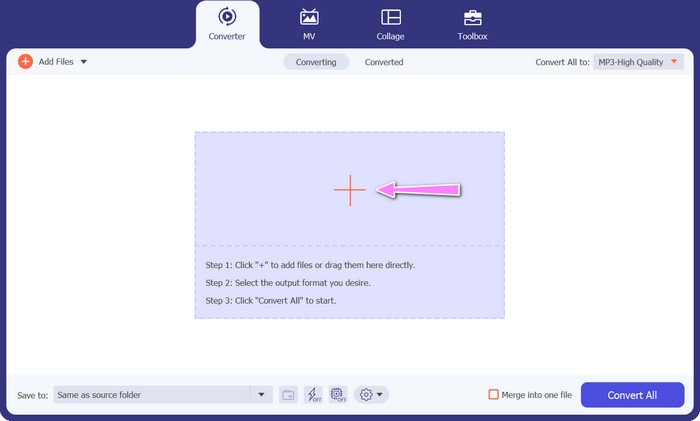
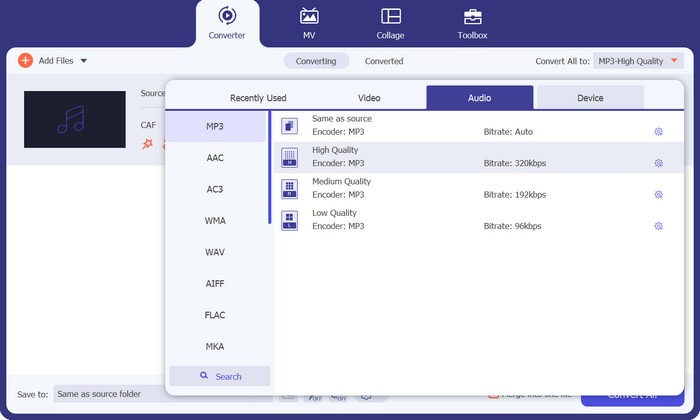
Stap 3. Je kunt nu het uitvoerformaat wijzigen door op de knop Alles converteren naar bovenaan het programmavenster te klikken. Kies MP3 in het paneel met het label Audio. Ondertussen kun je ook de samplefrequentie en bitsnelheid van het uitvoerbestand aanpassen om de gewenste kwaliteit te bereiken.
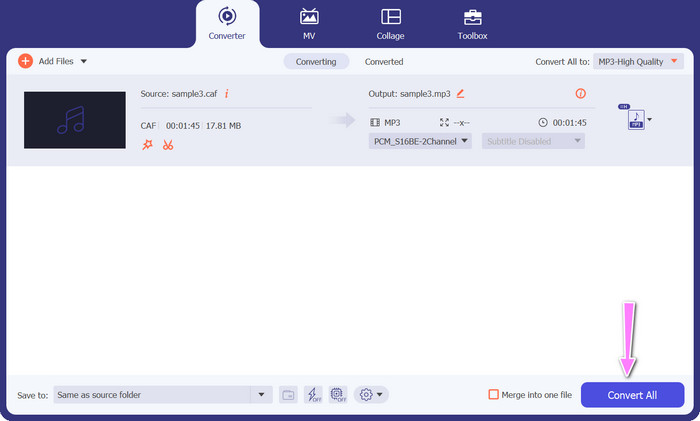
Stap 4. Klik onderaan op de knop Alles converteren om de conversie als laatste stap te starten. Het programma opent daarna automatisch de uitvoermap, zodat je het nieuwe bestandsformaat kunt controleren.
Voordelen
- Het kan Caf in batch naar MP3-audiobestandsformaat converteren.
- Het programma werkt goed met zowel Windows als Mac OS.
Nadelen
- Het vereist een betaald abonnement na de gratis proefperiode.
Deel 3. Converteer CAF naar MP3 online
Je kunt ook gebruikmaken van de Free MP3 Audio Converter Online, een andere optie. Dit is een webgebaseerde toepassing die via internet werkt, zoals de naam al aangeeft. Je hoeft dus geen aparte app te installeren om Caf naar MP3 te converteren. Alles is online beschikbaar; je hebt alleen je browser nodig om het werk te doen. Wat functies betreft schiet deze gratis Caf-naar-MP3-converter in geen enkel opzicht tekort. Bovendien kun je een groot aantal bestanden uploaden, ze in bulk converteren of het profiel van een video- of audioclip aanpassen. Door de hier beschreven stappen te volgen, leer je hoe je de beste online Caf-naar-MP3-converter gebruikt.
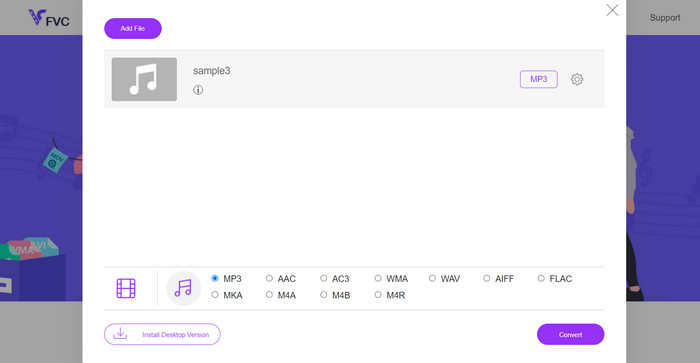
Stap 1. Ga eenvoudig naar de hoofdwebsite van Free MP3 Audio Converter Online door op de bovenstaande link te klikken. Je kunt je audiobestand uploaden door op het hoofdscherm de optie Bestanden toevoegen om te converteren te selecteren.
Stap 2. Op het scherm verschijnt een voorbeeld van het oorspronkelijke bestand dat je hebt geselecteerd. Je kunt het gewenste uitvoerformaat kiezen door onder het paneel te gaan waar je je aanvankelijk bevond.
Stap 3. Om de bestandsindeling van Caf naar MP3 te wijzigen, klik je op de knop Converteren. Als je een ander bestand wilt converteren, moet je dezelfde procedure opnieuw vanaf het begin doorlopen.
Voordelen
- Gebruikers kunnen genieten van onbeperkte conversies per dag.
- Deze online Caf naar MP3-converter werkt op bijna alle webbrowsers.
Nadelen
- De conversiesnelheid is evenredig met de beschikbare internetbandbreedte.
Verder lezen:
MP3 naar AAC converteren: hoe verbeter je je geluidskwaliteit
MP3‑speler download – 10 beste gratis MP3‑muziekspelers van 2023
Deel 4. Veelgestelde vragen over het converteren van CAF naar MP3
Kan ik de metadata van mijn Caf-bestanden bewaren nadat ik ze naar MP3 heb geconverteerd?
Het behoud van metadata tijdens conversie van Caf naar MP3 is afhankelijk van de specifieke converter of software die u gebruikt. Sommige conversietools hebben de mogelijkheid om metadata zoals artiestnaam, albumtitel, tracknummer en meer te behouden. Het is echter belangrijk op te merken dat niet alle converters het bewaren van metadata ondersteunen.
Zijn er andere audioformaten waarnaar ik Caf-bestanden kan converteren?
Ja, naast MP3 zijn er verschillende andere audioformaten waarnaar u Caf-bestanden kunt converteren, afhankelijk van uw specifieke behoeften. Veelgebruikte alternatieve formaten zijn WAV, FLAC (Free Lossless Audio Codec), AAC en OGG (Ogg Vorbis).
Moet ik betalen voor een Caf naar MP3 converter?
Er zijn zowel gratis als betaalde Caf naar MP3-conversieopties beschikbaar. Veel online converters bieden gratis diensten aan, waarmee je zonder kosten Caf-bestanden naar MP3 kunt converteren. Sommige geavanceerde software of premium online services kunnen echter een aankoop of abonnement vereisen voor extra functies of hogere conversiesnelheden.
Gevolgtrekking
Met de conversie van Caf naar MP3 ontsluit je het volledige potentieel van je audiocollectie en geniet je van naadloze weergave, altijd en overal. Zo kun je je favoriete muziek, podcasts of opnames afspelen op een breed scala aan apparaten en platforms.
-
 De beste 4 manieren om AIFF naar MP3 op Mac en pc te converteren
 Ondervindt u problemen omdat AIFF-bestanden te groot zijn om te worden opgeslagen? U moet dus verder lezen terwijl we uitleggen hoe u dit kunt oplossen door AIFF naar MP3-indeling te converteren.
-
 Ontdek hoe u AMR naar MP3 converteert [Online en offline]
 Heb je het moeilijk omdat .amr-bestanden niet op je desktop kunnen worden afgespeeld? Lees dan dit artikel om te leren hoe u AMR naar MP3-formaat kunt converteren.
-
 Gids voor het toevoegen van albumhoezen aan MP3 Moeiteloos bij Breze
 Wil je weten hoe je albumhoezen aan MP3 kunt toevoegen? Als dat zo is, lees dan de volledige details en een tutorial over het bewerken van de albumhoezen in je bestand.
