


 Video Converter Ultimate
 Scherm opnemer
 Videoreparatie
Handigste manieren om MP3 naar M4R te converteren voor Apple-apparaten
Heb je er ooit over nagedacht om je favoriete muziek op je iPhone als beltoon te gebruiken? Zou dat überhaupt mogelijk zijn? Zeker wel. Je hoeft het bestand alleen maar te converteren. Waarom moeten we het eerst converteren? Omdat we het dan als beltoon kunnen instellen. Voornamelijk omdat een specifiek nummer als beltoon alleen kan worden ingesteld als het in M4R-formaat staat. Dat betekent dat je op zoek moet naar de beste MP3‑naar‑M4R‑iTunesconverter die voor jou werkt. Dit artikel biedt verschillende methoden om je MP3‑bestand te converteren en zelfs om in batches te MP3 naar M4R te converteren. Lees hiervoor de onderstaande uitleg.

Deel 1. De meest haalbare manier om MP3 naar M4R te converteren
Video Converter Ultimate is verreweg de meest overtuigende tool die u kunt gebruiken om MP3 naar M4R te converteren. Niet alleen een enkel bestand, maar het kan ook batchgewijs converteren van MP3 naar MP4. Het is een converter die HD-video's en verliesloze audio kan produceren. In feite is het ideaal en aanbevolen om het bestand te converteren zonder de oorspronkelijke kwaliteit te verliezen. De snelheid is 30x sneller dan de normale converter die er is. En als je een afspeellijst converteert om op je telefoon op te slaan, kan deze tool zeker het werk voor je doen. Moeiteloos en geen zweet. Ondertussen zijn hier enkele van de andere functies waarvan u ook kunt genieten, afgezien van het converteren van audio. Ook is hieronder een stapsgewijze handleiding geschreven ter referentie als u besluit deze te gebruiken.
◆ Metagegevens bewerken.
◆ Supersnelle GPU-versnelling.
◆ Realtime technische ondersteuning.
◆ Het comprimeren van video wordt ondersteund.
Stap 1. Installeer de app door op de downloadknop hieronder te klikken. Zodra de app op je Windows- of Mac-computer is gedownload, start je deze.
Gratis downloadVoor Windows 7 of nieuwerVeilige download
Gratis downloadVoor MacOS 10.7 of nieuwerVeilige download
Stap 2. In de hoofdinterface van de tool zie je twee opties om het bestand te uploaden. Je kunt ofwel op het pictogram met het plusteken in het midden klikken of op de knop Bestanden toevoegen linksboven. Kies het gewenste bestand en upload het.
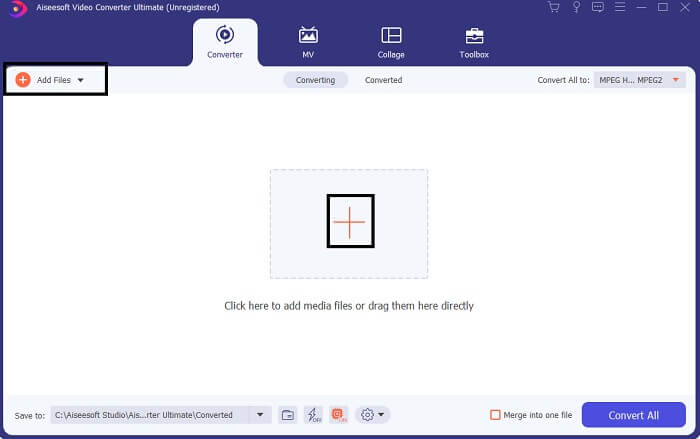
Stap 3. Om het gewenste uitvoerbestand te krijgen, wijzig je het formaat via het vervolgkeuzemenu rechtsboven in de interface.
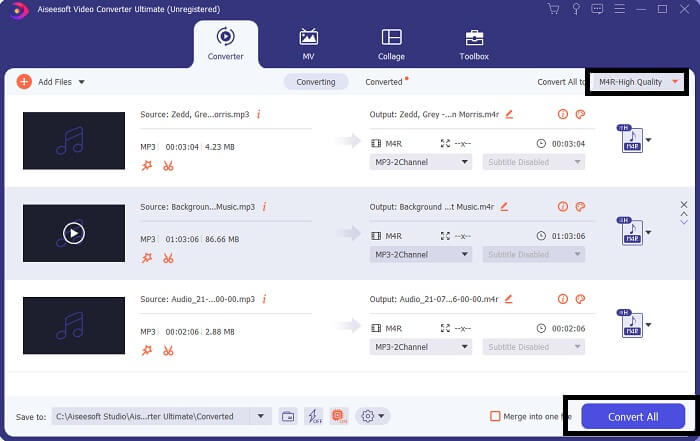
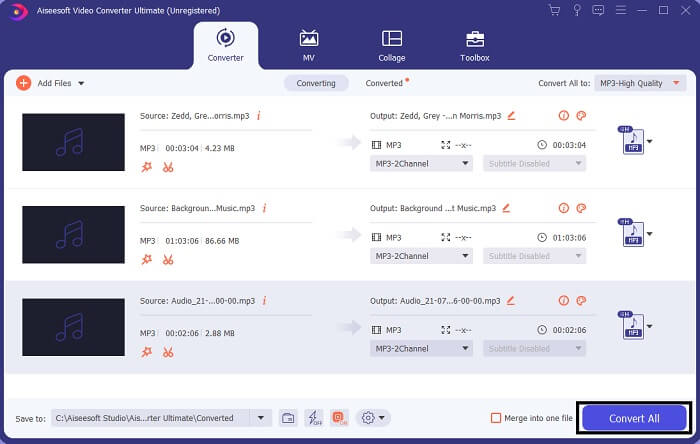
Stap 4. Klik ten slotte op de knop Alles converteren rechtsonder in de hoofdinterface. Wacht vervolgens tot het bestand is geconverteerd.
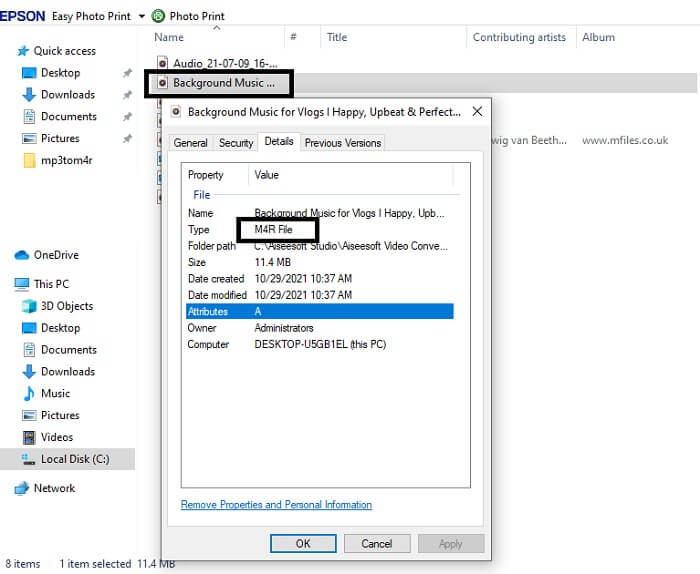
Stap 5. Open ten slotte de map waarin het audiobestand is opgeslagen en zet het over naar je iPhone. Je kunt hiervoor een overdrachtstool of ‑app gebruiken. Aanbevelingen zijn op internet te vinden. Je hoeft alleen maar te zoeken en vervolgens het bestand op je iPhone als beltoon in te stellen.
Deel 2. Enkele van de beste tools om MP3 naar M4R online te converteren
FVC gratis online audio-omzetter
Een premium conversietool is goed, maar niets gaat boven een praktisch hulpmiddel. Met jouw behoeften in gedachten heeft FVC een gratis versie van de tool ontwikkeld. De FVC Free Audio Converter is je gratis tool, altijd en overal beschikbaar. Het enige wat je nodig hebt is een werkende internetverbinding en een ondersteunde browser. Deze MP3‑naar‑M4R‑iPhonebeltoonconverter kan audiobestanden in hoge, verliesvrije kwaliteit produceren. De uitvoer is uitstekend, zonder dat je er geld aan hoeft uit te geven. En er is meer: wist je dat deze tool ook batchconversie ondersteunt? Ja, dat kan! Hieronder staan ook enkele opvallende functies die je krijgt als je de tool gebruikt. Daarnaast is er een handleiding voor je gemak.
◆ Het geconverteerde bestand heeft een vergelijkbare kwaliteit als het origineel.
◆ 100% gratis en veilig in gebruik.
◆ Geen limiet in grootte bij conversie.
◆ Batchconversie wordt ondersteund.
Stap 1. Ga om de tool te gebruiken naar de officiële website van de FVC Free Audio Converter.
Stap 2. Klik daar op Bestanden toevoegen om te converteren. Als je de tool voor de eerste keer gebruikt, moet je toegang verlenen door op FVC Launcher openen te klikken. Vervolgens verschijnt er een venster op je scherm waarmee je het bestand kunt zoeken dat je wilt converteren.
Download de desktopversie om bestanden in batches te converteren.
Stap 3. Nadat je het bestand hebt geüpload, verschijnt er nog een venster. Onderaan wijzig je het bestandsformaat van de uitvoer door M4R aan te vinken.
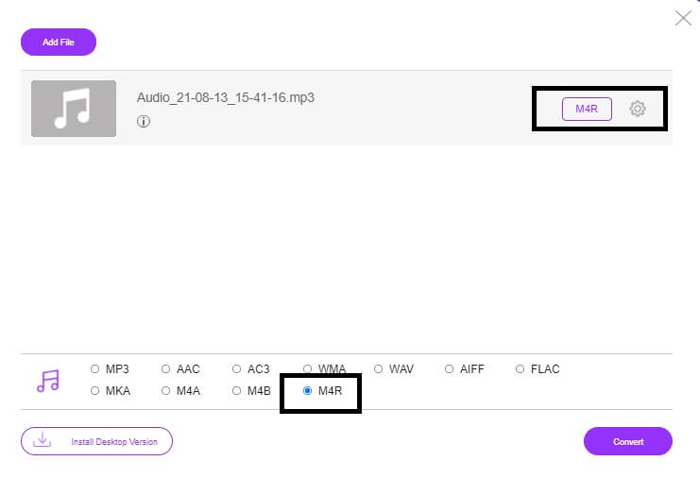
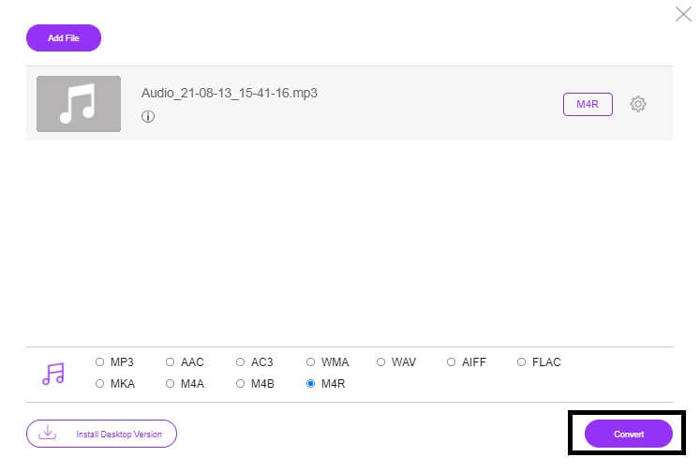
Stap 4. Klik vervolgens op de knop Converteren om het conversieproces te starten.
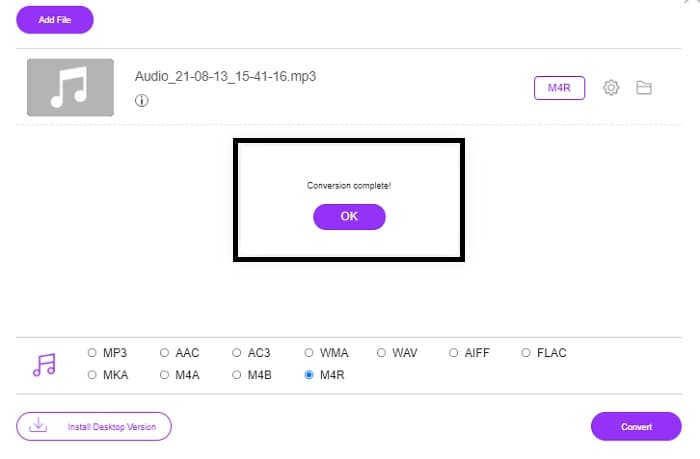
Stap 5. Kies ten slotte een map waarin je het bestand wilt opslaan; het wordt dan automatisch bewaard. Zet het vervolgens over naar je iPhone. Weet dat je ook batchconversie kunt uitvoeren, dus beperk jezelf niet.
Gerelateerd:
M4ROOnline door bestandsconvertor
Eenvoudig maar betrouwbaar, zo omschrijven gebruikers deze onlinetool. Standaard is deze tool speciaal ontworpen om MP3 naar M4R te converteren. Zoals de naam al aangeeft, is dat precies waar deze tool voor is gemaakt. Hij werkt in verschillende webbrowsers, zodat je niets hoeft te downloaden of aan te schaffen. Als je de website bezoekt, valt de eenvoud van de interface meteen op. Alles is zeer gebruiksvriendelijk: je hoeft alleen maar op de knop Browse te klikken om het upload- en conversieproces te starten. Als je het wilt proberen, wordt aangeraden de officiële website te bezoeken en het zelf te ervaren. Daarom is deze tool een goed alternatief. Hieronder vind je ook de stappen om te zien hoe je de tool gebruikt.
Stap 1. Ga eerst naar de officiële pagina van M4R Online en klik vervolgens op Browse.
Stap 2. Kies het bestand uit je map en klik op de knop Upload File.
Stap 3. Zodra je het bericht ziet dat het proces voltooid is, klik je op het bestand om het te downloaden.
Online-convert.com
Deze tool biedt al geruime tijd zijn diensten aan. Het is dan ook duidelijk dat veel gebruikers deze onlinetool erg nuttig vinden voor hun conversiebehoeften. Anders zou de site niet tot op de dag van vandaag bestaan als hij niet effectief was. Wanneer je de homepage bezoekt, zie je alle beschikbare tools in één oogopslag. Van audioconverter, videoconverter, afbeeldingsconverter en documentconverter tot e‑bookconverter: alles staat samen op de startpagina. Door ze te bundelen wordt het voor de gebruiker makkelijker om de benodigde tool te vinden. Daarom verdient deze site een plek op deze lijst met MP3‑naar‑M4R‑iTunesconverters. Hieronder lees je hoe je de tool kunt gebruiken.
Stap 1. Bezoek de officiële website van de tool en kies Audio Converter.
Stap 2. Klik op de vervolgkeuzelijst, kies het gewenste uitvoerformaat en klik op GO.
Stap 3. Er verschijnt vervolgens een nieuw venster. Klik daar op de knop Bestanden kiezen en upload het bestand. Klik op Conversie starten om het conversieproces te beginnen. Zodra het bestand klaar is, wordt het automatisch op je pc gedownload.
MP3 versus M4R
Het MP3-formaat werd in 1993 uitgebracht door Moving Picture Experts Group (MPEG). Het was de standaard voor het opslaan van muziek omdat het audio tot een veel kleiner formaat kon comprimeren dan andere niet-gecomprimeerde formaten. Het wordt tegenwoordig nog steeds veel gebruikt, vooral voor het online distribueren van audio.
Een M4R-bestand wordt gebruikt voor het opslaan van een aangepaste iPhone-beltoon die is gemaakt met Apple iTunes. Normaal gesproken kunt u dit formaat zien wanneer u een stuk ringtone van de computer naar een iOS-apparaat overzet. M4R-bestanden die met iTunes zijn gemaakt, bevatten meestal auteursrechtelijke bescherming.
Deel 3. Veelgestelde vragen over het converteren van MP3 naar M4R
Wat is M4R?
Het is een bestandsextensie die speciaal door Apple is gemaakt en strikt wordt gebruikt als beltoon voor iPhone en andere Apple-apparaten. Dit is net zo goed als M4A en MP4 als het om kwaliteit gaat.
Is er naast iTunes een MP3 naar M4R-converter?
Zeker, die zijn er. U kunt kiezen uit de bovenstaande tools of overwegen om Windows Media Player te gebruiken door te rippen. Als u niet alle processen wilt doorlopen, kunt u gewoon de gratis tools gebruiken die online beschikbaar zijn. Ze converteren de audio direct naar het gewenste formaat in plaats van het langdurige proces van rippen te doorlopen.
Waarom moet ik mijn bestand converteren van MP3 naar M4R om het als ringtone te gebruiken?
Het is een must. Om te worden beschouwd als een bestand als beltoon, moet het bestand standaard de M4R-indeling hebben om te worden afgespeeld als uw beltoon.
Gevolgtrekking
Met dat alles kunt u zeker vertrouwen op de hierboven genoemde tools. U hoeft alleen maar te openen welke tool voor u nuttig kan zijn, afhankelijk van uw behoeften. Als u een student en gewone burger bent die MP3 naar M4R op Mac gratis wil converteren en wilt converteren of welk apparaat u ook gebruikt, kunt u de gratis tools raadplegen. Voor professioneel gebruik is het aan te raden om de Video Converter Ultimate te gebruiken. U kunt altijd teruggaan naar deze pagina als u meer wilt weten over meer tools om te converteren.
-
 [Gratis en online] 3 methoden om MP3 naar MP4 met afbeelding te converteren
 Hoe converteer je MP3 naar MP4 in hoge kwaliteit? Dit bericht toont 3 efficiënte en gratis methoden om MP3 naar MP4 te veranderen met afbeeldingen op Windows en Mac.
-
 Lees meer over het converteren van MP3 naar een WAV-formaat
 Wil je weten hoe je MP3 naar WAV converteert? Bepaal welke van de tools de beste conversie opleveren die u kunt krijgen.
-
 Richtlijnen voor het converteren van M4A naar WAV [pc en Mac]
 Leer meer over het converteren van M4A naar WAV met gedetailleerde stappen en verschillende tools waaruit je kunt kiezen.

