


 Video Converter Ultimate
 Scherm opnemer
 Videoreparatie
 Beveiligde download
3 beste methoden om eenvoudig H. 264 naar MP4 te converteren [2024]
Heb je moeite om je video's af te spelen in H.264-formaat vanwege incompatibiliteitsproblemen? Nou, je bent niet de enige. Veel gebruikers ervaren hetzelfde probleem en kiezen ervoor om het bestand te converteren naar een formaat dat breed wordt ondersteund door verschillende apparaten, zoals MP4.
Dus als jij een van hen bent en op zoek bent naar manieren om dit bestand te converteren voor een probleemloze weergave op je apparaat, dan biedt dit artikel je de beste methoden om eenvoudig H.264 naar MP4 te converteren. Klaar om je video’s universeel compatibel te maken? Laten we beginnen!

Deel 1: Is H.264 hetzelfde als MP4?
Zowel H.264 als MP4 zijn videoformaten, maar ze dienen verschillende doeleinden. H.264, ook bekend als AVC (Advanced Video Coding), is een videocompressiestandaard die veel wordt gebruikt voor het opnemen, comprimeren en distribueren van high-definition videocontent. MP4 (MPEG-4 Part 14) is daarentegen een containerformaat dat verschillende soorten gegevens kan opslaan, waaronder video, audio, ondertitels en stilstaande beelden.
Terwijl H.264 specifiek verwijst naar videocompressietechnologie, omvat MP4 een breder scala aan multimediacontent. Simpel gezegd is H.264 vergelijkbaar met de coderingsmethode die wordt gebruikt om videodata te comprimeren, terwijl MP4 vergelijkbaar is met de container die de gecomprimeerde video bevat, samen met andere multimediacomponenten.
Deel 2: Snelle en eenvoudige manier om H.264 naar MP4 te converteren
De snelste en eenvoudigste manier om H.264 naar MP4 te converteren is met FVC Video Converter Ultimate. Deze desktopsoftware is ontworpen om verschillende video- en audiobestanden te verwerken, zoals MP4, MKV, MOV, AVI, FLV, WMV, WEBM, M4V, TS, MXF, MPG, 3GP, VOB en meer. Daarmee heb je volop keuze in welk formaat je H.264-bestand wordt geconverteerd. Bovendien heeft het programma een aangepast profiel dat je kunt gebruiken om de uitvoerinstellingen te bewerken, zoals de videocodec, resolutie, framesnelheid, bitrate en meer. Tot slot ben je verzekerd van een snel conversieproces en verliesvrije kwaliteit, omdat het conversies tot 4K-resolutie ondersteunt met een 30× hogere snelheid dan andere conversietools.
Stap 1. Download eerst de software en installeer deze op je computer.
Gratis downloadVoor Windows 7 of nieuwerVeilige download
Gratis downloadVoor MacOS 10.7 of nieuwerVeilige download
Stap 2. Klik op het tabblad Converter op de knop Bestanden toevoegen en importeer je H.264-bestanden.
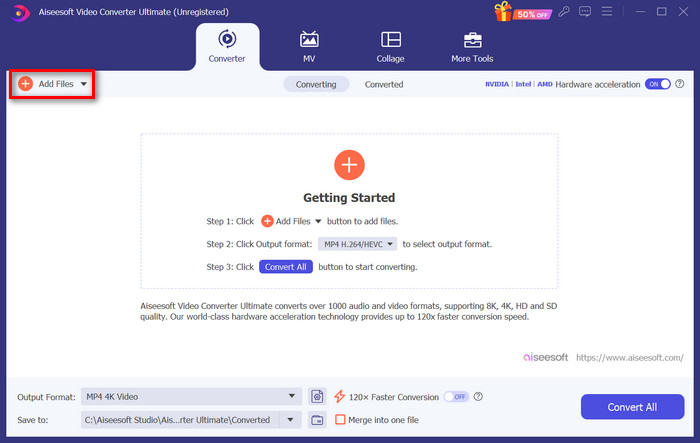
Stap 3. Zodra het H.264-videobestand is geïmporteerd, kies je MP4 uit de lijst met formaten door op de knop Uitvoerformaat te klikken.
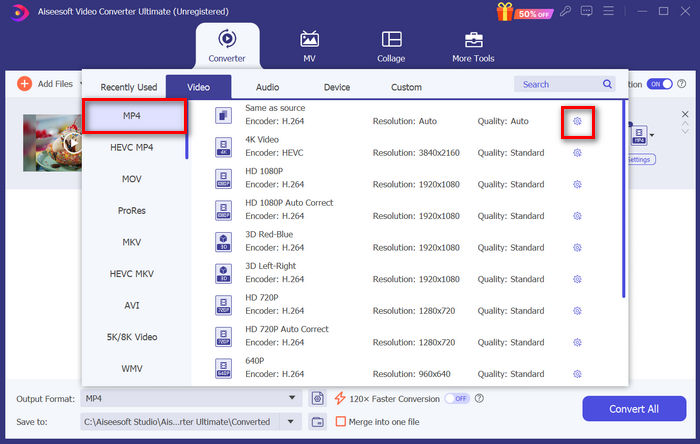
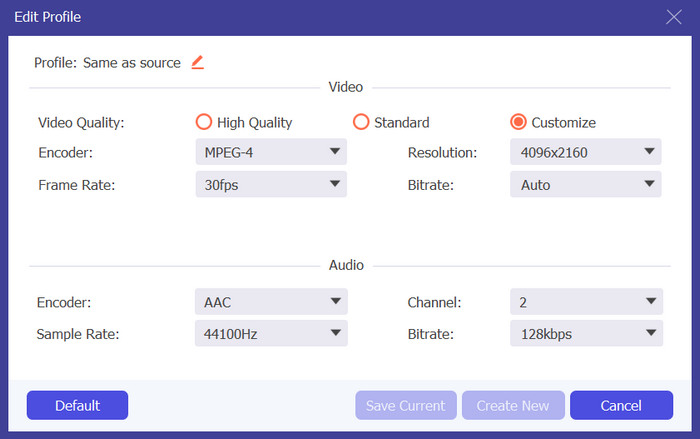
Als je ondertussen het Aangepaste profiel wilt personaliseren, ga dan naar het venster Instellingen. Van daaruit kun je de videocodec, kwaliteit, bestandsnaam enzovoort bewerken. Als je klaar bent, klik je op de knop Nieuwe maken om op te slaan.
Stap 4. Klik, zodra alles gereed is, op de knop Alles converteren.
Met FVC Video Converter Ultimate kan het converteren van H.264 naar MP4 snel worden uitgevoerd zonder dat het veel tijd en moeite kost. Bovendien kun je ook andere formaten converteren, zoals H.265 en AVCHD naar MP4. Daarnaast ben je er zeker van dat de hoge uitvoerkwaliteit tijdens het hele proces behouden blijft.
Deel 3: H.264 naar MP4 converteren met FFmpeg
FFmpeg is een command-line tool die wordt gebruikt om multimediabestanden te beheren, en biedt mogelijkheden variërend van afspelen tot conversie en bewerken. Met zijn veelzijdige functies stelt deze tool gebruikers in staat om H.264 efficiënt te converteren naar MP4-formaat, wat een handige oplossing biedt voor degenen die vertrouwd zijn met command-line interfaces.
Stap 1. Eerst moet je de FFmpeg-uitvoerbare bestanden op je computer installeren.
Stap 2. Open vervolgens het opdrachtregelvenster in de map met de uitvoerbare bestanden. Er wordt een terminalvenster geopend.
Stap 3. Voeg daarna het H.264-bestand toe dat je naar MP4 wilt converteren.
Stap 4. Voer tot slot de opdracht ./ffmpeg.exe -i inputfilename.mkv outputfilename.mp4 in en druk op Enter.
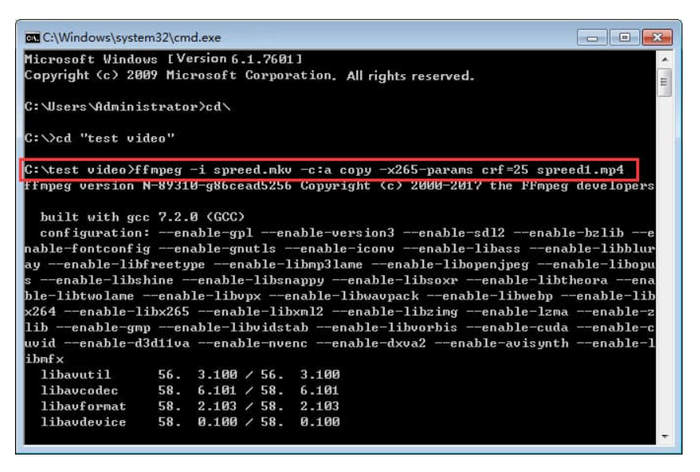
Als u bekend bent met opdrachtregels, kan FFmpeg het beste werken als u H.264 naar MP4 converteert. Als u dat echter niet bent, zult u deze tool moeilijk te gebruiken vinden, wat een van de tekortkomingen is als het gaat om bruikbaarheid voor nieuwe gebruikers.
Deel 4: H.264 online naar MP4 converteren
Als je op zoek bent naar een tool om H.264 online naar MP4 te converteren, is de beste tool die je hiervoor kunt gebruiken de FVC Free Video Converter Online. Deze tool biedt een snelle en zeer gebruiksvriendelijke manier om H.264-bestanden naar het gewenste formaat te converteren: je hoeft alleen het bestand te importeren en je voorkeursformaat te selecteren, en de rest gaat als vanzelf.
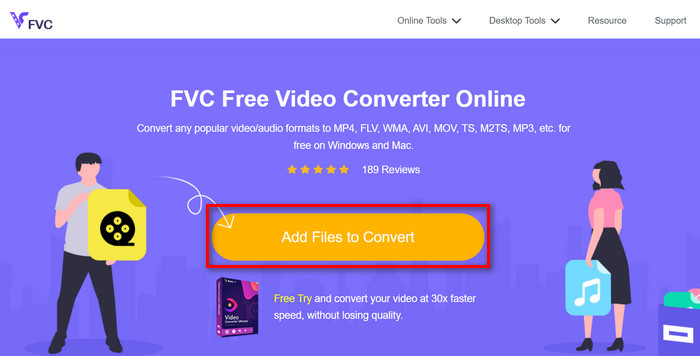
Stap 1. Importeer eerst het H.264-bestand dat je wilt converteren door op de knop Bestanden toevoegen om te converteren te klikken.
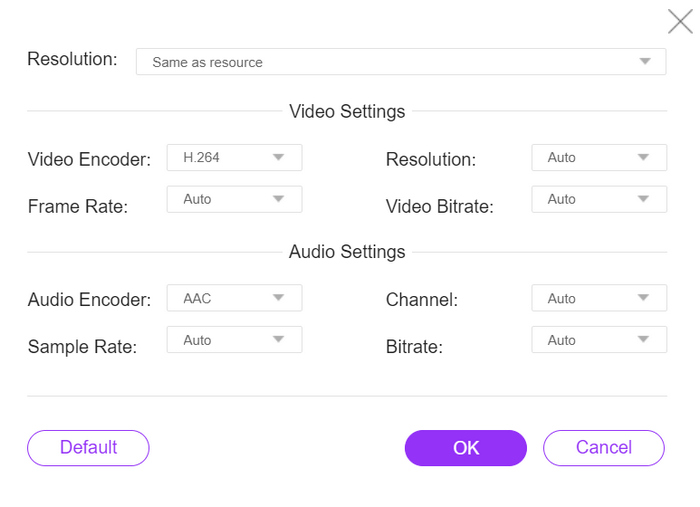
Stap 2. Kies nu als uitvoerformaat MP4. Als je de resolutie, video-encoder, bitrate enzovoort handmatig wilt instellen, klik dan op het tandwielpictogram naast het uitvoerformaat. Klik, als je klaar bent, op de knop OK.
Stap 3. Klik ten slotte op de knop Converteren om het conversieproces te starten.
U hoeft zich geen zorgen te maken over de uitvoerkwaliteit van het geconverteerde H.264-bestand, aangezien deze tool een videoresolutie tot 1080P ondersteunt. Bovendien duurt de conversiesnelheid niet zo lang, aangezien deze 30× sneller is in vergelijking met andere conversietools.
Deel 5. Veelgestelde vragen over het converteren van H.264 naar MP4
H264 versus mp4, wat is beter?
Als het aankomt op compatibiliteit, lijkt MP4 geweldig, aangezien mensen vaak kiezen om H.264 naar MP4 te converteren voor verbeterde apparaatondersteuning en afspeelervaring. Beide formaten hebben echter hun sterke punten en dienen effectief verschillende doeleinden.
Kan ik de originele kwaliteit van mijn H.264-video behouden bij het converteren naar MP4?
Ja, u kunt de originele kwaliteit van uw H.264-video behouden bij het converteren naar MP4, vooral als u een gerenommeerde conversietool gebruikt zoals FVC Video Converter Ultimate of FFmpeg. Deze tools bieden opties om instellingen aan te passen zoals resolutie, bitrate en codec om een uitvoer van hoge kwaliteit te garanderen.
Welke videospelers zijn compatibel met het H.264-formaat?
Er zijn veel videospelers die het H.264-formaat kunnen afspelen, waaronder VLC Media Player, Windows Media Player en QuickTime Player.
Gevolgtrekking
Dat is alles! Je beschikt nu over alle tools en methoden om H.264 naar MP4 moeiteloos te converteren. Of je nu de voorkeur geeft aan desktopsoftware, een commandlinetool of een online converter, de keuze is aan jou. Ga vandaag nog aan de slag en zorg voor compatibiliteit met elk apparaat!
-
 Beste gratis MPG naar MP4-converter in 2024 (diepgaande beoordeling)
 Waarom moet je MPG naar MP4 veranderen? Krijg het antwoord in dit bericht en ken de hooggeplaatste MPG-converter naar MP4 op de markt.
-
 Audio naar MP4: elk audiobestand converteren naar MP4-indeling
 Converteer uw favoriete nummers, podcasts en opnames naar MP4-indeling voor een unieke mix van audio en beeld. Ontdek hoe u WMA converteert naar MP4 of andere audio naar videoformaat.
-
 Top 5 beste FLV naar MP4-converter, gratis en betaald (2024 beoordelingen)
 Blijf op dit bericht en leer over de updates met betrekking tot FLV- en MP4-bestanden. Bovendien hebben we de meest betrouwbare FLV-converter naar MP4 samengesteld.
