


 Video Converter Ultimate
 Scherm opnemer
 Videoreparatie
 Beveiligde download
2 stappen om dvd van laptop naar tv te streamen met Chromecast
Het is een uitstekende manier om Chromecast te gebruiken om je favoriete media te streamen naar een HD‑streamingapparaat zoals een tv of monitor. Als je dvd‑entertainment op Chromecast wilt afspelen, kun je gefrustreerd raken, omdat je je dvd‑films niet rechtstreeks kunt casten via het dvd‑station of de harde schijf van je computer. Om dvd naar Chromecast te streamen, moet je het formaat van het dvd‑bestand wijzigen in een leesbaar bestand, zoals H.264‑video in een MP4‑container. Na de conversie kun je Chromecast gebruiken om de dvd‑inhoud vanaf je pc of Mac naar je tv te streamen.
Gelukkig zijn er verschillende dvd-riptools met een verscheidenheid aan verschillende opties die digitale kopieën van dvd kunnen maken en kunnen converteren naar een formaat dat wordt herkend door Chromecast. Voor meer informatie kunt u de stapsgewijze handleiding volgen om dvd-films van uw computer naar tv te streamen en te casten via Google Chromecast.

Deel 1. Converteer dvd-films naar Chromecast-compatibele bestandsindelingen
De eerste stap om uw dvd te streamen, is door een professionele dvd-ripper te gebruiken om uw dvd-films te converteren naar door Chromecast ondersteunde bestandsindelingen. Aiseesoft Video Converter is een uitstekende multifunctionele video-omzetter en dvd-converter. Met de nieuwste geavanceerde decoderingstechnieken kan het bijna alle soorten dvd's die u op de markt ziet snel converteren naar door Chromecast ondersteunde bestandsindelingen.
Bovendien biedt Aiseesoft Video Converter meer dan 500 formaten waaruit je kunt kiezen, waaronder MP4, AVI, MKV, MPEG, VOB, MP3, AAC, evenals apparaatformaten zoals iPhone, iPad, PS4, Xbox One en meer . Download de software gewoon gratis en volg de onderstaande instructies om het conversieproces van dvd naar Chromecast te starten.
Gratis downloadVoor Windows 7 of nieuwerVeilige download
Gratis downloadVoor MacOS 10.7 of nieuwerVeilige download
Stap 1. Plaats je dvd in het schijfstation en start Aiseesoft Video Converter op je Mac of pc. Ga in de hoofdpagina naar de functie Ripper en klik vervolgens op Load DVD en kies de film die je wilt rippen en converteren. Klik op Open om de analyse te starten.
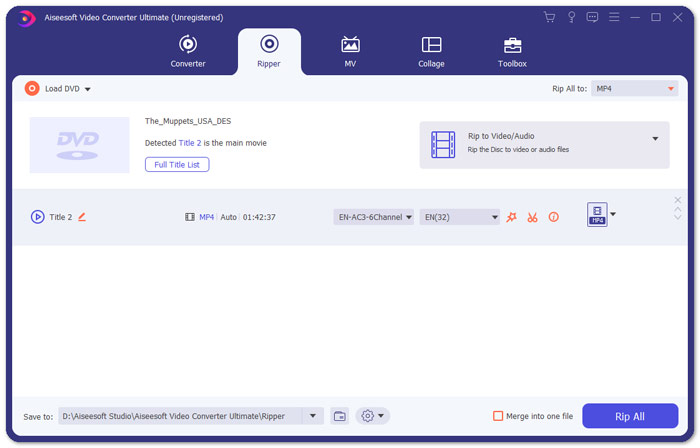
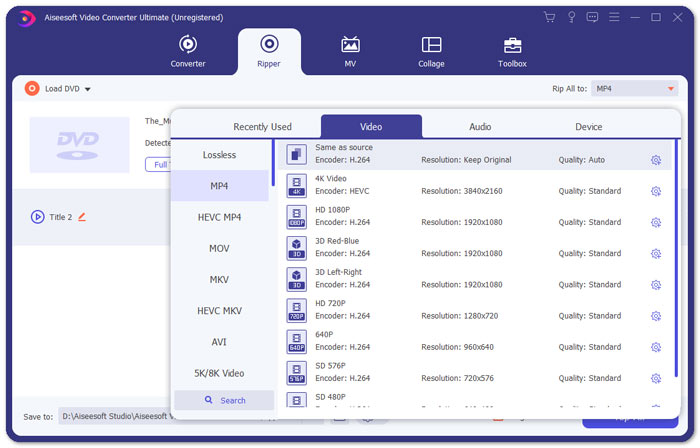
Stap 2. Nadat de bestanden zijn toegevoegd, converteer je ze naar een formaat dat compatibel is met Chromecast, zoals MP4. Vouw de vervolgkeuzelijst van de optie Rip All to uit en selecteer MP4 op het tabblad Video als uitvoerformaat.
Stap 3. Ga vervolgens naar het veld Save to om het pad te bepalen waar je geconverteerde dvd‑film wordt opgeslagen en klik daarna op de knop Rip All om het proces van dvd‑naar‑Chromecast‑conversie te starten.
Deel 2. Stream geconverteerde dvd-inhoud naar tv via Chromecast
Nu heb je een door Chromecast ondersteund videobestand gekregen. Het volgende dat u hoeft te doen, is de dvd-video naar tv casten met Chromecast. Dit is wat u moet doen:
Stap 1. Open je Chrome‑browser en controleer of de Chromecast‑extensie op je computer is geïnstalleerd. Als je de extensie nog niet hebt geïnstalleerd, kun je deze verkrijgen in de Chrome Web Store.
Opmerking: Zorg ervoor dat je de nieuwste Chrome‑versie gebruikt door naar Instellingen en vervolgens Over Chrome te gaan.
Stap 2. Verbind nu de Chromecast met de tv en verbind beide apparaten vervolgens met hetzelfde wifi‑netwerk.
Stap 3. Installeer daarna de Google Cast‑extensie in de Chrome‑browser. Je ziet het cast‑pictogram in de Chrome‑browser. Je kunt de kwaliteit van het casten aanpassen door op het cast‑pictogram voor je tv te klikken.
Stap 4. Sleep daarna je geconverteerde dvd‑film naar het Chrome‑venster, of druk op Ctrl+O om naar de media te bladeren. Nu kun je je dvd‑films naar je tv casten met behulp van Chromecast.
Deel 3. Veelgestelde vragen over het streamen van dvd naar Chromecast
Kan ik dvd naar tv casten met VLC?
Ja. Google heeft VLC-ondersteuning toegevoegd in de Chromecast 3 voor moeiteloos streamen.
Is er een alternatief voor de Chromecast?
Als u Chromecast niet wilt gebruiken om uw dvd te streamen, kunt u Chromecast-alternatieven gebruiken zoals Roku, Amazon Fire Stick, Apple TV en andere.
Welke formaten ondersteunt Chromecast?
Chromecast ondersteunt audio-, video- en grafische media-indelingen zoals JPEG, GIF, PNG, BMP, WEBP, HE-AAC, LC-ACC, MP3, WAV en nog veel meer.
Gevolgtrekking
We hopen dat het je met bovenstaande stappen is gelukt om de dvd naar Chromecast te casten. Behalve het streamen van dvd naar Chromecast zijn er nog andere streamingopties, bijvoorbeeld dvd naar Apple TV streamen of dvd naar Roku streamen. Kies een dienst die het beste bij je behoeften past om het streamen van dvd’s eenvoudig te maken. Als je je dvd‑films liever online bekijkt, probeer dan FVC Free Video Player
-
 6 geverifieerde oplossingen om video's te repareren die niet in Chrome worden afgespeeld
 Om het probleem op te lossen dat video's niet worden afgespeeld in Chrome, hoeft u alleen maar onze probleemoplossing te lezen en de geverifieerde oplossingen één voor één uit te voeren.
-
 100% Werkende oplossingen om te verhelpen dat QuickTime Player niet werkt
 Het is mogelijk om te repareren dat QuickTime Player niet werkt als u onze stapsgewijze oplossingen één voor één volgt. Dan kun je video's soepel afspelen op je Mac.
-
 Android dvd-speler - Hoe dvd-video's af te spelen op Android-mobiele telefoons
 Hoe dvd-bestanden afspelen op Android-mobiele telefoons? Zijn er Android-dvd-spelers? In dit artikel leert u over 3 manieren om dvd-video's af te spelen op Android-mobiele telefoons met of zonder het externe stuurprogramma.
