


 Video Converter Ultimate
 Scherm opnemer
 Videoreparatie
 Beveiligde download
VLC Rip DVD: Hoe u eenvoudig DVD's kunt converteren met VLC [2024]
Zeker, films kijken op een dvd-speler was ooit onderdeel van je leven? Vertel eens, waar heb je als kind je eerste tekenfilm of film gekeken? Nostalgisch gevoel, toch? Nu Netflix alle mediastreamingplatforms overheerst, is het kijken van films nog nooit zo makkelijk en toegankelijk geweest. Hierdoor worden veel schijven nu over het hoofd gezien, wachtend om na verloop van tijd te gaan rotten.
Als je je collecties wilt bewaren, is de enige manier waarop je dat kunt doen, ze één voor één te rippen met behulp van VLC. VLC is een gratis multimediaplayer waarmee gebruikers verschillende soorten video’s kunnen afspelen, converteren en repareren. Maar daarnaast kan deze tool ook dvd’s rippen en de mediacontent eruit halen. Daarom hebben we in dit artikel een handleiding opgesteld die je kan helpen om dvd’s te rippen met VLC. Bovendien vind je aan het einde van het artikel een VLC‑alternatief dat mogelijk makkelijker werkt en nog betere functies biedt. Waar wacht je nog op? Scroll naar beneden en duik in dit artikel.

Deel 1. DVD rippen op VLC
VLC is een mediaspeler-software-app die beschikbaar is voor Windows-, macOS- en Linux-gebruikers. Deze tool staat bekend om zijn facetfuncties, waarmee gebruikers niet alleen verschillende video's kunnen afspelen, maar ook dvd's kunnen rippen, waardoor ze toegankelijker en afspeelbaarder worden op verschillende apparaten. Wat deze tool doet, is dat het de inhoud van de schijf extraheert en deze vervolgens omzet in een gedigitaliseerd videobestand dat eenvoudig kan worden opgeslagen of gedeeld.
Prijs: 100% gratis
Hier is een stapsgewijze handleiding voor het rippen van dvd’s met VLC:
Stap 1: Download en installeer eerst VLC op je apparaat. Plaats daarna de schijf.
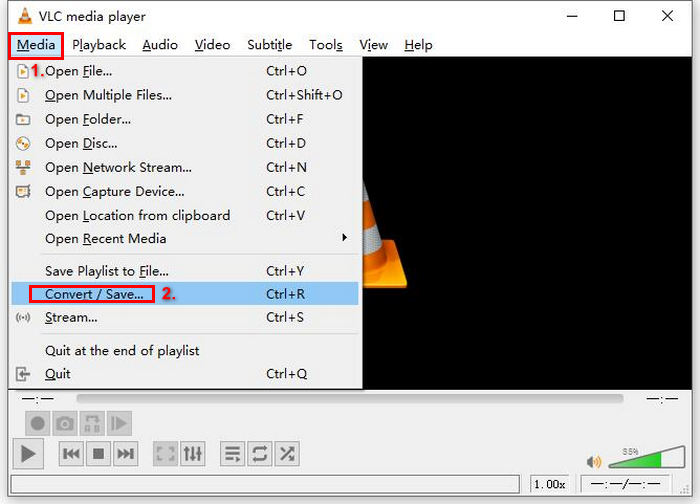
Stap 2: Ga vervolgens naar het tabblad Media en kies de optie Converteren/ opslaan uit de lijst.
Stap 3: Klik daarna bovenaan op Schijf, schakel de optie DVD in en selecteer bij Schijfapparaat de dvd die je wilt rippen.
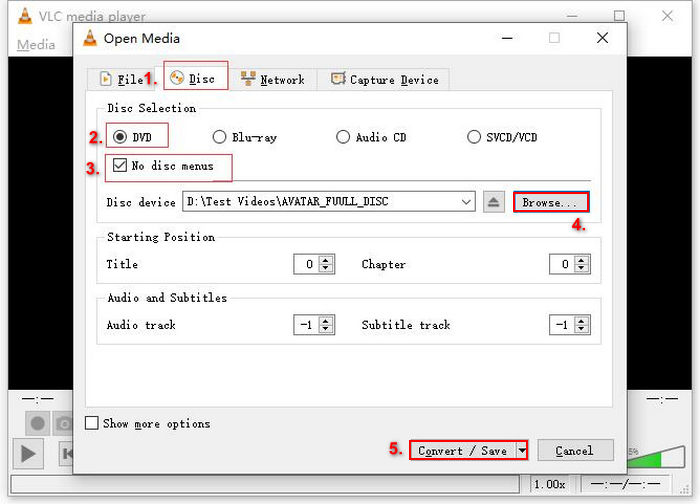
Stap 4: Klik nu op de knop Converteren/ opslaan en stel het uitvoerformaat in op MKV door in het vervolgmenu Profiel hieronder te klikken.
Stap 5: Klik vervolgens in de sectie Bestemming hieronder op Bladeren, kies een map en geef het uitvoerbestand een naam.
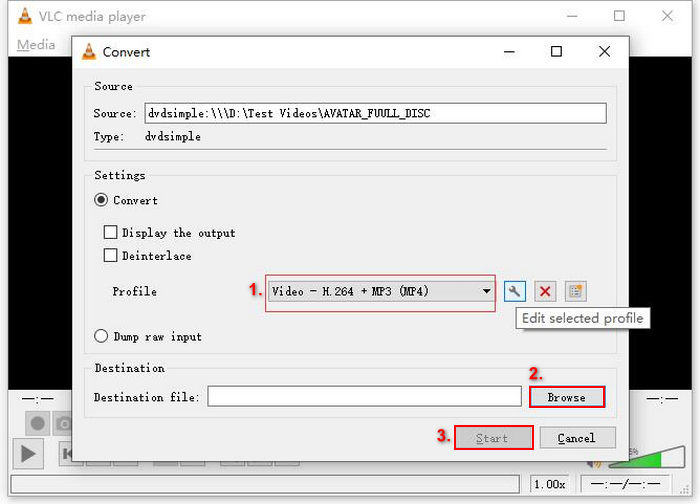
Stap 6: Wanneer alles is ingesteld, klik je op de knop Start om de dvd met VLC te rippen.
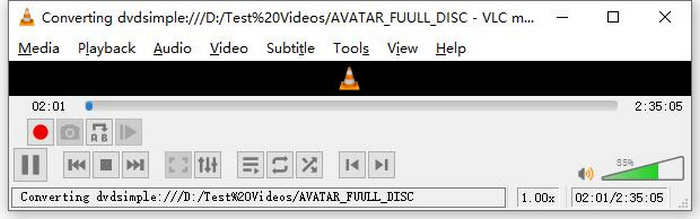
Opmerking: Je ziet de voortgangsbalk Converteren onderaan. Wacht gewoon tot VLC het rippen heeft voltooid.
Opmerking:
Wat we zo geweldig vinden aan VLC Media Player is dat het echt betrouwbaar en veelzijdig is, vooral voor gebruikers die op zoek zijn naar een gratis optie om dvd's te rippen. Ondanks deze functie kan de interface echter wat technisch zijn voor beginners, en het proces kan lang lijken vergeleken met meer gespecialiseerde en toegewijde dvd-rippersoftware. Bovendien kan het moeite hebben met sommige kopieerbeveiligde schijven, wat de effectiviteit in die gevallen beperkt. Desalniettemin is het nog steeds aan te raden om dvd's te rippen op VLC.
Deel 2. Alternatieven voor VLC DVD Ripper
Zoek je een alternatief voor VLC om dvd's te rippen? Dan is AnyMP4 DVD Ripper de perfecte keuze. Dit alternatief voor VLC is een complete tool die een groot aantal veelgebruikte videoformaten ondersteunt, waaronder MP4, MOV, AVI, MKV en meer. Hiermee kun je eenvoudig dvd's converteren naar digitale formaten voor weergave op diverse apparaten, zonder kwaliteitsverlies. De ripmogelijkheden zijn uitstekend; AnyMP4 DVD Ripper ondersteunt alle soorten dvd's, zoals zelfgemaakte dvd's, commerciële dvd's, fitness-dvd's en dvd's met 99 titels.
Gratis downloadenVoor Windows 7 of hogerVeilig downloaden
Gratis downloadenVoor macOS 10.7 of hogerVeilig downloaden
Stappenplan voor het rippen van een dvd met AnyMP4 DVD Ripper:
Stap 1: Download en installeer eerst de tool op je apparaat. Vergeet niet de dvd in de dvd‑drive van je computer te plaatsen en wacht een paar minuten tot deze wordt herkend.
Gratis downloadenVoor Windows 7 of hogerVeilig downloaden
Gratis downloadenVoor macOS 10.7 of hogerVeilig downloaden
Stap 2: Start nu de tool en klik op "Load DVD" om de schijf te laden.
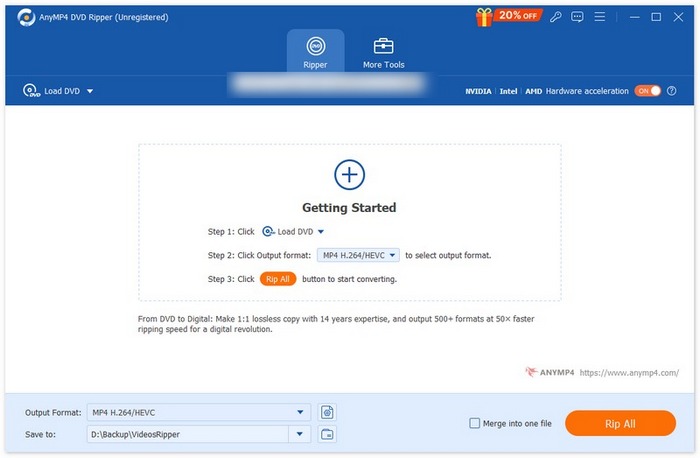
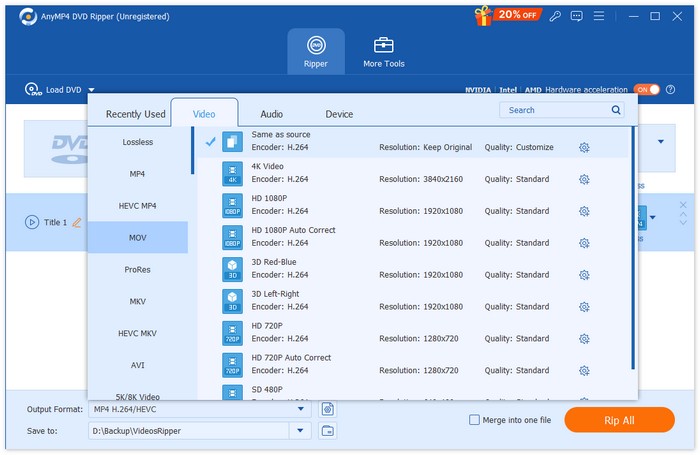
Stap 3: Klik daarna hieronder op "Output Format" en kies het gewenste videoformaat op het tabblad "Video". Met dit proces kun je je dvd omzetten naar een videoformaat dat toegankelijker is en door allerlei apparaten wordt ondersteund. Als je klaar bent, klik je eenvoudig op de knop "Rip All" om te beginnen met het rippen van je dvd.
Veel makkelijker, toch? AnyMP4 DVD Ripper is echt een geweldig alternatief voor VLC DVD Ripper. Van de interface en het ripproces tot alle andere essentiële functies, deze tool is een gamechanger en veel beter dan hoe VLC dvd's ript.
Deel 3. Veelgestelde vragen over het rippen van dvd's op VLC
Wat is het beste formaat om een DVD te rippen?
Het beste formaat om een DVD te rippen hangt af van het apparaat van de gebruiker. MP4 is echter een veelgebruikt videoformaat. Dus bij het rippen van een DVD is het veiligste formaat dat u kunt kiezen MP4.
Kan ik een DVD rippen op Windows 7?
Ja. U kunt een dvd rippen op Windows 7 met VLC Media Player. VLC ondersteunt verschillende besturingssystemen, waaronder Windows 7. Wanneer het aankomt op het rippen van dvd's op VLC, volgt u gewoon hetzelfde proces als u zou doen op andere versies van Windows. Maar zorg ervoor dat uw dvd-station werkt en dat VLC up-to-date is om compatibiliteitsproblemen te voorkomen.
Hoe lang duurt het om een DVD te rippen?
De tijd die nodig is om een dvd te rippen, varieert afhankelijk van verschillende factoren. Het is belangrijk om rekening te houden met de grootte van de dvd, de snelheid van je dvd‑station en de instellingen die je kiest voor het rippen, bijvoorbeeld de resolutie, het formaat, enzovoort. Maar meestal duurt het rippen van een standaard-dvd ongeveer 20 minuten tot meer dan een uur. Rips van hogere kwaliteit en grotere bestanden kosten over het algemeen meer verwerkingstijd. Wil je meer weten over de afspeelsnelheid van VLC, kijk dan hier.
Kan ik dvd's met kopieerbeveiliging rippen met VLC?
Nee. Het is voor alle software lastig om dvd's met kopieerbeveiliging te rippen vanwege encryptie en beveiligingen via digitaal rechtenbeheer.
Gevolgtrekking
Nu je weet hoe je dvd’s kunt rippen met VLC, is er geen reden meer om al je dvd’s voor altijd te bewaren. Volg gewoon deze handleiding en je kunt al je schijven omzetten naar digitale bestanden die je overal en op elk apparaat dat je wilt kunt afspelen. Werkt VLC ondertussen niet bij jou, dan kun je als alternatief AnyMP4 DVD Ripper proberen. Ben je er klaar voor? Laten we erin duiken en beginnen met rippen.
-
 Hoe dvd-films van pc/Mac naar tv te streamen via Chromecast
 Weet u niet hoe u dvd-films op tv kunt bekijken via Chromecast? Dit artikel toont de eenvoudigste manier om uw dvd-films via Chromecast van pc naar tv te casten.
-
 Android dvd-speler - Hoe dvd-video's af te spelen op Android-mobiele telefoons
 Hoe dvd-bestanden afspelen op Android-mobiele telefoons? Zijn er Android-dvd-spelers? In dit artikel leert u over 3 manieren om dvd-video's af te spelen op Android-mobiele telefoons met of zonder het externe stuurprogramma.
-
 De beste 3 alternatieven voor DVDFab Player om dvd-video's op pc af te spelen
 Is DVDFab Player het waard om te kopen? Kan het 4K-video's afspelen? Hoe zit het met de betaalde versie? Dit artikel introduceert de functies in detail en er zijn de 3 beste alternatieven voor DVDFab Player waaruit u kunt kiezen.
