


 Video Converter Ultimate
 Scherm opnemer
 Videoreparatie
 Beveiligde download
Beste OGG-spraakrecorder helpt OGG op alle platforms op te nemen
OGG is het beste audio-bestandsformaat in plaats van MP3. Dit opensource-audioformaat wordt onderhouden door Xiph.org. Dit type formaat wordt in de game-industrie gebruikt als audioformaat, omdat het beter klinkt en bestanden veel kleiner comprimeert. Toch vinden gebruikers het vaak lastig, omdat sommige recorders dit formaat niet ondersteunen, aangezien het standaard audioformaat MP3 is. De onderstaande lijst bevat de beste OGG-recorders die dit formaat ondersteunen. Als je meer gedetailleerde stappen en informatie wilt, lees dan aandachtig verder om de functies van de verschillende tools te begrijpen, zodat je kunt kiezen wat het beste bij je past als gebruiker en misschien in de toekomst als klant.

Deel 1. Beste OGG Recorder-software voor pc- en Mac-gebruikers
In onderstaande lijst staan de beste OGG recorders die in alle verschillende functies verkrijgbaar zijn met stappen en informatie.
FVC gratis audiorecorder

Een tool die gespecialiseerd is in het opnemen van audioformaten. FVC Free Audio Recorder staat bekend als de beste online tool die je op het web kunt vinden. Deze opensource-tool kan je helpen om overal waar je een internetverbinding hebt audiobestanden op te nemen. Het is ook een goede keuze als jouw OGG-recorder. Lees verder voor meer uitgebreide details over deze geweldige tool en volg de stappen om te leren hoe je audio-opnames maakt.
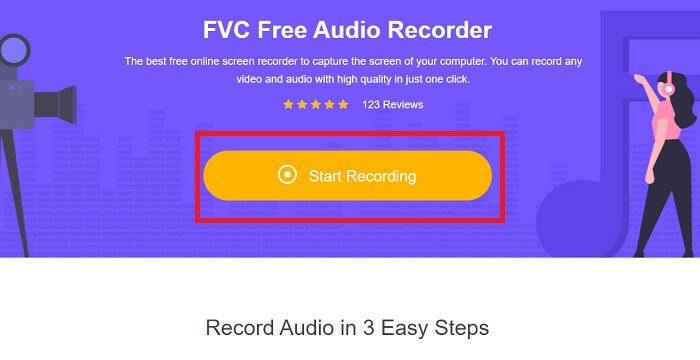
Stap 1. Klik op deze link om naar de webpagina van de tool te gaan. Klik op Start Recording en start de tool.
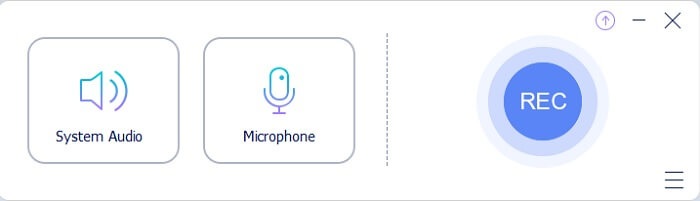
Stap 2. Er verschijnt een zwevende werkbalk zoals deze op het scherm.
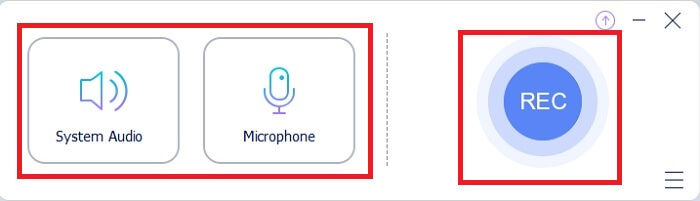
Stap 3. Zet de Speaker aan om het systeemaudio toe te voegen en de Mic om je stem toe te voegen. Klik op de ronde knop om met opnemen te beginnen.
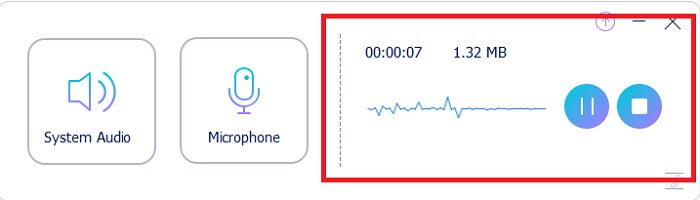
Stap 4. Nadat je op de opnameknop hebt geklikt, verschijnt dit scherm. Dat betekent dat de opname al is gestart.
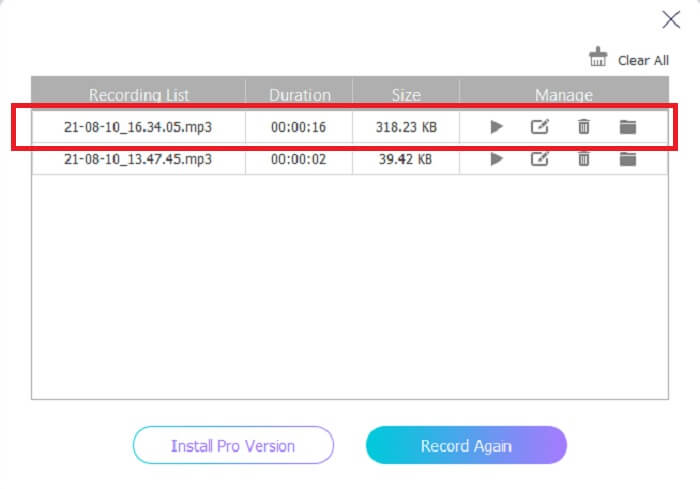
Stap 5. Als de opname klaar is, klik je op de Stop-knop en wordt het bestand automatisch op je apparaat opgeslagen. De geschiedenis van je opnames verschijnt op je scherm. Geniet van de opname-uitvoer op zijn best.
Voordelen
- Gebruiksvriendelijk vanwege de directe instructie.
- Het produceert een gecomprimeerd audioformaat, dus het is ook opslagvriendelijk.
- Open source, dus het is beschikbaar voor iedereen die de tool wil gebruiken.
Nadelen
- Het heeft een internetverbinding nodig voordat je het kunt gebruiken.
- Het heeft geen ruisonderdrukking zoals de premium.
Deel 2. Andere nuttige OGG-recorders voor alle besturingssystemen
1. FVC-schermrecorder
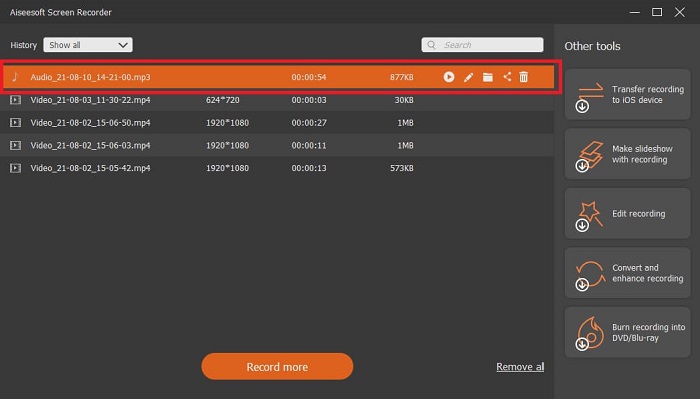
Als je denkt dat de tool hierboven al slim is: om je een concreet voorbeeld te geven, als Galileo Galilei de vader van de moderne wetenschap is, dan is deze tool de vader van het moderne opnamesysteem. FVC Screen Recorder is de beste recorder, of het nu om audio of video gaat. Hij levert een van de beste outputs en toch hoef je geen enkele moeite te doen om de tool zelf te gebruiken. In tegenstelling tot andere tools is dit programma ontworpen om de gebruiker de best mogelijke ervaring te bieden. Dus als jij een van de gebruikers bent die het lastig vindt om audio op te nemen, volg dan de eenvoudige stappen hieronder en houd je nauwkeurig aan de instructies.
Stap 1. Download de tool die past bij de specificaties van je besturingssysteem. Dit duurt slechts een paar seconden om te downloaden en vervolgens te installeren. Pas de Preference aan op basis van je voorkeuren en klik op Finish om verder te gaan.
Gratis downloadenVoor Windows 7 of nieuwerVeilig downloaden
Gratis downloadenVoor macOS 10.7 of nieuwerVeilig downloaden
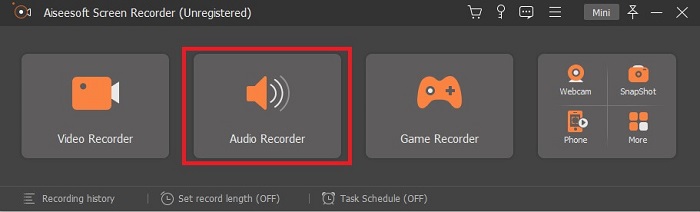
Stap 2. Klik in de werkbalk op Audio Recorder.
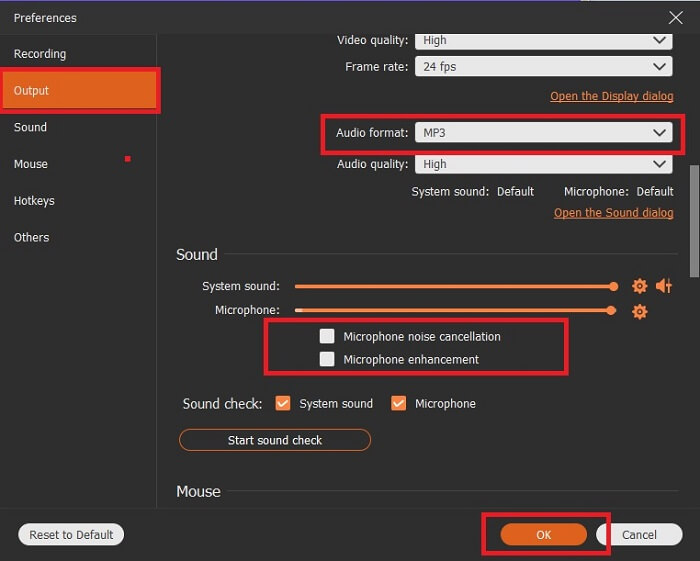
Stap 3. Zoek het Gear-pictogram om de andere opties aan te passen. Ga naar Output om deze te wijzigen naar MP3-, WMA-formaat of een ander gewenst formaat. Door met het muiswiel naar beneden te scrollen zie je meer opties. Andere functies die je tijdens het opnemen kunt gebruiken zijn onder andere Noise cancelling en Microphone enhancement. Klik op OK om verder te gaan.
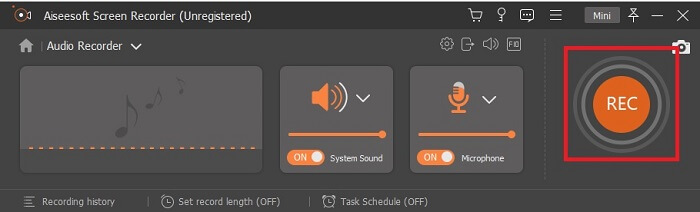
Stap 4. Nadat je de instellingen hebt aangepast, zet je in de werkbalk je Speaker en Microphone aan om het audio-uitvoer aan je opname toe te voegen. Klik daarna op de ronde knop om met opnemen te beginnen.
Stap 5. Als je de opname wilt beëindigen, klik je op de vierkante knop om te stoppen. Klik op Save en Next om verder te gaan. Speel je OGG-stemrecorder daarna af op elk mediaplatform.
Voordelen
- Met deze tool kun je altijd en overal opnemen met kristalhelder geluid.
- Het biedt een geweldige ervaring voor de gebruiker die deze tool al gebruikt.
- Alles-in-één opname.
Nadelen
- Betalen voor gebruik.
- Het heeft 2,4 MB aan opslagruimte nodig.
2. Screencast-O-Matic
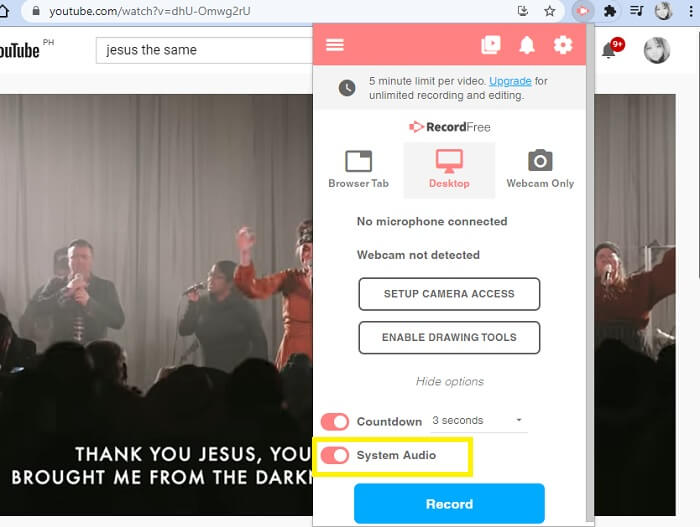
Nog een beste tool voor schermopname die het werk zal doen. Screencast-O-Matic is een van de beste tools die je op internet kunt vinden. Het maakt uw opname eenvoudig en efficiënt. Het heeft ook een online tool als u de online website bezoekt, maar het duurt een minuut of twee voordat het proces de online tool zelf heeft voltooid. Dus als je geen fan bent van in de rij wachten, dan is dit niet de beste keuze voor jou. Maar als je van wachten houdt, dan is het de moeite waard tot het einde.
Voordelen
- Het is gemakkelijker te gebruiken dan Camtasia.
- Werk als organisatie in plaats van als individu met het veiligheidswachtwoord.
- Zeer boeiend en het is een prima recorder.
Nadelen
- De tool-interface is op het punt, maar het is monochroom, dus verwacht dat het saai van kleur is, waardoor het minder interessant is om te gebruiken.
- Het staat de gebruiker alleen toe om maximaal 15 minuten op te nemen in de gratis versie.
3. ShareX
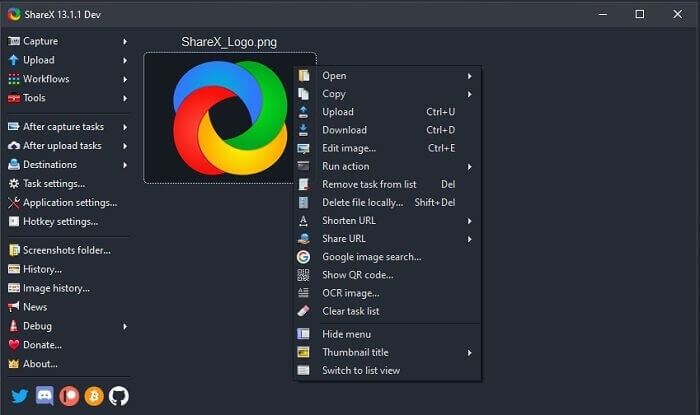
Een van de tools die je online kunt tegenkomen als je naar een schermrecorder zoekt. Deze is alleen beschikbaar voor Windows OS. Dat betekent dat als je een Mac- of Linux-gebruiker bent, deze tool niet op jouw besturingssysteem zal werken omdat die programma’s niet worden ondersteund. Share kan gemakkelijk in de top 20 van beste schermrecorders op internet worden geplaatst, omdat het meer dan 80 bestemmingen ondersteunt waarnaar je de uiteindelijke output kunt verzenden.
Voordelen
- Aanpasbaar hulpmiddel.
- Biedt indien nodig eigen bewerkingstools.
- Wijzig de sneltoetsen om het opnemen net zo gemakkelijk te maken.
Nadelen
- Overweldigend voor iemand die nieuw is met deze tool. Het is een pijn in de kont om deze tool te leren gebruiken.
- Niet beschikbaar voor mac-gebruikers.
Deel 3. Vergelijkingstabel
| Functies | FVC gratis audiorecorder | FVC-schermrecorder | Screencast-O-Matic | ShareX |
| Geluidsopname |  | | | |
| Ruisonderdrukking |  | | | |
| Microfoonverbetering | | | | |
| Complexiteit van de tool | On-point online opname-instructie. | Makkelijk in gebruik aangezien in de tool al aangegeven is wat het doel is en hoe het presteert. | Het is een makkelijk te gebruiken tool met minder details. | De complexiteit van de tool is moeilijk voor de nieuwe gebruiker. |
| Beschikbare platforms | Alle besturingssystemen. | Alle besturingssystemen. | Windows-pc, Mac en Chromebook. | Windows 7 SP1 of hoger. |
| Beschikbare audio-indeling | MP3 en OGG | MP3, WMA, AAC, M4A, FLAC, OGG, Opus en nog veel meer. | Kan audio niet afzonderlijk opnemen. | MP3 en WAV |
| Prijsbereik | Gratis online tool | Voor 1 maand: $25.00 Voor een jaar: $31.20 Voor levenslange licentie: $55.20 | Het heeft een gratis versie. Voor de premium solo. Luxe $1.65/maand Premier $4.00/maand Voor teamplannen. U kunt team deluxe of team premier instellen. | gratis en open source programma. |
Deel 4. Veelgestelde vragen over OGG Recorder
Hoe maak je een OGG-bestand met een geluidsrecorder?
Gebruik een audiorecorder zoals in de bovenstaande lijst. Lees voor meer gedetailleerde informatie het artikel hierboven voor informatie en stappen over hoe u kunt opnemen met het audio-uitvoerformaat voor OGG.
Wat is het beste audioformaat? MP3 of OGG?
OGG is het beste audiobestandsformaat. Maar gebruikers hebben de neiging om de MP3 te gebruiken omdat deze meer standaard is dan de OGG. Toch bevat OGG metadata met minder opslagruimte en de beste audio-output, bijvoorbeeld de naam van de artiest en trackdata.
Waarom kan mijn OGG-formaat niet worden afgespeeld in mijn mediaspeler?
Sommige mediaspelers ondersteunen dit type formaat niet. Daarom kun je FVC Free Online Video Converter gebruiken als converter. Hiermee kan de gebruiker het OGG-bestand naar MP3 converteren of naar een ander gewenst audioformaat, zodat het kan worden afgespeeld. Of je kunt FVC Free Video Player of andere OGG-spelers gebruiken om dit type formaat af te spelen, omdat deze tool vrijwel alle verschillende soorten audio- en videoformaten ondersteunt.
Gevolgtrekking
Aan het einde van de discussie heeft u nu een nieuwe kennis verworven door deze te lezen en te selecteren welke tool bij uw vraag past. Verschillende keuzes worden vermeld in dit artikel met stappen en wat informatie over de tool. Volg gewoon de stappen en neem de tijd om het te lezen, zodat u het zult begrijpen. Je moet verstandig kiezen.
Maar om een voorbeeld te geven: FVC Screen Recorder voldoet aan de vraag van de gebruiker. Als gebruiker moet je jouw behoeften en wensen bij een recorder vooropstellen. Bijvoorbeeld: of de recorder gemakkelijk te gebruiken is, geschikt is voor het opnemen van audio, beschikbaar is op bijna alle platforms, en als het een betaalde tool is, of hij dan goedkoop is en toch een uitstekende kwaliteit levert. Al deze voorbeelden komen samen in FVC Screen Recorder. Neem geen genoegen met minder, want je verdient meer.
-
 Snagit 2025 Review – Voor- en nadelen en het beste alternatief
 Wat is het beste alternatief voor Snagit? Is er een tool voor het vastleggen van schermen zoals Snagit? Dit bericht behandelt Snagit en deelt het beste alternatief voor Snagit om het scherm vast te leggen.
-
 QuickTime-schermopname - Video opnemen met audio op Mac en pc
 Opnamescherm met audio op Mac komt goed van pas. De ingebouwde speler, QuickTime Player, kan het. Lees zijn bericht en weet hoe je een scherm met geluid kunt vastleggen op Mac en pc.
-
 DU Recorder Review 2025: Veiligheid&Prijs&Functies&Gebruik&Beoordelingen
 DU Recorder is een scherm- en audiorecorder voor iPhone en Android. Is het de moeite waard om te downloaden? Is het veilig? Lees de volledige recensie om te zien of de app geschikt voor u is.
