


 Video Converter Ultimate
 Scherm opnemer
 Videoreparatie
 Beveiligde download
FLAC versus MP3: introductie en vergelijking van audioformaten
The debate between FLAC vs. MP3 file formats has been ongoing for years. While MP3 is one of the oldest and most widely-used formats, FLAC has gained popularity among audiophiles for its lossless audio compression. But which one is better? In this guide, we'll take a closer look at the differences between FLAC and MP3, including their sound quality, file size, compatibility, and more, to help you decide which format to choose for your music collection.

Deel 1. FLAC versus MP3: introductie van audioformaten
MP3 Anecdote
MP3 is een populair formaat voor digitale audiobestanden dat sinds de introductie in de jaren negentig op grote schaal wordt gebruikt. Het gebruikt een vorm van compressie met verlies om de grootte van audiobestanden te verkleinen met behoud van een goede geluidskwaliteit. MP3-bestanden kunnen eenvoudig worden gedeeld, gedownload en afgespeeld op verschillende apparaten, waardoor het een handige keuze is voor liefhebbers van digitale muziek. De vraag is, is FLAC beter dan MP3? Laten we erachter komen door de beschrijving van FLAC te lezen.
FLAC Anecdote
FLAC (Free Lossless Audio Codec) is een hoogwaardige audiobestandsindeling die lossless compressie gebruikt om de originele audiogegevens te behouden zonder aan kwaliteit in te boeten. Dit betekent dat FLAC-bestanden veel groter zijn dan MP3-bestanden, maar hetzelfde audiogetrouwheidsniveau behouden als het originele bronmateriaal.
Deel 2. Ondersteunde apparaten/platforms van FLAC en MP3
Laten we nu de MP3 versus FLAC-vergelijking bekijken om te zien hoe ze presteren met betrekking tot de platforms of apparaten die ze ondersteunen.
MP3 is een breed ondersteunde audiobestandsindeling die op verschillende platforms kan worden afgespeeld, waaronder:
◆ Computers met Windows-, macOS- en Linux-besturingssystemen.
◆ Portable media players, such as iPods and other MP3 players.
◆ Smartphones en tablets met iOS, Android en andere mobiele besturingssystemen.
◆ Autoradio's met USB- of aux-ingangen.
◆ Thuisbioscoopsystemen en stereo-ontvangers met USB- of netwerkconnectiviteit.
◆ Muziekstreamingservices, zoals Spotify en Apple Music, gebruiken MP3 vaak als hun standaardindeling voor het streamen en downloaden van muziek.
FLAC wordt niet zo breed ondersteund als MP3, maar kan nog steeds op verschillende platforms worden afgespeeld, waaronder:
◆ Computers met Windows-, macOS- en Linux-besturingssystemen.
◆ Sommige draagbare mediaspelers, zoals de Astell&Kern AK Jr en de PonoPlayer.
◆ Sommige smartphones en tablets met Android en andere mobiele besturingssystemen.
◆ Sommige autoradio's en home theatre-systemen met USB- of netwerkconnectiviteit.
◆ Sommige streaming-muziekservices, zoals Tidal, bieden high-fidelity FLAC-streaming- en downloadopties.
Deel 3. Is FLAC beter dan MP3?
Sta ons deze keer toe om het verschil tussen FLAC en MP3 op te sommen door deze audioformaten uitgebreid te vergelijken.
Hier is een uitgebreide vergelijking van FLAC en MP3 op basis van verschillende factoren:
Sound quality: FLAC offers better sound quality than MP3, for it is a lossless format that preserves all the audio data in the source material. On the other hand, MP3 is a lossy format that discards some audio data during compression, which can result in a loss of audio quality.
File size: MP3 files are much smaller than FLAC files, as MP3 uses lossy compression to reduce the file size. This makes MP3 a more practical choice for those with limited storage space or those who need to share or download music files quickly over the internet.
Compatibility: MP3 is widely compatible with various devices and software, including desktop and laptop computers, portable media players, smartphones, car stereos, and streaming music services. FLAC, on the other hand, may not be compatible with some devices and software due to its larger file size and lossless compression.
Bitrate: MP3 files can be encoded at a lower bitrate to reduce the file size further, but this also results in a loss of audio quality. FLAC files, on the other hand, always maintain the same bitrate as the original source material.
Editing: FLAC is a better choice for audio editing, as it offers a higher level of audio fidelity and doesn't introduce any additional compression artifacts. MP3 files, on the other hand, may introduce additional compression artifacts during editing due to their lossy compression.
Price: Both FLAC and MP3 are free and open-source formats, so there is no cost associated with using either format.
Deel 4. Converteer FLAC naar MP3 of MP3 naar FLAC
Nu we klaar zijn met het proces om FLAC met MP3 te vergelijken, gaan we verder met het proces van het converteren van MP3 naar FLAC of vice versa.
Video Converter Ultimate is a powerful software tool that allows you to easily convert audio and video files from one format to another. One of the many formats supported by FVC Video Converter Ultimate is FLAC, a high-quality, lossless audio format that is often used by audiophiles and music enthusiasts. You can quickly and easily convert your FLAC files to MP3, allowing you to save space on your device and make your music more easily shareable. Video Converter Ultimate offers a user-friendly interface and a range of options for customization, making it a convenient and helpful tool for anyone who needs to convert audio and video files.
Om met deze tool audiobestanden tussen FLAC- en MP3-indelingen te converteren, moet u een paar eenvoudige stappen volgen.
Step 1. First, download and install the program on your computer by clicking on one of the Free Download buttons and following the setup wizard. Next, launch the program to access its user-friendly interface.
Gratis DownloadVoor Windows 7 of hogerBeveiligde download
Gratis downloadenVoor macOS 10.7 of laterVeilige download
Step 2. Next, add the audio file you want to convert by clicking the plus sign button from the main interface. Once added, you'll see a thumbnail of each file on the interface.
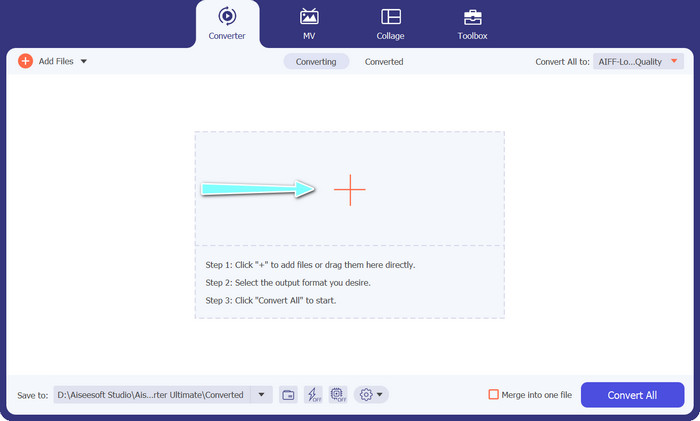
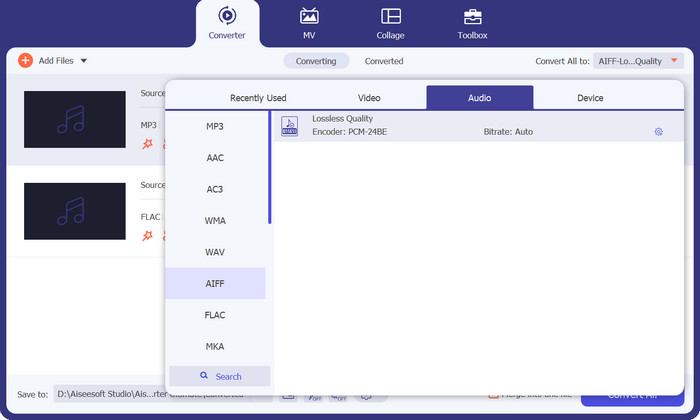
Step 3. Specify the output format by selecting the Audio tab from the Profile menu on the upper right side of the tool. Choose either MP3 or FLAC, depending on the direction of the conversion.
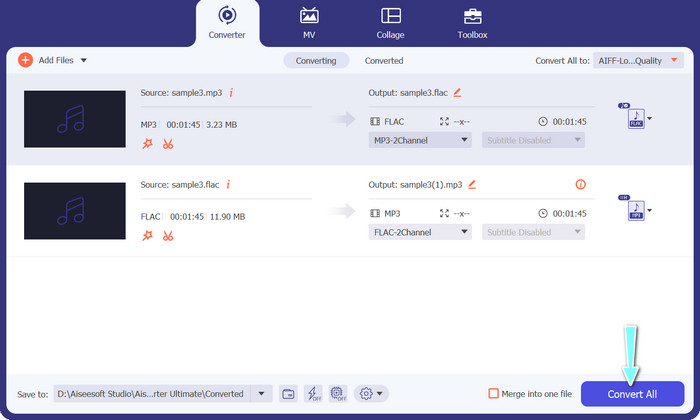
Step 4. Specify the output folder where you want to save the converted files by selecting the appropriate location at the bottom of the interface. Lastly, hit on the Convert All button to start the conversion process.
If you're in need of a free online tool to convert FLAC to MP3, look no further than Free Video Converter Online. This convenient program allows users to convert video and audio files without any cost and also offers the ability to customize output settings according to your preference. The conversion speed is also reliable, so long as you have an internet connection. To get started, follow these steps:
Step 1. Launch your preferred web browser and navigate to the Free Video Converter Online website.
Step 2. Click the Add Files to Convert button to upload the FLAC file you want to convert to MP3.
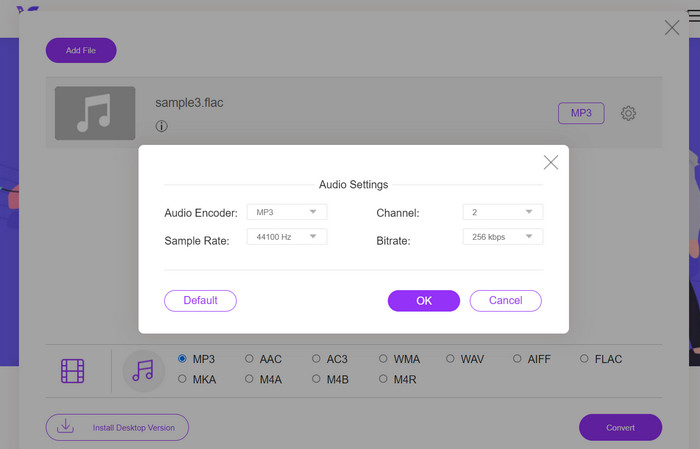
Step 3. Choose MP3 as the output format from the list of available formats under the Audio format menu. You can also select your desired bitrate or output quality for the MP3 file.
Step 4. Click the Convert button to start the conversion process.
Deel 5. Veelgestelde vragen over FLAC vs. MP3
Wat is beter tussen, 16-bit FLAC versus 320Kbps MP3?
De keuze tussen 16 bit FLAC en 320 kbps MP3 komt neer op persoonlijke voorkeur en het beoogde gebruik van het audiobestand. Als u prioriteit geeft aan audiokwaliteit en voldoende opslagruimte heeft, is 16-bits FLAC wellicht de betere optie. Als je een kleinere bestandsgrootte nodig hebt zonder al te veel in te leveren op de audiokwaliteit, kan 320 kbps MP3 een goede keuze zijn.
Zijn FLAC-bestanden groter dan MP3-bestanden?
Ja, FLAC-bestanden zijn doorgaans groter dan MP3-bestanden vanwege hun verliesloze aard.
Ondersteunen alle mediaspelers FLAC?
Nee, niet alle mediaspelers ondersteunen FLAC. Veel moderne mediaspelers en software ondersteunen echter FLAC-weergave, waaronder VLC, Foobar2000 en Winamp.
Gevolgtrekking
Choosing between MP3 and FLAC depends on your personal preference and specific needs. Therefore, FLAC vs. MP3 is a must for your decision-making. Ultimately, the decision on which format to use comes down to your priorities in terms of sound quality, file size, and compatibility.
-
 4 beste methoden om MOV gemakkelijk naar MP3 op Windows en Mac te converteren
 Als u de MP3-audiobestanden uit MOV-bestanden wilt extraheren, kunt u meer leren over de 4 meest efficiënte MOV naar MP3-converters om de gewenste bestanden uit het artikel te halen.
-
 Beste MP3-converters om eenvoudig audiobestanden naar MP3 te transformeren
 Converteer moeiteloos elk audioformaat naar MP3 met onze gebruiksvriendelijke online en offline MP3-converters. Krijg resultaten van hoge kwaliteit in slechts een paar klikken.
-
 Top 3 FLAC-metadata-editors op Mac en Windows [Bijgewerkt 2023]
 Wilt u FLAC-metadata wijzigen? In dit geval moet u dit artikel lezen omdat we voldoende kennis over de nieuwste FLAC-metadata-editor kunnen gebruiken.
