


 Video Converter Ultimate
 Scherm opnemer
 Videoreparatie
Ontdek hoe u het volume op AirPods & Aid Pods Pro met stappen kunt verhogen
Met de AirPods en AirPods Pro kun je Siri bedienen, naar je favoriete muziek luisteren, telefoontjes beantwoorden en meer doen. Een ander groot voordeel van het hebben van een Air Pod is dat het draadloos is, wat betekent dat je geen moeite zult hebben om de geknoopte draad van je oortelefoons te verwijderen. U kunt ook eenvoudig het audiovolume wijzigen door Siri opdracht te geven het volume hoger of lager te zetten.
But there are times that Siri can't detect your voice, so the best to change the volume is to do it manually. Below are the best ways to turn your volume up and the steps indicated between the functions. All of these functions are tested and do great on changing the volume of the sound. Let's learn how to turn up the volume on AirPods or AirPods Pro without further ado.
Deel 1. Hoe u het volume op AirPods/AirPods Pro op uw iOS-apparaten kunt verhogen
All these techniques that we provide will help you if you need to increase the audio on your AirPods. Although some of them are not new to us, we still include them. But before anything else, ensure that your AirPods or Air Pod Pro is connected to your phone via Bluetooth. If you don't know how to connect it, you can bring your AirPods or AirPods Pro next to your iOS device; make sure that it is under 30 meters. Open the case, press and hold the button on the case's back. Immediately a prompt will be on your screen; tap Connect. Once connected, the light on the case will blink, then permanently turn into solid. You can now play the sound on your AirPods after that.
Manier 1. Gebruik de knop Volume omhoog
Het is de meest gebruikelijke manier om het volume van audio die op je iOS wordt afgespeeld te verhogen, en dat is door de harde volumetoetsen te gebruiken. Deze harde toetsen bevinden zich aan de linkerkant van uw iOS-apparaten. Laten we leren hoe u het volume op Aird Pods Pro of uw AirPods zonder vertragingen kunt verhogen.
Step 1. Once the AirPods or AirPods Pro is connected, you can play the sound on your iOS. After playing, click the volume up key on your phone to increase the audio.
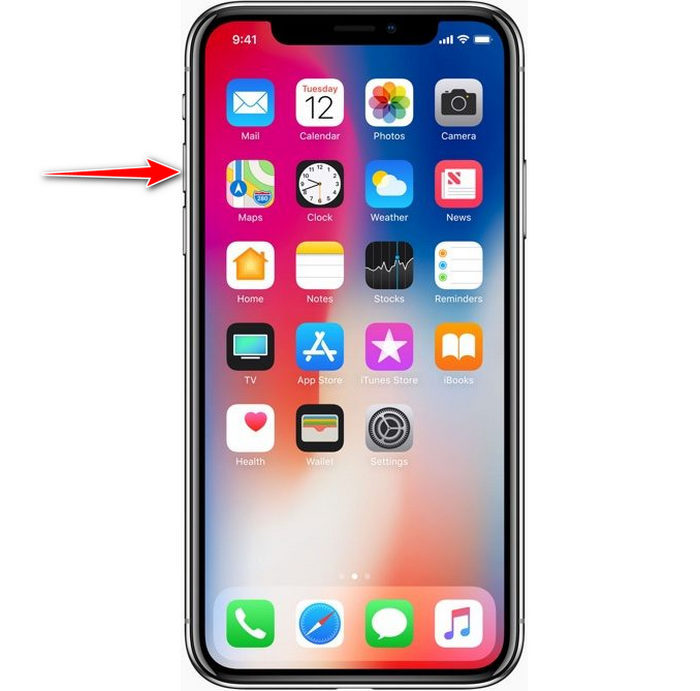
Step 2. If you feel that the sounds became high, click the volume down key to balance it.
Manier 2. Gebruik het controlecentrum
De volgende techniek is als de eerste; het is echter ongebruikelijk om dit te gebruiken omdat de eerste techniek veel gemakkelijker is. Maar dit is handig als de volumetoetsen kapot zijn of niet kunnen. Dus als u deze techniek wilt proberen, kunt u de volgende stappen volgen.
Step 1. Click the System Touch presented on your iOS devices, and click Control Center.
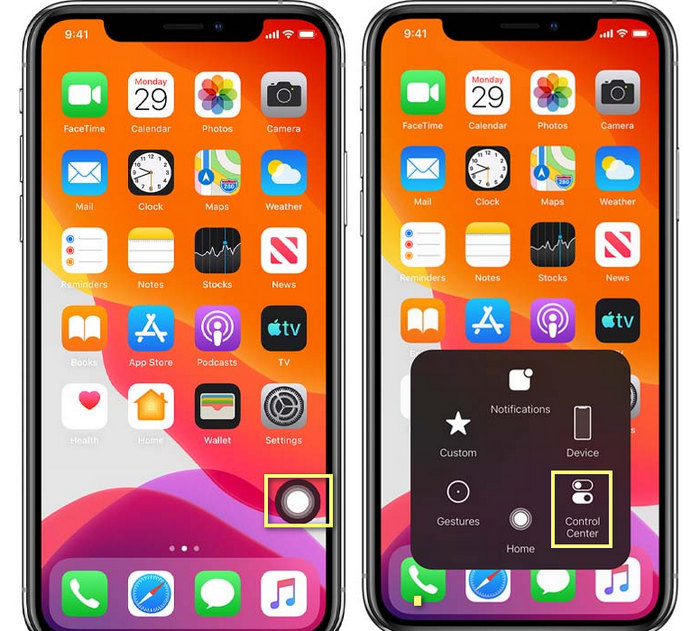
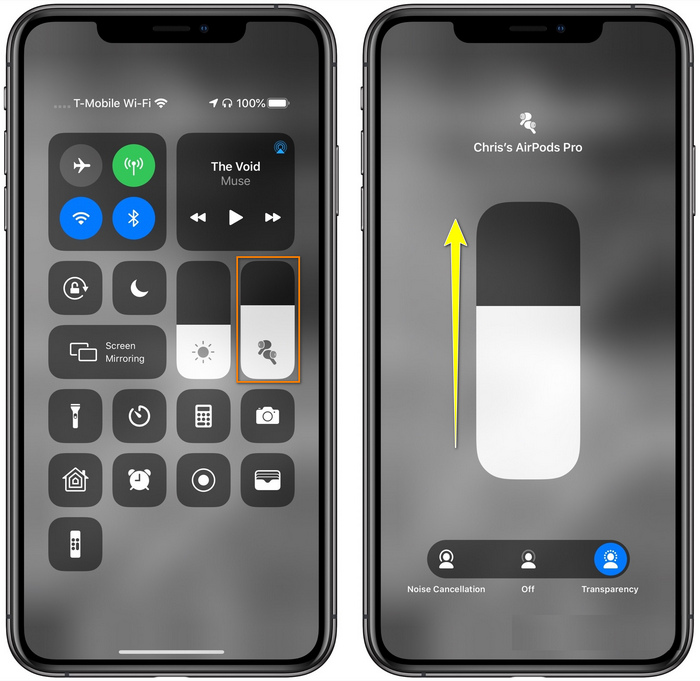
Step 2. At the Control Center, tap and hold the audio slider, adjust the slider up on the next function you will see on the screen, in this area, you can turn on the noise cancellation and transparency if you need.
Manier 3. Gebruik de instellingen
Did you know you can make a major adjustment on your volume if you go to the Settings of your iOS. However, this step only works if you stream music on your AirPods. Also, the volume will change a little bit, but it will increase. So, if you are ready to dig into how to turn up the volume on AirPods thru Settings, you can follow the steps below.
Step 1. Open the Settings, find Music, and click it.
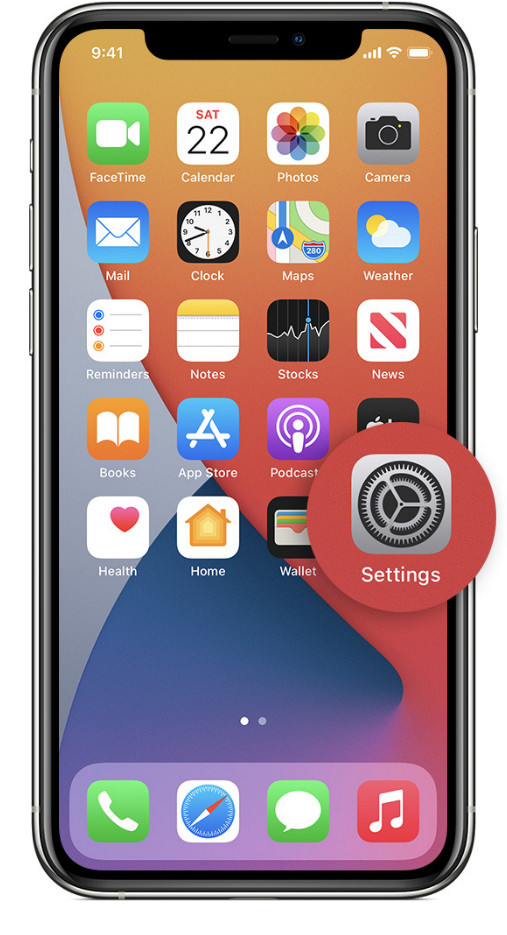
Step 2. Under Playback options, click the EQ choose one of the equalizers you want to add to your music.
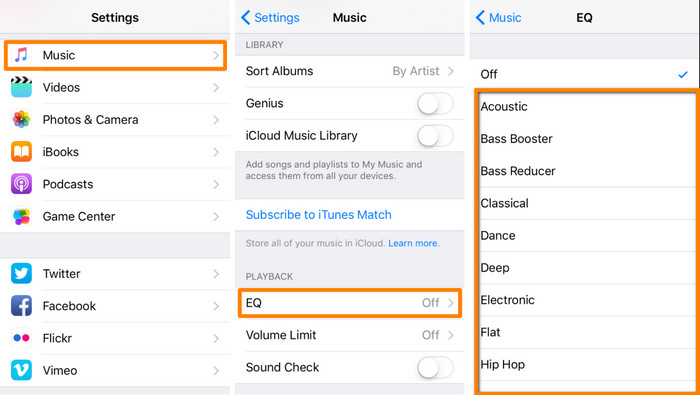
Step 3. After choosing, you can now click the volume key up on your phone to increase.
Bonus: hoe u het volume van uw video's kunt verhogen met de beste volumebooster op Windows en Mac
Not satisfied with the volume techniques we taught above? In that case, you can use the FVC Video Converter Ultimate to increase the volume of the file to hear it loud and clear. With this tool, you can extend the volume of the video file before you watch it first. But the downside of it is that it is not available on any mobile devices, and it can only increase one file audio.
Bovendien, als je hier het volume moet verhogen, hoor je het verschil tussen de originele audio en een verbeterde; u kunt de aangegeven stappen volgen. Maar vergeet vooral niet om het audiobestand over te zetten waarvan u het volume wilt verhogen. Volg de onderstaande stappen om te leren hoe u het volume op AirPods kunt verhogen.
Step 1. Download the software on your desktop, install it, then follow the installation process, and press Start Now to run the tool on your system.
Gratis downloadVoor Windows 7 of nieuwerVeilige download
Gratis downloadVoor MacOS 10.7 of nieuwerVeilige download
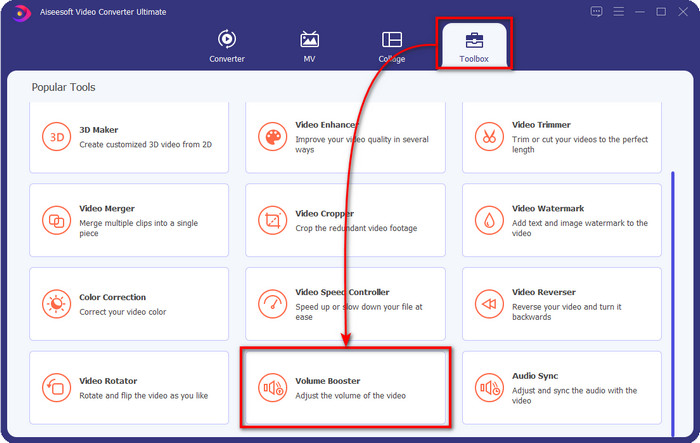
Step 2. Go to the Toolbox tab, look for the Volume Booster, and click it.
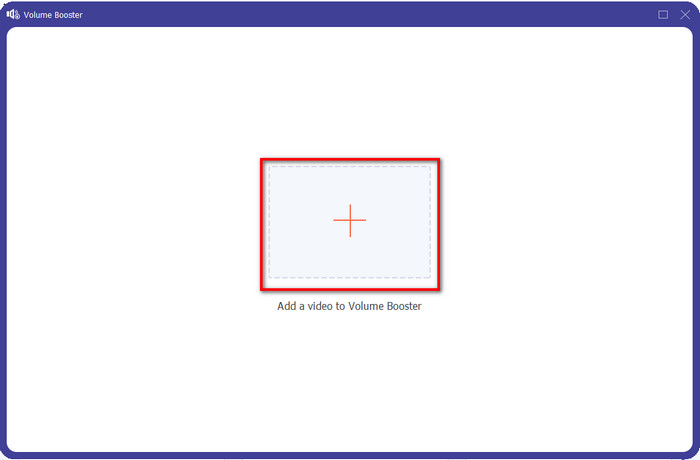
Step 3. A new window will show; click the add button to insert the file to increase the volume. Browse for the file, and press Open.
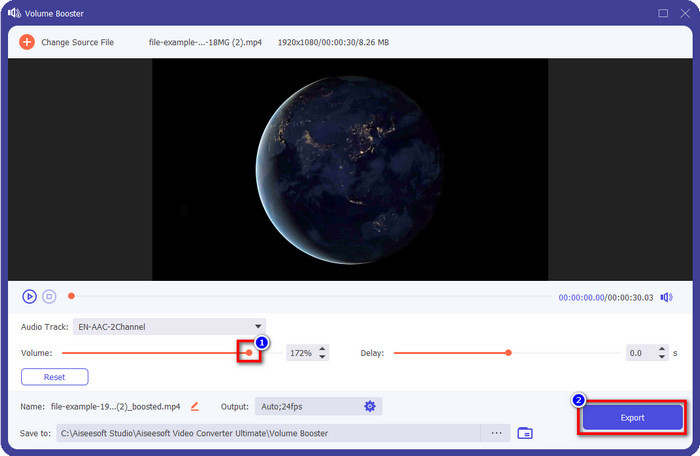
Step 4. After that, go to the Volume and adjust it by dragging the slider to the right to increase volume. Once you've done, click Export to proceed. With that, you have already increased the volume of the video you want.
Gerelateerd:
Deel 2. Veelgestelde vragen over het volume verhogen op AirPods
Klinkt hard luisteren goed?
Nee, het is niet geschikt voor uw oor. Hoewel het luisteren naar muziek op een maximaal niveau goed voor ons is, is het niet voor onze oren. Zorg ervoor dat u niet te veel wordt blootgesteld aan 70 decibel om gehoorverlies en andere permanente schade te voorkomen, vooral als u een hoofdtelefoon of AirPods gebruikt. Over het algemeen heeft dit geen onmiddellijke invloed op uw oor, omdat onze headset geen oorverdovend geluid kan creëren zoals een explosie. Maar op de lange termijn zal er een slecht resultaat zijn. Dus voordat dat gebeurt, moet je het voorkomen.
Waarom moet ik het geluid verhogen?
In sommige gevallen moet u het volume verhogen om de audio beter te horen, vooral om te luisteren naar enkele verwante details die deel uitmaken van de audio of video. Maar onthoud: voorkom overmatige blootstelling van uw oor aan een hard geluid om complicaties te voorkomen die tot blijvende schade kunnen leiden.
Waarom hebben mijn AirPods buzz?
Er zijn veel mogelijke redenen waarom uw AirPods zouden kunnen zoemen. Een van de redenen is dat je de AirPods intensief onder druk zet terwijl je het geluid te lang op de bas speelt. Het gezoem zal plaatsvinden na de voortdurende druk op de AirPods. Dus om dit te voorkomen, moet u het volume correct en niet te hard gebruiken.
Gevolgtrekking
Now we have learned how to turn up the volume on AirPods on your iOS devices quickly. Although the technique we present can help you increase the volume, it is sometimes not enough. So, if you are still not satisfied with the volume, you can use the FVC Video Converter Ultimate with the ways we taught. With this tool, you can quickly increase the volume of your audio within a few clicks. Today is your lucky day because you can download it right away by clicking the download button below. What are you waiting for? No need to worry; it is safe to download for everyone.
-
 Hoe u uw volume luider kunt maken en de beste geluidskwaliteit kunt ervaren [2021]
 Heeft u problemen omdat het volume van uw kijken erg laag is? Lees dan dit artikel, want we hebben trucs voor het verhogen van het volume en een hulpmiddel dat u kunt gebruiken.
-
 Snelle en gemakkelijke manieren om audio en video te synchroniseren in Adobe Premiere Pro
 Wil je weten hoe je audio en video synchroniseert in Premiere Pro? Dan past dit artikel bij jouw wensen. Terwijl we zelf proberen hoe te synchroniseren om alleen de echte en eenvoudige stappen te bieden.
-
 Top 3 oplossingen voor het oplossen van het probleem met audiovertraging [2021]
 Wil je weten hoe je de audiovertraging op je video kunt oplossen? Dan ben je hier aan het juiste adres, want we leggen je uit wat de factoren zijn en hoe je het kunt oplossen.
