


 Video Converter Ultimate
 Scherm opnemer
 Videoreparatie
Beste van de beste converters die u kunt gebruiken om 3GP online en offline naar AVI te converteren
3GP-indeling is een flexibele indeling waarmee audio- en videostreams via GSM naar mobiele telefoons van de derde generatie worden overgebracht. Het sluit aan bij 3G‑connectiviteit voor snellere bestandsoverdracht. Deze indeling werd het meest gebruikt op oudere telefoons, omdat hij veelzijdig is en snel kan worden verstuurd. Tegenwoordig kun je 3GP‑bestanden echter niet meer op je standaard mediaspeler afspelen, omdat deze indeling het voor nieuwe mediaspelers onmogelijk maakt de structuur te begrijpen. De beste manier om al je 3GP‑bestanden op je telefoon of desktop te bekijken, is ze te converteren. In plaats van op internet te zoeken naar welke converter je het beste kunt gebruiken, hebben wij vier converters voor je verzameld waaruit je kunt kiezen. De onderstaande tools zijn uitstekend en kunnen 3GP naar AVI converteren zonder kwaliteitsverlies.

Deel 1. Converteer 3GP offline naar AVI met de Ultimate Converter
FVC Video Converter Ultimate
Stel dat je geen enkele moeite wilt doen om je 3GP‑bestanden te converteren. In dat geval raden we je sterk aan om FVC Video Converter Ultimate te gebruiken. Deze software is een van de beste keuzes voor het converteren van bestanden en zet je bestanden razendsnel om, vaak binnen enkele seconden. Bovendien delen veel gebruikers die deze tool hebben geprobeerd dezelfde ervaring. Samenvattend geven zij duidelijk aan dat deze tool hun conversieprobleem in een oogwenk heeft opgelost.
Nadere uitleg, deze tool is niet alleen de beste in het converteren van het bestand; het heeft ook de meest geavanceerde functies die u zou willen proberen. Voorbeelden zijn editor, GIF-maker, volumebooster, audio en video synchroniseren, omkeren en meer. Als u deze tool koopt, krijgt u alle genoemde tools eerder en komt er nog veel meer bij kijken. Dus laten we nu proberen de stap-voor-stap te volgen om 3GP naar AVI te converteren op Mac en pc zonder de kwaliteit te verliezen.
Stap 1. Klik op de downloadknop en kies of je een pc‑ of Mac‑gebruiker bent, en installeer het programma vervolgens.
Gratis downloadVoor Windows 7 of nieuwerVeilige download
Gratis downloadVoor MacOS 10.7 of nieuwerVeilige download
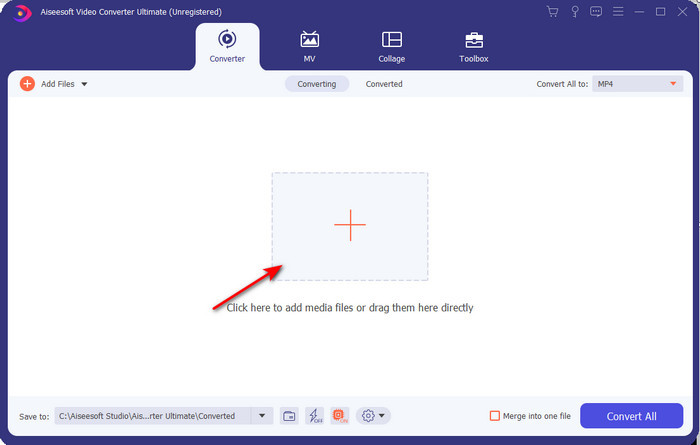
Stap 2. Start de tool, klik op het +-teken in het midden van de interface, selecteer het .3gp‑bestand in je map en klik op Openen. Je kunt hier ook een batchconversie uitvoeren als je dat wilt; klik dan op Bestanden toevoegen om meer bestanden toe te voegen.
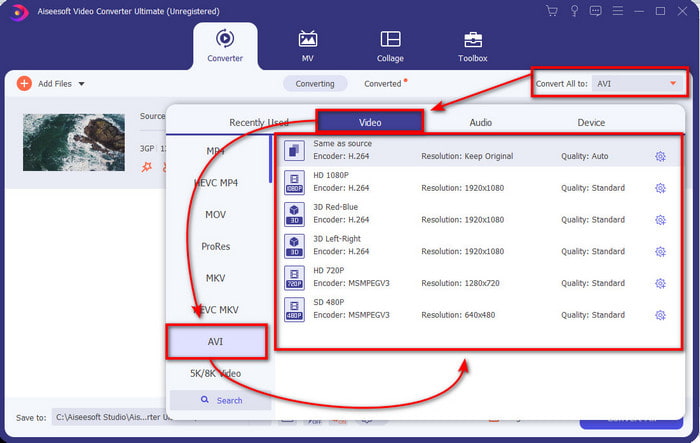
Stap 3. Om 3GP te wijzigen, klik je op de optie Alles converteren naar en kies je de indeling AVI onder de categorie Video.
Stap 4. Klik op Alles converteren om het conversieproces te starten; het omzetten van je 3GP‑bestanden begint nu.

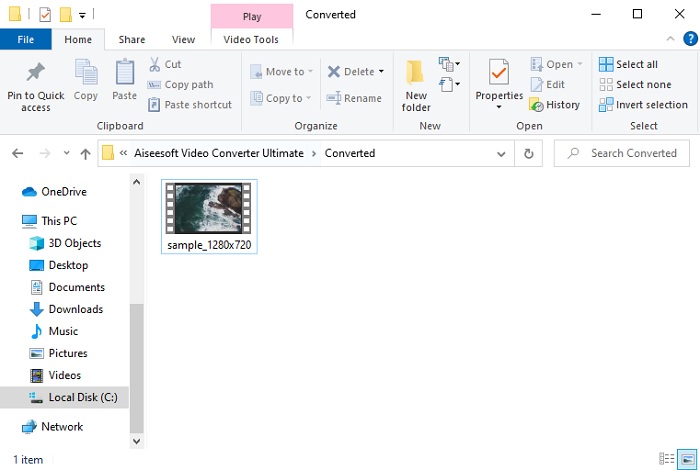
Stap 5. Na het converteren verschijnt er een map op je scherm met het geconverteerde 3GP‑bestand. Klik op het nieuw geconverteerde AVI‑bestand dat je hebt gemaakt om het te bekijken en later eventueel te bewerken.
Deel 2. 3 Beschikbare online converters om 3GP naar AVI te converteren
1. FVC gratis video-omzetter online

We verzekeren je dat de tool in deze lijst de beste online 3GP‑naar‑AVI‑converter is, en dat is de FVC Free Video Converter Online. Alle functies die je graag in een online converter ziet, zijn hier aanwezig. We noemen dit de beste online converter, in alle opzichten. Wil je bijvoorbeeld een efficiënte online converter, een veilig conversieproces en helemaal geen advertenties, dan is dit de webtool voor jou. Hoewel de webtool er goed uitziet en perfect werkt, ondersteunt hij nog steeds slechts een middelgroot aantal indelingen. Geavanceerde functies die je mogelijk tegenkomt in FVC Video Converter Ultimate zijn hier niet beschikbaar. Maar het voordeel ten opzichte van de softwareversie is dat deze versie volledig gratis is. Zonder verder oponthoud gaan we nu over op de stappen om je bestand naar een nieuwe versie te converteren.
Stap 1. Klik op deze link om naar de website te gaan.
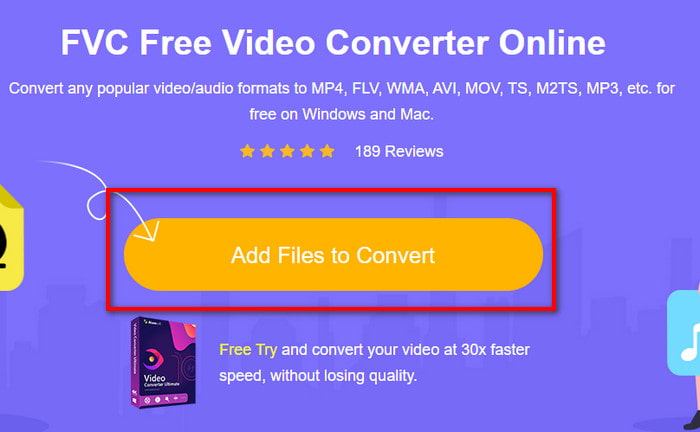
Stap 2. Klik op Bestanden toevoegen om te converteren om de online tool te starten; er verschijnt dan een map, waarna je het .3gp‑bestand opzoekt. Als je deze tool voor het eerst gebruikt, moet je de launcher downloaden door op Bestanden toevoegen om te converteren te klikken en daarna nogmaals te klikken om te starten.
Stap 3. Nadat het selecteren van het bestand is voltooid, kies je de AVI‑indeling in het gedeelte hieronder.
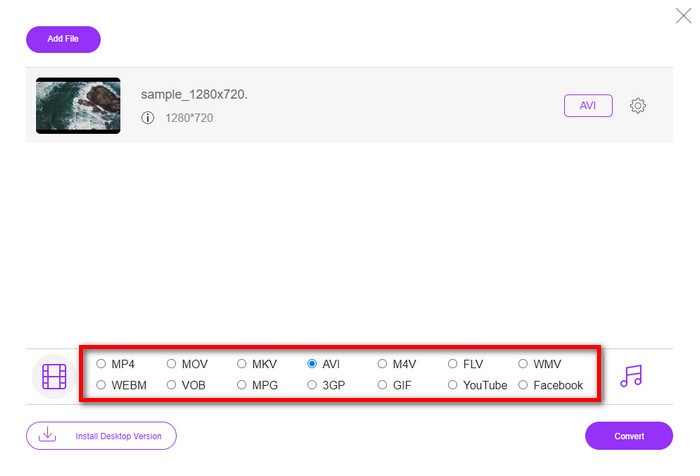
Stap 4. Als je klaar bent om het bestand te converteren, klik je op Converteren.
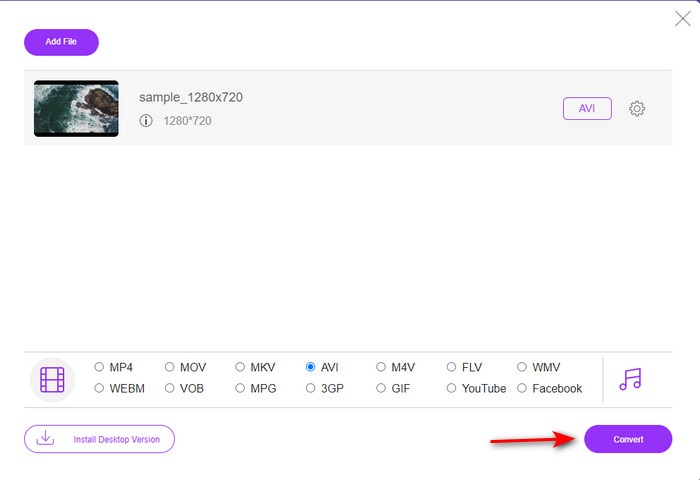
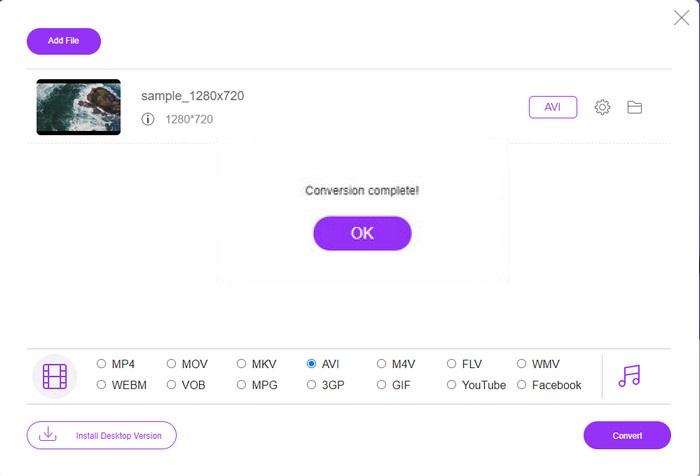
Stap 5. Na de conversie verschijnt er opnieuw een map, maar nu met het bestand dat je zojuist hebt geconverteerd.
2. Fconvert.com
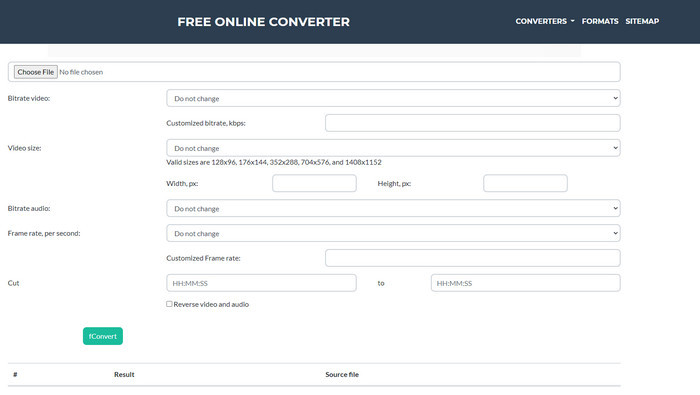
Als het gaat om het converteren van bestanden, moet Fconvert.com op de lijst staan, omdat deze webtool een van de fantastische converters is die je gratis kunt gebruiken. Deze converter kan bijna alle indelingen die je kent – en waarschijnlijk ook een van jouw bestanden – omzetten. Er is echter een probleem met deze tool, en dat zijn de advertenties. Want elke keer dat je ergens op de website klikt, verschijnt eerst een advertentie voordat je doorgaat naar waar je op geklikt hebt. Hoewel de advertenties irritant zijn, ziet deze app er toch netjes uit en presteert hij uitstekend bij het converteren van indelingen. Als je wilt ervaren hoe goed deze tool werkt, volg dan de onderstaande stappen en leer hoe je 3GP gratis naar AVI kunt converteren.
Stap 1. Zoek de hoofdwebsite van deze tool in je browser.
Stap 2. Klik op AVI onder video, klik op Bestand kiezen, lokaliseer het .3gp‑bestand, scroll naar beneden en klik op fConvert.
Stap 3. Scroll naar beneden en dan zie je het Resultaat; klik op het bestand om het te downloaden.
3. Anyconv
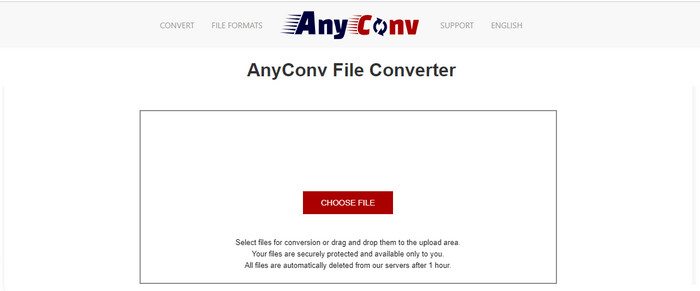
Een andere tool die gespecialiseerd is in het converteren van indelingen is Anyconv. Deze webtool verschilt sterk van Fconvert.com, omdat deze tool veel beter en sneller is. Ook heeft deze tool minder advertenties dan de vorige. Hoewel er minder advertenties zijn, zijn ze groter dan die op Fconvert.com, maar qua prestaties doet deze tool het erg goed. Laten we deze tool testen om te zien of hij werkt om gratis 3GP naar AVI te converteren, zonder verder uitstel.
Stap 1. Open je zoekmachine en zoek de Anyconv‑website.
Stap 2. Klik op Bestand kiezen; er verschijnt een map, voeg het .3gp‑bestand toe aan de webtool en ga verder. Om de indeling te wijzigen, moet je op de vervolgkeuzelijst klikken en AVI zoeken. Klik op Converteren om het conversieproces te starten.
Stap 3. Wacht tot het proces is voltooid en klik vervolgens op Download AVI om het geconverteerde bestand te downloaden.
Deel 3. Welk formaat is het beste; 3GP of AVI
Als u een 3e generatie telefoon gebruikt en video van hoge kwaliteit wilt opslaan, en deze sneller wilt overbrengen in de 3e generatie telefoon, dan is 3GP het formaat voor de klus. Als u echter de AVI-indeling naar telefoons van de derde generatie probeert te verzenden, wordt het bestand niet geopend omdat deze indeling niet wordt ondersteund. Maar in het huidige geval is AVI veel beter. Het heeft al veel steun gekregen van alle mediaspelers en editors in vergelijking met 3GP. Hoewel het AVI-formaat tegenwoordig de beste keuze is, is de bestandsgrootte enorm in vergelijking met 3GP, en als je het op je telefoon zou opslaan, zou het veel ruimte in beslag nemen. Bovendien zijn beide formaten geweldig, maar ze hebben verschillende doelen en toepassingen.
Deel 4. Veelgestelde vragen over 3GP en AVI
Kan ik FFmpeg gebruiken om 3GP naar AVI te converteren?
Je kunt FFmpeg gebruiken om je 3GP‑bestand te converteren; het is echter lastig, maar wel te doen als je de tijd neemt. De eerste stap is het zip‑bestand van FFmpeg op je computer downloaden en uitpakken. De tweede stap is je CMD openen om met de tool te communiceren. Lokaliseer vervolgens je bestand via de opdrachtprompt; ffmpeg -i input.3gp -vn -ar 44100 -ac 2 -b:a 192k output.avi kopieer deze code, plak hem in CMD en druk op Enter om het conversieproces te starten.
Kan 3GP worden gespeeld op telefoons van de 4e generatie?
Dit formaat wordt gebruikt op telefoons van de derde generatie, en je kunt nog steeds video's in 3GP‑indeling afspelen op sommige telefoons van de vierde generatie, maar niet op alle. Want, zoals eerder gezegd, 3GP is voor de derde generatie en niet voor sommige telefoons van de vierde generatie. Je kunt ook terugvallen op professionele 3GP‑spelers om van je video's te genieten.
Welk formaat is beter: 3GP of MP4?
Als het gaat om kwaliteit en de meest ondersteunde indeling, is MP4 op dit gebied veel beter. 3GP is echter veel kleiner en werkt beter op 3G‑netwerken voor snellere overdracht van dit bestandsformaat. Wil je MP4 naar 3GP converteren of andersom, klik dan hier om meer details te lezen.
Gevolgtrekking
Aan elke reis moet een einde komen, en nu kunt u 3GP eenvoudig naar AVI converteren met behulp van de bovengenoemde tools. Bovendien werken alle hierboven gepresenteerde tools, inclusief FFmpeg, prima. Toch valt altijd de beste keuze bij de FVC Video Converter Ultimate. Deze tool overtreft alle online converters die kunnen doen in conversie en nog veel meer aspecten. Dus nu, als u de software wilt downloaden, klikt u op de downloadknop en voert u de conversie snel uit.
-
 [Online en gratis] 3 methoden om MP4 probleemloos naar 3GP te converteren
 Wilt u MP4 op een snelle en gemakkelijke manier naar 3GP converteren? Hier zullen we 3 MP4 naar 3GP-converters delen om MP4 naar 3GP te veranderen voor weergave op verschillende mobiele telefoons.
-
 Top 3 gratis manieren om FLV naar 3GP te converteren op Windows / Mac
 Kun je FLV-bestanden niet openen op smartphone of tablet? Maak je geen zorgen! Hier delen we drie methoden om FLV naar 3GP te converteren zonder kwaliteit te verliezen voor het spelen op mobiel.
-
 Uitstekende keuze om MKV naar een AVI-formaat te converteren
 Leer hoe u MKV-video's kunt converteren met eenvoudige stappen die exclusief voor u zijn verstrekt. Wil je weten hoe? Klik dan op deze link voor meer informatie.
