


 Video Converter Ultimate
 Scherm opnemer
 Videoreparatie
Hoe 3GP-bestanden naar DivX te converteren met de Professional & Free-Way Tools
3GP-bestanden zijn al jarenlang het meest gebruikelijke formaat voor mobiele apparaten. Ze zijn vooral handig om 3GP-bestanden over te zetten naar een andere telefoon van de derde generatie of zelfs naar het internet. Maar tegenwoordig is dit formaat niet langer de beste keuze om gegevens te delen, omdat we nu 4G- of 5G-telefoons gebruiken. Daarom moet je het formaat converteren naar DivX-bestanden of een ander mediaformaat. Wil je weten hoe? Lees dan verder om te ontdekken hoe je 3GP-bestanden naar DivX kunt converteren met converters die op het web en voor desktop beschikbaar zijn.

Deel 1. 2 De beste manieren om 3GP online en offline naar DivX te converteren
Eerste manier. De professionele video-omzetter - de beste optie voor batch-conversie
FVC Video Converter Ultimate is gebruiksvriendelijk en betrouwbaar voor alle gebruikers. Deze converter biedt verschillende formaten die je kunt uploaden of naar je schijf kunt downloaden. Bovendien kun je, als je twee of meer 3GP-bestanden wilt samenvoegen, dat hier doen. Ook kun je meerdere 3GP-bestanden in één keer gelijktijdig converteren. Verder helpen de onderstaande details je om de andere functies te leren kennen.

FVC Video Converter Ultimate
4.258.369+ downloads- Converteer 3GP-bestanden naar DivX, XviD, AVI, MOV, MP4 en de andere 200+ beschikbare formaten.
- Maak uw conversieproces nog sneller met hardwareversnelling en snelle conversie.
- Beschikbaar in alle Windows- en Mac-programma's om te downloaden en een breed scala aan gebruikers te helpen.
- Geavanceerde bewerkingsfuncties zoals bijsnijden, samenvoegen, knippen, effecten toevoegen, enz. zijn hier beschikbaar.
- Een professionele converter die iedereen met of zonder idee over het converteren van bestanden kan gebruiken.
Gratis downloadVoor Windows 7 of nieuwerVeilige download
Gratis downloadVoor MacOS 10.7 of nieuwerVeilige download
Is het niet indrukwekkend? Als dat zo is, laten we dan de volledige gedetailleerde stappen hieronder lezen om te weten hoe u 3GP naar DivX kunt converteren.
Stap 1. Download de software naar de schijf van je computer door op de downloadknop hieronder te klikken. Installeer het vervolgens, doorloop de snelle installatie en open daarna de tools.
Gratis downloadVoor Windows 7 of nieuwerVeilige download
Gratis downloadVoor MacOS 10.7 of nieuwerVeilige download
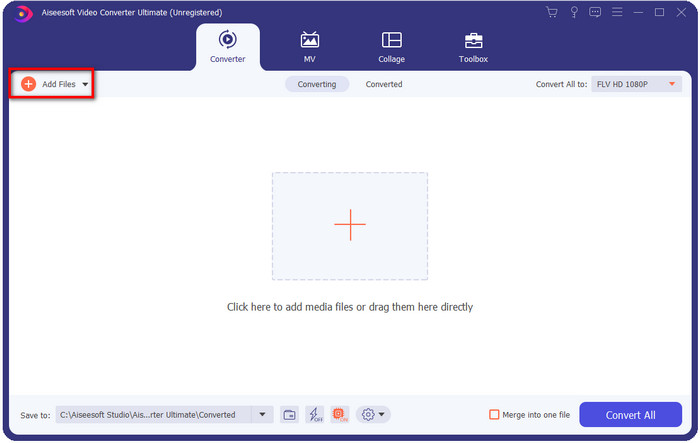
Stap 2. Na het openen is het nu het juiste moment om het bestand te uploaden door linksboven in de interface op Add file te klikken.
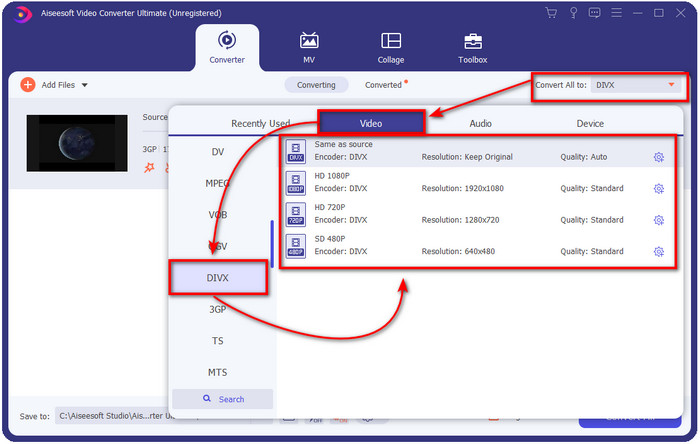
Stap 3. Om het formaat te wijzigen, klik je op Convert All to, rechtsboven in de interface.
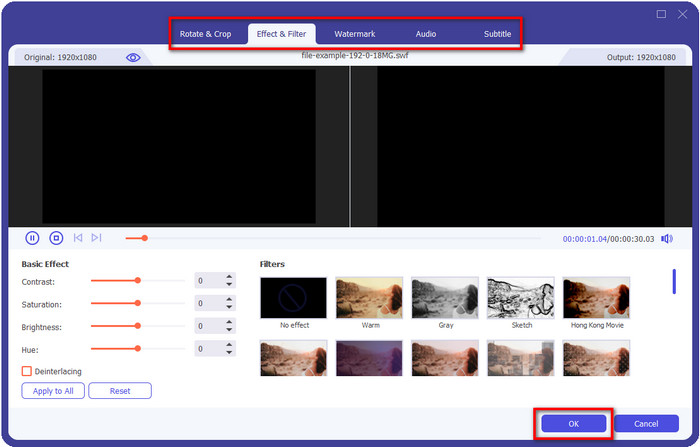
Wil je wat extra flair aan je video toevoegen? Klik dan op de toverstafknop om dat te doen. Nadat je erop hebt geklikt, verschijnt er een nieuwe interface waarin je effecten kunt toevoegen of alles naar wens kunt bewerken. Om de aangebrachte bewerkingen op te slaan, klik je op OK.
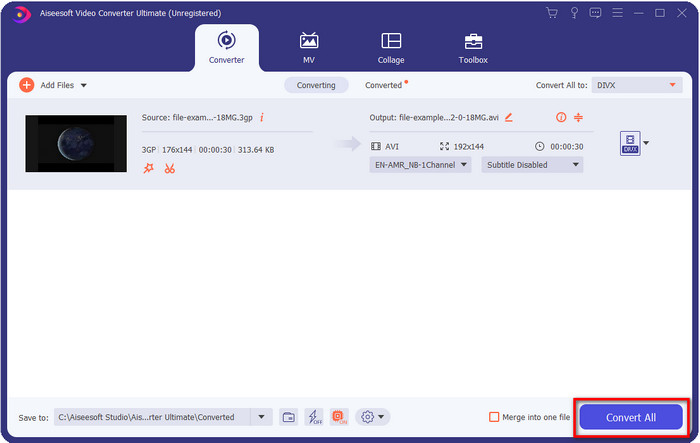
Stap 4. Start het conversieproces door op Convert All te klikken; daarna verschijnt er een map met het geconverteerde bestand op je scherm.
Tweede manieren. De Free-Way Video Converter - Biedt het online converteren van video aan
FVC Free Video Converter Online is de perfecte online 3GP-naar-DivX-converter die je kunt gebruiken. Deze webconverter verschilt sterk van andere converters die je op het internet tegenkomt. Waarom? Ten eerste heeft deze tool geen vervelende advertenties die je irriteren tijdens het converteren. Ten tweede ondersteunt deze tool veel meer formaten dan andere webconverters die je kunt gebruiken. En een van de hoogtepunten van deze converter is dat je in de instellingen de specificaties voor video en audio kunt wijzigen. Wil je weten hoe je deze converter gebruikt? Volg dan de stappen hieronder.
Stap 1. Als je op deze link klikt, wordt er een nieuw browservenster geopend met de hoofdwebconverter.
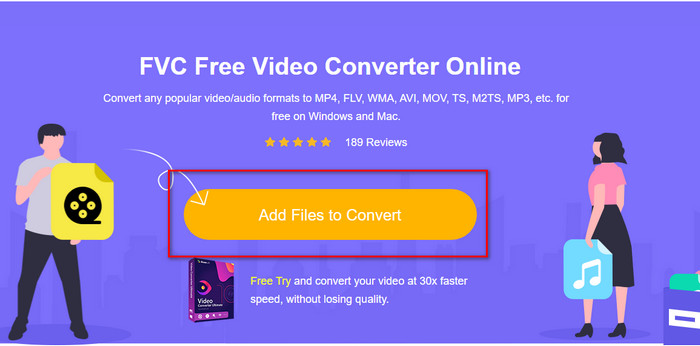
Stap 2. Druk op de knop Add Files to Convert in de interface om je computermappen te openen, zoek de .3gp-bestanden die je wilt converteren en klik op Open.
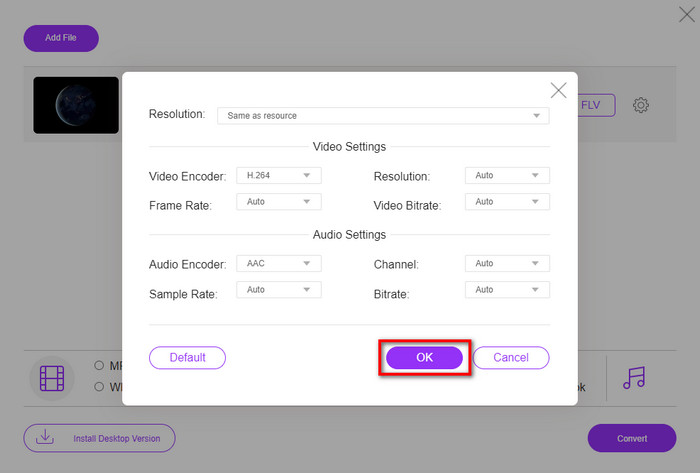
Klik op de tandwielknop om de specificatie te wijzigen. Hier wijzig je gratis handmatig je video- of audio-instellingen.
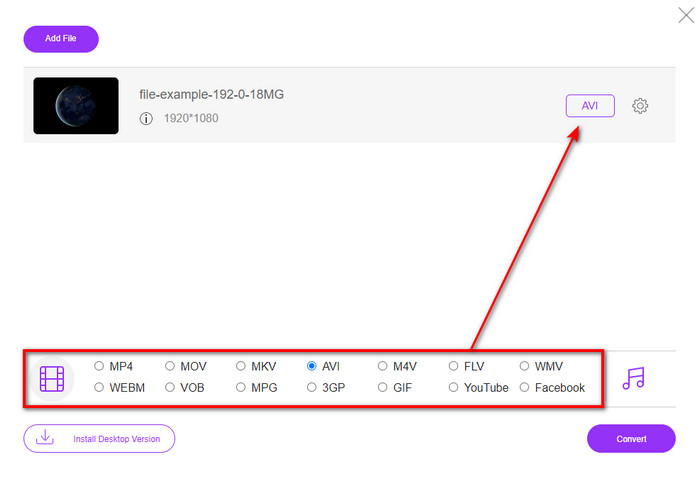
Stap 3. Klik hieronder op het gewenste formaat dat je wilt gebruiken.
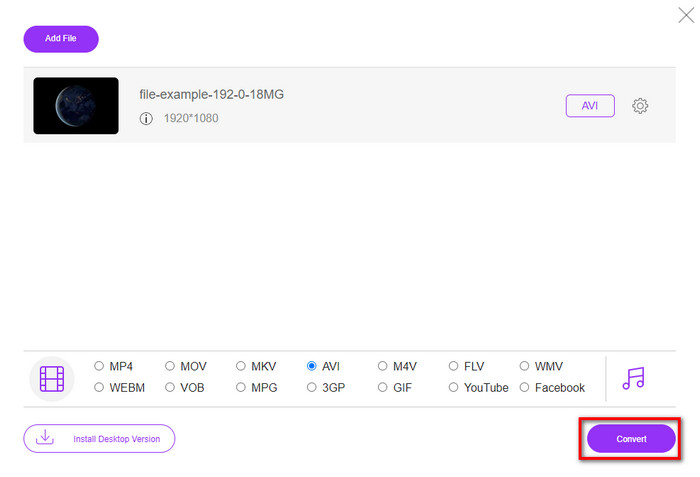
Stap 4. Klik vervolgens op Convert om te beginnen met het converteren van je formaat.
Voordelen
- Gratis en voor iedereen toegankelijk.
- Geen storende advertenties op de interface om uw conversie-ervaring hier geweldig te maken.
- Beste keuze voor het converteren van bijna elk formaat naar een nieuw formaat.
Nadelen
- Het is niet toegankelijk als er geen internetverbinding is.
- Geavanceerde functies zijn hier niet beschikbaar.
Deel 2. Diep begrip van 3GP & DivX
3GP is een gestandaardiseerd multimediaformaat dat video en audio vastlegt in 3G-telefoons. Dit formaat is uitstekend geschikt voor het efficiënt overbrengen van video's op 3G-mobiele telefoons en internet. Verdere verklaring is dat het is ontwikkeld om klein te worden in bestandsgrootte en niet te veel bandbreedte en datagebruik gebruikt voor het verzenden van data. Hoewel dit formaat op dit moment nog steeds actief is, krijgt de werkzaamheid minder prioriteit omdat het nieuwe formaat een betere structuur vertoonde dan dit formaat.
DivX is een type compressor dat voornamelijk wordt gebruikt om het bestand in een kleiner bestand te persen zonder de kwaliteit van de video te beïnvloeden. Deze codec probeerde de manier te veranderen waarop we huur-dvd's naar ons huis brengen, maar het is mislukt. En nu, in plaats van de dvd-vervangingspoging voort te zetten, helpt deze codec de meeste formaten om ze nog sneller te comprimeren en via internet te verzenden.
Ook al is DivX niet zo populair om te uploaden en af te spelen in mediaspelers of het te bewerken met de editor, het is nog steeds beter dan 3GP. Er zijn veel aspecten die we kunnen onderscheiden tussen de twee, maar een van de belangrijkste redenen is dat 3GP minder compatibiliteit en kwaliteit heeft dan DivX-bestanden.
Deel 3. Veelgestelde vragen over 3GP naar DivX-conversie
Heb ik een speciale app nodig om .3gp te openen?
Als je het hebt over plug-in plays of encoders, dan is het antwoord nee. Dit formaat kan in de meeste desktopmediaspelers worden afgespeeld zonder plug-ins of encoders te downloaden. Als je dit echter op je mobiele apparaten speelt, verwacht dan niets meer, want het gaat niet open. Hoewel je .3gp-bestanden op je mobiele apparaten kunt opslaan, is het doel om het te spelen onmogelijk. In plaats van het bestand te verwijderen, kunt u proberen het te converteren naar MP4, AVI, MOV en een meer compatibel formaat om het op uw apparaat af te spelen.
Welke generatie telefoons ondersteunt 3GP?
Hoewel het formaat voor 3G-apparaten is, kunt u dit bestand nog steeds gebruiken in de meeste 2G en sommige van de 4G, maar niet in alle.
Ondersteunt VLC 3GP?
VLC is een van de beste multifunctionele mediaspelers die u op uw apparaat kunt downloaden voor het afspelen van video. Ja, dat kan; deze mediaspeler ondersteunt verschillende formaten en encoders om het afspelen van video's gemakkelijker te maken zonder extra encoders of plug-ins te downloaden.
Gevolgtrekking
Nu we weten hoe we 3GP naar DivX kunnen converteren, moeten we bestanden omzetten als je ze compatibel wilt maken. Deze twee genoemde converters presteren uitstekend, vooral bij het converteren van je .3gp-bestanden. Hoewel beide tools uitstekend werk leveren, zijn er nog steeds bepaalde criteria waarop ze van elkaar verschillen. Zo is FVC Free Video Converter Online de beste online converter die je gratis kunt gebruiken. Ook al is hij niet zo professioneel als de ultimate-tool, toch wordt hij beschouwd als een professionele webgebaseerde tool. Tegelijkertijd is FVC Video Converter Ultimate een unieke converter die je op je desktop kunt downloaden. Deze converter is de beste keuze voor converteren en bewerken, video's versnellen of vertragen, omkeren, GIF's maken en meer. Als je een fenomenaal resultaat wilt behalen, moet je de ultimate-tool nu meteen downloaden.
-
 Top 4 meest effectieve manieren om 3GP naar AVI-formaat te converteren [2025]
 Kan ik mijn 3GP-bestanden naar AVI converteren? Welnu, je kunt het gemakkelijk converteren als je deze beschikbare tools probeert, aangezien we alle mogelijke oplossingen voor je 3GP naar AVI-conversieprobleem hebben verzameld.
-
 Hoe 3GP naar MOV te converteren met behulp van verschillende benaderingen [2025]
 Heb je het 3GP-formaat onhandig gevonden voor sommige videospelers om dit soort videoformaat af te spelen? Probeer het naar MOV te converteren, en dit artikel praat er veel over, dus lees verder.
-
 Beste 3GP naar FLV-converter voor gebruik bij het converteren van 3GP naar FLV [2025]
 Heb je ooit geprobeerd 3GP naar FLV te converteren, maar weet je niet wat voor soort converter je gaat gebruiken? Lees dit artikel om alle details te leren over het converteren van 3GP naar FLV.
