


 Video Converter Ultimate
 Scherm opnemer
 Videoreparatie
Hoe 3GP op een professionele manier naar WMV te converteren [Online & Offline]
3GP is een populair mobiel formaat dat gegevens via mobiele telefoons overdraagt zonder veel bandbreedte te verbruiken en tegelijkertijd ruimte bespaart. Dit formaat is bovendien gestandaardiseerd voor het opnemen van video op mobiele telefoons van de derde generatie, maar wees gerust: je kunt de video ook afspelen op toestellen van de tweede en vierde generatie. Hoewel het uitstekend werkt op telefoons, is het vooral beperkt tot smartphones. Het is dus geen verrassing als het .3gp-bestand niet zo goed presteert op een desktop. Toch kun je leren hoe je 3GP kunt converteren naar een formaat dat op een desktop veel breder wordt ondersteund, zoals WMV. Wil je leren hoe je op een professionele manier 3GP naar WMV converteert? Laten we er dan meteen induiken en geen tijd verspillen.

Deel 1. Wat is 3GP
Het is een ISO-gebaseerd formaat dat mediastreams zoals H.263 of H.264 voor video en AMR of AAC voor audio opslaat, perfect voor compressie met verlies. Bovendien is dit 3e-generatieformaat opslagvriendelijk voor het opslaan van gegevens op draagbare schijven op onze telefoons, zelfs op IOS. Hoewel 3GP nog steeds beschikbaar is, begon de effectiviteit van dit formaat te dalen, en om die reden trad 3GPP toe tot het toneel en werd het een betere versie ervan.
Deel 2. Wat is WMV?
Het is een eigen multimedia-indeling die door Windows is ontwikkeld voor het online streamen van video's. In tegenstelling tot elk ander formaat, zoals 3GP, gebruikt WMV een multifold-encoder om het bestand nog meer gecomprimeerd te maken. Vanwege de mogelijkheid om veel encoders te gebruiken, is het toegankelijker om video's in dit formaat efficiënt te delen. Er is echter een nadeel aan het gebruik van veel encoders, vooral bij het bewerken en afspelen, omdat niet alle mediaspelers en editors een breed scala aan codecs ondersteunen. Hoewel het formaat een compressor gebruikt, wordt de mediakwaliteit niet gewijzigd of verminderd.
Deel 3. Professionele manier om 3GP naar WMV te converteren met Video Converter Ultimate
Wil je een professionele converter voor 3GP naar WMV gratis downloaden op jouw platform? FVC Video Converter Ultimate biedt een deskundige conversieprocedure zonder dat je daar veel moeite voor hoeft te doen. Deze converter tilt je naar een hoger conversieniveau dat geen enkele andere online of offline converter je kan bieden. Bovendien ondersteunt deze ultieme tool meer dan 200 mediaformaten om uit te kiezen, in tegenstelling tot veel andere tools.
Zolang je deze converter hebt, verwacht je altijd een professionele uitvoer op je geconverteerde mediaformaat. Wilt u de professionele converter gebruiken om uw 3GP-bestanden te converteren? Als dat het geval is, kun je de onderstaande stappen volgen om succesvol te converteren met de ultieme tool.
Stappen om een 3GP-bestand naar WMV te converteren met FVC Video Converter Ultimate
Stap 1. Hieronder staan de downloadknoppen; kies de knop die bij het door jou gebruikte platform hoort. Klik bijvoorbeeld op de Windows-downloadknop als je een Windows-gebruiker bent. Maar als je een Mac-gebruiker bent, klik je op de andere knop. Installeer na het downloaden de converter en start deze door op Start Now te klikken. Belangrijker nog: nadat je het programma hebt geopend, moet je je eerst vertrouwd maken met de interface voordat je doorgaat naar de volgende stappen.
Gratis downloadVoor Windows 7 of nieuwerVeilige download
Gratis downloadVoor MacOS 10.7 of nieuwerVeilige download
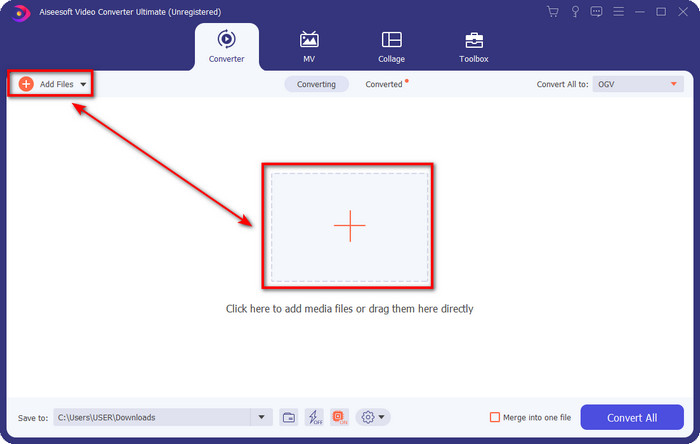
Stap 2. Je ziet Add Files linksboven in de interface; klik daarop en er wordt een map geopend. Zoek het .3gp-bestand op de schijf van je computer en upload het door op Open te drukken.
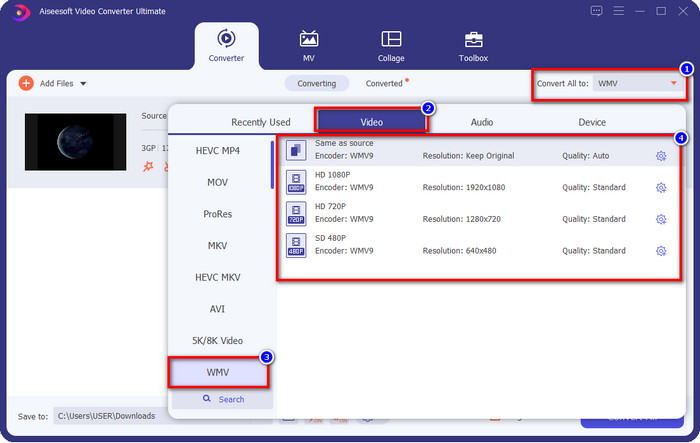
Stap 3. Klik op Convert All to om het gewenste WMV-formaat te kiezen of selecteer WMV als uiteindelijke uitvoer.
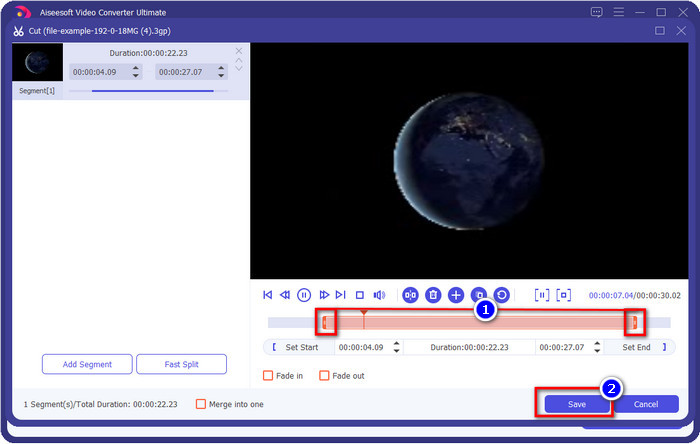
Optioneel. Voordat we het 3GP-bestand naar WMV converteren, bespreken we kort de andere functies die deze tool biedt. Moet je knippen? Geen probleem. Klik op de scissor-knop, sleep de slide bar aan beide uiteinden zoals je wilt en druk op Save om de gemaakte knipactie toe te passen.
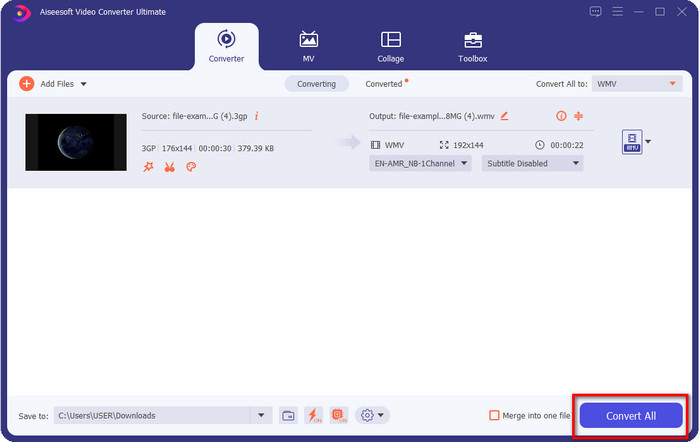
Stap 4. Start het conversieproces door op de knop Convert All te klikken. De conversie zal binnen korte tijd voltooid zijn en voilà, het WMV-bestand wordt op de schijf van je computer opgeslagen.
Deel 4. Online manier om MXF naar WMV te converteren met de gratis video-omzetter online
Een ander product van FVC, maar dan een online oplossing, is de FVC Free Video Converter Online. Deze professionele online converter biedt een nette en overzichtelijke interface in vergelijking met andere webconverters. Bovendien hoef je de converter niet op je apparaat te downloaden voordat je hem gebruikt; je opent gewoon je browser en gaat naar de converter. Hoewel de webconverter uitstekend is, kan hij niet alle geavanceerde functies bieden. Toch is dit de juiste keuze als je 3GP online naar WMV wilt converteren; volg de onderstaande stappen om deze tool te gebruiken.
Stappen om 3GP gratis online naar WMV te converteren met FVC Free Video Converter Online
Stap 1. Klik op deze link om de online converter te openen.
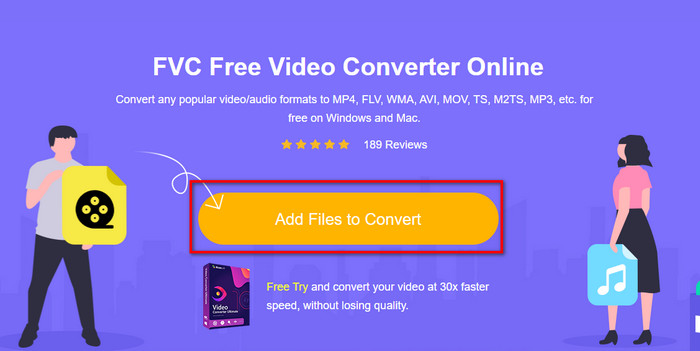
Stap 2. Nadat je hebt geklikt, druk je op Add Files to Convert om de converter te starten. Als je deze converter voor het eerst gebruikt, moet je de launcher installeren door op Add Files to Convert te klikken, maar deze is niet zo groot als de ultieme tool. Zoek het 3gp-bestand dat je wilt converteren en klik op Open.
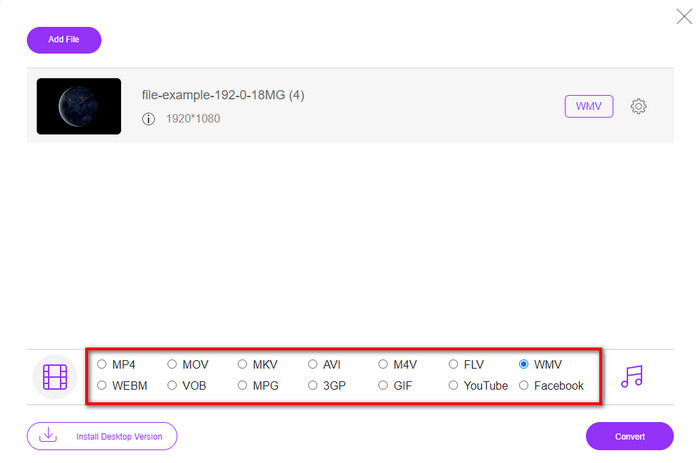
Stap 3. Nadat je het 3GP-bestand hebt geüpload, is het tijd om een van de onderstaande formaten te kiezen of op WMV te klikken.
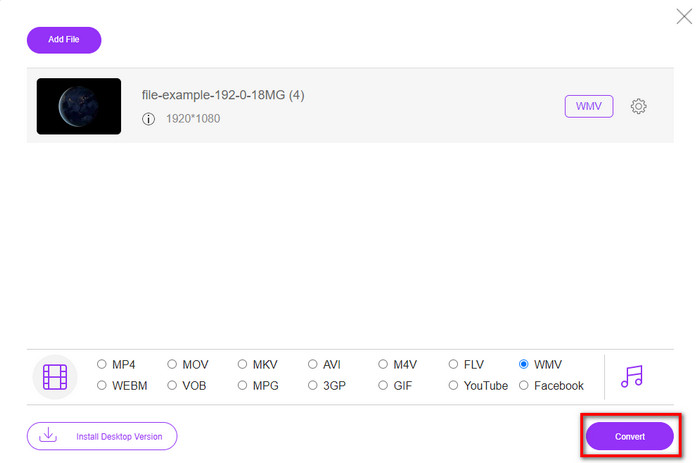
Stap 4. Heb je al een formaat gekozen? Klik dan op Convert om het conversieproces van het bestand te starten.
Deel 5. Veelgestelde vragen over 3GP naar WMV-conversie
Is het een goed idee om online een 3GP naar WMV-converter te gebruiken?
Als je geen converter op je apparaat wilt downloaden, is het ideaal om een online converter te gebruiken. Maar onthoud dat niet alle online of offline converters veilig zijn om te gebruiken. Meestal hebben ze virussen als je ze installeert of als je de taak niet goed uitvoert. Maar als u zekerheid wilt over uw conversie, raden we u aan de FVC-converterproducten te gebruiken, omdat deze 101% malwarevrij is en uw conversieproces een succes garandeert.
Is het mogelijk om meerdere 3GP-video's samen te voegen?
Ja, met behulp van de FVC-mergertools kun je meerdere video's in 3GP-formaat samenvoegen. Dus als je wilt weten hoe je meerdere 3GP-video's kunt samenvoegen, moet je dit artikel lezen om te ontdekken hoe je dat doet.
Hebben 3GP-video's een goede kwaliteit?
3GP heeft een prima kwaliteit, maar het kan geen high-definition kwaliteit opslaan, dus verwacht dat de videokwaliteit van een 3GP laag is.
Gevolgtrekking
Concluderend: de converters die in dit artikel worden genoemd, zijn zorgvuldig geselecteerd aan de hand van een bepaalde professionele standaard voor uitvoer. Daarnaast hebben we de tools zelf gebruikt om alleen feiten over hun kenmerken te kunnen presenteren. Bovendien, stel dat je geen converter op je desktop wilt downloaden om ruimte te besparen en toch een professioneel resultaat wilt behalen; dan raden we je sterk aan om FVC Free Video Converter Online te gebruiken. Maar als je je 3GP-bestanden op een nog professionelere manier wilt transcoderen, bevelen we FVC Video Converter Ultimate van harte aan. Nog steeds niet overtuigd door onze uitleg? Probeer het dan zelf, ervaar de professionele conversie die deze tool biedt en leer hoe je 3GP naar WMV converteert.
-
 Top 4 meest effectieve manieren om 3GP naar AVI-formaat te converteren [2025]
 Kan ik mijn 3GP-bestanden naar AVI converteren? Welnu, je kunt het gemakkelijk converteren als je deze beschikbare tools probeert, aangezien we alle mogelijke oplossingen voor je 3GP naar AVI-conversieprobleem hebben verzameld.
-
 Beste 3GP naar FLV-converter voor gebruik bij het converteren van 3GP naar FLV [2025]
 Heb je ooit geprobeerd 3GP naar FLV te converteren, maar weet je niet wat voor soort converter je gaat gebruiken? Lees dit artikel om alle details te leren over het converteren van 3GP naar FLV.
-
 2 beste mogelijke manieren om niet-ondersteunde 3GP naar DivX te converteren [2025]
 Veel gebruikers vragen hoe ze 3GP naar DivX kunnen converteren. Dus nu bieden we daarvoor een artikel om u te helpen bij het probleemloos converteren van uw .3gp-bestand.
