


 Video Converter Ultimate
 Scherm opnemer
 Videoreparatie
 Beveiligde download
Converteer DIVX naar 3GP met de meest effectieve procedures
Kun je je DIVX‑video niet op je apparaat afspelen omdat het formaat niet wordt ondersteund? Veel mensen hebben hetzelfde probleem. Maar jij hebt geluk, want we bespreken de meest effectieve en eenvoudigste methode om DIVX naar 3GP te converteren. Mis deze kans niet en leer meer over het converteren van verschillende bestanden met diverse betrouwbare en geteste toepassingen die we zullen introduceren.

Deel 1: Beste software om DIVX naar 3GP te converteren
Wil je DIVX naar 3GP converteren op apparaten zoals Windows- en Mac‑computers? Dan is je probleem al opgelost. Om je DIVX‑bestand te converteren kun je Video Converter Ultimate gebruiken. Uit de naam van de tool blijkt al dat het een ultieme toepassing is waarmee je meer dan 1000 videoformaten kunt converteren, waaronder DIVX, 3GP, MP4, MOV, MTS, WEBM en meer. Je kunt ook twee of meer bestanden tegelijk converteren, omdat deze tool batchconversie biedt. Bovendien heeft Video Converter Ultimate een snel conversieproces, wat ideaal is als je van plan bent talloze bestandsindelingen te converteren.
Bovendien kunt u deze offline applicatie nog steeds gebruiken als u geïnteresseerd bent in het bewerken van uw DIVX-bestand voordat u het converteert. Ervan uitgaande dat u de kleur van uw video wilt corrigeren, kunt u doorgaan naar het Toolbox-paneel en de tool Kleurcorrectie selecteren om de helderheid, het contrast en de verzadiging van uw video aan te passen. Stel bovendien dat u audio in uw DIVX-videobestand wilt synchroniseren voordat u het converteert. In dat geval kun je dat doen omdat het een Audio Sync-functie biedt, zodat het synchroniseren van audio met video gemakkelijk voor je is.
Functies:
◆ Converteer videobestandsindelingen, waaronder MP4, M4V, FLV, AVI, enz.
◆ Kan muziekvideo's maken met verschillende thema's.
◆ De Toolbox bevat een videoverbeteraar, watermerkverwijderaar, compressor en meer.
◆ In staat om een collage te maken.
Voordelen
- Het ondersteunt verschillende bestandsindelingen, zoals MP4, AVI, FLV, MOV, MTS, DIVX, 3GP, enz.
- Heeft een vriendelijke gebruikersinterface die geschikt is voor beginners.
- Heeft een 30x sneller conversieproces
- Toegankelijk op zowel Windows als Mac.
- Het kan meerdere video's in één keer converteren.
Nadelen
- Koop de Video Converter Ultimate om te genieten van meer unieke functies.
Om DIVX eenvoudig naar 3GP te converteren, moet u deze eenvoudige handleidingen hieronder volgen.
Stap 1: Download eerst Video Converter Ultimate op je apparaten, zoals Windows‑ of Mac‑computers. Doorloop vervolgens het installatieproces en open de toepassing.
Gratis downloadVoor Windows 7 of nieuwerVeilige download
Gratis downloadVoor MacOS 10.7 of nieuwerVeilige download
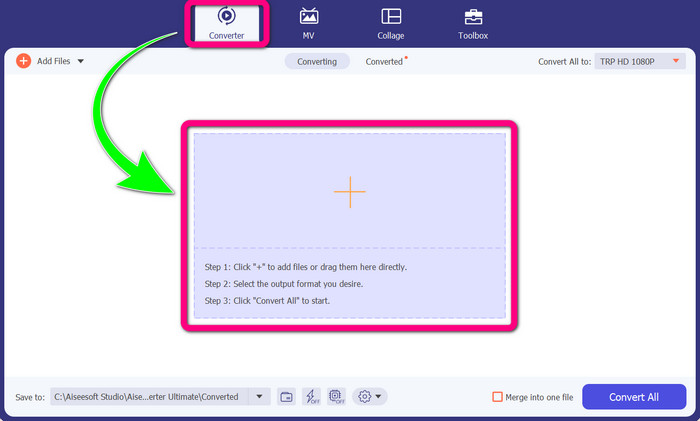
Stap 2: Wanneer je Video Converter Ultimate al op je apparaat hebt geopend, kies je het paneel Converter. Klik daarna op het +‑pictogram om je DIVX‑videobestand toe te voegen.
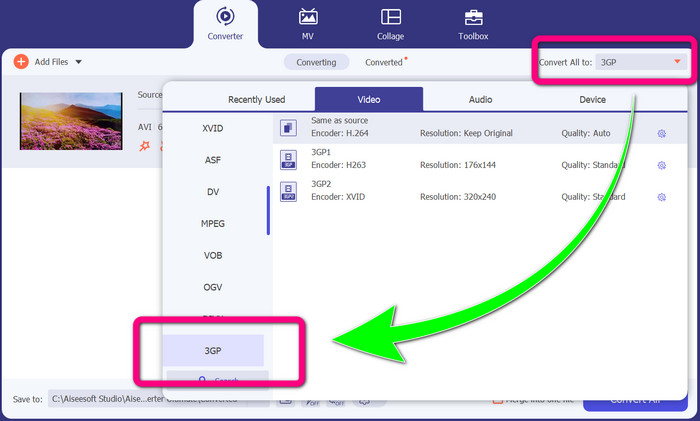
Stap 3: Nadat je je videobestand hebt toegevoegd, klik je op de optie Convert all to, zoek je het 3GP‑bestandsformaat op en selecteer je het.
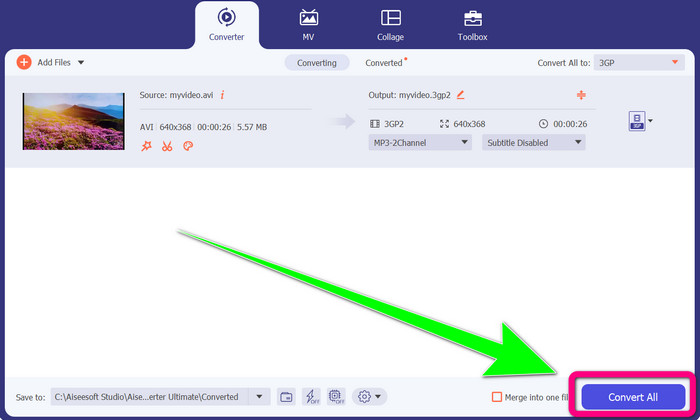
Stap 4: Als je klaar bent met het selecteren van het 3GP‑bestandsformaat, klik je op de knop Convert All. Wacht op het conversieproces en sla je uiteindelijke video op je apparaat op.
Deel 2: Uitstekende online converters om DIVX naar 3GP te converteren
FVC gratis video-omzetter online gebruiken
Een van de beste online tools om DIVX naar 3GP te converteren is FVC Free Video Converter Online. Met deze tool kun je verschillende bestandsindelingen in slechts een paar klikken converteren. Hij ondersteunt bijna alle gangbare video- en audioformaten naar MP4, MOV, MKV, FLV, VOB, MP3, AAC en meer. FVC Free Video Converter Online is eenvoudig en gebruiksvriendelijk. Zelfs beginners kunnen deze toepassing probleemloos gebruiken. Of je nu Windows‑ of Mac‑gebruiker bent, je kunt op deze tool vertrouwen omdat hij zowel op Windows als Mac beschikbaar is. Volg de eenvoudige stappen hieronder om DIVX naar 3GP te converteren.
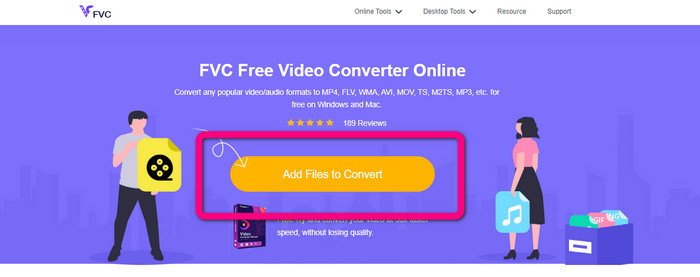
Stap 1: Bezoek de FVC Free Video Converter Online. Klik vervolgens op de knop Add Files to Convert om het DIVX‑bestand te importeren dat je wilt converteren.
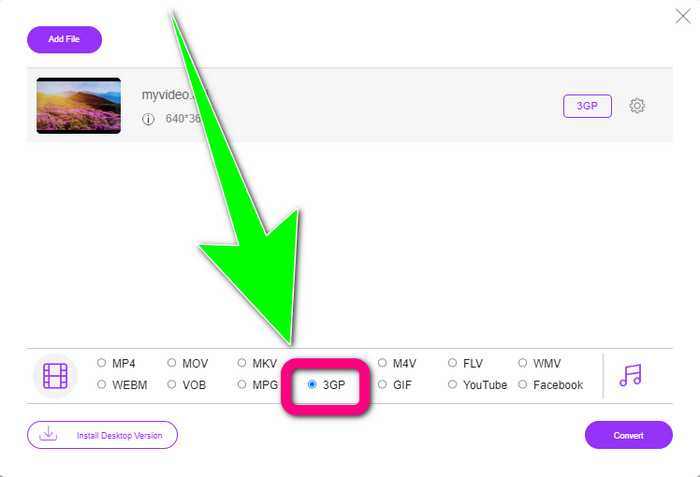
Stap 2: Nadat je je DIVX‑bestand hebt toegevoegd, klik je op het 3GP‑bestandsformaat uit de formaatopties hieronder.
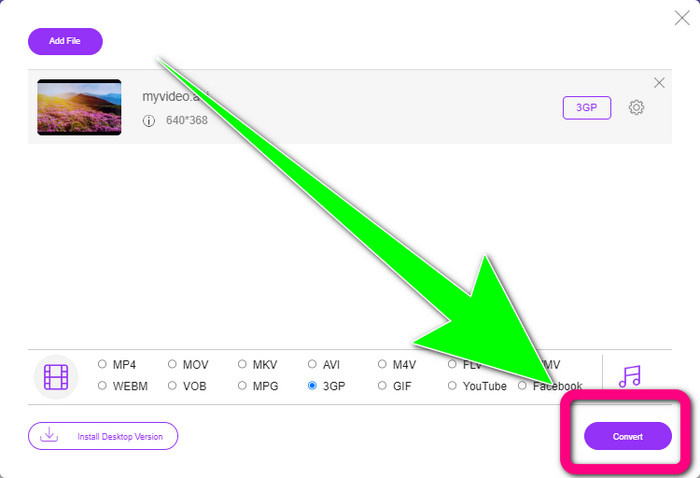
Stap 3: Ga verder door op de knop Convert te klikken. Wacht op het conversieproces en sla je geconverteerde video op.
Convertio gebruiken
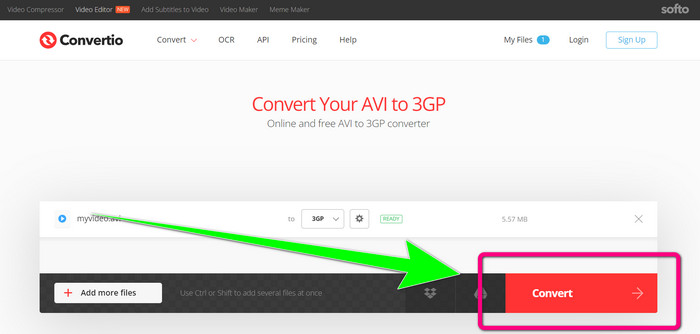
Als je DIVX naar 3GP online wilt converteren, is Convertio een van de tools die je kunt gebruiken. Het ondersteunt veel formaten, zoals 3GP, DIVX, XVID, AVID, MP4, M4V, ASF, HEVC en meer. Naast het converteren van videobestanden kun je ook afbeeldingen, audio, documenten, archieven en andere bestanden converteren. Convertio is bovendien een eenvoudige tool, omdat je in een paar stappen kunt converteren, zodat je geen moeite hoeft te doen om je DIVX‑bestand naar een 3GP‑bestand te converteren. Net als andere online tools kun je deze software echter niet gebruiken als je geen internettoegang hebt. Ook zijn er momenten waarop deze online tool niet optimaal presteert. De gratis versie van Convertio heeft een beperking: je kunt alleen converteren met een maximale bestandsgrootte van 100 MB. Je moet de software aanschaffen om de maximale bestandsgrootte te verhogen en betere prestaties te ervaren. Volg de onderstaande stappen om het DIVX‑bestand naar het 3GP‑bestandsformaat te converteren.
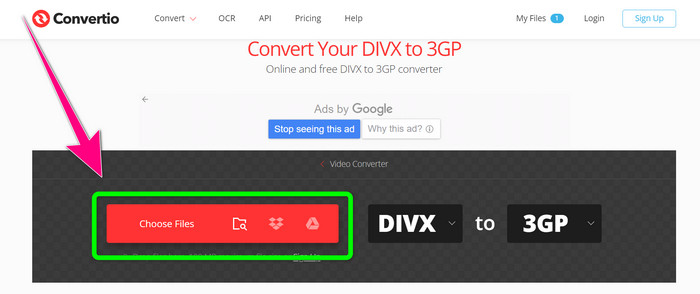
Stap 1: Ga naar de website van Convertio. Klik op de knop Choose Files en voeg je video met DIVX‑bestandsformaat toe.
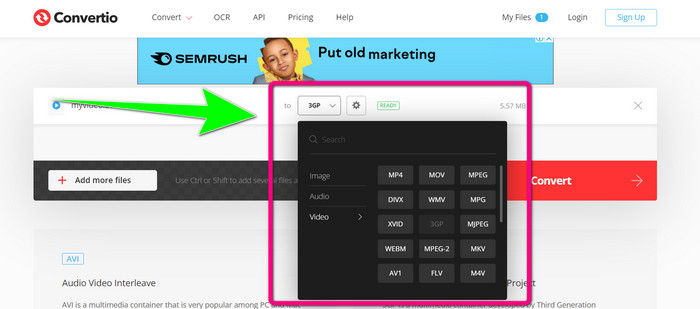
Stap 2: Nadat je je video hebt toegevoegd, ga je naar de formaatopties en selecteer je het 3GP‑bestandsformaat.
Stap 3: Wanneer je het 3GP‑bestandsformaat hebt geselecteerd, klik je op de knop Convert, wacht je op het conversieproces en sla je je 3GP‑videobestand op.
Deel 3: Overzicht van DIVX- en 3GP-bestandsindelingen
DIVX
DIVX is videocompressiesoftware die in staat is videobestanden te comprimeren tot een twaalfde van de originele video, met een minimaal kwaliteitsverlies. Dit videoformaat is gangbaar bij grote filmmaatschappijen zoals Disney, DreamWorks SKG, Universal en Paramount.
3GP
3GP is een multimedia‑container. Het werd in 1998 ontwikkeld door het Third Generation Partnership Project voor GSM‑gebaseerde (Global System for Mobile Communications) telefoons. De 3GP‑container vereist weinig opslagruimte, datagebruik en bandbreedte, wat het ideaal maakt voor mobiele telefoons.
Verder lezen
Converteer MTV eenvoudig naar MKV met deze ultieme converters
Hoe TRP naar MKV converteren zonder kwaliteitsverlies
Deel 4: Veelgestelde vragen over het converteren van DIVX naar 3GP
Wat is een DIVX-converter?
Het is een uitstekend hulpmiddel dat verschillende bestandstypen naar talrijke andere bestandsformaten kan converteren. Daaronder AVI, MP4, MPEG, MOV, FLV en meer. Zodra je klaar bent met converteren, kun je je video afspelen in elke andere mediaspeler die het betreffende formaat ondersteunt. FVC Free Video Converter Online is een van de beste converters die je kunt gebruiken.
Is het DIVX-bestandsformaat hetzelfde als de AVI?
Het DIVX-bestandsformaat is gebaseerd op de AVI-container, maar het kan geweldige functies bevatten, zoals hoofdstukken en ondertitels. Bovendien kunnen zowel AVI- als DIVX-bestandsindelingen worden afgespeeld op DIVX-gecertificeerde apparaten.
Kan ik het DIVX-bestand converteren naar 3GP zonder kwaliteitsverlies?
Ja, natuurlijk kan dat. Met Video Converter Ultimate kun je het DIVX‑bestand naar 3GP converteren zonder je zorgen te maken dat de kwaliteit verandert. Deze uitstekende converter kan verschillende bestanden omzetten zonder de kwaliteit van je video te verliezen.
Gevolgtrekking
Zoals je ziet, zijn er verschillende effectieve methoden om DIVX naar 3GP te converteren met offline en online tools. Maar soms zijn sommige online tools onhandig, vooral als je een trage internetverbinding hebt, dus kun je beter een downloadbare toepassing gebruiken. Als je op zoek bent naar een uitstekende offline tool, kun je Video Converter Ultimate proberen.
-
 4 van de beste MKV naar 3GP-converters voor Windows en Mac
 Als u op zoek bent naar MKV naar 3GP-converters die gemakkelijk te gebruiken zijn, dan heeft u geluk! We hebben de beste en gratis MKV naar 3GP-converters gevonden die je moet proberen.
-
 5 beste ultieme MOV naar 3GP-converters die u niet mag missen
 Als u op zoek bent naar de beste online en offline MOV naar 3GP-converters, dan bent u op de goede weg. Lees dit artikel om uw MOV naar een 3GP-bestand te converteren.
-
 3 manieren om MPG naar 3GP te converteren op Windows en Mac [gratis]
 Als u op zoek bent naar manieren om MPG naar 3GP te converteren, lees dan dit artikel om de beste manieren te weten om MPG naar 3GP te converteren op Windows en Mac.
