


 Video Converter Ultimate
 Scherm opnemer
 Videoreparatie
Begrijp wat de converters zijn die gemakkelijk kunnen worden gebruikt om DivX naar AVI te converteren
DivX en AVI zijn geen concurrenten van elkaar, ook al worden ze allebei met videobestanden in verband gebracht; toch zijn er veel verschillen tussen de twee. Zo wordt DivX gebruikt om de inhoud van lange video’s zo sterk mogelijk te comprimeren zonder de kwaliteit van de video zelf aan te tasten. AVI daarentegen is een voorbeeld van een videocontainer die je kunt gebruiken om HD‑video op te slaan, maar dan in een groter bestand. Nu we een korte achtergrond over beide hebben, gaan we dieper graven om ze beter te begrijpen en te leren hoe je DivX gratis naar AVI kunt converteren door dit artikel verder te lezen.
Deel 1. DivX versus AVI
Zoals eerder gezegd zijn DivX en AVI niet echt een eigen concurrent omdat ze zowel in een bestand als in een ander kunnen worden gebruikt. Bovendien is DivX een bestandscompressor die door DivX, Inc. zelf is ontwikkeld. Deze compressor is eigendom van en er wordt gezegd dat het de volgende generatie video-verhuur van dvd's is. Maar nu is de DivX uitgeschakeld vanwege de mislukte poging om de dvd's te vervangen. Maar nu hebt u nog steeds toegang tot de tool en kunt u deze bekijken in sommige oude mediaspelers die het type compressie ondersteunen dat DivX biedt.
AVI is een mediabestandsformaat dat wordt gebruikt om video‑ en audiobestanden met verschillende codecs in op te slaan. Dit formaat is ontwikkeld door Microsoft om videostreams en audiostreams mee af te spelen. Eind 1992 werd AVI gecreëerd om geavanceerde, toekomstgerichte video en audio te bieden die alleen op Windows‑besturingssystemen gebruikt kon worden. Tegenwoordig kun je AVI echter ook gebruiken op Mac of Linux en zelfs op je telefoon. Toch is er nog één punt waarop het AVI‑formaat zich niet heeft verbeterd: de compressie en dus de bestandsgrootte.
DivX
◆ Compressoren die worden gebruikt om de bestandsgrootte van een container kleiner te maken zonder de kwaliteit ervan aan te tasten.
◆ Het is een eigen compressor van DivX Inc.
◆ Er werd gezegd dat het de betere versie van dvd's was, maar het mislukte bij zijn poging.
◆ De meeste nieuwe mediaspelers ondersteunen tegenwoordig DivX niet.
AVI
◆ Het staat bekend als een van de revolutionaire video- en audiocontainers in dit moderne tijdperk.
◆ Dit formaat wordt ondersteund door de meeste platforms en software.
◆ Er wordt geen exacte compressie ondersteund omdat het verliesvrij is.
En nu we het verschil tussen de twee kennen, is het nu het juiste moment om de DivX naar AVI-converter online en offline te kennen die u kunt gebruiken om het DivX-bestand te bekijken.
Deel 2. 4 van de beste converters en leer hoe u DivX naar AVI kunt converteren
Boven 1. FVC Video Converter Ultimate
Als het converteren van je DivX‑bestand je probleem is, dan is FVC Video Converter Ultimate het antwoord. In tegenstelling tot andere converters is deze software in de loop der jaren sterk verbeterd en uitgegroeid tot een van de opvallendste converters. Behalve dat het een van de beste is, heeft het ook het snelste conversieproces dat je zult ervaren, omdat het gebruikmaakt van hardwareversnelling en snelle conversie. En dankzij de ingebouwde functies heeft het gemakkelijk een toppositie veroverd. Hoewel het nog steeds een betaald programma is, hoef je er niet veel voor te betalen tijdens het gebruik. Dus als je wilt leren hoe je DivX naar AVI op Mac of pc converteert, volg dan de onderstaande stappen terwijl we het zelf uitproberen.
Stap 1. Allereerst moet je deze tool downloaden naar je schijf voordat je hem kunt gebruiken. Installeer het programma, doorloop de set‑up en klik op Start Now om verder te gaan.
Gratis downloadVoor Windows 7 of nieuwerVeilige download
Gratis downloadVoor MacOS 10.7 of nieuwerVeilige download
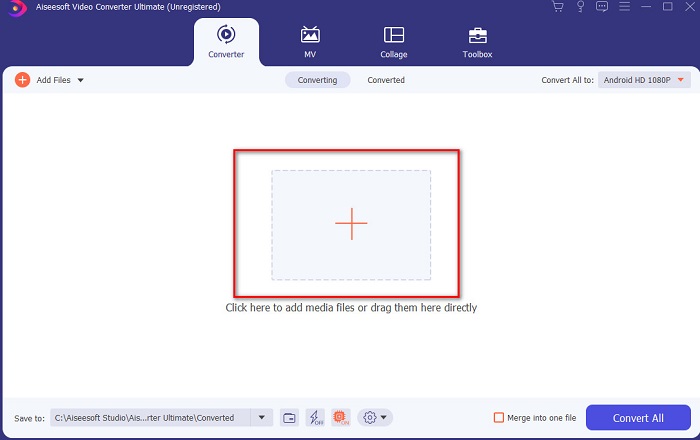
Stap 2. Start de tool om verder te gaan; vervolgens verschijnt er een interface zoals deze. Klik in het middelste gedeelte op de +‑knop en zoek het DivX‑bestand dat je wilt toevoegen en klik vervolgens op Open.
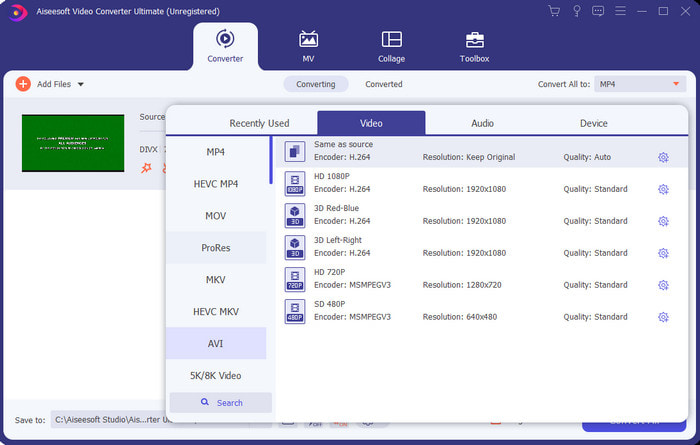
Stap 3. Om DivX in AVI te wijzigen, klik je op Convert All naar en zoek je het AVI‑formaat op en klik je erop.
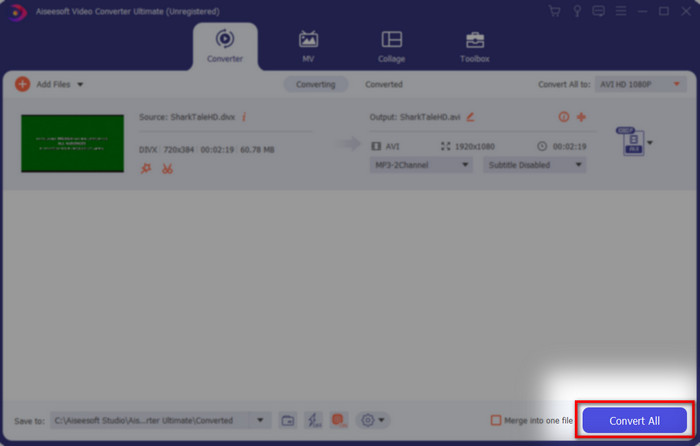
Stap 4. Klik op Convert All om het conversieproces te starten en wacht tot het proces voltooid is.
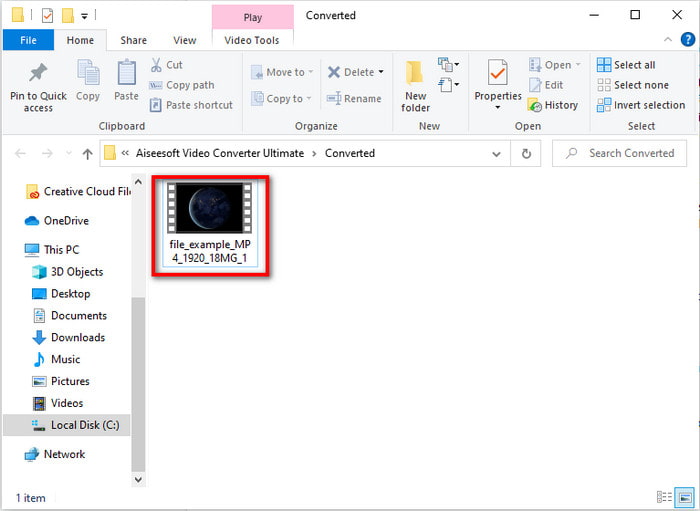
Stap 5. Wacht tot het conversieproces is voltooid. Zodra dat is gebeurd, verschijnt er een map op je scherm met het geconverteerde bestand; klik erop om het te bekijken en ervan te genieten.
Boven 2. Freemake Video Converter
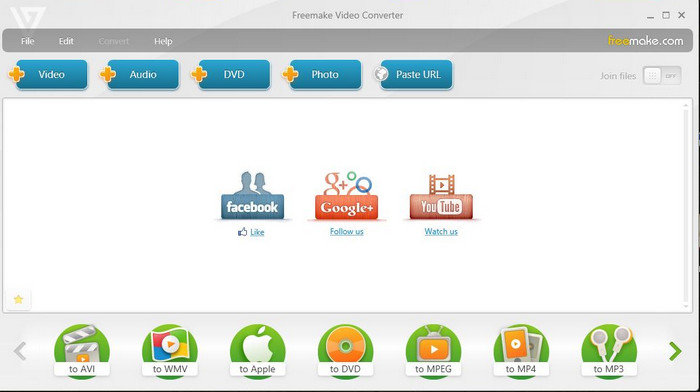
Een andere downloadbare software die je kunt gebruiken om formaten te converteren is Freemake Video Converter. Deze tool heeft al veel gebruikers geholpen om elk mediabestand naar een nieuw formaat te converteren. Ook wordt het algemeen beschouwd als een van de beste programma’s die je kunt downloaden en waarop je kunt vertrouwen. Hoewel de tool goed is, ondersteunt hij nog steeds niet alle formaten en is het conversieproces erg traag, omdat de tool geen hardwareversnelling heeft zoals FVC Video Converter Ultimate. Dus als je DivX gratis naar AVI wilt converteren, dan is dit de software waar je voor kunt kiezen.
Voordelen
- Gratis om software te downloaden.
- Uiterlijk is eenvoudig.
Nadelen
- Heeft geen hardwareversnelling.
- Sommige formaten worden hier niet ondersteund.
Top 3. FVC gratis video-omzetter
Wat als je een mediabestand naar een nieuw formaat wilt converteren maar niets wilt downloaden? Dan is FVC Free Video Converter er om je te helpen. In tegenstelling tot de twee hierboven genoemde tools heb je voor deze tool geen download nodig; je kunt hem rechtstreeks online gebruiken. Hoewel de software gratis toegankelijk is, worden nog steeds niet alle formaten ondersteund. Je hebt ook maar een beperkte keuze aan formaten om naar te converteren. Het conversieproces is echter veel sneller als we het vergelijken met Freemake Video Converter. Dus als je wilt weten hoe je DivX online naar AVI converteert, volg dan de onderstaande stappen.
Stap 1. Ga naar de hoofdwebsite van de FVC Free Video Converter door op deze link te klikken.
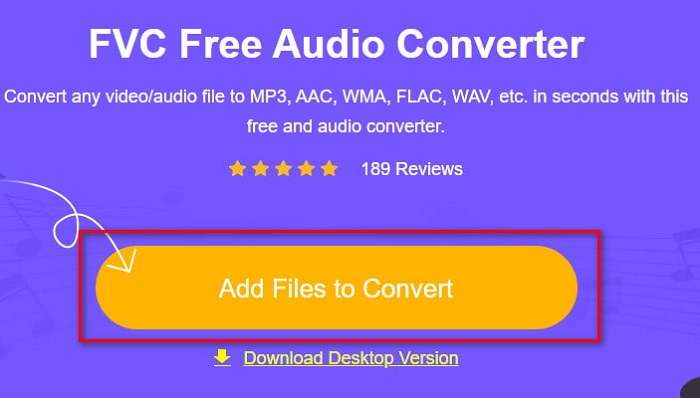
Stap 2. Klik op Add Files to Convert om de launcher te downloaden als het je eerste keer is. En als de launcher al is geïnstalleerd, klik je opnieuw op Add Files to Convert, lokaliseer je het bestand in de map, klik je erop en druk je op Open.
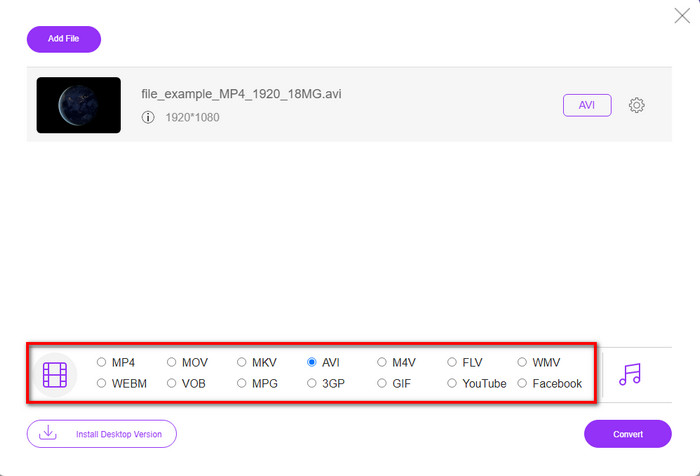
Stap 3. Selecteer het AVI‑formaat in de lijst met opties hieronder of elk ander formaat waarin je het wilt omzetten.
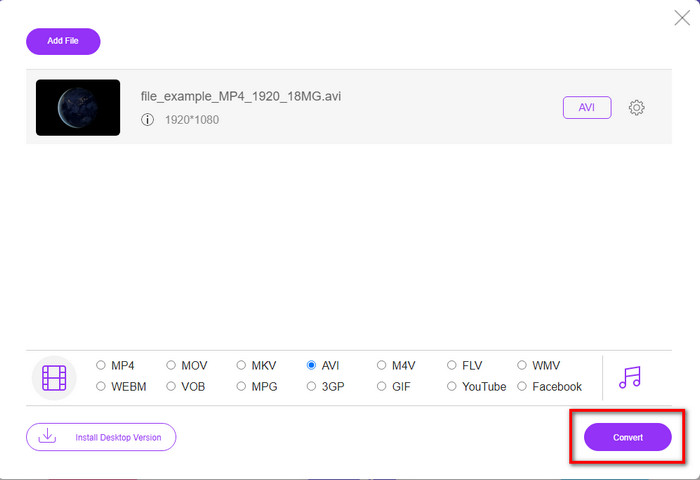
Stap 4. Als je klaar bent met het selecteren van het formaat, is het nu tijd om het op je schijf op te slaan door op Convert te klikken.
Stap 5. Als het proces al is uitgevoerd, wacht dan tot de bestandsmap op je scherm verschijnt. Open het bestand door erop te klikken en bekijk het geconverteerde mediabestand.
Top 4. Online-Convert.com
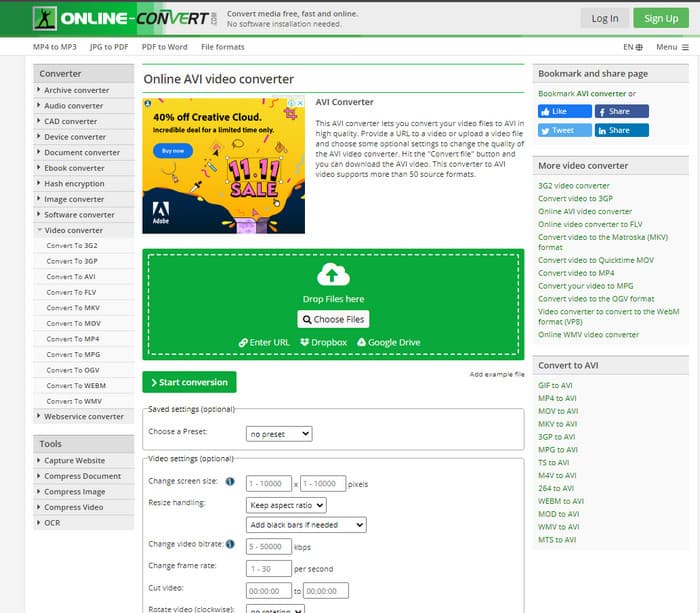
Een andere online tool die je kunt gebruiken om mediabestanden te converteren is Online-Convert.com. Net als sommige andere online tools ondersteunt deze converter slechts een beperkt aantal formaten. Hij heeft echter wel een ingebouwde video‑aanpassing die je kunt gebruiken, maar die moeilijk te bedienen is, vooral als je er geen ervaring mee hebt. Bovendien gaat het uploaden en downloaden van bestanden hier erg traag in vergelijking met de FVC Free Video Converter.
Voordelen
- Gratis toegankelijk op internet.
- De interface van de tool is geweldig en er zijn weinig tot geen advertenties.
- Het conversieproces is afhankelijk van de internetverbinding.
Nadelen
- Niet toegankelijk zonder internet.
- Het proces van importeren en exporteren kost veel tijd in vergelijking met de andere tools.
Deel 3. Welke is het beste om DivX naar AVI te converteren?
| Functies | FVC Video Converter Ultimate | Freemake Video Converter | FVC gratis video-omzetter | Online-Convert.com |
| Video en audio converteren |  | | | |
| Batchconversie | |  | | |
| Hardware acceleratie | | | | |
| Programmagebaseerd hulpmiddel | Desktop-gebaseerde tool | Desktop-gebaseerde tool | Webgebaseerd hulpmiddel | Webgebaseerd hulpmiddel |
| Netwerkconnectiviteit | Niet vereist | Niet vereist | Verplicht | Verplicht |
Deel 4. Veelgestelde vragen over DivX naar AVI-converters
Wat is beter? DivX en XviD?
DivX is een bekende eigen codec voor het video- en audiocontainerbestand en het is ook gespecialiseerd in het rippen van het bestand op de schijf terwijl het wordt gecomprimeerd zonder kwaliteitsverlies. Hoewel XviD de knock-off-versie van de DivX is en iets veel beter is dan de DivX. Het is ook niet-gepatenteerd, wat betekent dat iedereen dit kan gebruiken wanneer en wat je maar wilt.
Wat zijn codecs?
Een codec wordt gebruikt om een bestand te comprimeren en alle audio- en videobestanden veel sneller te distribueren binnen een kleinere bestandsgrootte. Het wordt ook gebruikt om een bestand te decomprimeren dat is gebonden aan de genoemde codec om het gecomprimeerde bestand te openen dat u hebt gemaakt zonder de geloofwaardigheid ervan te vernietigen.
Om een kleinere bestandsgrootte te hebben, is het ideaal om te comprimeren of te converteren?
Als je de kwaliteit van een video wilt behouden en die kleiner wilt maken, is het ideaal om hem te comprimeren met behulp van deze link. Maar als je een veel eenvoudigere manier wilt, overweeg dan om video’s naar MP4 te converteren door dit artikel te lezen om een idee te krijgen hoe je dat doet.
Gevolgtrekking
Nu we aan het einde van dit artikel zijn gekomen, is het voor ons makkelijker om te begrijpen wat DivX is en wat AVI is. Ook hebben we je de 4 handige tools laten zien die je kunt gebruiken om je DivX‑bestand af te spelen door het naar een AVI‑formaat te converteren. Dus als je een "100%" succes wilt ervaren, gebruik dan FVC Video Converter Ultimate om dat succes te garanderen.
Gratis downloadVoor Windows 7 of nieuwerVeilige download
Gratis downloadVoor MacOS 10.7 of nieuwerVeilige download
-
 [Gratis en online] 7 manieren om MTS naar AVI te converteren op Mac/Windows-computer
 Hoe MTS gemakkelijk naar AVI te converteren? In deze gids vindt u 7 gratis en eenvoudige manieren om MTS-bestanden naar AVI op Windows of Mac te converteren zonder kwaliteitsverlies.
-
 Tutorial om MP4 naar AVI-bestanden te converteren met 7 gratis video-converters
 Wil je alle gratis manieren krijgen om AVI naar MP4-video te converteren? Dit artikel mag je niet missen. Hier zijn 7 manieren om AVI-bestanden gratis naar MP4 te converteren op Windows, Mac, iPhone, Android en online.
-
 3 eenvoudige methoden om FLV naar AVI op desktop en online te converteren
 Hier zijn drie methoden om u te helpen uw FLV-videobestanden efficiënt te converteren naar AVI-indeling op Windows en Mac, zodat u ze met hoge kwaliteit kunt bekijken.
