


 Video Converter Ultimate
 Scherm opnemer
 Videoreparatie
Fenomenale Mini DV naar AVI Converter Beschikbaar op Windows & Mac OS
DV-bestanden zijn in de eerste plaats bedoeld om digitale video te bevatten die is opgenomen met videocamera’s of camcorders van Panasonic en Sony eind 1995. Deze codec- en bandindeling werd bekend doordat hij de overgang van analoge naar digitale productie mogelijk maakte. Maar tegenwoordig kun je een DV-bestand niet meer afspelen met je standaard mediaspeler of het zelfs online delen. Als je dit bestand nu wilt afspelen, moet je overwegen het om te zetten naar een meer ondersteund en goed afspeelbaar formaat zoals AVI. Bovendien helpen de onderstaande uitleg en stappen je om DV te begrijpen, DV-bestanden naar AVI te converteren en ze af te spelen in een mediaspeler als je niet wilt converteren.

Deel 1. Battle of the Formats: DV VS AVI
DV-bestand en AVI zijn bijna hetzelfde omdat deze twee formaten video en audio kunnen bevatten. Hun doel en hoe ze het mediabestand opslaan, liggen echter ver van elkaar. Laten we in dat geval eens kijken wat de verschillen zijn tussen DV en AVI door hun 3 unieke mogelijkheden te vergelijken.
Compatibiliteit van het formaat
AVI wordt breder ondersteund en is een van de meest compatibele formaten om video’s mee af te spelen en te bewerken. Dit formaat kan videoweergave in een gesynchroniseerd formaat bevatten. Daarentegen wordt een DV-bestand niet ondersteund door tal van videobewerkers en mediaspelers op pc en Mac. Daarom is dit een van de redenen waarom je een mini‑DV‑naar‑AVI-converter nodig hebt.
Ondersteunde compressie
AVI is een verliesvrij bestandsformaat voor robuuste en geavanceerde opslag van mediabestanden. Dit formaat zal echter veel van uw harde schijfopslag opslokken omdat het niet gecomprimeerd is. Terwijl DV een lossy compressie gebruikt voor zijn video, maar het audiobestand is niet gecomprimeerd. De reden waarom het formaat verliesgevend is, is omdat het de DCT gebruikt als basis voor frame-voor-frame dat wordt gebruikt om video te comprimeren.
Audio‑kwaliteit
Het audiogetrouwe DV-bestand ondersteunt tussen de gemiddelde en de beste audiokwaliteit omdat het een bemonsterde PCM-audio tot 48 kHz gebruikt met een woordlengte van 20 bits. AVI gebruikt wel een ongecomprimeerde PCM en de kwaliteit van de audio is uitstekend. Toch kan het beter zijn als u DV als encoder gebruikt om DV-AVI te verkrijgen die comprimeert.
Nu we begrijpen wat deze formaten zijn, is het nu het juiste moment om DV naar AVI op Mac of uw pc te converteren door de onderstaande tutorial te lezen.
Deel 2. Beste fenomenale conversietool om DV naar AVI te converteren op Mac en Windows
FVC Video Converter Ultimate
Heb je moeite om een converter te kiezen die een fenomenaal resultaat oplevert? In dat geval raden wij je aan om FVC Video Converter Ultimate te gebruiken. Deze software is een van de populairste keuzes onder gebruikers die vaak bestandsindelingen omzetten. En ‘ultimate’ is niet alleen maar een naam, het verwijst ook naar de prestaties die het programma levert. Kortom, dit programma is ideaal voor iedereen die hulp nodig heeft bij conversieproblemen. Voordat we doorgaan naar de stappen, kijken we eerst naar de voordelen die je krijgt als je deze software downloadt.

Video Converter Ultimate
30000+ downloads- Converteer uw DV-videobestand naar meer dan 200 beschikbare formaten.
- Ondersteunt alle besturingssystemen zoals pc en Mac.
- De toolbox bevat geavanceerde functies zoals het maken van GIF's, het bewerken van video's, samenvoegen en meer.
- Intuïtieve interface voor iedereen.
- Het ondersteunt 30x snellere conversie in vergelijking met de andere converters online of offline.
Gratis downloadVoor Windows 7 of nieuwerVeilige download
Gratis downloadVoor MacOS 10.7 of nieuwerVeilige download
Dus zonder verder oponthoud, laten we doorgaan naar de onderstaande tutorial en laten we DV naar AVI converteren zonder de kwaliteit van de video te verliezen.
Stappen om DV naar AVI te converteren met FVC Video Converter Ultimate:
Stap 1. Klik op de downloadknop hieronder en kies het besturingssysteem dat je momenteel gebruikt. Installeer de software op je schijf en klik op Nu starten om naar de volgende stap te gaan.
Gratis downloadVoor Windows 7 of nieuwerVeilige download
Gratis downloadVoor MacOS 10.7 of nieuwerVeilige download
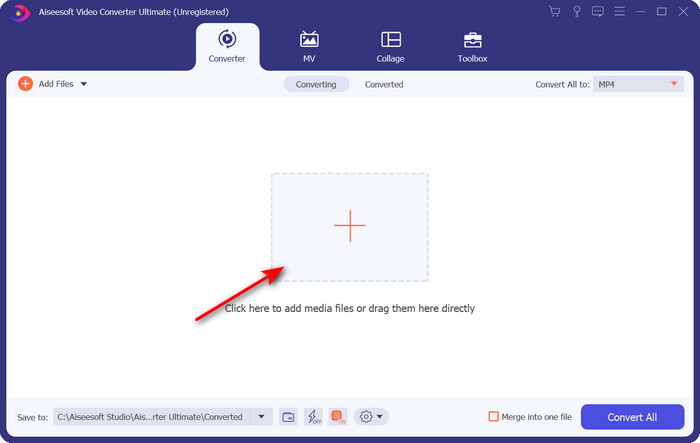
Stap 2. Open de software en klik op de +‑knop in het midden van de interface van het programma. Er verschijnt een mapvenster; om het .dv‑bestand te uploaden, klik je op Openen.
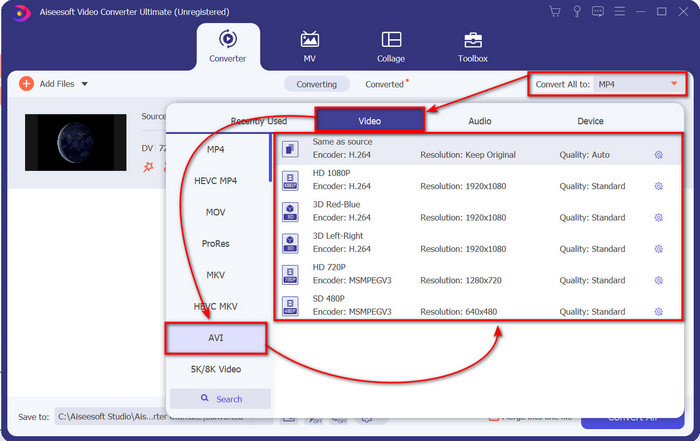
Stap 3. Om het .dv‑bestand in een .avi‑bestand te wijzigen, klik je op de vervolgkeuzelijst en zoek je het AVI‑formaat.
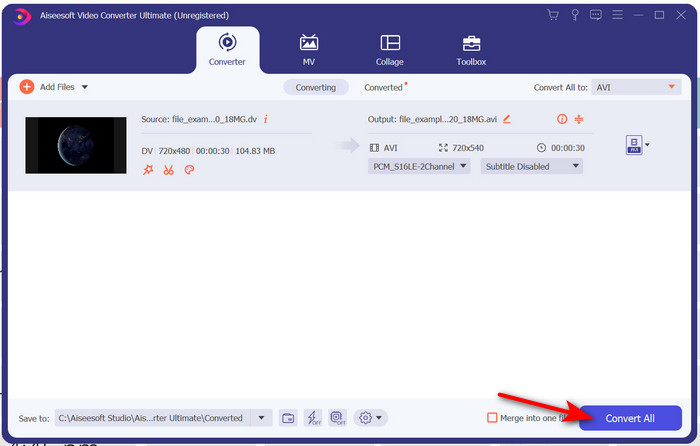
Stap 4. Zodra je het formaat hebt gekozen, is het tijd om je DV naar AVI om te zetten door op Alles converteren te klikken.
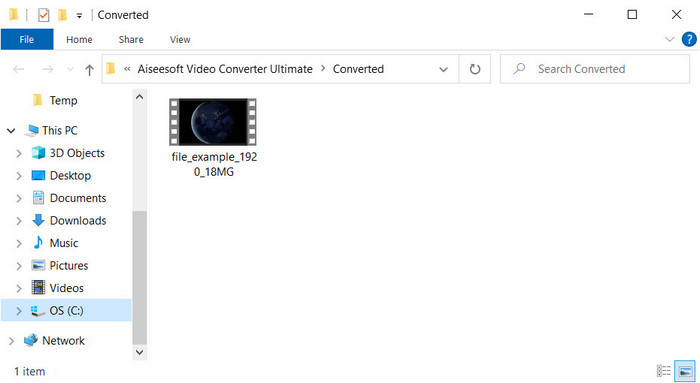
Stap 5. Het converteren van een bestand duurt minder dan een minuut, dus lang wachten is niet nodig. Er verschijnt een nieuwe map met de geconverteerde bestanden.
Deel 3: Speel uw DV-bestanden af met de DV-videospeler die beschikbaar is op pc en Mac
Blu-ray speler
Wil je mini‑DV niet naar AVI converteren, probeer dan deze mediaspeler die dit type formaat ondersteunt: de Blu-ray Player. Deze mediaspeler ondersteunt meer dan 300 formaten en codecs om video’s zonder moeite op je desktop af te spelen. Daarnaast beschikt deze mediaspeler over de meest geavanceerde functies die een speler zou moeten bieden om je kijkervaring te verbeteren. Je kunt ook een cd, dvd of Blu-ray‑schijf gebruiken om video op je computer af te spelen; kortom, het is een veelzijdige mediaspeler. Als je dus geen gedoe wilt met het converteren van het .dv‑bestand, volg dan deze stappen om de video af te spelen.
Stappen om het DV‑bestand af te spelen met behulp van Blu-ray Player:
Stap 1. Om deze mediaspeler te downloaden, klik je op de knop hieronder, installeer je de speler en start je hem op.
Gratis downloadenVoor Windows 7 of laterVeilige download
Gratis downloadenVoor macOS 10.7 of laterVeilige download
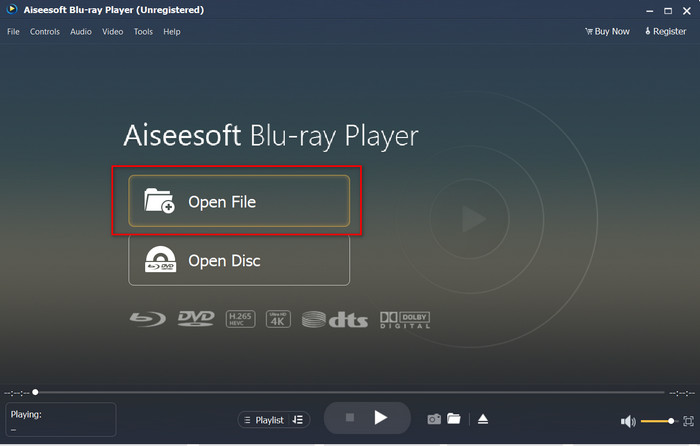
Stap 2. Klik op Bestand openen, lokaliseer vervolgens het .dv‑bestand in je map en klik op Openen.
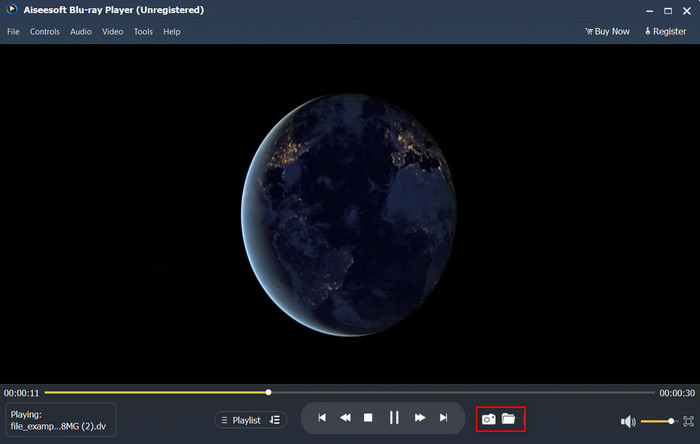
Stap 3. Het DV‑bestand wordt automatisch op je desktop afgespeeld. Klik daarnaast op de camera-knop als je een screenshot wilt maken van wat je aan het bekijken bent. Als je de gemaakte snapshots wilt terugvinden, klik je op de map-knop.
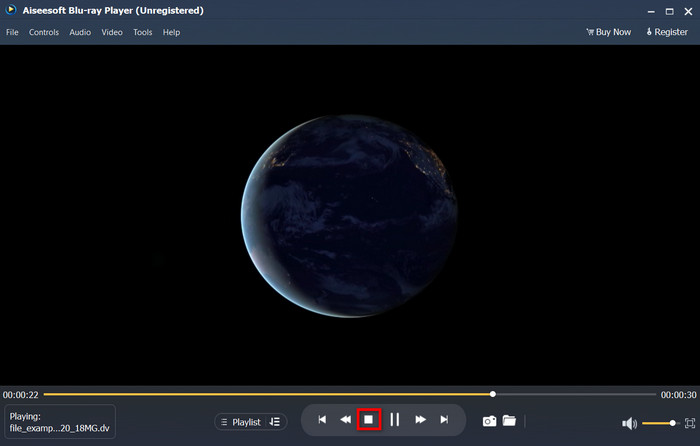
Stap 4. Als je wilt stoppen met het bekijken van het .dv‑bestand, klik je op de kubus-knop.
Stap 5. Als je een ander bestand in een ander formaat wilt bekijken, volg je stap 2 en 3 en geniet je van de video in hoge kwaliteit.
Gerelateerd:
Deel 4. Veelgestelde vragen over DV naar AVI-conversie
Verliest het converteren van DV-bestanden hun kwaliteit?
Het converteren van een formaat naar een nieuwe versie mag de kwaliteit van het originele videoformaat niet verminderen. Sommige converters bieden echter geen ondersteuning voor het converteren van 1080- of 4k-videokwaliteit omdat dit tijd kost. Dus, als je geen kwaliteit wilt verliezen, gebruik dan de FVC Video Converter Ultimate. Verwacht niets minder, want deze software zal uw kwaliteit niet aantasten en u een optie bieden om deze te verhogen of te behouden.
Kan ik .dv op VLC spelen?
Vandaag ondersteunt VLC geen enkel .dv-bestand om af te spelen; als u echter AVI comprimeert en in plaats daarvan de DV-AVI gebruikt, kunt u de video op de VLC afspelen.
Welk formaat is de beste vervanging voor DV?
Als je de beste vervanging voor een DV-bestand wilt weten, probeer dan het MP4-bestand te gebruiken. Dit formaat staat bekend als het multifunctionele formaat omdat het compatibel is met alle desktops en apparaten als ze de video willen afspelen of bewerken. Maar de kwaliteit van MP4 en DV is heel anders als we ze zouden vergelijken. Desalniettemin is MP4 qua compatibiliteit het beste mediaformaat dat u als vervanging kunt gebruiken.
Gevolgtrekking
Kortom, we hebben slechts één DV‑naar‑AVI‑converter voorgesteld, omdat dit de enige software is die echt goed presteert bij het converteren van dit bestandstype. Terwijl je dit artikel las, heb je ook een andere manier ontdekt om het .dv‑bestand af te spelen, namelijk met deze DV‑speler. We hebben dus twee tools gepresenteerd die elk hun eigen taak hebben, of je nu het .dv‑bestand wilt afspelen of het wilt converteren. Als je kiest voor FVC Video Converter Ultimate, kun je rekenen op een fenomenale uitvoerkwaliteit binnen korte tijd. Maar als je het DV‑bestand alleen wilt afspelen, dan is je beste keuze de Blu-ray Player.
-
 Beste 5 keuzes om MPEG naar AVI-formaat te converteren [Online & Offline]
 Vind je het lastig om een converter voor MPEG te zoeken? Probeer dan dit artikel te lezen terwijl we leren hoe we MPEG naar AVI-formaat kunnen veranderen met gedetailleerde stappen.
-
 4 geweldige converters om gratis WMV naar AVI online te converteren [2021]
 Bent u op zoek naar een WMV naar AVI converter? En als dat zo is, probeer dan dit artikel te lezen terwijl we alle hulpmiddelen die we op internet kunnen vinden, uitzoeken om u bij deze taak te helpen.
-
 4 Nieuwste online en offline converters om F4V naar AVI-formaat te converteren
 Heb je geen idee welke converter je moet gebruiken om F4V naar AVI of een ander videoformaat te converteren? Lees dan dit artikel terwijl we leren hoe u kunt converteren met de beschikbare tool.
