


 Video Converter Ultimate
 Scherm opnemer
 Videoreparatie
 Converteer MOD naar elk formaat zoals MP4, MOV, AVI, MP3, enz.
7 gratis MOD-converters beschikbaar in uw platform om het MOD-formaat gemakkelijk te veranderen
Moet u uw MOD-bestand wijzigen? In dat geval hoeft u zich geen zorgen meer te maken of allerlei verschillende converters uit te proberen. Raak niet in paniek, want vandaag hebben wij de oplossing voor u. We laten u direct de beste manieren zien om MOD naar MP4, MOV, MPEG2, DVD of elk ander gewenst videoformaat te converteren, inclusief stappen die u kunt volgen.

Deel 1. Top 7 gratis MOD-converters om MOD-bestanden online en offline te converteren
1. FVC Video Converter Ultimate - Beste MOD-converter op Windows en Mac
Als eerste op onze lijst staat de meest gekozen MOD-converter die op meerdere platforms beschikbaar is, de FVC Video Converter Ultimate. Deze converter biedt een ultrasnelle conversiesnelheid aan zijn gebruikers en stelt hen nooit teleur. Hoewel het converteren met deze tool snel gaat, blijft de kwaliteit behouden, omdat deze wordt beschermd tijdens het wijzigen van het formaat.
Wat is meer dan het razendsnelle proces? Het ondersteunt ook de enorme formaten die u kunt importeren of exporteren, zoals MOD, MP4, MOV, MKV, FLV, WMV en nog veel meer. Vanwege het ondersteunde formaat raakten klanten dol op de tool en velen van hen bevelen dit aan andere medegebruikers aan die hun formaat moeten converteren. Dus als je hulp nodig hebt bij het converteren van MOD naar MP4 of welk videoformaat je maar wilt, dan is deze tool een uitstekende hulp door de onderstaande stappen te volgen.
Stap 1. Klik op de downloadknop hieronder om de converter op uw desktop te downloaden en kies welk platform u momenteel gebruikt. Volg vervolgens snel het installatieproces en start de software. Als u nieuw bent met converteren, wees dan niet bang, want de stappen die hier worden gegeven, zorgen ervoor dat u het MOD-bestand op de juiste manier converteert.
Gratis downloadVoor Windows 7 of nieuwerVeilige download
Gratis downloadVoor MacOS 10.7 of nieuwerVeilige download
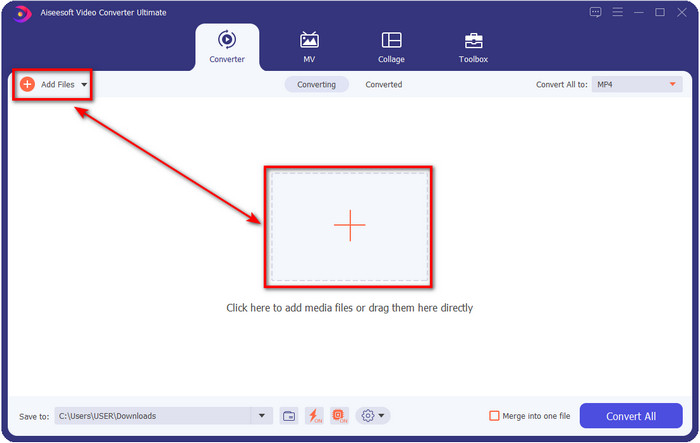
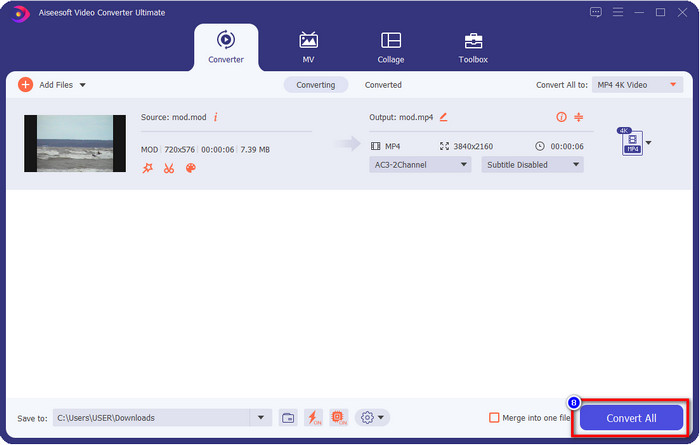
Stap 2. Upload het MOD-bestand door op Bestanden toevoegen te klikken, of druk op de grote +-knop in het midden van de interface. Daarna verschijnt er een computer-map op uw scherm; blader nu, klik op het MOD-bestand en druk op Openen om naar de volgende stap te gaan.
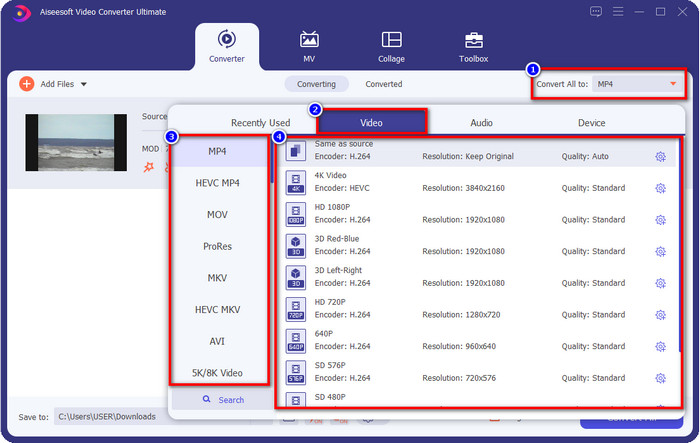
Stap 3. Om het formaat te wijzigen naar MP4, MOV, MKV of welk ander formaat u ook nodig hebt, klikt u op Alles converteren naar en maakt u een keuze.
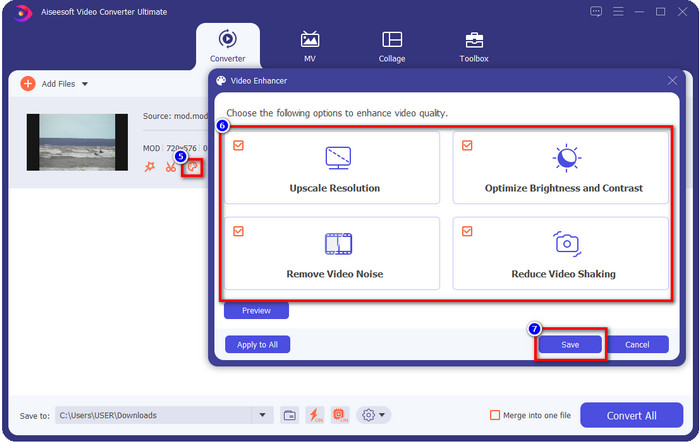
Optioneel. Een van de fantastische functies die deze tool biedt, is de enhancer. Als u op het verfpalet klikt, verschijnt er een nieuw mini-venster; nu kunt u belangrijke aanpassingen aan uw video doen door de vakjes aan te vinken. Klik op Opslaan om de wijzigingen die u in uw MOD‑video hebt aangebracht toe te passen.
Stap 4. Na alle procedures is het tijd om MOD te converteren door op Alles converteren te klikken. Zo eenvoudig als 1-2-3 weet u nu hoe u het MOD‑formaat naar een nieuw formaat converteert.
Voordelen
- Converteer MOD naar MP4, MOV, MKV, FLV, AVI of naar 200+ formaat dat effectief beschikbaar is.
- Geavanceerde bewerkingsfuncties zijn onder meer bijsnijden, knippen, bijsnijden en meer.
- Het is veilig en vrij van malware om te downloaden.
- Beschikbaar om te downloaden op alle desktopplatforms zoals Windows en Mac.
Nadelen
- Om gebruik te kunnen maken van alle geavanceerde functies, moet u de tool aanschaffen.
2. iMovieSoft gratis TOD-converter
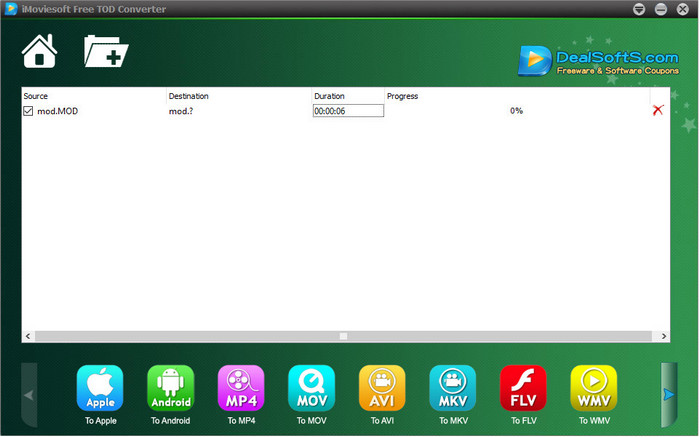
Een andere converter die u op uw desktop kunt downloaden is de iMoiveSoft Free TOD Converter. Hiermee kunt u uw MOD‑formaat eenvoudig converteren naar de beschikbare formaten. Het aantal ondersteunde formaten is echter niet zo groot, maar de bekende formaten zijn wel beschikbaar. Bovendien is de hoofdwebsite van de tool niet met een beveiligde verbinding voorzien; ondanks de waarschuwing hebben wij deze toch op ons systeem gedownload om stappen te kunnen geven voor het converteren van MOD‑bestanden naar MOV, MP4, AVI, enz.
Stap 1. Download de converter op uw desktop en open hem.
Stap 2. Klik op de Map en zoek de MOD‑bestanden die u wilt invoegen.
Stap 3. Klik op het formaat onderaan en druk op Converteren.
Voordelen
- Het is gratis te downloaden op Windows en Mac.
- Makkelijk te gebruiken.
- Basisbewerkingsfuncties zijn beschikbaar.
Nadelen
- De hoofdwebsite is niet verbindingsveilig.
- Het heeft een formaatoptie die u kunt kiezen.
- Gebruikersinterface moet worden verbeterd.
3. iOrgSoft-omzetter
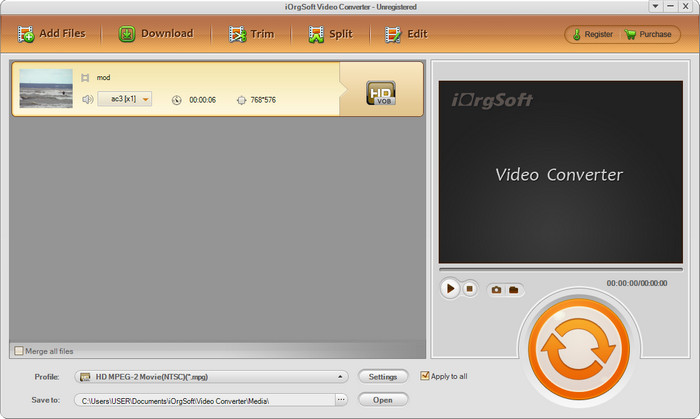
iOrgSoft Converter is een goede keuze als u eenvoudig MOD naar MPEG2 wilt converteren. De hoofdwebsite van deze converter heeft, net als iMovieSoft, ook een onbeveiligde verbinding. U kunt hier ook een externe link gebruiken om de video te downloaden. Hoewel de tool enkele opties biedt, heeft de gebruikersinterface minder prioriteit gekregen, wat betekent dat u geen heel mooi ogende UI hoeft te verwachten. Bovendien treden er crashes en storingen op wanneer u gaat converteren.
Stap 1. Zoek de hoofdwebpagina van de converter en download hem daar.
Stap 2. Open de converter, klik op Bestanden toevoegen om MOD‑bestanden in te voegen, klik op de formaatkeuze en kies het gewenste formaat.
Stap 3. Klik op de knop Converteren om het converteren te starten.
Voordelen
- Het ondersteunt meer formaten dan iMovieSoft.
- Eenvoudig te gebruiken en gemakkelijk te begrijpen.
- Download het op Windows en Mac.
Nadelen
- Onbeveiligde verbinding met de hoofdwebsite.
- De gebruikersinterface is verschrikkelijk.
4. FFmpeg
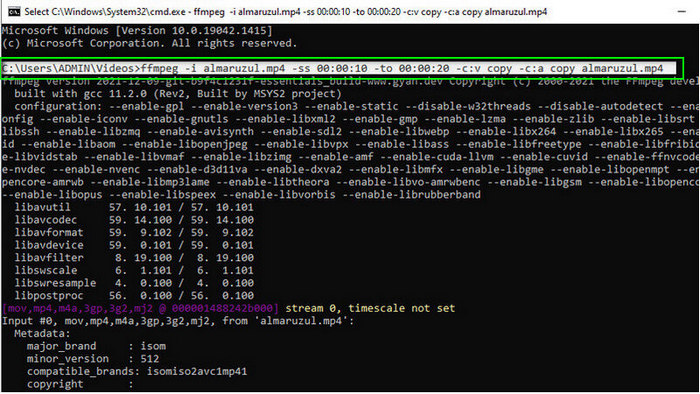
Stel dat u een gratis MOD‑naar‑MOV‑converter nodig hebt, dan is FFmpeg er om u te helpen. Anders dan de andere converters in deze lijst gebruikt dit programma een CLI‑gebaseerde interface, waardoor u via tekst met de tool communiceert. Hoewel dit voor velen niet zo bekend is, gebruiken sommige gebruikers het nog steeds als hun converter. Als deze converter nu uw aandacht heeft getrokken, volg dan de onderstaande stappen.
Stap 1. Download FFmpeg en voer het exe‑bestand uit.
Stap 2. Open de CMD; hiermee kunt u met de tool communiceren.
Stap 3. Zoek via de opdrachtprompt de locatie van het bestand. Kopieer en plak daarna deze tekst, ffmpeg -i input.mod -vn -ar 44100 -ac 2 -b:a 192k output.mp4 om naar MP4 te converteren. U kunt het formaat ook wijzigen naar MOV, MKV, AVI en meer. Druk op Enter op uw toetsenbord om het proces te starten.
Voordelen
- Unieke video-omzetter beschikbaar op de meeste platforms.
- Veilig in gebruik.
- Het is betrouwbaar in het converteren van uw formaat.
Nadelen
- Het is niet erg gemakkelijk te gebruiken.
- Het is niet de beste keuze voor starters of beginners om het formaat te converteren.
5. CloudConvert
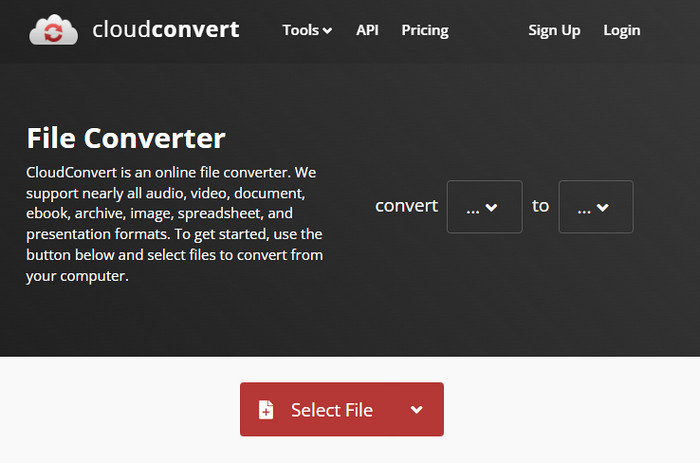
Wilt u geen converter op uw desktop downloaden? Dan kunt u het MOD‑formaat nog steeds online converteren met CloudConvert. Deze onlinetool biedt zijn gebruikers een eenvoudig maar effectief conversieproces. Hij ondersteunt ook het converteren van andere bestandstypen, zoals PDF, archieven, e‑books en meer, naar een nieuw formaat.
Stap 1. Zoek CloudConvert in uw favoriete browser.
Stap 2. Klik op Select File en upload het MOD‑bestand. Klik op de vervolgkeuzelijst en kies uw gewenste formaat. Klik vervolgens op Convert.
Stap 3. Klik na het uploaden op Download om het nieuwe bestandsformaat op uw schijf op te slaan.
Voordelen
- Het downloaden van de tool is niet nodig.
- Gratis online webtool.
- Gebruikersvriendelijk.
Nadelen
- Netwerkafhankelijk.
- Het verloop van het proces is afhankelijk van de snelheid van uw internet.
6. Converter365
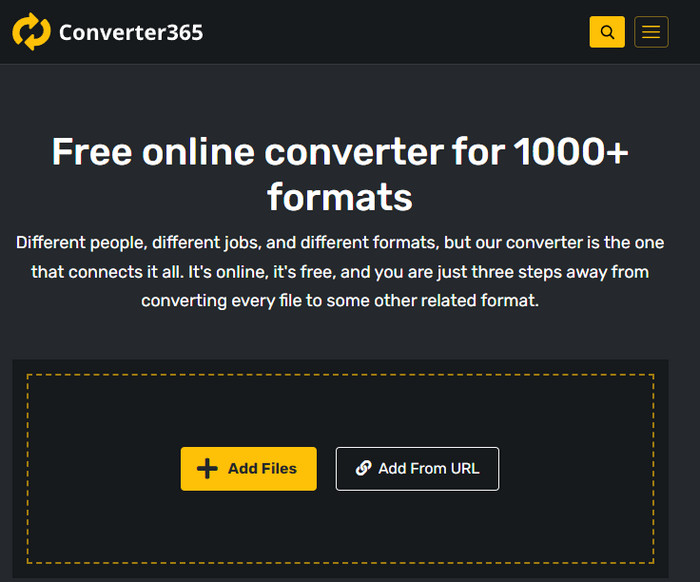
Een andere gratis online MOD‑naar‑MP4‑converter die u kunt gebruiken is Converter365. Het is een van de onlinetools met een interface die we een elegante uitstraling kunnen noemen. Daardoor oogt het gebruik van deze tool professioneel; echter hadden wij problemen met het converteren van videobestanden omdat de tool crashte. Als u uw MOD‑bestand eenvoudig moet converteren, kan dit u desondanks wellicht helpen.
Stap 1. Open uw browser en zoek naar Converter365.
Stap 2. Vink Bestanden toevoegen aan en zoek vervolgens het .mod‑bestand. Zodra u het bestand hebt gevonden, kiest u het formaat door op de vervolgkeuzelijst te klikken.
Stap 3. Druk op Start Conversion en de conversie begint.
Voordelen
- De converter is toegankelijk via het web.
- Het biedt een eenvoudige maar effectieve conversie.
- De gebruikersinterface ziet er professioneel uit.
Nadelen
- Het heeft een internetverbinding nodig om te gebruiken.
- Soms gebeuren er fouten tijdens het converteren van het formaat.
7. Zamzar
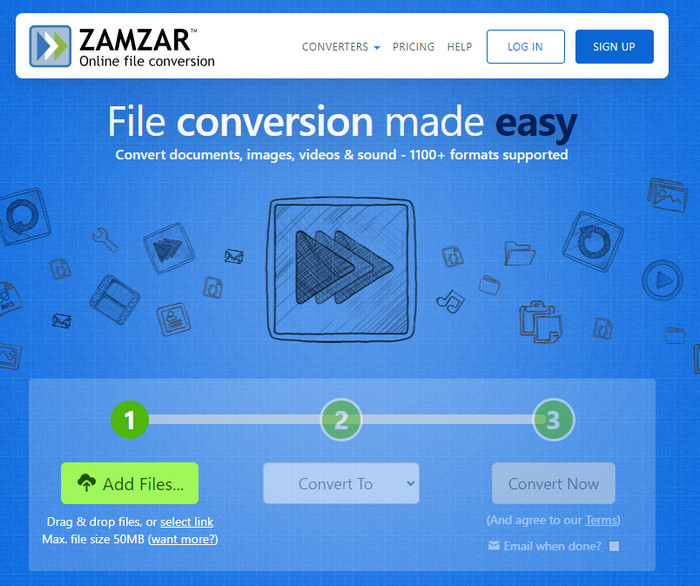
Als u een eenvoudige en praktische online MOD‑converter nodig hebt, dan is Zamzar een uitkomst. Deze tool biedt een rechttoe rechtaan proces voor het converteren van uw .mod‑bestanden. Bovendien is het zonder twijfel een van de veiligste converters die op het web beschikbaar zijn. Als u deze tool wilt proberen, kunt u de onderstaande stappen volgen.
Stap 1. Ga naar Zamzar door ernaar te zoeken in uw favoriete browser.
Stap 2. Druk op Add File om het MOD‑bestand in te voegen dat u wilt converteren. Klik op Convert To en kies het formaat dat u nodig hebt.
Stap 3. Klik op Convert Now en wacht op het proces. Klik daarna op Download om het op de schijf van uw computer op te slaan.
Voordelen
- Een van de beste opties als u een formaat moet converteren.
- Het biedt een eenvoudig conversieproces.
- Beschikbaar in alle webbrowsers.
Nadelen
- Internet-afhankelijk, geen internet je kunt het niet gebruiken.
- Het ondersteunt minder formaatopties.
Gerelateerd:
Deel 2. Veelgestelde vragen over MOD-converters
Wat is MOD?
MOD is een tweerichtingsindeling die kan worden gebruikt als audio voor standaardtoepassingen voor het volgen van digitale muziek. Het bevat nootpatronen, instrumentnummers en berichtcontrollers met verschillende sporen voor voorbeeldgeluiden. Zoals vermeld, is het tweerichtingsverkeer; u kunt dit ook gebruiken als videoformaat voor digitale camcorders van Panasonic en JVC. Hoewel dit formaat ondersteuning heeft van bekende merken, is het een beetje achterhaald als we het zouden vergelijken met de andere videocontainer.
Ondersteunen mediaspelers de .mod-extensie?
Niet alle mediaspelers ondersteunen dit formaat, vooral als uw speler geen MPEG-2-videocodec heeft. Het is nogal een probleem voor iedereen; je kunt een MPEG-2-video-extensie downloaden als je deze nodig hebt om af te spelen. Maar u kunt het bestand ook naar een ondersteund formaat converteren naar uw platforms, dit is tot nu toe de gemakkelijkste en veiligste manier. Dus als u uw MOD-bestand moet converteren, wilt u misschien in plaats daarvan de FVC Video Converter Ultimate gebruiken. Heeft u geen idee van de tool? Lees in dat geval de details hierboven.
Is MOD compatibel met de dvd-speler?
Het is niet compatibel met de dvd-speler; u kunt het echter op dvd branden om het compatibel te maken met de dvd-speler.
Gevolgtrekking
Deze zeven tools zijn de beste keuze als u een MOD‑converter nodig hebt vanwege hun prestaties en efficiëntie. We hebben alle software zorgvuldig getest en ontdekten dat de FVC Video Converter Ultimate een fenomenaal resultaat en functies levert die geen van de andere tools kan overtreffen. Als u dus de kwaliteit van deze tool zelf wilt ervaren, kunt u hem eerst op uw desktop downloaden en vervolgens naar wens gebruiken.

FVC Video Converter Ultimate
2.999.368+ downloads- Converteer MOD naar elk populair formaat.
- Verbeter de videokwaliteit op natuurlijke wijze
- Maak videocollage soepel met uitvoer van hoge kwaliteit
- Bewerk video's als een professional, inclusief bijsnijden, roteren, filter toevoegen, enz.
Gratis downloadVoor Windows 7 of nieuwerVeilige download
Gratis downloadVoor MacOS 10.7 of nieuwerVeilige download
-
 2 Ultieme MPG-converters om gratis MPG naar WMV te converteren
 Wilt u MPG gratis naar WMV converteren? In dat geval heb je geluk, want we hebben ontdekt dat er twee tools zijn die je kunt gebruiken om je MPG-bestanden te converteren.
-
 Hoe iTunes M4V in MKV op Mac en Windows de snelste manier te veranderen
 Als u M4V naar MKV op Mac moet converteren, moet u dit artikel lezen. Omdat we feiten over de converters bieden die u zullen helpen bij uw conversieproces.
-
 Top 5 gratis MPEG naar MKV-converters beschikbaar op alle platforms
 Wat zijn de beschikbare MPEG naar MKV-converters? Wilt u meer weten over de MPEG-converters die beschikbaar zijn op uw platform? Dan is dit artikel iets voor jou.
