


 Video Converter Ultimate
 Scherm opnemer
 Videoreparatie
Beste gratis MKV naar WMV-converters die uw bestanden snel kunnen converteren
MKV (Matroska) is een standaardcontainer voor uitgebreide audio- en videobestanden. Hoewel het een veelvoorkomend bestandsformaat is, moet je het toch converteren naar een bestandsformaat dat breed wordt ondersteund, zoals WMV. Dus als je op zoek bent naar een gratis MKV-naar-WMV-converter, dan is dit het artikel voor jou.

Deel 1. Waarom moet u MKV naar WMV converteren?
MKV (Matroska) kan een grote hoeveelheid audiovisuele en multimediabestanden bevatten, omdat het een vrije standaardcontainer is. Ondanks dat het een veelgebruikt bestandsformaat is, is het geen industriestandaard. Daarom ondersteunen sommige mediaspelers dit type bestand niet. Daarentegen is WMV of Windows Media Video een bestandsformaat dat breed wordt ondersteund door veel mediaspelers op elk apparaat. Bovendien is het een codec die de bestandsgrootte comprimeert, waardoor het een van de meest gangbare en geschikte bestandsformaten is in veel mediaspelers.
Deel 2. Converteer MKV naar WMV met behulp van de Lightning-Speed Converter
Het lijdt geen twijfel dat FVC Video Converter Ultimate de beste tool voor u is als het gaat om het converteren van MKV naar WMV-bestanden. Met deze gratis en ultrasnelle converter kun je MKV naar WMV converteren zonder kwaliteitsverlies. Deze converter heeft ook indrukwekkende functies waarmee je meerdere bestanden kunt bewerken, verbeteren en zelfs samenvoegen tot één. Bovendien kun je verschillende bestandsindelingen zoals MKV naar WMV, MP4, M4V, AVI, MOV en meer converteren.

FVC Video Converter Ultimate
5.689.200+ downloads- Ondersteunt batchconversie om meerdere bestanden tegelijkertijd te converteren.
- Het heeft een functie waarmee u uw MKV-bestanden ultrasnel kunt converteren.
- Het ondersteunt 200+ inclusief MKV, WMV, MP4, AVI, MPG, MOV, VOB en meer.
- Verkrijgbaar in verschillende platforms, zoals Windows en Mac.
Gratis downloadVoor Windows 7 of nieuwerVeilige download
Gratis downloadVoor MacOS 10.7 of nieuwerVeilige download
Hoe converteer je je bestanden met FVC Video Converter Ultimate
Stap 1. Klik op de Download-knop hieronder om FVC Video Converter Ultimate te installeren. Volg daarna het installatieproces en open de app.
Gratis downloadVoor Windows 7 of nieuwerVeilige download
Gratis downloadVoor MacOS 10.7 of nieuwerVeilige download
Stap 2. Nadat je de applicatie hebt geopend, klik je op Add Files of op de knop + om bestanden in de wachtrij te zetten, zodat je met het conversieproces kunt beginnen.
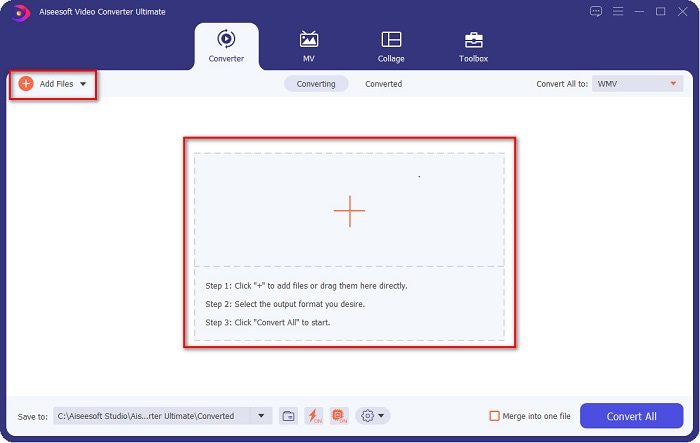
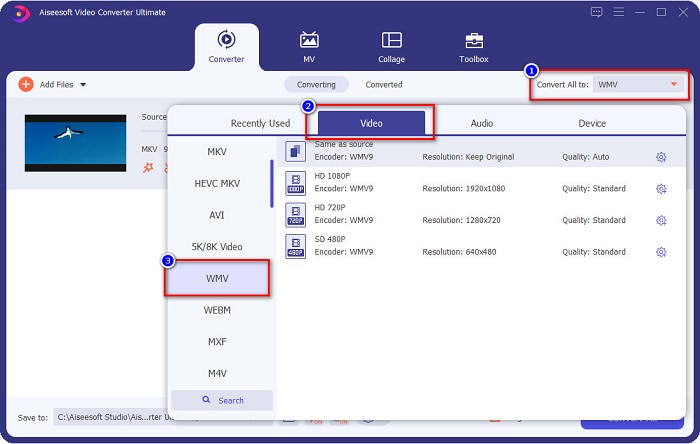
Stap 3. Klik vervolgens op de knop Convert All to, die zich in de rechterbovenhoek van de interface van de software bevindt. Er verschijnt een lijst met bestandsformaten; selecteer vervolgens het WMV-bestand.
Stap 4. Nadat je het gewenste bestandsformaat hebt gekozen, klik je op de knop Convert All om je MKV-bestand naar het WMV-bestandsformaat te converteren. Wacht daarna enkele seconden, en je WMV-bestand is klaar!
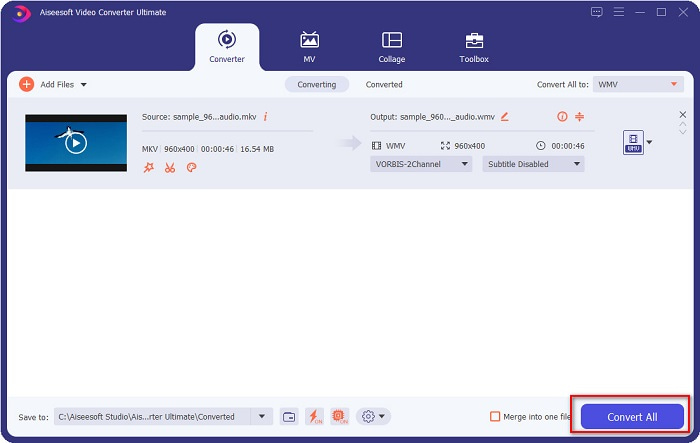
Door deze eenvoudige stappen te volgen bij het gebruik van FVC Video Converter Ultimate, kunt u deze MKV naar WMV-converter snel converteren.
Deel 3. Converteer MKV naar WMV met VLC Media Player Converter
Een andere manier waarop u uw MKV-bestand naar een WMV-bestand kunt converteren, is door een freeware-converter te gebruiken. VLC Media Player is niet alleen een videospeler; het kan ook bestanden zoals MKV naar WMV, WebM, MP4, enz. converteren. De interface is echter een beetje moeilijk te begrijpen. Desalniettemin wordt deze converter door veel gebruikers gebruikt.
Korte handleiding over het gebruik van VLC Media Player Converter:
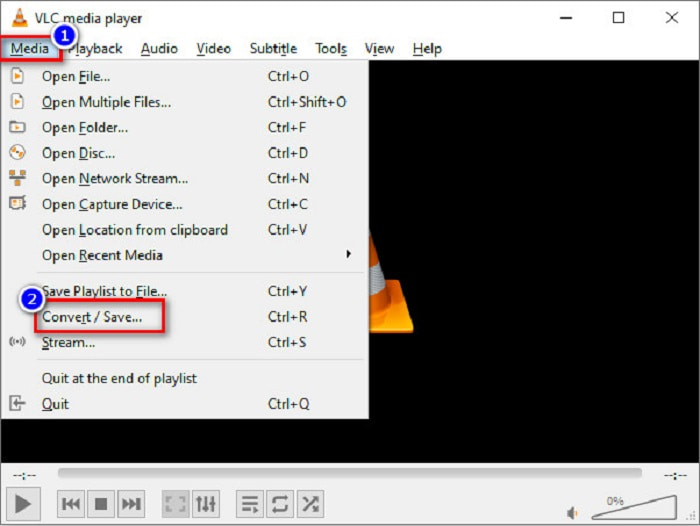
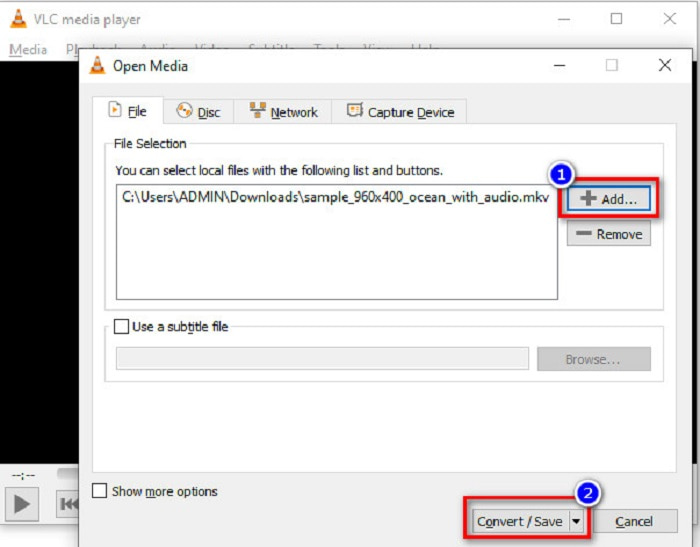
Stap 1. Open VLC Media Player, of als het nog niet op je computer is gedownload, zoek dan naar VLC Media Player en volg het installatieproces. Klik vervolgens linksboven in je scherm op de optie Media en daarna op de knop Convert/Save.
Stap 2. Nadat je op de knop Convert/Save hebt geklikt, verschijnt er een nieuw scherm waar je de lijst met lokale bestanden die je hebt geüpload kunt zien. Klik op de knop + Add om je MKV-bestand te uploaden. Druk op de knop Convert/Save onderaan om naar de volgende stap te gaan.
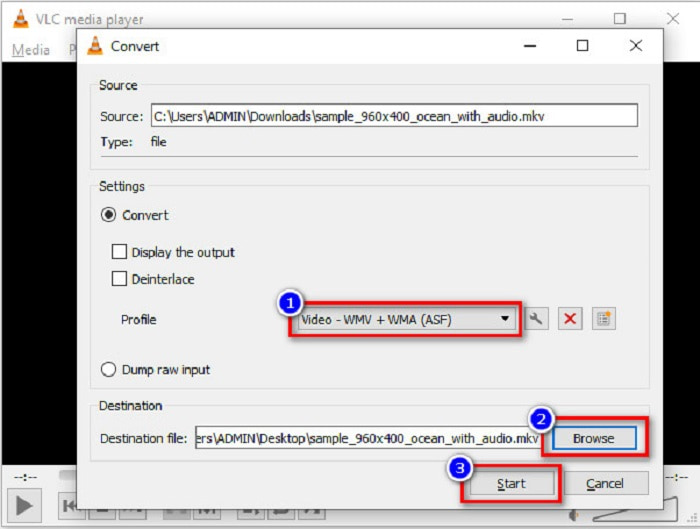
Stap 3. Selecteer tot slot het WMV-bestand als je bestandsformaat. Klik op de knop Browse om de bestemming van je bestand te kiezen wanneer de conversie is voltooid. Vink ten slotte de knop Start aan om te beginnen met het converteren van je MKV-bestand naar een WMV-bestand.
Deel 4. Converteer MKV naar WMV met behulp van gratis online converter
FVC Free Video Converter Online is een gratis online MKV-naar-WMV-converter waarmee je talloze audio- en videobestandsformaten kunt converteren, waaronder MKV naar WMV, AVI, MPG, MOV, MP4, MP3 en meer. Deze converter heeft ook een functie waarmee je de videobitrate, framerate en zelfs de resolutie van je bestand kunt aanpassen. Hoewel het een fantastische online converter is, kun je te maken krijgen met een trage conversie door je internetverbinding, omdat het een internetafhankelijke converter is. Desondanks levert hij nog steeds uitstekende prestaties en wordt hij door velen als een van de beste beschouwd.
Hier zijn de stappen om je MKV-bestand naar WMV te converteren met behulp van FVC Free Video Converter Online
Stap 1. Zoek in je browser naar FVC Free Video Converter Online om naar hun website te gaan.
Stap 2. Nadat je naar hun website bent gegaan, klik je op de knop Add Files to Convert en start je deze. De bestanden op je computer verschijnen, waar je je MKV-bestand selecteert.
Download de desktopversie om bestanden in batches te converteren.
Stap 3. Je ziet onderaan op de tweede interface van de software de lijst met bestandsformaten. Vink het rondje naast het WMV-bestand aan.
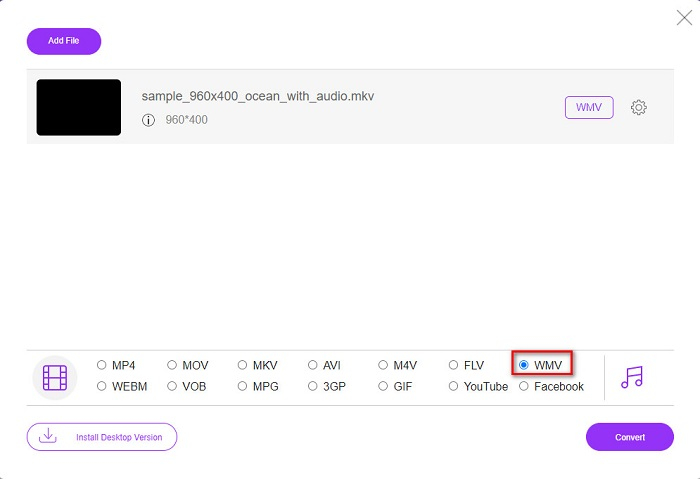
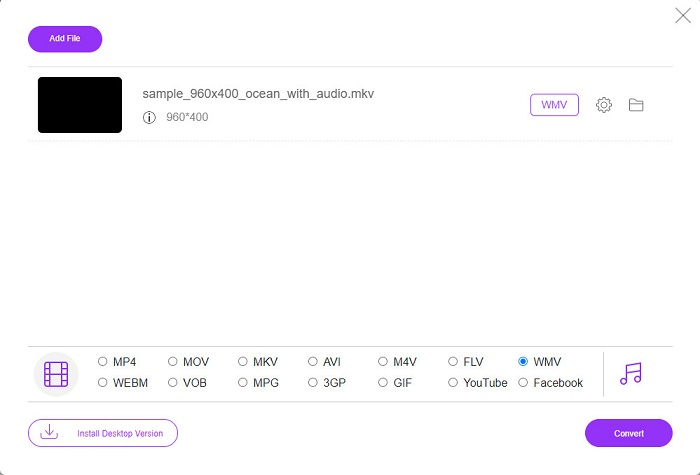
Stap 4. Klik voor de laatste stap op de knop Convert rechtsonder in de interface van de software. Vervolgens begint je MKV-bestand met converteren.
MKV versus WMV
Het Matroska multimedia containerformaat, uitgebracht in 2002, is een open-source formaat dat een aantal video-, audio-, beeld- en ondertiteltracks kan bevatten. U kunt het dus gebruiken om eenvoudig korte videoclips, tv-programma's en films op te slaan. Het is vrij populair voor het ondertitelen van anime-fans.
WMV, geproduceerd door Microsoft, was in de jaren 2000 een van de meest voorkomende videoformaten. Het kan via internet worden bekeken en door verschillende mediaspelers op Windows worden afgespeeld. En het is ook het standaard videobestandsformaat van Windows Media Player. Maar het is onlangs overgenomen door andere formaten.
Deel 5. Veelgestelde vragen over het converteren van MKV naar WMV
Kun je MKV in WMV veranderen zonder de kwaliteit van je bestand te verliezen?
Zeker. Door de FVC Video Converter Ultimate te gebruiken, kunt u uw MKV-bestand naar WMV converteren zonder de kwaliteit van uw bestand te verliezen.
Wat is het beste bestandsformaat om je MKV-bestand te converteren?
Zoals hierboven vermeld, ondersteunen sommige mediaspelers dit bestandsformaat niet. Daarom moet je het converteren naar een bestandsformaat dat door veel mediaspelers breed wordt ondersteund. Een daarvan is het MP4-formaat. Wil je meer weten over dit onderwerp, lees dan dit artikel [Online & Free] How Can I Convert MKV to MP4 on Windows/Mac.
Kan Windows Media Player MKV-bestanden afspelen?
Windows Media Player ondersteunt geen MKV-bestandsformaten. Dus wanneer je probeert een MKV-bestand in Windows Media Player af te spelen, wordt alleen het geluid afgespeeld. Lees Best MKV Player om de speler te vinden die je wilt.
Gevolgtrekking
Er zijn veel manieren om uw MKV-bestand naar WMV te converteren. De hierboven gepresenteerde converters hebben verschillende kenmerken die ze van elkaar onderscheiden.
Van de beste MKV-naar-WMV-converters die we hebben genoemd, raden we aan om FVC Video Converter Ultimate te gebruiken, omdat deze converter efficiënter en gebruiksvriendelijker is. Bovendien heeft hij unieke functies die je kunnen helpen je bestand te verbeteren. Nog steeds niet zeker? Download hem nu om deze ultrasnelle converter zelf te ervaren.
-
 MKV naar MOV - Hoe MKV naar MOV te converteren
 Hoe converteer ik MKV naar MOV op Mac? Kan iMovie MKV lezen? Wat betekent MOV-formaat? Dit bericht vertelt 2 eenvoudige manieren om u te helpen MKV naar MOV te converteren met gratis online en professionele videoconverters.
-
 Hoe MKV-video's naar geanimeerde GIF's te converteren zonder Photoshop/FFmpeg
 Na het downloaden en bekijken van MKV-films op uw computer, wilt u misschien enkele prachtige momenten delen met vrienden of op internet als GIF's. In dit artikel leert u over de 2 gemakkelijkste manieren om MKV naar GIF te converteren.
-
 Tips en trucs voor het converteren van MKV-bestanden naar MP3 [2021]
 Heeft u problemen met het kiezen van de juiste converter voor MKV naar MP3? Lees dan dit bericht verder terwijl we verschillende oplossingen voor één probleem hebben gepresenteerd.

