


 Video Converter Ultimate
 Scherm opnemer
 Videoreparatie
Vereenvoudigde gids voor het converteren van uw MTV-bestanden naar WMV-indeling met gedetailleerde stappen
Veel gebruikers vragen hoe ze hun MTV-bestanden kunnen omzetten naar een afspeelbaar formaat in Windows, zoals het WMV‑formaat. Vandaag is je geluksdag, want hier presenteren we twee van de beste converters die we konden vinden. Bovendien zijn alle gedetailleerde informatie en feiten die hier worden vermeld, bruikbaar voor jou. Zonder verder oponthoud gaan we verder; lees de onderstaande details om meer ideeën te krijgen over hoe je MTV naar WMV kunt converteren.

Deel 1. Converteer MTV naar WMV met Video Converter Ultimate
FVC Video Converter Ultimate biedt een efficiënt conversieproces en een professioneel resultaat wanneer je MTV naar WMV of andere formaten converteert. Deze converter biedt een ongeëvenaarde aanpak bij het omzetten die geen enkele andere converter kan evenaren. Daarnaast beschikt hij over bewerkingsfuncties die je zeker zult waarderen en die je in veel situaties zullen helpen. Wil je meer weten over enkele onderdelen? Lees dan de onderstaande details.

FVC Video Converter Ultimate
3.222.440+ downloads- Converteer MTV naar WMV, AVI, MKV, MOV, FLV of naar meer dan 200 ondersteunde formaten.
- Het ondersteunt hardwareversnelling en supersnelle conversie voor een snel en efficiënt conversieproces.
- De beste keuze voor beginners bij het converteren zorgt voor een professionele uitvoer zonder enige moeite.
- Er zijn geavanceerde bewerkingsfuncties beschikbaar die u kunt gebruiken, zoals bijsnijden, knippen, samenvoegen en meer.
- Beschikbaar om te downloaden in alle besturingssystemen zoals Windows en macOS.
Gratis downloadVoor Windows 7 of nieuwerVeilige download
Gratis downloadVoor MacOS 10.7 of nieuwerVeilige download
Nu we de unieke eigenschappen ervan hebben ontdekt, is het tijd om je MTV-bestanden te converteren met behulp van deze ultieme tool door de onderstaande stappen te volgen.
Stap 1. Allereerst moet je de software downloaden op de schijf van je desktop door op de downloadknop hieronder te klikken. Na het downloaden volg je direct het installatieproces en start je de software.
Gratis downloadVoor Windows 7 of nieuwerVeilige download
Gratis downloadVoor MacOS 10.7 of nieuwerVeilige download
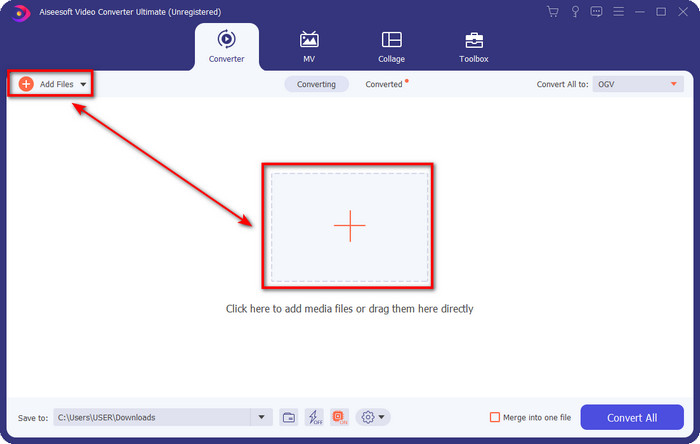
Stap 2. Upload het MTV‑bestand door het naar de interface te slepen en daar neer te zetten. Of je kunt op Bestanden toevoegen klikken, vervolgens het bestand opzoeken in de map die op je scherm verschijnt en op Openen drukken.
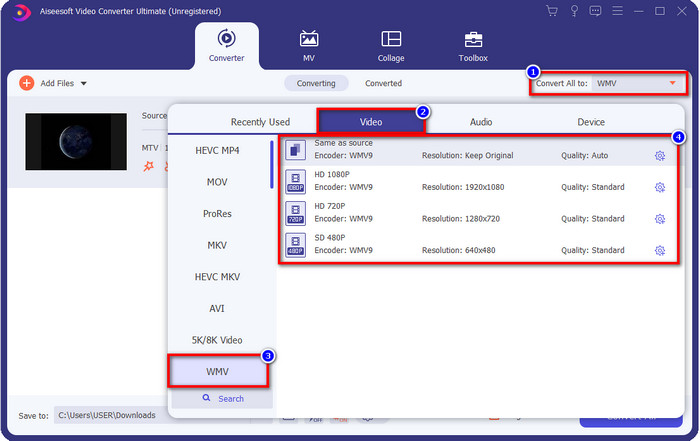
Stap 3. Zodra je het MTV‑bestand hebt toegevoegd, moet je op de knop Alles converteren naar klikken en het formaat WMV kiezen, of een ander gewenst formaat dat in de lijst beschikbaar is.
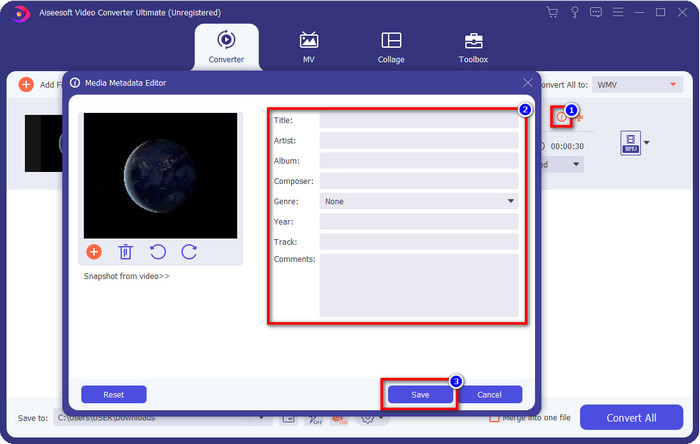
Optioneel. Moet je de metagegevens bewerken? Klik dan op de knop metadata en voeg de gegevens toe die je wilt invoegen. Vul bijvoorbeeld Titel, Artiest, Componist, Album, Genre en meer in en klik op Opslaan om de metadata te bewaren.
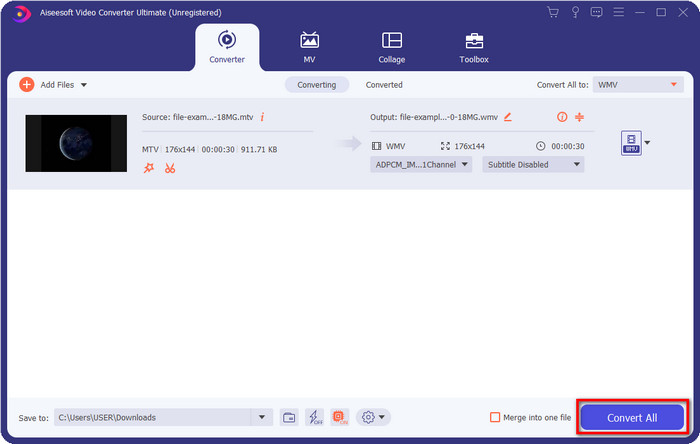
Stap 4. Door op de knop Alles converteren te klikken, begint het proces. Zodra het voltooid is, verschijnt er een nieuwe computermap op je scherm met het WMV‑bestand.
Deel 2. Converteer MTV online naar WMV
FVC Free Video Converter Online biedt passende functies als converter die iedereen met een internetverbinding kan gebruiken. Deze webconverter is beschikbaar in alle browsers en is eenvoudig te bedienen. In tegenstelling tot de eerstgenoemde converter is deze tool niet als volledig programma te downloaden, maar moet je wel een installatiebestand downloaden voordat je hem gebruikt. Hoewel de tool ruimte op je schijf kan besparen, is hij niet zo goed als de Ultimate‑tool. Laten we nu doorgaan naar de stappen en leren hoe je online MTV naar WMV converteert met behulp van deze webconverter.
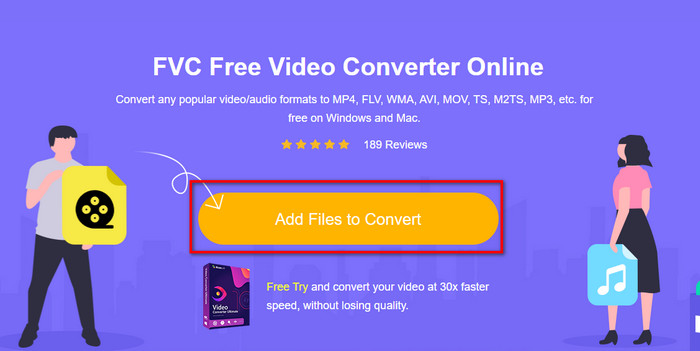
Stap 1. Klik op deze link en de hoofdwebconverter wordt in een nieuw tabblad geopend.
Stap 2. Klik op de knop Bestanden toevoegen om te converteren om het installatiebestand te downloaden. Klik er daarna opnieuw op; er wordt een map van je computer geopend. Dit keer moet je het MTV‑bestand opzoeken, erop klikken en vervolgens op Openen drukken.
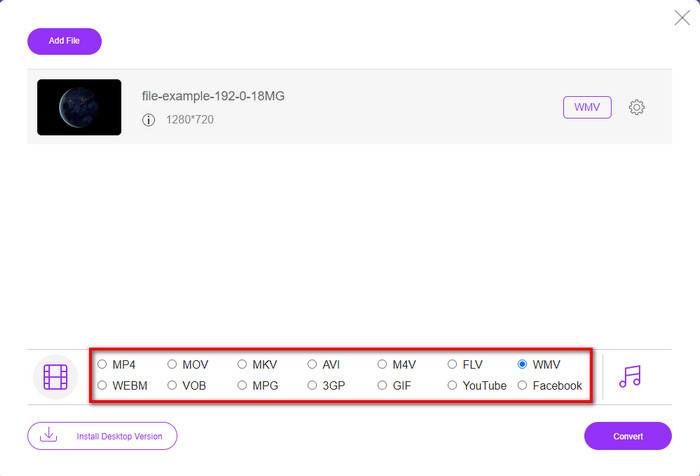
Stap 3. Nadat je het MTV‑bestand hebt geüpload, klik je hieronder op het formaat WMV of op een ander formaat waarin je het wilt converteren.
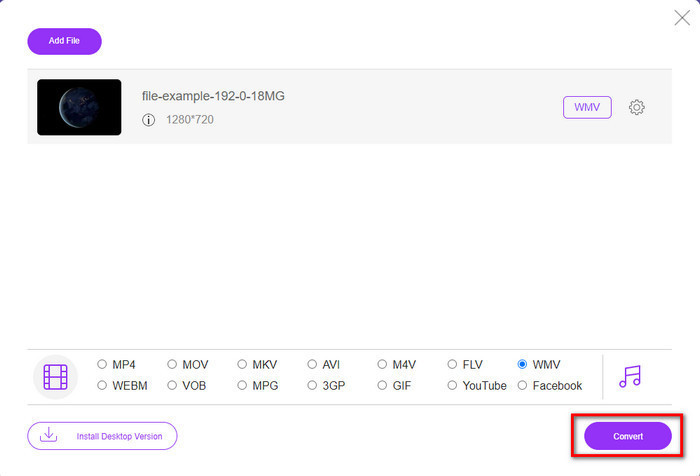
Stap 4. Als je klaar bent om te converteren, klik je op de knop Converteren en het proces begint.
Deel 3. Wat is het verschil tussen MTV en WMV?
MTV en WMV zijn beide containers voor video- en audio-inhoud; ze hebben echter unieke mogelijkheden die de ander niet kan kopiëren. Meer weten over MTV en WMV? Laten we dan beginnen met het lezen van de volgende gedetailleerde informatie hieronder.
Integendeel, WMV biedt een veel hogere resolutie in vergelijking met MTV. Hoewel het een hogere resolutie heeft, gebruikt het een compressor om de bestandsgrootte kleiner te maken, maar zonder de kwaliteit te verminderen. Dit formaat is ook meer compatibel om op alle Windows te spelen dan MTV. Dus als u uw MTV-bestand wilt afspelen, moet u weten hoe u het in een WMV kunt converteren en op Windows OS kunt afspelen.
Ten slotte moet u MTV naar WMV converteren vanwege de kwaliteit die de WMV biedt en de compatibiliteitsredenen. Dus als u bereid bent het MTV-bestand te converteren, moet u het FVC-product gebruiken om de fantastische uitvoer te bereiken zonder veel processen te doorlopen.
Deel 4. Veelgestelde vragen over MTV naar WMV-conversie
Waarom zijn de MTV-videoresoluties laag?
Als het mediabestand in dit formaat is, verwacht dan een lage resolutie. Omdat bij compressie van het bestand de kwaliteit van de video een opoffering is om het formaat kleiner te maken. Ook kan dit formaat alleen een reeks afbeeldingen in 465/555 afspelen met een conjunctie, en de audio is in MP3.
Welke videospeler kan ik gebruiken om .mtv-bestanden af te spelen?
Je kunt de VLC‑mediaspeler gebruiken om dit mediaformaat af te spelen, omdat deze verschillende encoders en het formaat dat je wilt afspelen ondersteunt. Dus als je je MTV‑bestanden wilt bekijken, moet je VLC op je apparaat downloaden om het te laten werken. Maar als je een veel betere mediaspeler wilt dan VLC, moet je in plaats daarvan de Blu‑ray Player gebruiken, omdat die bij het bekijken van MTV‑bestanden bijna een bioscoopachtige sfeer geeft.
Ondersteunt Quicktime het MTV-formaat?
Helaas is het MTV‑formaat niet afspeelbaar in QuickTime vanwege de gebruikte encoder. Maar we hebben ontdekt dat je het bestand in plaats daarvan naar MOV‑formaat kunt converteren. Wil je meer weten over hoe je MTV naar MOV converteert? Dan moet je 5 minuten uittrekken om dit artikel te lezen zodat je goed geïnformeerd bent.
Gevolgtrekking
Tot slot hebben we de twee beste manieren gevonden om MTV naar WMV te converteren en het niet alleen compatibel te maken met Windows, maar er zelfs meer mee te doen dan met het MTV‑formaat mogelijk is. Nu we hebben uitgezocht welke converters je kunt gebruiken, is het tijd om er één te kiezen. Welke van de twee je ook kiest, je bent verzekerd van een geslaagde conversie. Maar als je een professioneel en fenomenaal resultaat wilt, moet je FVC Video Converter Ultimate gebruiken. Wil je meer weten over deze ultieme converter? Download hem dan nu en probeer hem zelf uit.
-
 [Online en gratis] 3 methoden om MTV probleemloos naar AVI te converteren
 Heb je ooit gehoord van een videoformaat als MTV? Aangezien je niet alles weet over dit formaat en je een MTV-video naar AVI wilt converteren, lees je dit artikel aandachtig om meer over dit probleem te weten te komen.
-
 Top 3 manieren om FLV naar WMV te converteren op Windows en Mac
 Op zoek naar de beste manier om FLV naar WMV te converteren zonder kwaliteitsverlies op pc of Mac? Je hebt geluk, want hier delen we drie methoden om het werk gemakkelijk te doen.
-
 Een eenvoudige handleiding voor het omzetten van uw GIF naar WMV op Windows/Mac
 Wil je weten hoe je GIF naar WMV-formaat kunt converteren? Volg dan dit artikel, want het toont verschillende oplossingen waaruit u kunt kiezen.
