


 Video Converter Ultimate
 Scherm opnemer
 Videoreparatie
 Beveiligde download
Snelste methode voor het converteren van MXF naar M4V op desktop en online
Een MXF-bestand is een industriestandaardformaat voor audio en video. Dit bestandsformaat wordt echter niet ondersteund door Apple QuickTime Player, waardoor het onmogelijk is je MXF-bestand met dit programma af te spelen. Als je je MXF-bestand niet in Apple QuickTime Player kunt afspelen, moet je het omzetten naar een ander bestandsformaat, zoals M4V. Gelukkig heb je geluk, want wij hebben de beste oplossing voor je. In dit artikel geven we je de meest effectieve en nuttige methoden om MXF naar M4V te converteren met behulp van betrouwbare converters, zowel offline als online. Bovendien laten we je een idee krijgen hoe je je video’s aantrekkelijker kunt maken door ze eenvoudig te bewerken. Lees dit artikel meteen en verkrijg de informatie die je nodig hebt.

Deel 1: geweldige methode om MXF online naar M4V te converteren
Een van de beste online converters die je kunt gebruiken om MXF naar M4V te converteren is FVC Free Video Converter Online. Deze online software kan verschillende videobestanden converteren, zoals MOV, MKV, AVI, FLV, MP4, WEBM, VOB en meer. Bovendien kun je veel bestanden in één keer converteren, omdat deze converter batchconversie ondersteunt. Daarnaast kun je, voordat je je video’s converteert, de resolutie, bitsnelheid (bitrate) en framesnelheid (frame rate) naar wens aanpassen. Het heeft ook een gebruiksvriendelijke interface en een eenvoudige manier om bestanden te converteren. Zo kan iedereen deze online converter bedienen, zowel gevorderde als niet-professionele gebruikers. Bovendien is deze online converter beschikbaar in alle browsers, zoals Google Chrome, Mozilla Firefox, Microsoft Edge en meer, wat hem goed toegankelijk maakt voor gebruikers.
Bovendien kunt u naast videoconversie ook tal van audioformaten converteren, waaronder AAC, MP3, M4A, M4B, FLAC en meer. Het heeft ook een audio-instelling waarmee u hun sample- en bitsnelheden kunt aanpassen. Met deze functies kunt u zien dat FVC Free Video Converter Online betrouwbaar is.
Functies
◆ Converteer verschillende videoformaten, zoals MP4, AVI, M4V, MXF, MOV, WMV, MKV, FLV en meer.
◆ Kan de resolutie, bitsnelheid en framesnelheid van video's bewerken.
◆ Biedt batchconversieproces.
◆ Converteer audiobestanden zoals MP3, AAC, AC3, M4B, FLAC en meer.
◆ Kan de samplefrequentie en bitrate van de audio bewerken.
Zie de onderstaande stappen voor meer informatie over het converteren van het MXF-bestand naar M4V-indeling met behulp van FVC Free Video Converter Ultimate.
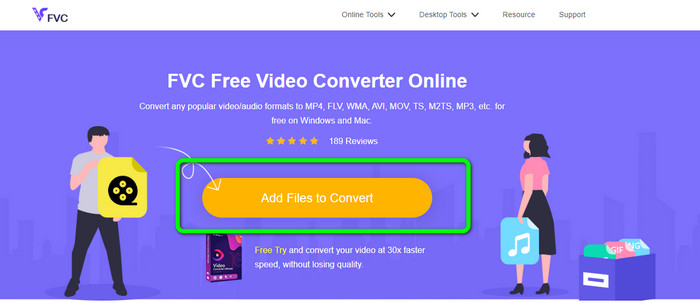
Stap 1: Ga naar je browser en bezoek de website van FVC Free Video Converter Online. Zodra je op de hoofdpagina bent, klik je op Add Files to Convert om het MXF-videobestand te uploaden dat je wilt converteren.
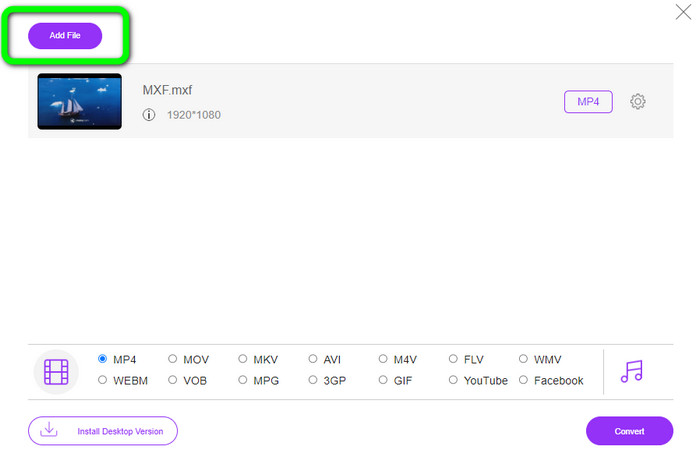
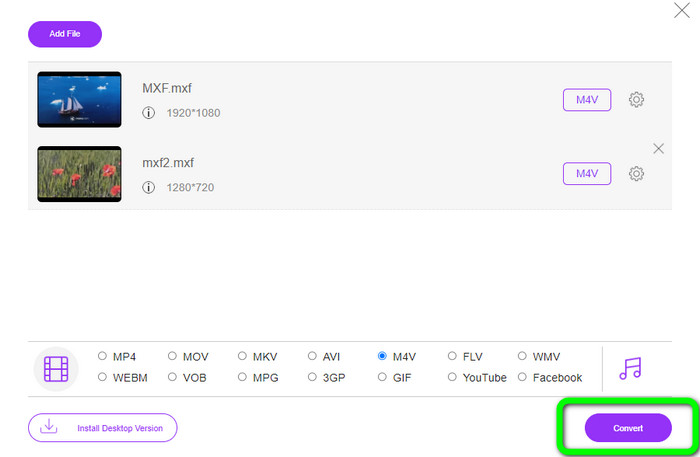
Stap 2: Deze converter biedt een batchconversieproces. Dus als je meer MXF-bestanden wilt uploaden, klik je op de knop Add File.
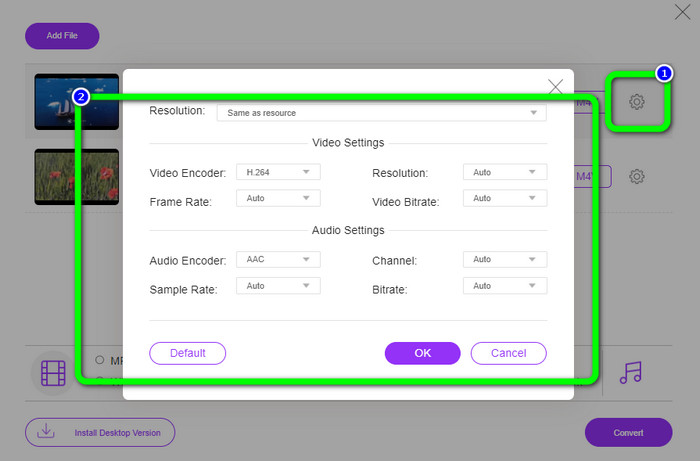
Stap 3: In dit deel kun je je video bewerken door op het pictogram Setting te klikken. Nadat je op dit pictogram hebt geklikt, kun je de framesnelheid, resolutie en bitsnelheid van de video aanpassen. Ook kun je de samplefrequentie en bitsnelheid van het audiobestand wijzigen. Klik daarna op de knop OK.
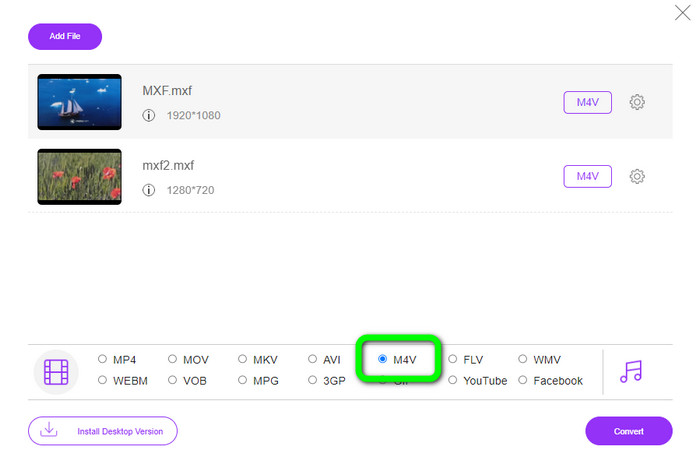
Stap 4: Nadat je je video’s hebt bewerkt, kun je het uitvoerformaat wijzigen door het M4V-formaat te kiezen uit de formaatopties in het onderste deel van de interface.
Stap 4: Voor de laatste stap druk je op de knop Convert. Wacht op het conversieproces en sla je video op in de gewenste map.
Deel 2: snelste manier om MXF zonder verlies naar M4V te converteren
Als je een downloadbare tool wilt om MXF verliesvrij naar M4V te converteren, is Video Converter Ultimate de beste keuze. Deze ultieme converter kan diverse bestanden snel converteren, omdat hij een snel conversieproces heeft – niet 10x, niet 20x, maar 30x sneller dan de gemiddelde conversiesnelheid. Daarnaast heeft het een andere geweldige functie waarvan je kunt profiteren: je kunt meerdere bestanden tegelijkertijd converteren, omdat deze converter batchconversie biedt. Bovendien ondersteunt deze tool, naast MXF en M4V, verschillende videoformaten, waaronder MP4, FLV, AVI, MKV, MOV, WMV, VOB en meer. Daarnaast is Video Converter Ultimate beschikbaar op zowel Windows als Mac, wat ideaal is voor zowel Mac- als Windows-gebruikers.
Bovendien heeft deze downloadbare applicatie nog meer geweldige functies naast het converteren van video's. Als u een muziekvideo wilt maken voor uw partner, familie, vrienden, enz., dan kunt u deze tool gebruiken. Video Converter Ultimate biedt een maker van muziekvideo's waarin je prachtige films met muziek kunt maken. Het biedt ook gratis thema's, zoals vrolijke, chique, eenvoudige, besneeuwde nachten, romantisch en meer. Als u een video met een grote bestandsgrootte heeft, kunt u deze ook comprimeren met behulp van de videocompressor. Met behulp van deze tool kun je eenvoudig de grootte van je video wijzigen.
Functies
◆ Converteer meer dan 100 videobestandsindelingen, waaronder M4V, MXF, FLV, AVI, MP4, XVID, VOB, MOV, SWF, MKV en meer.
◆ Converteer meerdere bestanden tegelijkertijd.
◆ Biedt muziekvideomaker.
◆ Maak een fantastische collage.
◆ Biedt tools voor videobewerking, zoals videotrimmer, compressor, versterker, kleurcorrectie, enz.
◆ Converteer afbeeldingsbestandsindelingen zoals BMP, PNG, JPG en meer.
Volg de gedetailleerde stappen hieronder om MXF zonder verlies naar M4V te converteren met behulp van de FVC Video Converter Ultimate.
Stap 1: Download Video Converter Ultimate op je apparaat door op de knop Download te klikken. Er staan hieronder twee downloadknoppen. Als je een Windows-gebruiker bent, klik dan op de Windows-versie. En klik op de Mac-versie als je een Mac-gebruiker bent. Start vervolgens de applicatie.
Gratis downloadVoor Windows 7 of nieuwerVeilige download
Gratis downloadVoor MacOS 10.7 of nieuwerVeilige download
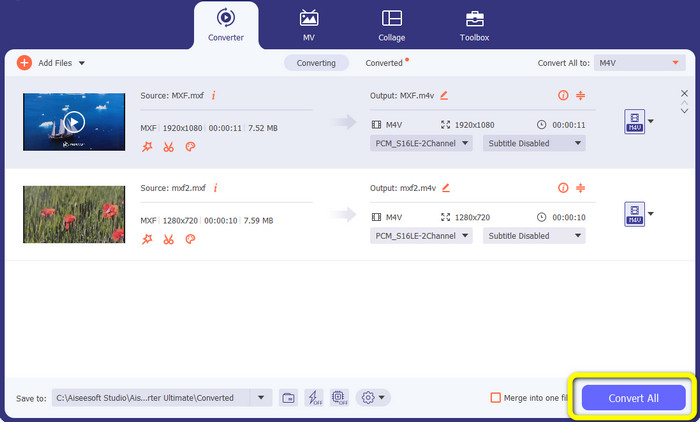
Stap 2: Selecteer daarna het paneel Converter. Klik op het +-pictogram of de knop Add File om het MXF-videobestand te importeren.
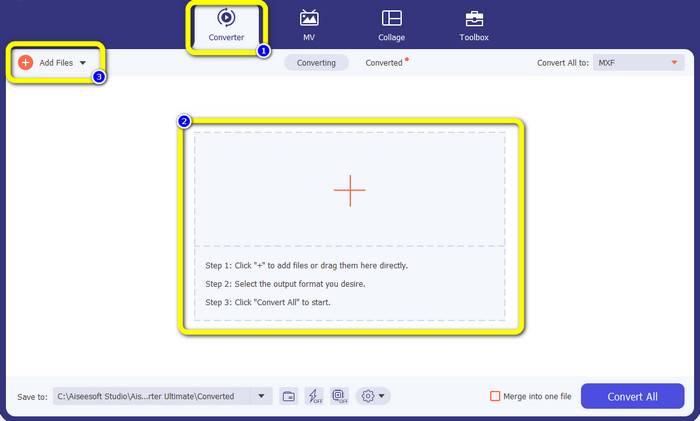
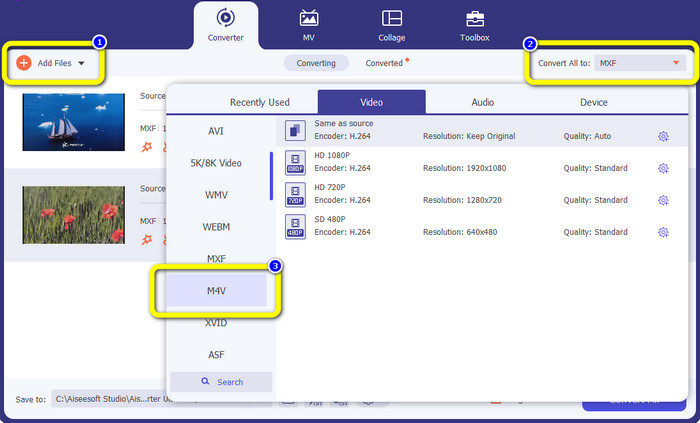
Stap 3: Als je meerdere bestanden tegelijk wilt converteren, klik je op de knop Add File. Klik daarna op de knop Convert All to en selecteer het M4V-bestandsformaat. Je kunt ook de gewenste resolutie voor je video kiezen.
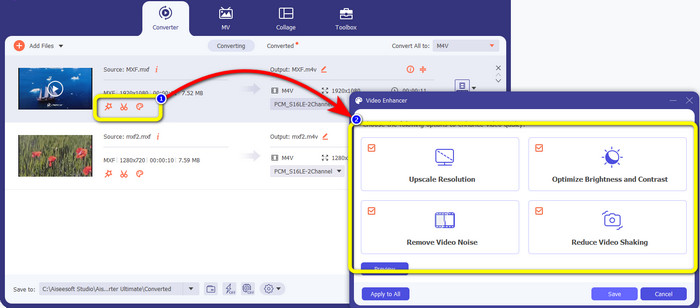
Stap 4: Als je je video’s vóór het converteren wilt bewerken, kan dat. Klik op de bewerkingstools in het eerste vak. Selecteer vervolgens het pictogram video enhance. Vink daarna alle vakjes aan om de resolutie te verbeteren, de helderheid en het contrast te optimaliseren en videoruis en -schokken te verminderen.
Stap 5: Wanneer je klaar bent met het bewerken en het wijzigen van het uitvoerformaat van je video’s, klik je op de knop Convert All en sla je je video op je apparaat op.
Deel 3: Wat is MXF?
De SMPTE-vereniging heeft de MXF-mediacontainer voor zakelijk gebruik gemaakt. MXF implementeert een deel van het gegevensschema Advanced Authoring Format (AAF) en is onlangs naar voren gekomen als de industriestandaard voor niet-lineaire professionele videobewerking. MXF-bestanden kunnen eenvoudig worden geconverteerd naar elk gangbaar videoformaat en gecomprimeerd met bijna elke codec. Het is belangrijk op te merken dat de implementatie van dit formaat door Sony, Panasonic en Canon tal van onverenigbaarheden vertoonde, een grote zwakte van deze container. De herziening van de norm in 2009 verhelpt deze problemen.
Deel 4: Wat is M4V?
M4V is een soort videocontainer die door iTunes-bestanden wordt gebruikt om zowel audio- als videogegevens op te slaan. Het is het beste om audio- of videobestanden te kopen in de iTunes Store als ze Apple FairPlay DRM-beveiligd zijn tegen ongeoorloofd bekijken en kopiëren. Omdat het formaat is gebaseerd op de MPEG-4-structuur, kan vrijwel elke hedendaagse speler onbeveiligde bestanden weergeven.
Verder lezen:
Beste MXF-naar-WMV-converters om MXF gratis naar WMV te converteren
Top 4 beste oplossingen voor het converteren van MXF naar MKV [Opgelost]
Deel 5: Veelgestelde vragen over het converteren van MXF naar M4V
Hoe groot is een MXF-bestand?
MXF ondersteunt bestandsgroottes tot 2 gigabyte. Bovendien ondersteunt MXF langere bestanden. De maximale opnametijd voor mediabestanden voor het OMF-formaat is drie uur. MXF kan 12 uur audio aan op twee kanalen op 48 kHz.
Wie gebruikt MXF-bestanden?
Verschillende productiecommercials, waaronder de SONY MSW 2000-serie IMX-videorecorders, gebruikten het. Ook ondersteunt Avid-montageapparatuur een bepaalde variant van MXF.
Hoe converteer ik MXF naar MOV?
Je kunt FVC Free Video Converter Online gebruiken. Upload je MXF-bestand, kies het MOV-formaat uit de formaatopties en klik op de knop Convert. Op deze manier kun je MXF direct naar MOV converteren.
Gevolgtrekking
Er zijn veel manieren om MXF naar M4V te converteren. Maar als je de beste en meest waardevolle converters wilt, kun je de hierboven genoemde toepassingen gebruiken: Video Converter Ultimate en FVC Free Video Converter Online. Deze twee converters kunnen bestanden sneller converteren dan andere converters, en je kunt ze gratis gebruiken.
-
 Verschillende methoden voor het wijzigen van MOV naar M4V-bestandsindeling
 Wenst u een effectieve methode om het MOV-bestand naar het M4V-formaat te converteren? Dan zal dit artikel uw verlangen vervullen. Hier zijn de beste converters die u kunt gebruiken.
-
 Uitstekende technieken om GIF direct naar M4V te converteren
 Deze wegwijzer biedt u de meest effectieve strategieën om GIF naar M4V te converteren. Bovendien laten we u kennismaken met de beste twee converters die u kunt proberen.
-
 Top 2 uitzonderlijke manieren om M2TS naar M4V te converteren
 Denk je dat het mogelijk is om het M2TS-bestand naar een ander formaat te converteren? We laten u zien hoe u M2TS naar M4V-bestandsindeling converteert als u de beste oplossing wilt.
