


 Video Converter Ultimate
 Scherm opnemer
 Videoreparatie
2 Aanbevolen MXF naar WMV-converters die online en offline beschikbaar zijn
Veel gebruikers vragen hoe ze MXF naar WMV kunnen converteren, omdat ze de video online willen streamen. In tegenstelling tot MXF‑bestanden is WMV geschikter om videocontent te verspreiden en op te slaan op HD‑dvd of Blu‑ray. In plaats van miljoenen artikelen over MXF‑converters te lezen, waarom lees je dit niet eerst verder? Zo kom je te weten hoe je je MXF‑bestanden zonder kwaliteitsverlies kunt converteren met behulp van de twee onderstaande opties.

Deel 1. Korte introductie van MXF en WMV
Voordat we verder gaan met het converteren van MXF naar WMV, laten we een voorproefje nemen van deze twee formaten en de reden kennen voor het converteren van het formaat.
Material eXchange Format, ook wel MXF genoemd, is een mediaformaat dat een alternatieve videoband bevat. Maar in plaats daarvan, op een band, is het nu gedigitaliseerd. Dit formaat werkt het beste door metadata en tijdcode op te nemen over de video- en audiodetails. Het wordt meestal gebruikt om advertenties op tv-stations over te dragen of om uitgezonden tv-programma's te archiveren.
Terwijl het WMV- of Windows Media Video-bestand dezelfde gelijkheid heeft met het ASF-formaat omdat het de bitstream van het mediabestand omhult. Dit formaat is ongetwijfeld kleiner dan de MXF omdat het lossless compressie gebruikt om de bestandsgrootte te comprimeren. Toch zal de kwaliteit ervan niet worden aangetast. Bovendien was WMV in eerste instantie gemaakt voor online streaming, maar met de nieuwe versie, WMV9, is het aangepast voor HD-dvd's en Blu-ray-schijven.
U moet uw MXF-bestand converteren omdat het veel gemakkelijker is om video's in WMV-formaat af te spelen, vooral op Windows, dan op MXF. Voor online distributie is WMV beter dan het MXF-bestand. Maar als u een tijdcode- en metadatarecord wilt hebben, biedt MXF die optie voor u.
Deel 2. Converteer MXF naar WMV met de Amazingly Ultimate Converter op Windows en Mac
FVC Video Converter Ultimate biedt het beste conversieproces van MXF naar WMV met behoud van de oorspronkelijke kwaliteit. Daarnaast kun je MXF ook encoderen naar AVI, MOV, MKV, MP4 en meer, zonder de kwaliteit van het ruwe MXF‑bestand aan te tasten. Deze tool is meer dan alleen een converter, want je kunt er veel geweldige dingen mee doen, zoals bewerken enzovoort. Bovendien is hij compatibel met alle desktopprogramma’s zoals Windows en Mac, met dezelfde functies. Wil je nu weten hoe je deze fenomenale converter gebruikt? Kopieer dan de onderstaande stappen en leer hoe je kunt converteren.
Stappen om MXF naar WMV te converteren met FVC Video Converter Ultimate:
Stap 1. Allereerst moet je de software op je desktop downloaden door op de downloadknop te klikken. Volg snel de installatie en start het programma.
Gratis downloadVoor Windows 7 of nieuwerVeilige download
Gratis downloadVoor MacOS 10.7 of nieuwerVeilige download
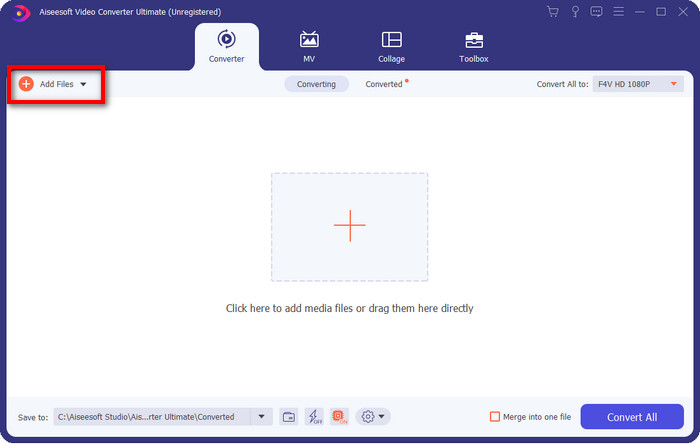
Stap 2. Upload het bestand door op Add Files te klikken; kies in de map het MXF‑bestand dat je wilt converteren en klik op Open.
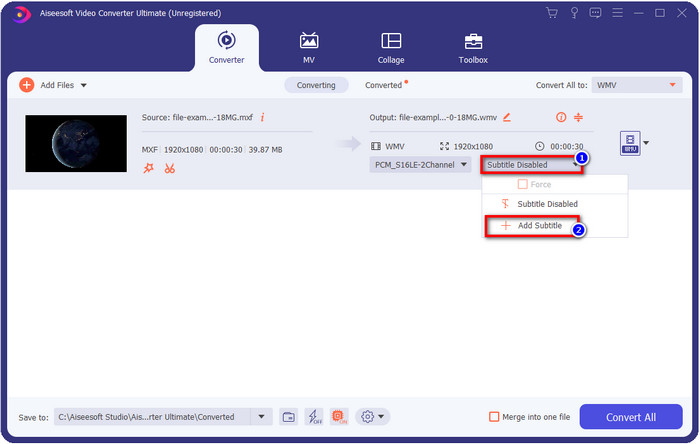
Wil je ondertitels aan je video toevoegen? Klik dan op de drop‑downknop en druk op Add Subtitle. Zoek het ondertitelbestand in de map op je desktop en klik op Open.
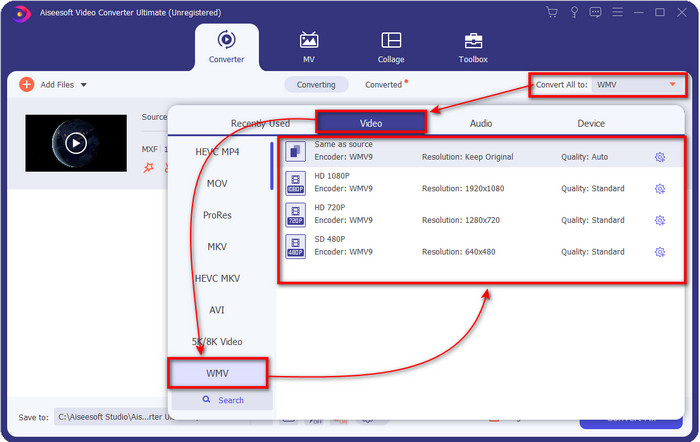
Stap 3. Laten we de indeling wijzigen in WMV door op Convert All to te klikken.
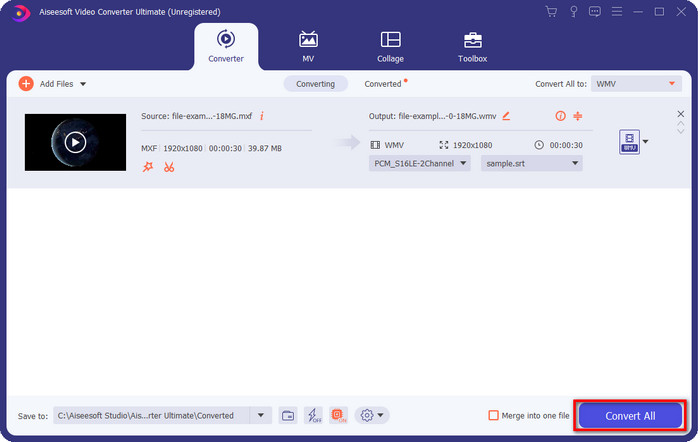
Stap 4. Na alle stappen is het nu tijd om het bestand naar WMV te converteren door op Convert All te klikken.
Voordelen
- Het ondersteunt een groot formaat om MXF naar WMV, FLV, MKV, AVI, MOV en meer te converteren.
- Beschikbaar in alle besturingssystemen om te downloaden op Windows en Mac.
- Het ondersteunt unieke bewerkingsfuncties om uw video uniek en opvallender te maken dan andere.
- Ervaar het snelste en fenomenale conversieproces met de FVC Video Converter Ultimate.
Nadelen
- Aanschaf van de software is nodig.
- Download de software op uw bureaublad voordat u deze kunt gebruiken.
Deel 3. Snelst en gemakkelijkst om MXF naar WMV te converteren met online service
FVC Free Online Video Converter is een eersteklas videoconverter die je eenvoudig via het web kunt gebruiken. Je kunt hier een gemiddelde hoeveelheid formaten uploaden, zoals MP4, MOV, MKV, FLV, AVI en andere videoformaten. In tegenstelling tot andere online videoconverters zijn er geen beperkingen op het aantal of de grootte van de bestanden die je wilt converteren. Je kunt hier echter geen batchconversie uitvoeren, omdat dit niet wordt ondersteund. Laten we de volgende stappen hieronder toepassen om MXF naar WMV te converteren.
Stappen om MXF naar WMV te converteren met FVC Free Video Converter Online:
Stap 1. Klik op deze link om het hoofddomein van de website te openen.
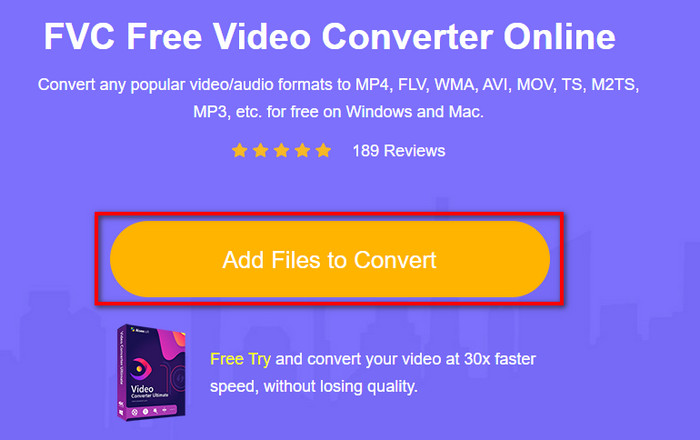
Stap 2. Druk op Add Files to Convert om de map te openen waar je je MXF‑bestand hebt opgeslagen. Klik op het bestand en druk op Open.
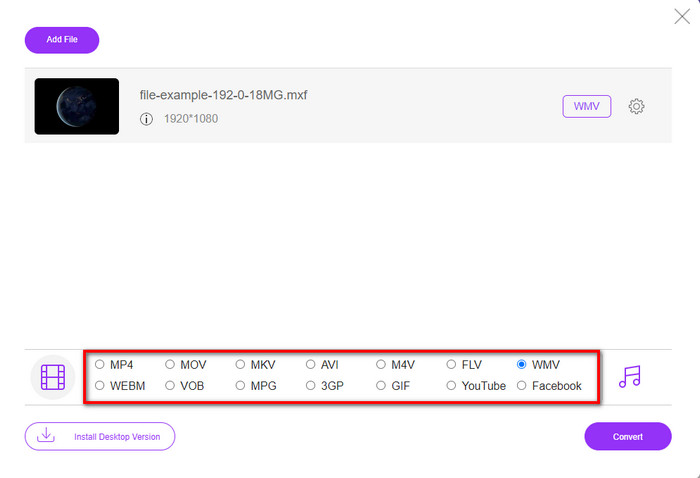
Stap 3. Kies het formaat waarnaar je wilt converteren onder de setlijst in de nieuwe web‑UI of klik op WMV.
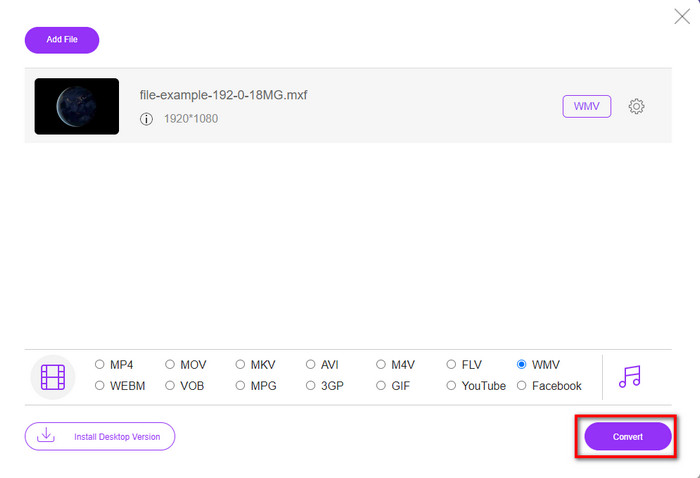
Stap 4. Begin met het converteren van het formaat door op Convert te klikken; het proces zal starten.
Voordelen
- Het is een van de veiligste manieren om MXF naar WMV, AVI, MOV, MP4 en andere bekende formaten te converteren.
- Open het altijd en overal in uw favoriete browser.
- Gratis, en het is lichtgewicht.
Nadelen
- Je hebt een internetverbinding nodig om te gebruiken.
- Het ondersteunt geen batch- en snelle conversie
Deel 4. Veelgestelde vragen over MXF naar WMV-conversie
Waarom zijn MXF-bestanden te groot?
Een van de redenen waarom MXF‑bestanden groot zijn, is de metadata die ze bevatten en die de bestandsgrootte vergroot. Maar je kunt het bestand comprimeren om het kleiner te maken door dit artikel te lezen en te leren hoe je MXF‑bestanden comprimeert.
Duurt het converteren van MXF-bestanden lang?
Dat hangt af van de converter die je gebruikt. Als je bijvoorbeeld een online tool gebruikt, hangt het af van je internetverbinding. Een MXF‑converter online gebruiken kost veel meer tijd dan een desktopconverter die je op je pc of Mac kunt downloaden. Dus als je razendsnel wilt converteren, moet je FVC Video Converter Ultimate gebruiken.
Zijn MOV- en MXF-formaten hetzelfde?
Als we het hebben over wat ze bevatten, hebben MXF en MOV bijna dezelfde elementen. Bijvoorbeeld video, audio en metadata, maar MXF biedt veel meer gedetailleerde informatie over het bestand dan MOV, vooral wat betreft metadata en timecode. MOV is echter veel gemakkelijker te gebruiken dan MXF. In veel gevallen vragen veel gebruikers of ze hun MXF naar MOV kunnen converteren. Ben jij een van hen, klik dan op deze link en lees alle details over MXF‑naar‑MOV‑converters.
Gevolgtrekking
Samenvattend is het nu eenvoudiger voor ons om de converters, zowel webbased als desktop, te kennen om MXF naar WMV te converteren. Omdat beide converters je een fenomenaal resultaat geven, maar als je een professioneler resultaat wilt, moet je kiezen voor FVC Video Converter Ultimate. Het lijdt geen twijfel dat deze tool je zal helpen bij al je conversieproblemen. En als je ooit een video moet omkeren, samenvoegen, verbeteren en meer, is dit je enige oplossing voor al deze problemen.
-
 4 gratis manieren om camcorder MXF naar MP4 te converteren voor universele weergave
 Dit bericht is de gedetailleerde gids om MXF naar MP4 op de computer te converteren. U kunt 4 gratis MXF naar MP4-converters krijgen om camcorder MXF naar MP4 in eenvoudige stappen te transcoderen.
-
 4 Top MXF-converters om MXF naar AVI te converteren [gratis en betaald]
 Wat is een MXF-bestand? Hoe MXF naar AVI te converteren? Dit zijn de weinige vragen die we beantwoorden. Dus als je dezelfde vraag hebt, lees dan dit artikel.
-
 Hoe MXF naar FLV te converteren met verschillende methoden [bewezen]
 Heb je geprobeerd MXF naar FLV te converteren met een vreemde online beschikbare converter. Krijg je nog steeds niet de gewenste kwaliteit voor je video? We raden u aan dit artikel te lezen om meer te weten te komen over de conversie van MXF naar FLV.
