


 Video Converter Ultimate
 Scherm opnemer
 Videoreparatie
 Beveiligde download
Hoe SWF eenvoudig en direct naar 3GP te converteren
Small Web Format, of SWF, is een Adobe-bestandsindeling die vectorgebaseerde animaties en video’s bevat. Deze bestandsindeling is echter niet gangbaar en wordt niet breed ondersteund door andere browsers en programma’s. Daardoor is dit bestand lastig af te spelen. In dat geval kun je het SWF-bestand het best converteren naar andere indelingen die wel door browsers en programma’s worden ondersteund, zoals het 3GP-formaat. Gelukkig biedt dit artikel een effectieve manier om SWF naar 3GP te converteren met behulp van diverse converters. Laten we zonder verder oponthoud deze handige methoden ontdekken door dit artikel te lezen.

Deel 1: meest betrouwbare SWF naar 3GP-converter om SWF naar 3GP te wijzigen
Converteer SWF naar 3GP door Video Converter Ultimate
Video Converter Ultimate is de meest betrouwbare offline tool voor Windows en Mac. Met deze applicatie kun je direct SWF naar 3GP converteren. Daarnaast kun je nog veel meer bestanden omzetten, omdat het meer dan 100 bestandsformaten ondersteunt, waaronder MP4, MOV, MKV, FLV, DIVX, XVID en meer. Bovendien kan deze offline tool bestanden tot 30x sneller converteren dan andere converters. Je kunt het ook gratis gebruiken. Daarnaast kun je meerdere bestanden tegelijk converteren, zodat je niet lang hoeft te wachten. Het beste is dat alle gebruikers met deze tool overweg kunnen, omdat het een eenvoudige interface heeft met basisstappen voor het converteren van verschillende bestanden.
Bovendien heeft Video Converter Ultimate ook meer geweldige functies dan u zich kunt voorstellen. U kunt doorgaan naar de Toolbox-functie als u uw SWF-video wilt verbeteren. U kunt videoverbeteraars gebruiken om de resolutie van uw video, de helderheid en het contrast te verbeteren. Je kunt zelfs de ruis in je video verwijderen. Dit is slechts een van de geweldige functies die u kunt ervaren bij het gebruik van deze converter. Als je meer functies wilt ontdekken, gebruik dan Video Converter Ultimate en bekijk het zelf.
Functies
◆ Converteer veel videobestanden, zoals MP4, AVI, FLV, SWF, M4V, MTS, etc.
◆ Maak een muziekvideo met verschillende prachtige thema's.
◆ Maak een collage met tal van gratis sjablonen en filters.
◆ Het heeft een Toolbox die verschillende tools biedt om video te verbeteren, zoals videoverbetering, kleurcorrectie, 3D Maker, enz.
◆ Pas de videosnelheid aan tot 8x sneller.
◆ Watermerken toevoegen aan en verwijderen uit een video.
◆ In staat om de bestandsgrootte van de video te wijzigen.
◆ Geschikt voor het converteren van afbeeldingen.
Voordelen
- Beschikbaar voor elke gebruiker.
- Het ondersteunt meer dan 1000 bestandsindelingen.
- Toegankelijk op zowel Windows als Mac.
- Het kan de video gemakkelijk verbeteren.
Nadelen
- Om meer geweldige functies te ervaren, wordt het aanbevolen om de pro-versie aan te schaffen.
Volg de onderstaande basisgidsen om uw SWF eenvoudig naar 3GP te converteren.
Stap 1: Download de applicatie Video Converter Ultimate op je Windows- of Mac-computer door op de downloadknop hieronder te klikken. Ga vervolgens verder met het installatieproces en start de applicatie.
Gratis downloadVoor Windows 7 of nieuwerVeilige download
Gratis downloadVoor MacOS 10.7 of nieuwerVeilige download
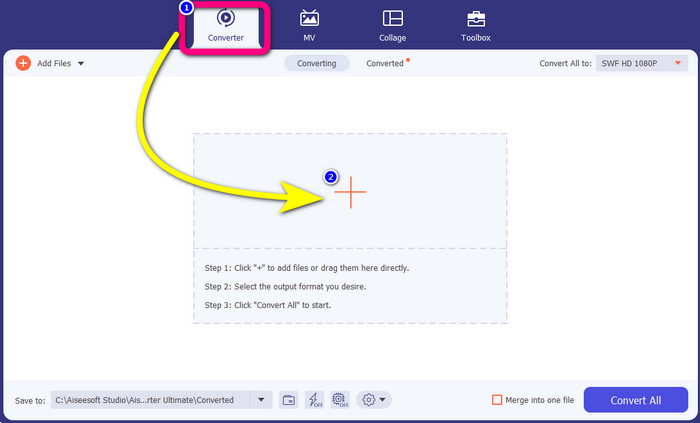
Stap 2: Kies in de vier opties aan de bovenzijde van de interface het paneel Converter. Klik op het Plus-pictogram en selecteer de video met het SWF-bestand dat je wilt converteren.
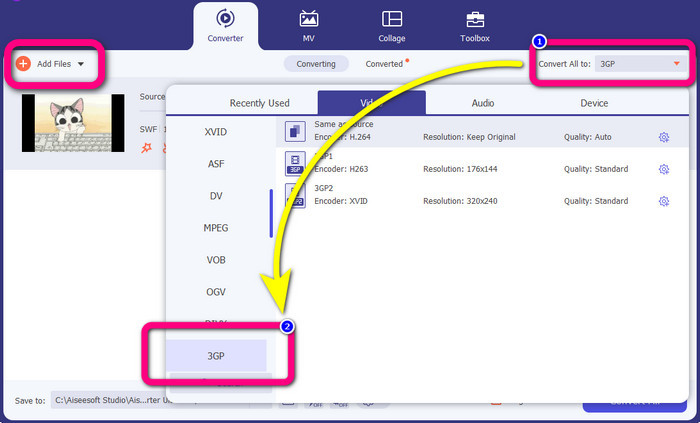
Stap 3: Klik op de knop Convert all to en kies het 3GP-formaat uit de formaatopties. Batchconversie is toegestaan, dus als je meer bestanden wilt converteren of je SWF-bestand naar andere formaten zoals MP4, MKV, MOV, AVI en meer wilt omzetten, klik je op de knop Add Files. Je kunt ze in één keer converteren.
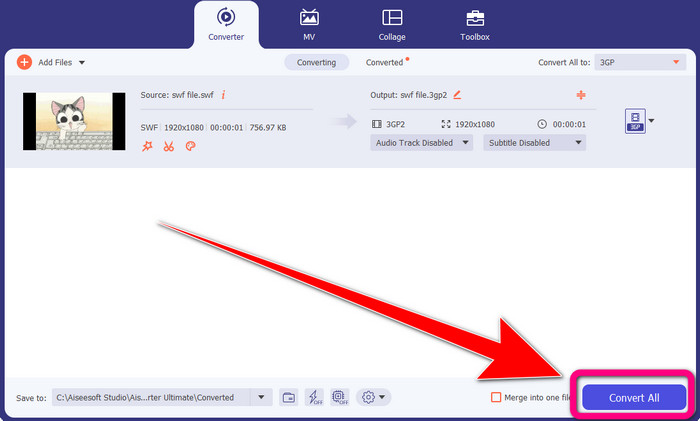
Stap 4: Als je klaar bent met het selecteren van het 3GP-bestandsformaat, klik je tot slot op de knop Convert All. Wacht op het snelle conversieproces en sla vervolgens je uiteindelijke video-output op.
Deel 2: uitstekende online tools om SWF naar 3GP te converteren
FVC gratis video-omzetter online
Voor het online converteren van SWF naar 3GP kun je de FVC Free Video Converter Online gebruiken. Deze online tool is betrouwbaar voor het converteren van video- en audiobestandsindelingen, zoals FLV, MP4, MTS, MP3, AVI, WMA, enzovoort. Je kunt hem bovendien gratis gebruiken op zowel Mac als Windows. Daarnaast is hij geschikt voor alle gebruikers, vooral voor beginners. De methode is eenvoudig en overzichtelijk, zodat je jezelf niet hoeft te vermoeien. Volg tot slot de onderstaande stappen als je enthousiast bent om FVC Free Video Converter Online te gebruiken om SWF naar 3GP te converteren.
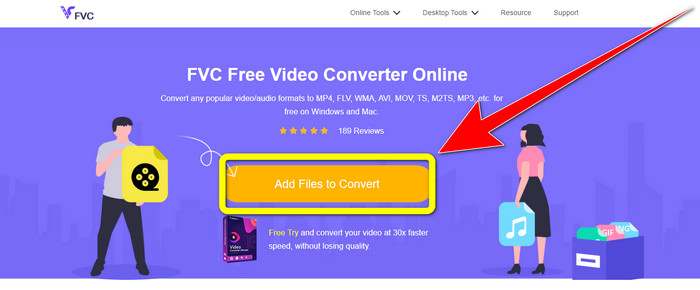
Stap 1: Bezoek de website van FVC Free Video Converter Online. Klik op het oranje vak om je video met het SWF-bestandsformaat in te voegen.
Stap 2: Nadat je het videobestand hebt ingevoegd, kun je al het 3GP-bestandsformaat uit de beschikbare opties kiezen en erop klikken.
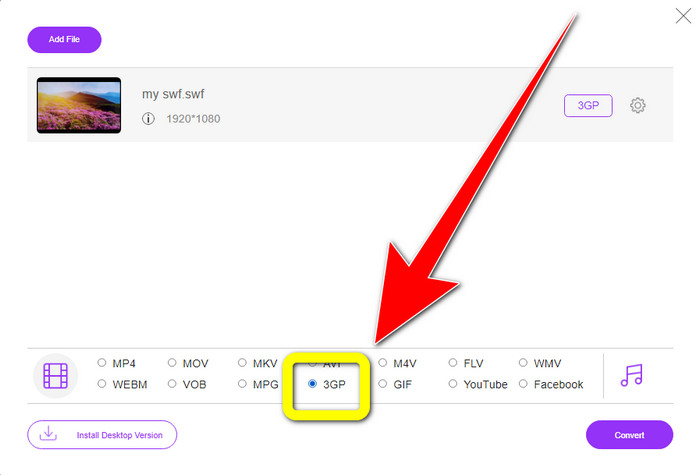
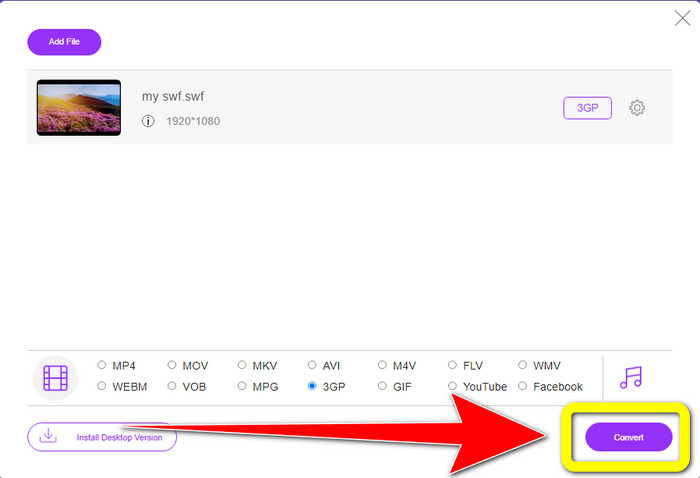
Stap 3: Klik op de knop Convert om je SWF-bestand naar het 3GP-formaat te converteren.
Gratis online converteren
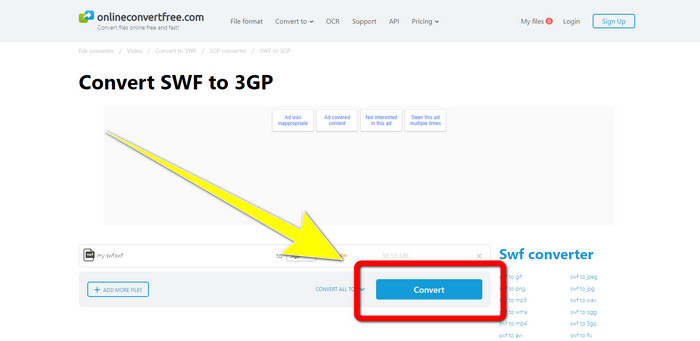
Een andere nuttige en handige online tool om SWF naar 3GP te converteren is Online Convert Free. Met behulp van deze online software kun je verschillende bestanden converteren, waaronder M4V, MP4, AVI, WEBM, XVID, FLV en meer. Je kunt er dus ook MP4 naar 3GP mee omzetten. Daarnaast kun je deze tool gebruiken om afbeeldingen, audio, documenten enzovoort te converteren. Het conversieproces is snel. Ook is de tool eenvoudig te gebruiken, wat een voordeel is voor niet-professionele gebruikers. Houd er echter rekening mee dat je met de gratis versie van deze software slechts bestanden tot maximaal 100 MB kunt converteren. Om de maximale bestandsgrootte te verhogen, moet je een abonnement aanschaffen. Volg de onderstaande stappen om SWF naar 3GP te converteren met deze online tool.
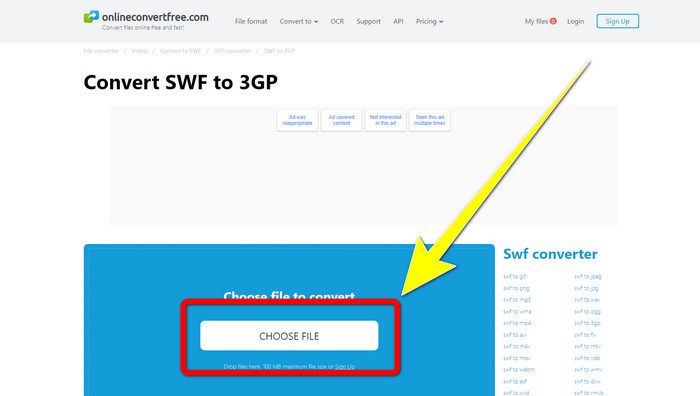
Stap 1: Ga naar de website van Online Convert Free. Klik op de knop Choose File om het videobestand te importeren.
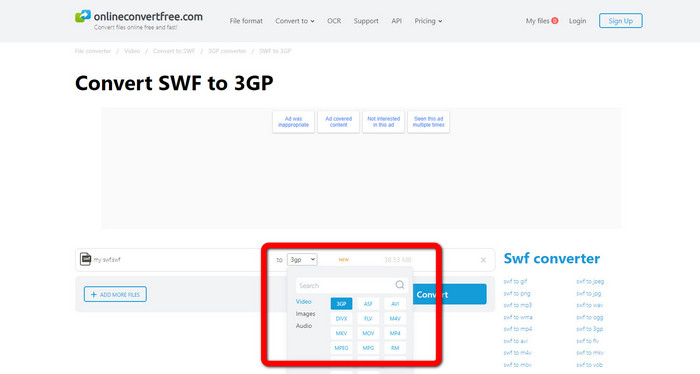
Stap 2: Selecteer het 3GP-bestandsformaat in de formaatopties nadat je het videobestand hebt geïmporteerd.
Stap 3: Klik op de knop Convert om je bestand naar 3GP te converteren en sla je resultaat op je desktop op.
Deel 3: SWF versus 3GP
| SWF | 3GP | |
| Beschrijving | Een animatie die vector-, rasterafbeeldingen, tekst en interactieve inhoud bevat, geschreven in ActionScript. | Multimediacontainer gedefinieerd door 3GPP voor 3G UMTS-services. |
| Ontwikkeld door | Adobe | Partnerschapsproject van de derde generatie |
| Bestandstype | Adobe Flash-bestandsindeling | 3GPP multimedia-indeling |
| Voordelen | Kan over het algemeen worden gebruikt voor efficiënte levering van multimedia-inhoud. | Beschikbaar in bijna alle programma's/apparaten |
| Nadelen | Niet ondersteund door andere browsers of programma's. | De video slaat op in lage kwaliteit |
Deel 4: Veelgestelde vragen over het converteren van SWF naar 3GP
1. Hebben SWF-bestanden audio?
- Een SWF-indeling is gemaakt voor vectorafbeeldingen en animaties, maar kan ook andere soorten gegevens bevatten, zoals tekst, video en geluid. Deze bestanden worden vaak gebruikt om animaties te maken, games te spelen en video en audio op websites te maken.
2. Wat kan .SWF-bestanden openen?
- Om een SWF-bestand te openen, kunt u VLC Player of de verborgen Flash-speler van Adobe gebruiken, die ontwikkelaars vaak gebruiken.
3. Kan ik het SWF-bestand converteren naar andere formaten?
- Absoluut, ja! De beste oplossing is om Video Converter Ultimate te downloaden op je Windows- of Mac-computer. Met deze applicatie kun je je SWF-bestand naar MKV en andere bestandsindelingen converteren.
Gevolgtrekking
Hier vind je de meest gedetailleerde handleiding voor het converteren van SWF naar 3GP-formaat. Mensen geven de voorkeur aan eenvoud boven ingewikkelde methoden. Dus als je eenvoudig verschillende bestanden wilt converteren, gebruik dan de FVC Free Video Converter Online.
-
 3 manieren om MPG naar 3GP te converteren op Windows en Mac [gratis]
 Als u op zoek bent naar manieren om MPG naar 3GP te converteren, lees dan dit artikel om de beste manieren te weten om MPG naar 3GP te converteren op Windows en Mac.
-
 De beste manier om 3GP-metadata op het bureaublad te bewerken, verwijderen en bekijken
 Wat zijn 3GP-metadata? Hoe kan ik de tags op mijn 3GP bekijken, wijzigen en bewerken? Als je dezelfde vraag hebt, dan is dit artikel iets voor jou.
-
 Hoe DIVX naar 3GP te converteren op Windows, Mac en online
 Hoe converteer ik DIVX naar 3GP? Als u op zoek bent naar een antwoord, lees dan dit artikel. We laten u geweldige procedures zien met behulp van verschillende converters.
