


 Video Converter Ultimate
 Scherm opnemer
 Videoreparatie
 Beveiligde download
Top 3-methoden die u kunt proberen om WebM naar 3GP te converteren
WebM wordt ondersteund door bijna alle browsers, zoals Google Chrome, Microsoft Edge, Mozilla Firefox, Opera en meer. Er zijn echter momenten waarop je je WebM‑bestand niet kunt afspelen op bepaalde apparaten, zoals telefoons. Om je video op andere apparaten af te spelen, moet je online of offline converters downloaden om je WebM‑bestand naar andere formaten te converteren. Gelukkig zal dit artikel enkele van de meest eenvoudige manieren introduceren om WebM naar 3GP te converteren met behulp van geteste software.

Deel 1: effectieve methoden om WebM naar 3GP te converteren op Windows en Mac
Dit artikel is voor jou bedoeld als je een WebM‑naar‑3GP‑converter voor Windows en Mac zoekt. Video Converter Ultimate is de beste software die je kunt gebruiken. Met deze applicatie kun je veel bestanden converteren, zoals FLV, MKV, DIVX, XVID, MT2S, MTS, M4V, AVI, MP4 en meer dan 1000 andere. Bovendien hoef je je geen zorgen te maken over het conversieproces, omdat je bestanden 30x sneller kunt converteren dan met andere converters. Je kunt deze geweldige applicatie ook gratis downloaden.
Bovendien zijn de methoden van deze applicatie voor het converteren van bestanden niet ingewikkeld omdat het een gebruiksvriendelijke interface en eenvoudige manieren heeft, wat perfect is voor alle gebruikers. Naast converteren zijn er nog meer tools waar je van kunt genieten, zoals het verbeteren van je video's, het maken van een muziekvideo, het maken van een collage, het wijzigen van de bestandsgrootte en meer.
Functies
◆ Perfect voor het maken van een collage.
◆ Personaliseer en pas GIF's aan.
◆ Verander de snelheid van een video.
◆ Kan de bestandsgrootte van een video wijzigen
◆ Het kan het audiobestand comprimeren.
Voordelen
- Perfect voor Windows- en Mac-gebruikers.
- Het heeft een snel conversieproces.
- Het ondersteunt meer dan 1000 formaten, zoals MP4, M4V, DIVX, FLV, MKV, 3GP, SWF, enz.
- Heeft een vriendelijke gebruikersinterface, die geschikt is voor beginners.
- Kan eenvoudig onnodige elementen zoals watermerken, logo's, handtekeningen, enz. toevoegen en verwijderen.
Nadelen
- Betaal voor de pro-versie om alle geweldige functies te gebruiken.
Stap 1: Download Video Converter Ultimate op je Windows of Mac door op de Download-knop hieronder te klikken. Installeer het op je apparaat en start de software.
Gratis downloadVoor Windows 7 of nieuwerVeilige download
Gratis downloadVoor MacOS 10.7 of nieuwerVeilige download
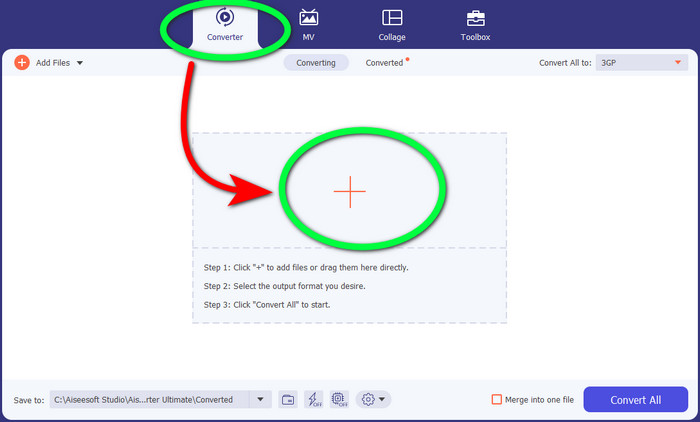
Stap 2: Wanneer je de vier opties in het bovenste deel van de interface ziet, selecteer je het paneel Converter en klik je op het +-teken om het WebM‑videobestand te uploaden.
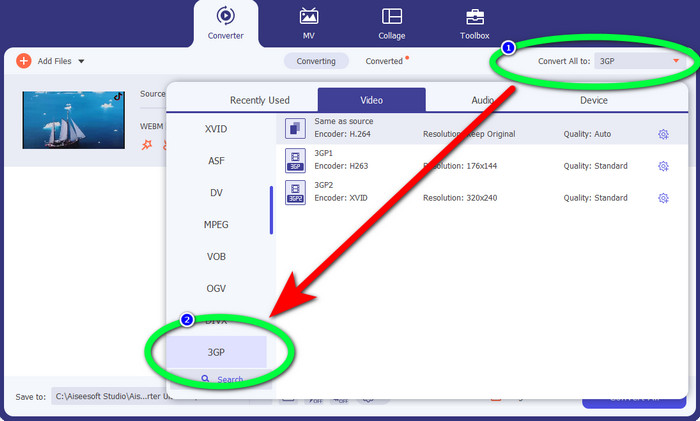
Stap 3: Nadat je het WebM‑videobestand hebt geüpload, klik je op de optie Convert all to en kies je het 3GP‑bestand.
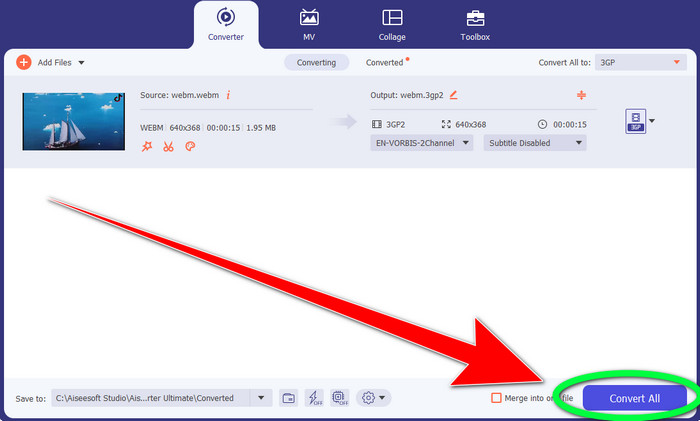
Stap 4: Wanneer je klaar bent met het wijzigen van de bestandsindeling van WebM naar 3GP, klik je op de knop Convert.
Deel 2: eenvoudige manieren om WebM online naar 3GP te converteren
FVC gratis video-omzetter online gebruiken
Wil je een gratis online videoconverter gebruiken? Dan is de online tool die je gratis kunt gebruiken FVC Free Video Converter Online. Met deze online applicatie kun je WebM eenvoudig naar 3GP converteren. Er zijn slechts drie (3) basisstappen, zodat je niet in de war raakt bij het converteren van verschillende bestanden. Bovendien is deze gratis converter toegankelijk op zowel Windows als Mac. Hij kan ook diverse bestanden converteren, zoals MP4, AVI, M4V, MKV, WMA, MP3 en meer. Daarnaast kun je je bestand snel converteren, omdat hij een hoge conversiesnelheid heeft, zodat je niet lang hoeft te wachten om een ander bestand te converteren. Als je geïnteresseerd bent in het converteren van je WebM naar 3GP met FVC Free Video Converter Online, volg dan de eenvoudige stappen hieronder.
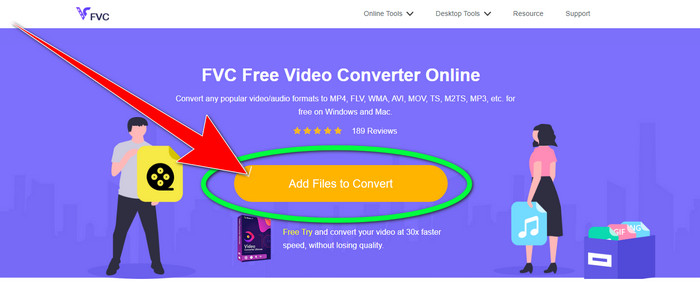
Stap 1: Bezoek de FVC Free Video Converter Online. Klik op het oranje vlak in het midden om je WebM‑videobestand toe te voegen.
Stap 2: Selecteer vervolgens het 3GP-bestand als je gekozen formaat. Je ziet de formaatopties in het onderste deel van de interface.
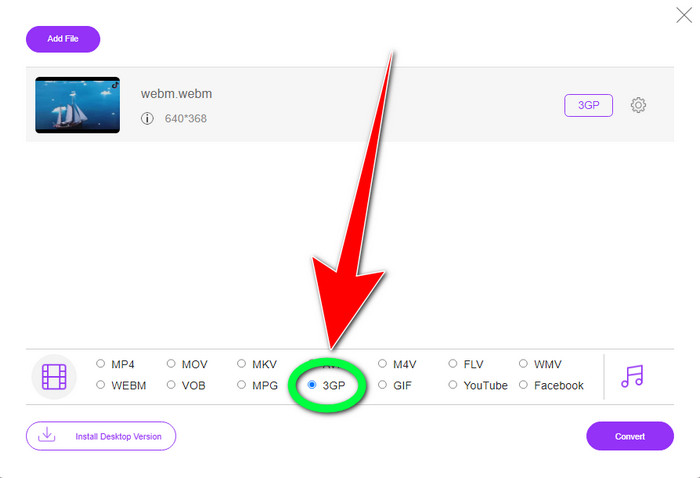
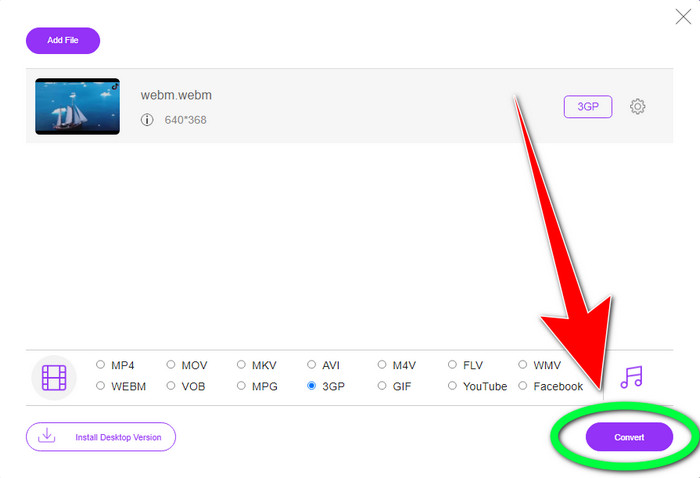
Stap 3: Nadat je het 3GP‑bestandsformaat hebt gekozen, kun je al op de knop Convert klikken om je video op te slaan. Met deze tool kun je ook WebM naar DIVX converteren.
Convertio gebruiken
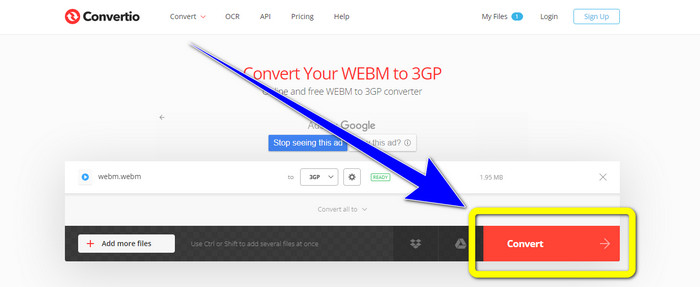
Als u nog steeds online op zoek bent naar een andere WebM naar 3GP-converter, dan is Convertio de tool die u zoekt. Het heeft ook eenvoudige stappen om uw bestanden te converteren. Bovendien kunt u uw bestand converteren naar 37 verschillende videobestandsindelingen, waaronder HEVC, MPG, M4V, MKV, WMV, MP4, MOV, AVI, enz. Convertio is niet alleen beperkt tot het converteren van videoformaten. U kunt ook verschillende audio-, afbeeldingen- en documentindelingen converteren.
100Mb is echter de maximale bestandsgrootte van deze online applicatie voor het gebruik van de gratis versie. U moet de betaalde versie aanschaffen om onbeperkte bestandsgrootte te hebben en van meer functies te genieten. Maar het aanschaffen van een abonnement is duur. Als u het WebM-bestand met Convertio naar 3GP wilt converteren, volgt u de onderstaande stappen.
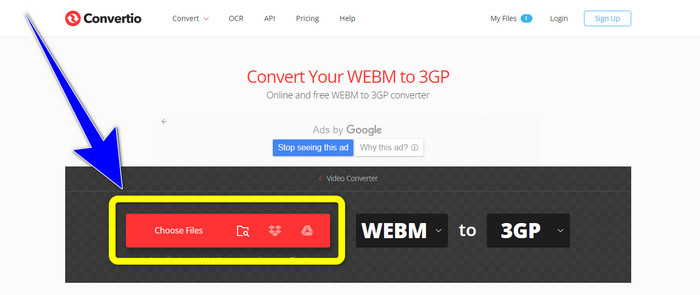
Stap 1: Ga naar de website van Convertio en druk op de knop Choose files om je WebM‑videobestand toe te voegen.
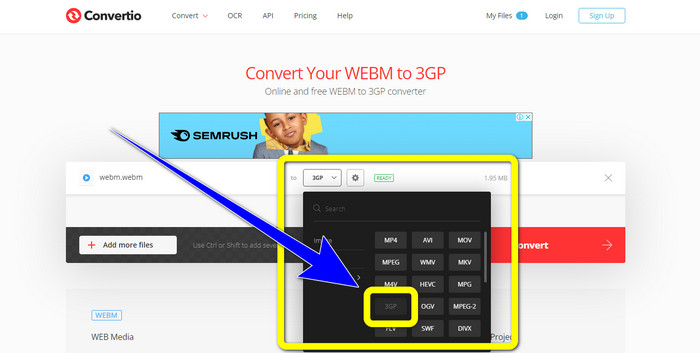
Stap 2: Nadat je je WebM‑videobestand aan Convertio hebt toegevoegd, selecteer je de formaatopties en kies je het 3GP‑bestandsformaat.
Stap 3: Voor je laatste stap kun je op de knop Convert klikken om je bestand te converteren. Sla vervolgens je uiteindelijke bestand op je computer op na het conversieproces. Klik hier om te leren hoe je MPG naar 3GP converteert.
Deel 3: Informatie over WebM en 3GP
WEBM
Met VP8‑videocompressie en Vorbis‑audiocompressie is WebM een open mediacontainer. Het WebM‑formaat wordt doorgaans gebruikt om media aan webpagina’s toe te voegen en wordt door alle webbrowsers ondersteund, waaronder Opera, Mozilla Firefox en Google Chrome. Het biedt een goede videoweergavekwaliteit en kenmerken voor gegevenscompressie. Het insluiten van WebM‑video op webpagina’s verloopt zonder haperingen of fouten. Het WebM‑formaat is bedoeld als concurrent van de h.264‑standaarden. Google is eigenaar van het auteursrecht op de extensie.
3GP
Voor GSM‑gebaseerde telefoons (Global System for Mobile Communications) creëerde het Third Generation Partnership Project in 1998 de 3GP-multimediacontainer. De container is perfect voor mobiele telefoons omdat hij minder data, bandbreedte en opslag gebruikt. Het is een veelgebruikte container voor MMS‑bestanden (Multimedia Messaging Service).
Deel 4: Veelgestelde vragen over het converteren van WebM naar 3GP
Wat zijn de beste offline en online converters die ik kan gebruiken om WebM naar 3GP te converteren?
Hier volgen de geteste en betrouwbare applicaties om WebM naar 3GP en andere bestanden te converteren.
1. FVC Free Video Converter Online
2. Video Converter Ultimate
3. Convertio
4. HitPaw Video Converter
5. Online Convert Free
6. AnyMP4 Video Converter Ultimate
7. OnlineConvert
Is 3GP een goed videoformaat?
Als het gaat om 3G-netwerktelefoons, is het 3GP-formaat uitstekend omdat het speciaal voor het apparaat is gemaakt. Wat streaming op draagbare mediaspelers of desktops betreft, zijn er echter meer goede formaten zoals MP4 omdat het video met een hogere resolutie kan ondersteunen dan 3GP.
Wat is de resolutie van 3GP?
3GP-video's hebben twee resoluties: de eerste is 176x144 voor alle telefoons die het 3G-formaat ondersteunen. De andere resolutie is 320 x 240 voor telefoons met breedbeeld, PSP, MP4-spelers en iPad touch.
Gevolgtrekking
In dit artikel kunnen we concluderen dat er veel manieren zijn om WebM naar 3GP te converteren. Als je de beste manier wilt om videobestanden online te converteren, gebruik dan FVC Free Video Converter Online. En als je op zoek bent naar downloadbare software, gebruik dan Video Converter Ultimate. Beide zijn betrouwbaar voor het converteren van diverse videoformaten.
-
 Top Most Choice WebM naar FLV Converter Gratis op het web en desktop
 Heeft u hetzelfde probleem bij het afspelen van WebM-bestanden op uw smartphones? Besteed dan 5 minuten aan het lezen van dit artikel om te weten hoe u WebM naar FLV converteert.
-
 Top 3 beste WebM naar WMV-converters die u niet mag missen
 Op zoek naar een manier om een WebM-bestand naar een WMV-bestand te converteren? We hebben vandaag een aantal beroemde converters op de markt geprobeerd en hebben de beste en gemakkelijkst te gebruiken onder hen gekozen.
-
 Beste WebM naar MKV-converters die u moet gebruiken om snel te converteren
 Bent u op zoek naar manieren om WebM naar MKV-bestanden te converteren? Dit artikel presenteert de beste WebM naar MKV-converters die u kunt proberen.
