


 Video Converter Ultimate
 Scherm opnemer
 Videoreparatie
 Beveiligde download
4 eenvoudige methoden om WEBM naar DIVX te converteren
Videobestanden converteren is de beste aanpak wanneer een video niet wordt ondersteund in een bepaald programma. In dit bericht leer je de eenvoudigste methoden om je WEMB-bestand naar het DIVX‑formaat om te zetten. Je kunt veel WEBM-naar-DIVX-converters online en offline vinden, maar sommige daarvan zijn niet effectief en ingewikkeld in het gebruik. Daarom hebben wij tal van toepassingen getest om je de meest handige en uitstekende converters met begrijpelijke methoden te laten zien, die je op je Mac, Windows en online kunt downloaden. Ben je benieuwd naar deze uitstekende methoden? Ga dan verder en lees dit informatieve artikel.

Deel 1: Converteer WEBM naar DIVX offline met de beste kwaliteit
Het converteren van verschillende bestanden is lastig, zeker als je het proces en de toepassing die je moet gebruiken niet kent. Wil je dus het WEBM‑bestand naar DIVX converteren met uitstekende kwaliteit? Download dan Video Converter Ultimate op je Windows- en Mac-computer. Deze toepassing is eenvoudig te gebruiken bij het converteren van diverse bestanden, omdat hij basismethodes en een gebruiksvriendelijke interface heeft, waardoor de procedures niet ingewikkeld worden. Bovendien ondersteunt hij meer dan 1000 formaten, waaronder WEBM, DIVX, ASF, OGV, MTV, GIF, MPEG, DPG, MOV, M4V, MP4, FLV, enzovoort. Daarnaast kan Video Converter Ultimate je video’s verbeteren omdat het krachtige videobewerkingstools bevat. We kunnen nog veel meer doen met je WEBM‑video. Om je video te comprimeren ga je naar de Toolbox en kies je Video compressor. Om watermerken aan je WEBM‑video toe te voegen, kies je de tool Video Watermark.
Functies
◆ Converteer veel video's tot meer dan 1000 bestandsindelingen.
◆ Converteer bestanden 30x sneller dan andere converters.
◆ Biedt collagemakers met gratis filters en thema's.
◆ Geschikt voor het maken van een muziekvideo.
◆ Biedt een toolbox voor het verbeteren van een video, zoals een videocompressor, kleurcorrectie, audiosynchronisatie, versterker en meer.
Voordelen
- Het heeft een gebruiksvriendelijke interface en is geschikt voor beginners.
- Het is een gratis te downloaden applicatie.
- Het maakt batchconversie mogelijk.
- Kan bestanden converteren zonder kwaliteitsverlies.
Nadelen
- Koop een abonnement om de pro-versie te gebruiken.
Converteer WEBM naar DIVX met behulp van de Video Converter Ultimate.
Stap 1: Installeer Video Converter Ultimate op je computer. Start het programma vervolgens.
Gratis downloadVoor Windows 7 of nieuwerVeilige download
Gratis downloadVoor MacOS 10.7 of nieuwerVeilige download
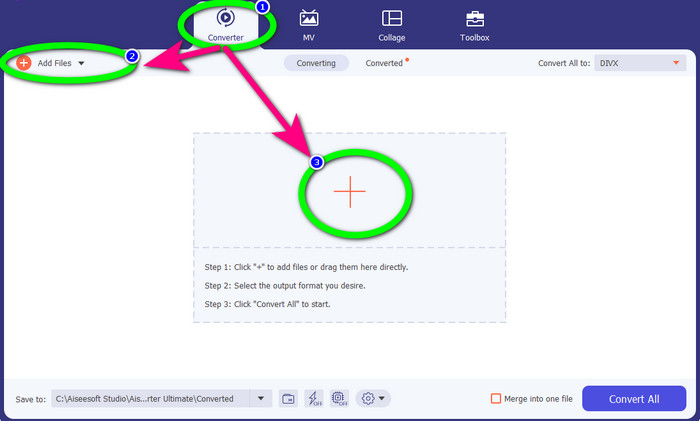
Stap 2: Wanneer de interface verschijnt, selecteer je het paneel Converter en klik je op de knop Add Files of op het Plus-icoon om het WEBM‑bestand toe te voegen.
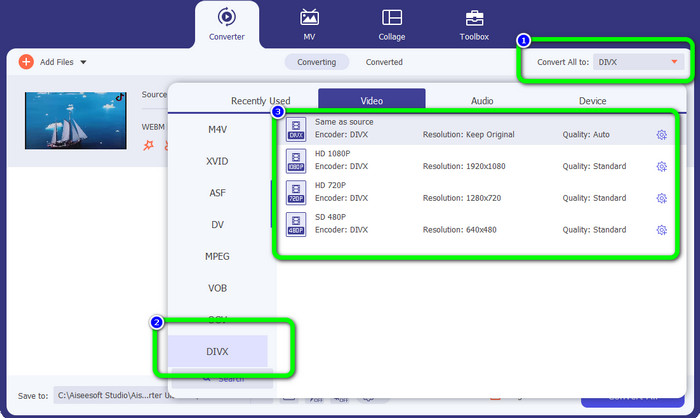
Stap 3: Nadat je het WEBM‑bestand hebt toegevoegd, klik je op de knop Convert All to. Selecteer je gewenste formaat, namelijk het DIVX‑bestandsformaat. Je kunt ook de kwaliteit van je video kiezen, van 480p tot 1080p.
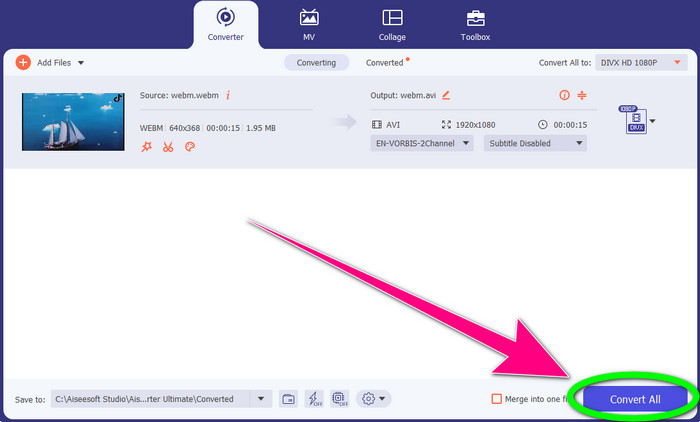
Stap 4: Klik tot slot op de knop Convert All om het WEBM‑bestand naar DIVX‑formaat te converteren.
Deel 2: 3 manieren om WEBM online naar DIVX te converteren
WEBM.to gebruiken
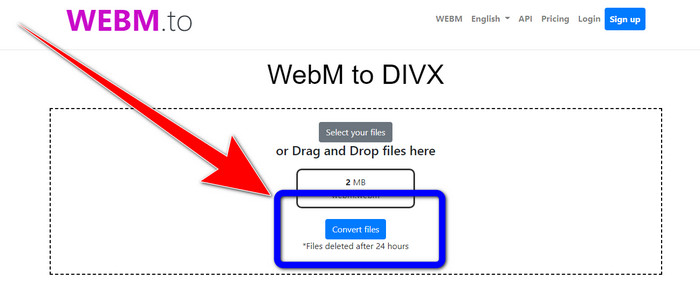
Ben je op zoek naar een online WEBM-naar-DIVX-converter? WEBM.to is een tool die je niet wilt missen. Hij kan verschillende bestanden converteren via je browser, zoals Google Chrome, Mozilla Firefox, Microsoft Edge, enzovoort. Hij ondersteunt bestandsformaten zoals MOV, FLV, M4V, TS, MT2S en meer. Net als de converter hierboven is WEBM.to eenvoudig te gebruiken omdat hij zich uitsluitend richt op het converteren van bestanden. Ten slotte is je bestand hier veilig, omdat het automatisch na 24 uur wordt verwijderd. De conversie verloopt echter traag. Bovendien presteert de tool niet goed als je geen stabiele internetverbinding hebt. Laten we je WEBM‑bestand naar DIVX converteren met deze online tool.
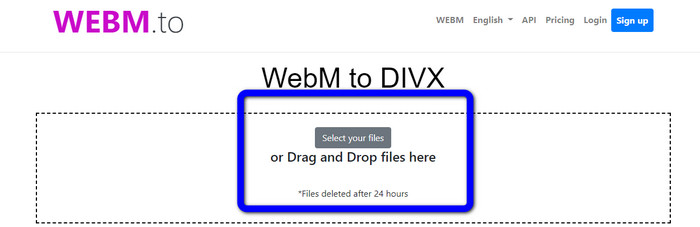
Stap 1: Bezoek de website WEBM.to. Klik op de knop Select your files om je WEBM‑bestand te importeren. Je kunt je bestand ook naar het vak slepen.
Stap 2: Klik op de knop Convert Files nadat je het WEBM‑bestand hebt toegevoegd. Wacht tot het conversieproces is voltooid en sla vervolgens je uiteindelijke video op.
Evano gebruiken
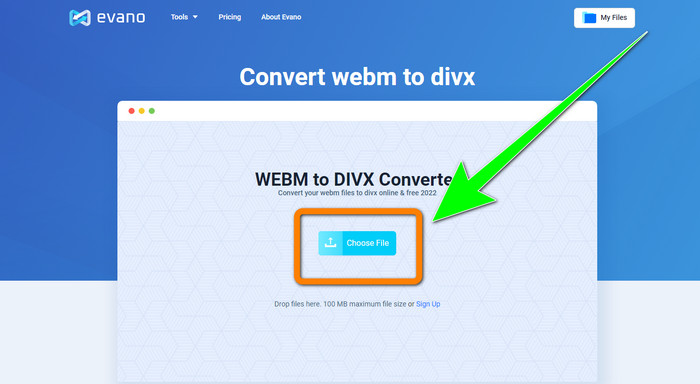
Je kunt ook Evano gebruiken om WEBM naar DIVX te converteren. Deze online tool is eveneens betrouwbaar. Hij kan verschillende bestandsformaten converteren, zoals MP4, AVI, DIVX, XVID, 3GP, FLV, VOB, MOV, enzovoort. Je kunt dus ook WEBM naar FLV converteren met deze tool. Daarnaast is EVANO niet alleen een converter, maar ook een audio-editor en optimizer, zodat je nog meer met deze tool kunt doen. Maar deze toepassing heeft een beperking in de gratis versie. Je kunt alleen bestanden converteren met een maximale bestandsgrootte van 100 MB. Dat betekent dat je een abonnement moet kopen om onbeperkte bestandsgroottes te krijgen. Ook heb je een snelle internetverbinding nodig. Het is een webgebaseerde toepassing en een internetverbinding is sterk aanbevolen. Volg de onderstaande stappen om WEBM naar DIVX te converteren met Evano.
Stap 1: Bezoek de website van Evano. Druk op de knop Choose File om het WEBM‑bestand toe te voegen.
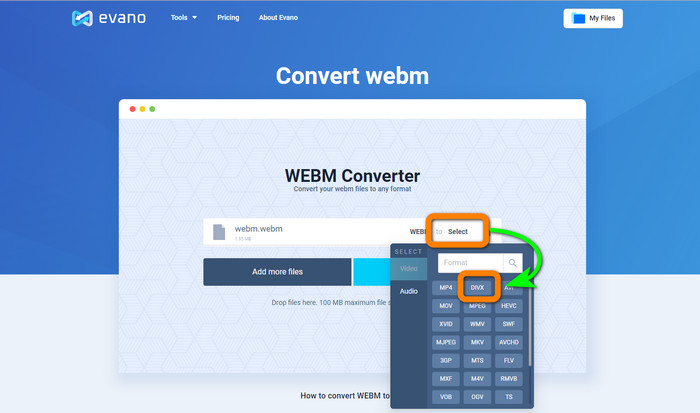
Stap 2: Klik op de knop Select om naar de formaatopties te gaan. Selecteer vervolgens het DIVX‑bestandsformaat.
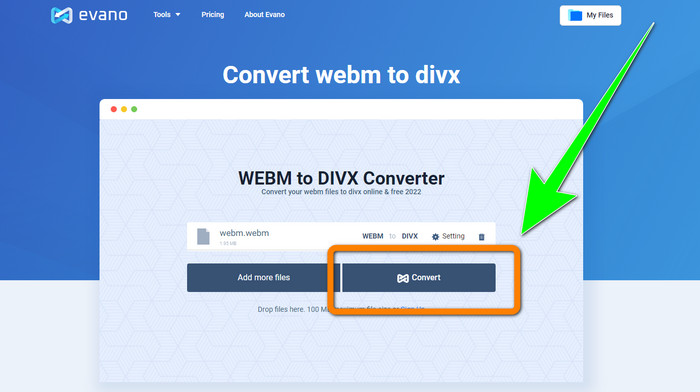
Stap 3: Klik voor de laatste stap op de knop Convert. Wacht geduldig op het conversieproces en sla de video op in het DIVX‑bestandsformaat.
FileProInfo gebruiken
FileProInfo is een van de online converters die je eenvoudig kunt gebruiken om WEBM naar DIVX te converteren. Met behulp van deze online tool hoef je je geen zorgen te maken over hoe je je bestand naar andere formaten converteert. Je kunt deze tool ook gebruiken om WEBM naar MKV te converteren. Bovendien heeft het eenvoudige methoden voor het converteren van bestanden. Daarnaast kun je deze tool, naast het converteren, gebruiken voor plagiaatcontroles, volledige websitebeoordelingen, ping‑websitetools en meer. Er zijn echter momenten waarop FileProInfo niet werkt. Ook is het conversieproces traag. Net als bij andere online converters is er een maximale bestandsgrootte van 150 MB. Laten we dus verdergaan met het converteren van het WEBM‑bestand naar DIVX met deze online tool.
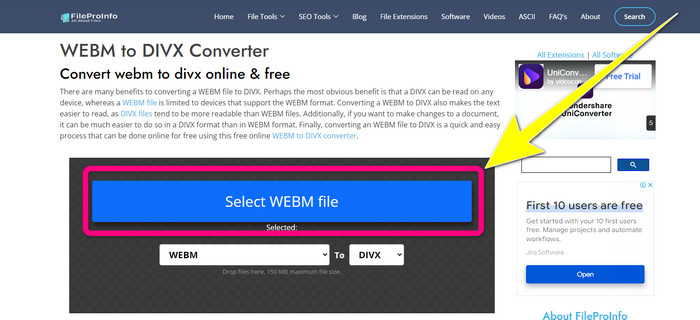
Stap 1: Ga naar de website van FileProInfo. Klik op het blauwe vak om het WEBM‑bestand in te voegen.
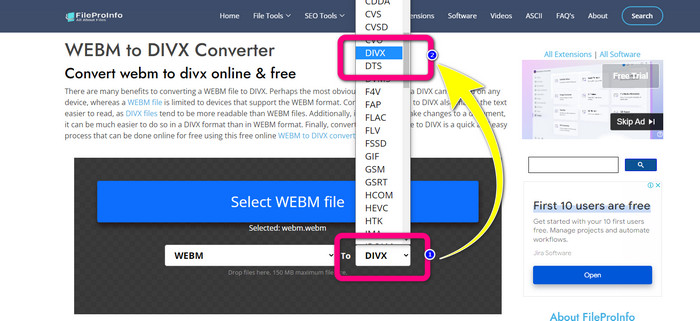
Stap 2: Nadat je het WEBM‑bestand hebt ingevoegd, ga je naar de formaatopties en selecteer je het DIVX‑bestandsformaat.
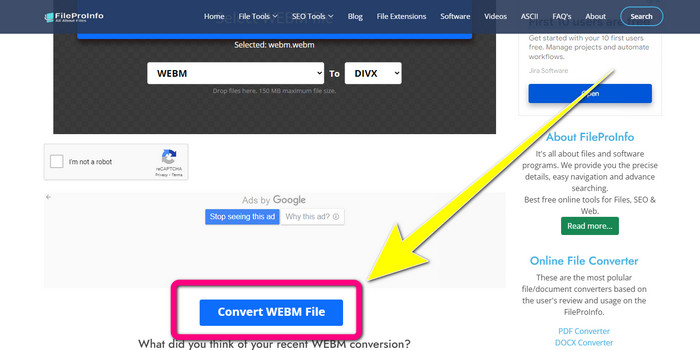
Stap 3: Scroll naar beneden en klik op de knop Convert WEBM file.
Deel 3: WEBM versus DIVX
| WEBM | DIVX | |
| Videobestandsextensie | Een open-source, niet-royalty multimedia-indeling genaamd WebM wordt gebruikt voor het streamen van internetinhoud. Het bevat gecomprimeerde audiostreams met de Oupus- of Vorbis-codecs en gecomprimeerde videostreams met de VP8 of VP9. Vanwege het lichtgewicht ontwerp en de real-time distributiemogelijkheden is het een van de meest populaire bestandsindelingen geworden voor het online streamen van video's. | Een hoogwaardige videocodec met hoge compressie die resoluties tot 1080 HD ondersteunt en video's comprimeert tot een fractie van hun standaardformaat zonder veel van hun kwaliteit op te offeren. |
| Ontwikkeld door | Google Inc. | DIVX Netwerk Inc. |
| Voordelen | Loyaliteitsvrij en open source, ondersteunt de meeste codecs. | Klein van formaat, gratis te gebruiken |
| Nadelen | Gebrek aan interactieve elementen | |
| Geassocieerde programma's | VLC Media Player, Mozilla Firefox, Google Chrome, Windows Media Player | XBox 360, autoradio, dvd-spelers, Blu-ray-spelers |
Deel 4: Veelgestelde vragen over het converteren van WEBM naar DIVX
1. Wat zijn de voordelen van het omzetten van WEBM naar DIVX?
Het DIVX-bestandsformaat is beter leesbaar en algemeen geaccepteerd dan het WEBM-bestand. Ook kan het converteren naar DIVX-bestanden helpen bij de beveiliging.
2. Wat is beter, WEBM of MP4?
Wat de grootte van het videobestand betreft, is WEBM kleiner dan MP4. Maar in termen van kwaliteit en compatibiliteit is MP4 beter.
3. Heeft WEBM een geluid?
Ja natuurlijk. Het open-source WebM-project promoot WebM, een bestandsindeling voor digitale multimediacontainers die zowel audio als video kan bevatten. WEBM is slechts een containerformaat. Het bevat een subset van het Matroska-multimediacontainerformaat.
Gevolgtrekking
Dit zijn de meest uitstekende toepassingen die je kunt gebruiken om WEBM naar DIVX te converteren met effectieve methoden. Waar wacht je nog op? Download en gebruik nu Video Converter Ultimate. Het kan je bestanden sneller en eenvoudiger converteren.
-
 Eenvoudig te leren methoden voor het converteren van Xvid naar DivX
 Bent u op zoek naar de beste oplossing om Xvid gratis naar DivX te converteren? Dit artikel zal u helpen uw probleem op te lossen. Lees het bericht dus continu.
-
 Hoe MPG naar DivX te converteren zonder kwaliteitsverlies
 Bent u op zoek naar een probleemloze applicatie waarmee u MPG naar DivX kunt converteren? Dit artikel geeft je verschillende effectieve methoden die je moet proberen.
-
 Hoe DIVX naar 3GP te converteren op Windows, Mac en online
 Hoe converteer ik DIVX naar 3GP? Als u op zoek bent naar een antwoord, lees dan dit artikel. We laten u geweldige procedures zien met behulp van verschillende converters.
