


 Video Converter Ultimate
 Scherm opnemer
 Videoreparatie
 Beveiligde download
Stap voor stap hoe u albumhoezen aan MP3 kunt toevoegen met de beste software op het bureaublad
Prefixing album art can become handy, especially if you want to help the listener feel more attached to the music they are listening to. With this album art, users can glimpse an idea of what the music is all about, chiefly the digital ones. In some scenarios, MP3 doesn’t have a proper album art or isn’t attached to the file. If you experience the same thing, it is essential to learn how to add album art to MP3 music on your desktop. To know more about this topic, keep reading this article as we provide compact knowledge about the problem.

Deel 1. Hoe albumhoezen aan MP3 toe te voegen met Video Converter Ultimate [Aanbevolen Tag Editor]
Are you looking to use ultimate software to add album art to MP3? FVC Video Converter Ultimate is the recommended tag editor in this task. This software isn’t recommended for no reason. Unlike other software, there are limited album art formats you can upload and use as a cover for your MP3 music, but not with this tool. With this ultimate software, you can add the album art on your MP3, WAV, WMA, AAC, FLAC, and 1000+ video and audio formats. Amazing right? This tool is the first choice for adding an image cover to your album. Do you want to know how to use the ultimate software? In that case, you can read and follow the demonstration thoroughly we include below.
Step 1. Click the download button below, choose which operating system you currently use. After downloading the software, proceed to install the tool. If all is done, click Start Now to launch the software on your desktop.
Gratis downloadVoor Windows 7 of nieuwerVeilige download
Gratis downloadVoor MacOS 10.7 of nieuwerVeilige download
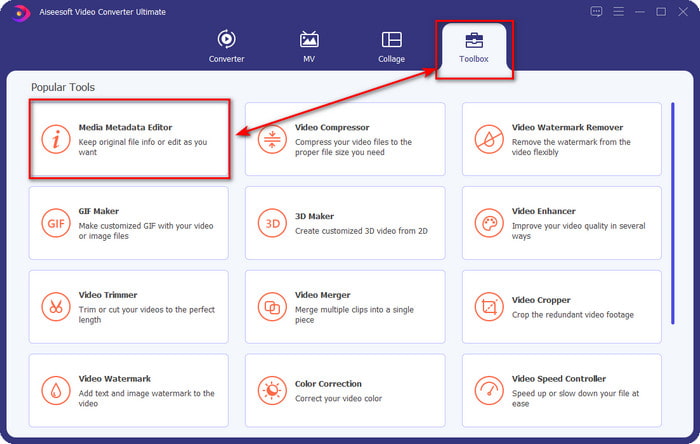
Step 2. Proceed onto the Toolbox section click Media Metadata Editor under it.
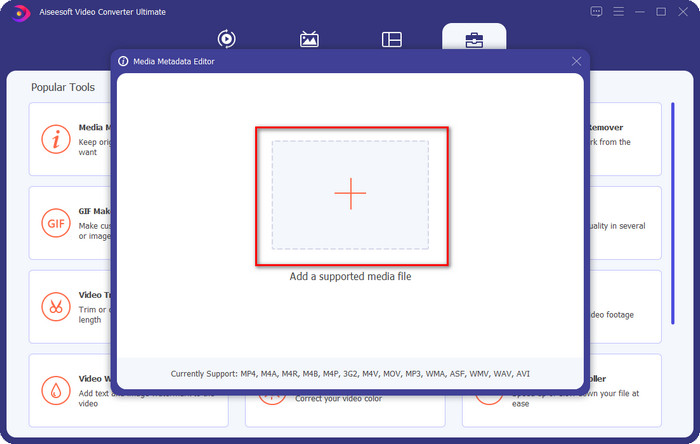
Step 3. Select the music file you want to add album art to by clicking the + button. To insert the music file you’ve selected, click Open.
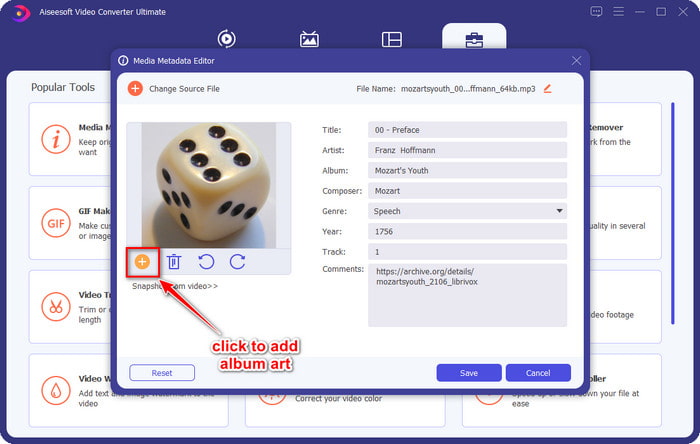
Step 4. Next, click the + button on the left lower left side of the interface, find the album cover you want to use, and click Open. Add the other metadata you want on the textbox if you need it.
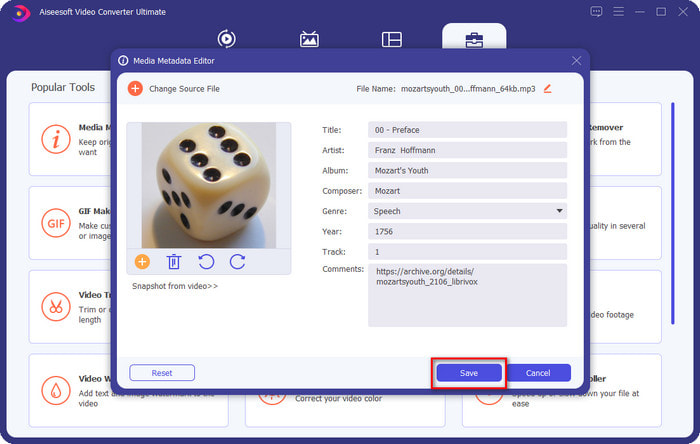
Step 5. If you are finished adding the album art and the metadata on the MP3 file you have, you can now click Save to attach the album art to the MP3 file you’ve uploaded. Easy isn’t it? Everything becomes possible and easy if you use the ultimate tool to fix the problem.
Deel 2. Albumhoezen toevoegen aan MP3 met VLC Media Player Gratis metadata-editor]
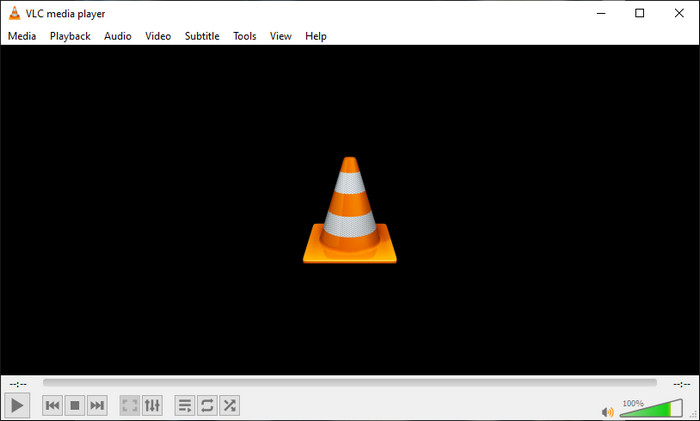
VLC Media Player is the best media player that most of us have. This tool can play any video file, and it is capable of editing metadata as well, like adding album art to the music file. With this media player, you can freely adjust or add metadata. If you want a tutorial on adding album art to MP3 on Windows 10/11 or Mac with this tool, the steps below are for you.
Step 1. Download the media player on your desktop and open it.
Step 2. On the main interface, click Tools, and under it, click Information.
Step 3. Right-click the VLC icon on the bottom right corner, add the album art, and click Save.
Deel 3. Albumhoezen toevoegen aan MP3 in iTunes [Ingebouwde metadata-editor op Mac]
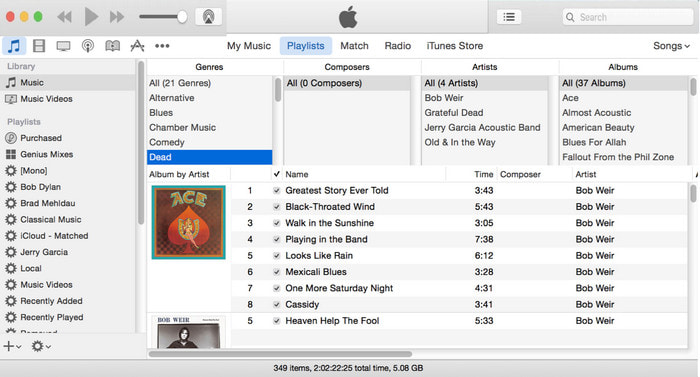
For Mac users, iTunes is our go-to metadata editor to add the image cover on our MP3 file. This built-in app can help us edit the metadata on the file that we have on Mac. However, the software is currently unavailable on some Mac versions because it is now changed into three separate apps that perform the same as iTunes. But on some Mac with the older version. If you are one of the Mac users that wants to know how to add album art to MP3 on iTunes, you can follow the steps below.
Step 1. Open the iTunes application on your Mac.
Step 2. Click the Music then Library and right-click the music file that doesn’t have album art.
Step 3. On the options above, click Artwork, then Add Artwork, select the image you’ve want to upload, and click OK to apply it.
Deel 4. Veelgestelde vragen over het toevoegen van albumhoezen op MP3
Kan ik albumhoezen toevoegen aan MP3 op Audacity?
Helaas kunt u de afbeeldingskunst niet toevoegen aan het MP3-bestand dat u hebt met Audacity. Deze tool ondersteunt geen enkel beeld- of videoformaat omdat dit bedoeld is om als muziekeditor te gebruiken. Maar je kunt Audacity nog steeds gebruiken als metadata-editor als je je MP3-metadata wilt bewerken.
Waarom ontbreekt mijn albumhoes in mijn audiobestand?
Er zijn drie redenen waarom je albumhoezen ontbreken in je audiobestand. De eerste reden is dat het bestand dat u moet downloaden geen albumhoezen bevat, vooral als dit piraterij is. De meeste muziekbestanden die we op internet hebben gedownload, bevatten geen albumhoezen om kopieerproblemen te voorkomen. Vervolgens verdween het bestand omdat de afbeelding niet correct was bijgevoegd. Sommige gebruikers komen dit probleem tegen en het is moeilijk om ermee om te gaan, dus het is essentieel om een professionele albumhoezen-adder te gebruiken. Ten slotte is de afbeelding beschadigd; als het bestand dat je hebt geüpload niet beschikbaar is als albumhoes of als het muziekbestand dat je hebt beschadigd is, kan dit de reden zijn.
Wat is de beste metadata die ik kan gebruiken?
If the metadata editor we provided above is limited, you can click on this link to go to a new article to gather all of the best metadata editors you can use.
Gevolgtrekking
Nu we het idee hebben om albumhoezen op MP3 toe te voegen, is het tijd om te kiezen welke tool volgens ons het beste bij ons past. Als u een Mac-gebruiker bent en geen software op uw bureaublad wilt downloaden, moet u iTunes kiezen. Maar iTunes wordt uitgefaseerd op de bijgewerkte versie van Mac. Als je een gratis tool wilt downloaden waarmee je de hoes aan je muziek kunt toevoegen, dan is VLC een goede keuze. De tool is echter geen professionele tool. Dus als u deskundige software wilt die u bij deze taak kan ondersteunen, beschikbaar op zowel besturingssystemen, Windows als Mac, gebruik dan de ultieme software. Download de software op uw desktop om de professionele tool binnen handbereik te hebben door op de downloadknop hierboven te klikken.
-
 Hoe u gemakkelijk metadata van foto's en video's op iOS kunt bekijken
 Wil je weten hoe je metadata op iPhone en iPad kunt zien? Dan kan het lezen van dit artikel je misschien helpen om dit probleem moeiteloos op te lossen.
-
 Beste technieken voor het bewerken van iD3-tags op iTunes [Effectieve tips]
 Wilt u weten hoe u tags op iTunes kunt bewerken? Dan ben je hier aan het juiste adres. Zoals we de methoden hebben besproken, kunt u volgen om de tags te bewerken met iTunes.
-
 Eigenschappen van WAV-bestanden bewerken op Windows 10/11 en Mac [opgelost]
 Bent u op zoek naar een manier om de eigenschappen van uw WAV-bestanden op Windows 10/11 te bewerken? Deze vraag zal een antwoord hebben als je dit artikel blijft lezen.
