


 Video Converter Ultimate
 Scherm opnemer
 Videoreparatie
 Beveiligde download
2 efficiënte manieren om video's voor Instagram te combineren
“Hoe kan ik video's voor Instagram combineren? Ik had een onvergetelijk verjaardagsfeestje en heb er veel video's van gemaakt. Nu wil ik de videoclips combineren tot een complete en deze op Instagram plaatsen. Leer me alstublieft hoe ik het moet doen..."Er zijn veel gelegenheden waar veel videoclips wachten om samengevoegd te worden tot één. Om aan zo'n behoefte te voldoen, gaat dit artikel het hebben over 2 efficiënte methoden om deel te nemen aan video's voor Instagram.

Deel 1: Combineer video's voor Instagram zonder kwaliteitsverlies
Om te beginnen heb je een app nodig om de video’s voor Instagram samen te voegen. Je wilt geen ingewikkeld videobewerkingsprogramma zoals Adobe Premiere Pro of Final Cut Pro gebruiken voor zo’n eenvoudige taak. Video Converter Ultimate is precies voldoende voor jou.
Het kan je helpen om eenvoudig meerdere video's voor Instagram samen te voegen. De verwerkingssnelheid en beeldkwaliteit zijn beide perfect. Ongeacht het formaat, je kunt deze app gebruiken om onbeperkt deel te nemen aan de video's voor Instagram.
Belangrijkste functies:
- • Combineer video's voor Instagram, ongeacht het formaat en de resolutie
- • Hardwareversnellingstechnologie zorgt voor 70x hogere processnelheid
- • Bewerk en doe mee aan video's voor Instagram zonder een watermerk achter te laten
- • Bijsnijden en video's samenvoegen met verschillende resoluties om ze naadloos te maken
- • Doe mee met video's met de trimfunctie om de ongewenste segmenten te verwijderen
- • Vlotte en intuïtieve gebruikersinterface voor zowel beginners als professionals
Gratis downloadVoor Windows 7 of nieuwerVeilige download
Gratis downloadVoor MacOS 10.7 of nieuwerVeilige download
Stappen om video’s voor Instagram te combineren zonder kwaliteitsverlies
Stap 1. Download, installeer en start Video Converter Ultimate gratis. Klik op de knop Bestanden toevoegen om de video’s toe te voegen die je voor Instagram wilt samenvoegen.

Stap 2. In de hoofdinterface kun je de geïmporteerde video’s verslepen om hun volgorde vrij te wijzigen. Vink het vakje Samenvoegen tot één bestand aan zodat de video’s niet afzonderlijk worden geconverteerd.
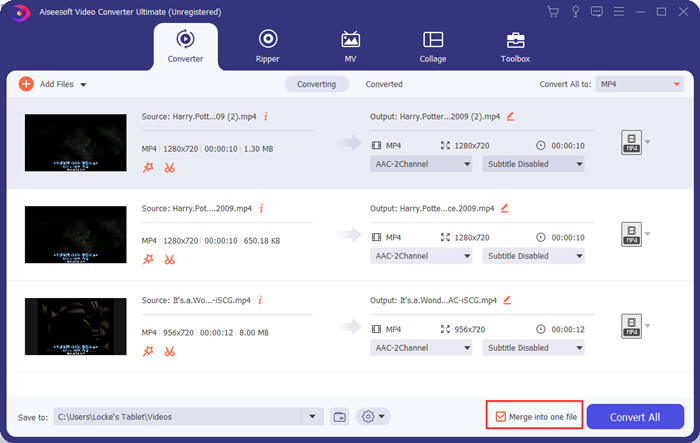
Stap 3. Klik op het kader Alles converteren naar voor het profielmenu. Vervolgens kun je het gewenste formaat, de resolutie en de encoder selecteren. Om video’s voor Instagram samen te voegen is het MP4‑formaat een goede keuze. Je kunt ook op een van de knoppen Aangepast profiel klikken om de instellingen verder aan te passen.
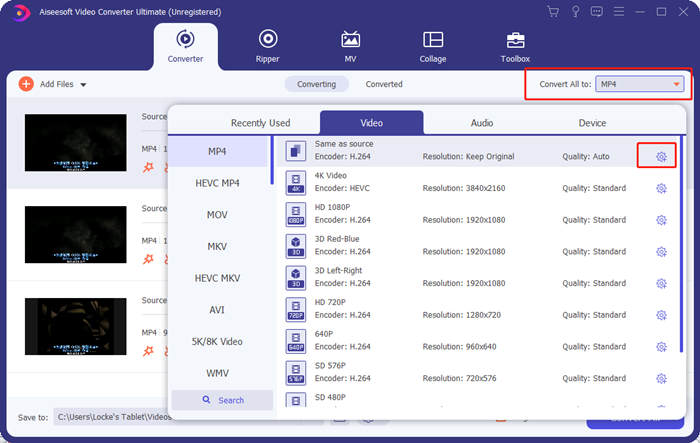
In het venster Profiel bewerken kun je de encoder, resolutie, framesnelheid, bitrate en enkele audio‑parameters aanpassen.

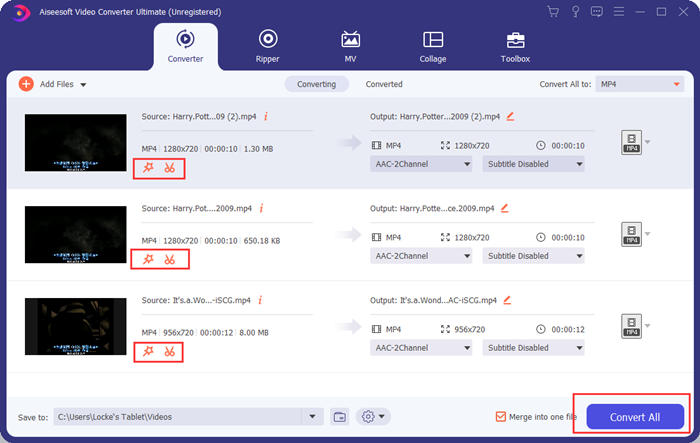
Stap 4. Terug in de hoofdinterface kun je op de knop Alles converteren klikken om te beginnen met het samenvoegen van de video’s voor Instagram. Vooraf kun je ook de knoppen Knippen en Bewerken gebruiken voor trimmen, bijsnijden, roteren en andere functies die je video er beter uit laten zien.
Video Converter Ultimate is handig en krachtig, maar niemand wacht graag op het downloaden van een enorm programma. Wij ook niet. Dus is het mogelijk om video's voor Instagram samen te voegen zonder een programma te downloaden? Ja, lees verder!
Deel 2: video's voor Instagram online en gratis samenvoegen
Hier is nog een handig hulpmiddel, FVC Free Online Video Merger, een geweldige webgebaseerde tool om video’s voor Instagram samen te voegen. Je laadt deze tool in één seconde en uploadt vervolgens je video’s in de volgende seconde. Pas eenvoudig de instellingen aan en laat het programma de rest afhandelen. Het belangrijkste is dat deze tool volledig gratis te gebruiken is.
Stappen om online en gratis video’s voor Instagram samen te voegen
Stap 1. Klik op FVC Free Online Video Merger om het te openen. Klik in het midden van de webpagina van de tool op de knop Upload videos to Merge. Vervolgens verschijnt het venster van de bestandsverkenner, waarin je de video’s moet selecteren en uploaden.

Stap 2. Wanneer de video’s zijn geïmporteerd, kun je hun volgorde aanpassen. Om dit te doen kun je een geïmporteerde video op de verkeerde plaats verwijderen en deze opnieuw invoegen op de juiste plek.

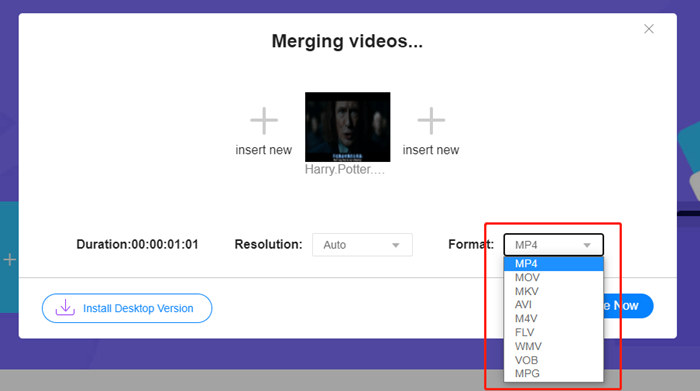
Stap 3. Met deze online videomenger kun je de Resolutie en het Formaat van de voor Instagram samengevoegde video bepalen. Je kunt Auto selecteren om de oorspronkelijke resolutie te behouden of een van de vijf andere resolutie‑opties kiezen.
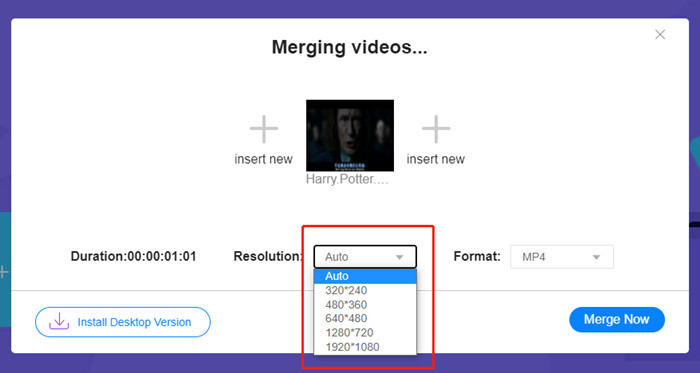
De online videofusie biedt momenteel negen uitvoerformaten waaruit u kunt kiezen. MP4 is misschien het beste voor je Instagram-post.
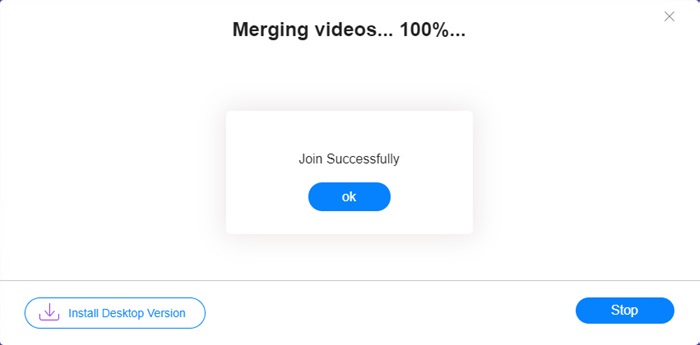
Stap 4. Klik op de knop Nu samenvoegen en wacht op de melding Join Successfully.
Hoewel handig, is deze online tool niet zo perfect als Video Converter Ultimate. In de online tool kunt u de volgorde van de video's niet gemakkelijk aanpassen, de encoder of framesnelheid wijzigen of de video's bewerken. Plus, Video Converter Ultimate geeft je meer keuzes in resolutie en formaten, en verwerkt de video's veel sneller.
Deel 3: Veelgestelde vragen over het combineren van video's voor Instagram
Welke specificaties zijn goed voor Instagram-video's?
De beeldverhouding van 9:16 zou perfect zijn. Om precies te zijn, gebruik gewoon 1080 * 1920 als het mogelijk is. Het beste videoformaat is MP4, hoewel andere populaire formaten ook worden geaccepteerd.
Wat te doen als mijn gecombineerde video te groot is voor Instagram?
Bovenaan de hoofdinterface van Video Converter Ultimate vind je een Toolbox met daarin een Video Compressor. Je kunt deze gebruiken om je video te comprimeren tot de gewenste grootte. Voor Instagram moet je er zeker van zijn dat het bestand niet groter is dan 4 GB.
Hoe lang mag mijn samengevoegde video voor Instagram zijn?
Het hangt ervan af waar je de video plaatst. De limiet voor feedvideo's is 3 seconden tot 1 minuut en voor verhalen is korter dan 15 seconden. IGTV-video's kunnen 60 minuten duren, wat waarschijnlijk aan uw behoeften voldoet.
Gevolgtrekking
Dit artikel heeft twee efficiënte manieren geïntroduceerd om video’s voor Instagram te combineren. Je kunt Video Converter Ultimate gebruiken om video’s voor Instagram te combineren zonder enig kwaliteitsverlies en om de video’s naar wens aan te passen en te bewerken. De andere tool, FVC Free Online Video Merger, is de snelste oplossing, maar biedt je minder opties wat betreft resoluties en formaten. Daarnaast kun je er de encoder of framesnelheid helemaal niet mee wijzigen. Tot slot, als je enige problemen hebt met het samenvoegen van video’s voor Instagram, laat ons dan een reactie achter om het ons te laten weten.
-
 Hoe video's op iPhone samen te voegen met of zonder iMovie
 Lees en ontvang 4 eenvoudige manieren om video's op de iPhone samen te voegen. Alle iPhone-modellen en iOS-versies worden ondersteund. U kunt 2 en meer video's op de iPhone snel combineren tot een nieuwe video.
-
 2 beste manieren om deel te nemen aan MKV-bestanden om onophoudelijk films te bekijken
 Wanneer u uw favoriete film downloadt met gescheiden MKV-bestanden en u wilt MKV-bestanden samenvoegen om deze onophoudelijk te bekijken, kunt u in dit artikel 2 efficiënte manieren leren om MKV-bestanden samen te voegen.
-
 Top 6 beste MP4-videomakers om gratis MP4-video's te combineren
 Er zijn veel MP4-joiners beschikbaar om verschillende MP4-clips verbonden te maken. In dit artikel hebben we enkele gratis MP4-leden uitgekozen voor Windows 10/8/7 en Mac.
