


 Video Converter Ultimate
 Scherm opnemer
 Videoreparatie
 Beveiligde download
2 snelle manieren om grote OGV-bestanden te verkleinen [gratis en online]
OGV files are often used for playing webpage video content using the HTML5 < video > tag. When you are going to send large OGV files to partners, clients, or friends, compressing those files becomes incredibly useful. Since there are many file size limitations of many email and file transfer platforms, compressed videos can greatly prevent the file transfer failure, at least in most cases. So, we’ll take a look at two online ways to compress your OGV files and make them smaller in this post.

Deel 1. Online manier om OGV-bestanden te comprimeren met een OGV-compressor
Free Video Compressor is a popular and useful free online OGV compressor tool available for users. Unlike many other common free online tools, Free Video Compressor comes without restrictions on either the number or size of the files uploaded. More importantly, there will be no watermark on your exported video files. Also, it allows you to compress MP4, AVI, WMV, MOV, and many other common video files without destroying quality.
Hoe OGV-bestanden te comprimeren met behulp van gratis videocompressor
Step 1. Go to the online OGV video compressor website by entering https://www.free-videoconverter.net/free-video-compressor/.
Step 2. Locate and click Add Files to Compress button, and then download its launcher to activate the service. In the window that pops up, go and find your OGV files and hit Open to confirm.

Step 3. Next, you should define the compression settings to make the file smaller. You can set the size of your video, change the resolution, select the bitrate, and more.

Step 4. Hit on the Compress button to commence the process. After it’s finished, the file will be downloaded to your computer automatically.

Bovendien kan deze gratis videocompressor u helpen bij het oplossen van andere problemen met videocompressie. Bekijk gewoon de volgende artikelen:
How to Compress a Video for Email
How to Compress AVCHD Video Files for Free on Windows and Mac
Deel 2. Hoe een OGV-bestand te comprimeren en optimaliseren met Clideo
Clideo is een gratis alles-in-één videotoolkit. Het werkt met alle populaire formaten en comprimeert snel en hoeft niet te worden gedownload. Hiermee kunt u gratis een OGV-bestand tot 500 MB comprimeren, maar het heeft geen limiet. Nu kunt u de onderstaande stappen volgen om uw OGV-bestandsgrootte te verkleinen.
Step 1. Visit https://clideo.com/compress-video and then hit on the Choose file button.
Step 2. Upload an OGV file you want to compress from your computer. You can also select the file from Dropbox or Google Drive by clicking the blue downward arrow.
Step 3. When the file is uploaded, the tool will start processing the video. The processing time depends on the size of the video.
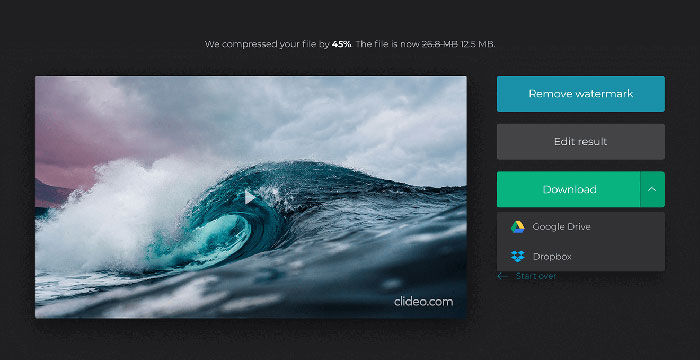
Step 4. Once the compression is over, you can see the initial file size and the compressed one. Now, you can preview the result to make sure it looks good. If you’re satisfied with it, you can click on the Download button to save it to your device or cloud storage.
Deel 3. Veelgestelde vragen over het comprimeren van OGV-bestanden
Wat is een OGV-bestand?
Een OGV-bestand is een videobestand dat is opgeslagen in het Xiph.Org open source Ogg-containerformaat. Het bevat videostreams die een of meer verschillende codecs kunnen gebruiken, zoals Theora, Dirac of Daala. OGV-bestanden kunnen worden afgespeeld met verschillende mediaspelers.
Hoe werkt OGV-compressie?
Als het gaat om OGV-bestandscompressie, is het de interframe-compressie die leidt tot het verkleinen van de bestandsgrootte door de overeenkomsten tussen de videoframes te verwijderen.
Hoe comprimeer ik het MP4 naar OGV-formaat?
U kunt de bovengenoemde tool gebruiken - Gratis videocompressor om uw MP4-bestanden naar OGV te comprimeren. Of u kunt een video-omzettertoepassing kiezen om u te helpen deze te maken.
Gevolgtrekking
Met de bovenstaande online methoden kunt u een OGV-video efficiënt comprimeren en verkleinen. Welke heb je het liefst gebruikt? U kunt uw aanbevelingen in de onderstaande opmerkingen delen!
-
 Van 50 MB tot 5 MB - Hoe MP4-bestand in seconden te comprimeren
 MP4-video is te groot om te uploaden? Wilt u het videoformaat verkleinen? Hier zijn 3 efficiënte manieren om een MP4-bestand onbeperkt naar een kleiner formaat te comprimeren.
-
 Tutorial - 7 manieren om video's gratis te comprimeren zonder kwaliteit te verliezen
 Lees en krijg 7 manieren om gratis video's te comprimeren op uw computer of telefoon. U kunt grote video's gemakkelijk verkleinen tot kleine bestandsgroottes voor e-mail, Twitter, Instagram, YouTube, WhatsApp en meer.
-
 Hoe MOV-bestanden op Windows, Mac, iPhone en Android te comprimeren
 In dit artikel wordt gedetailleerd uitgelegd hoe u QuickTime MOV-video's op uw telefoon of computer kunt comprimeren. Als uw MOV-video te groot is om te verzenden, delen of opslaan, kunt u hier 4 werkbare oplossingen krijgen.
