


 Video Converter Ultimate
 Scherm opnemer
 Videoreparatie
 Beveiligde download
Hoe 3GP-video's van mobiele telefoon in één bestand samen te voegen
Wanneer je tijdens je reis meerdere video's maakt met je smartphone, wil je misschien 3GP-bestanden samenvoegen tot één video. Wat zijn de beste methoden om de videoclips te combineren? Of je nu gewoon deelneemt aan de 3GP-video's of films maakt met de smartphonebestanden, je kunt meer te weten komen over de 2 meest gebruikte methoden in het artikel.

Deel 1: Hoe u 3GP gratis online kunt samenvoegen
To merge your 3GP files without editing, you only need a convenient tool that can merge 3GP videos free online. FVC Free Online Video Merger is one of the best 3GP video mergers with a simple interface. It enables you to combine 3GP files without a number or size limit. Moreover, you can adjust the resolution and video format.
Step 1: Go to the Free Online Video Merger with any web browser. You can click the Upload Videos to Merge button to load one 3GP file into the online video merger. It will direct you to an online video joiner interface.
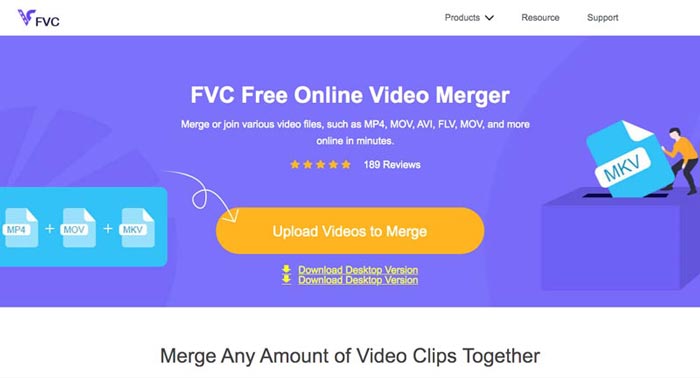
Step 2. Just upload more 3GP files that you need to combine. Then you can change the resolution and the format of your video by clicking the Resolution and Format fields. You can merge your 3GP files into popular video files like MP4 or MKV.
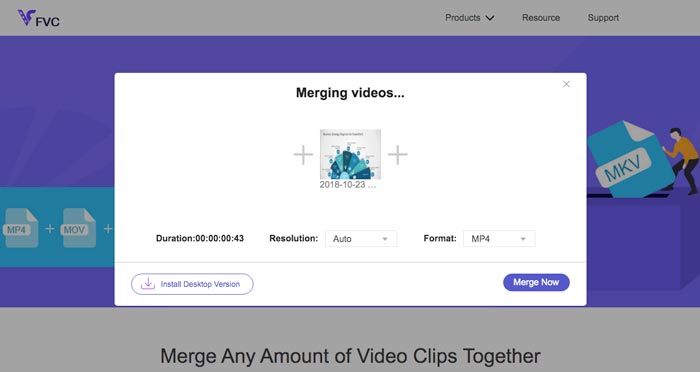
Step 3. Once you are satisfied with the output video, you can click the Merge Now button to start the combination process. When the merging is finished, the joined video will be saved on your hard drive.
Het is een gemakkelijke manier om gratis online 3GP-bestanden samen te voegen. Maar als u meer wilt bewerken voor uw videobestanden, heeft u een professionelere tool nodig.
Deel 2. Hoe 3GP-video's in een film te combineren
Whether you need to combine 3GP videos into a movie with some stunning filters, or simply join 3GP files into one, Video Converter Ultimate is a versatile video converter you should take into consideration. It enables you to split and merge video clips, select the video themes, add watermarks to videos, and even convert 3GP videos to other video formats for social media websites directly.
- 1. Hiermee kunt u de gewenste onderdelen uitknippen of meerdere 3GP in één combineren.
- 2. Bied basisfuncties voor videobewerking, zoals bijsnijden, splitsen, bijsnijden en roteren.
- 3. Voeg 3GP-videoclips samen tot een film met verschillende filters, thema's, muziekbestanden, enz.
- 4. Voeg ondertitels, audiotracks, 3D-effecten, watermerk, comprimeer video, en meer.
Gratis downloadVoor Windows 7 of nieuwerVeilige download
Gratis downloadVoor MacOS 10.7 of nieuwerVeilige download
Methode 1: Meerdere 3GP-video's rechtstreeks combineren?
Step 1: Download and launch Video Converter Ultimate from the official website. Choose the Converter interface and click the Add Files button to add the 3GP files you want to merge. Moreover, you can also drag the 3GP videos into the program.

Step 2: Once you have imported the 3GP files, you should choose the format of the output file. Click the scissors icon to cut out the desired part. Moreover, you can rotate/crop the videos, apply filters, add a watermark, or adjust audio tracks for the output video.

Step 3: Go to the bottom of the user interface to choose the destination folder for the merged 3GP files. After that, you can click the Merge into One File box and click the Convert All to start to merge 3GP files.

Methode 2: 3GP-bestanden samenvoegen tot een film
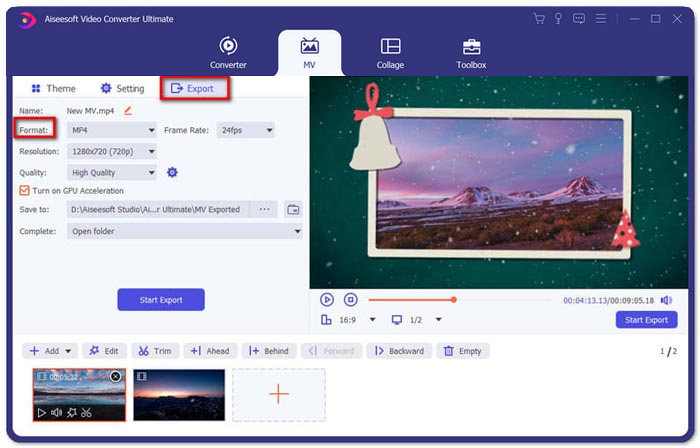
Step 1: When you need to join 3GP files into a movie, you can choose the MV menu, and then you will enter into the MV creating interface. Click the Add button from the lower left of the window to import your 3GP videos and pictures.
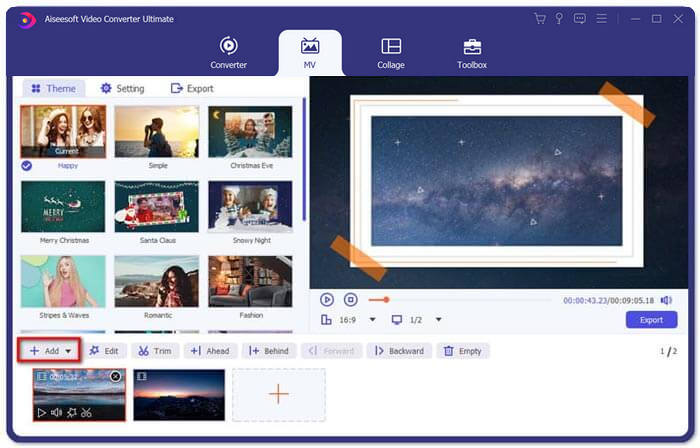
Step 2: After that, you can click the Edit button to apply the video effects. Moreover, you can also select a theme for your MV movie. On the left section, click the Theme tab and then choose your desired theme for your MV.
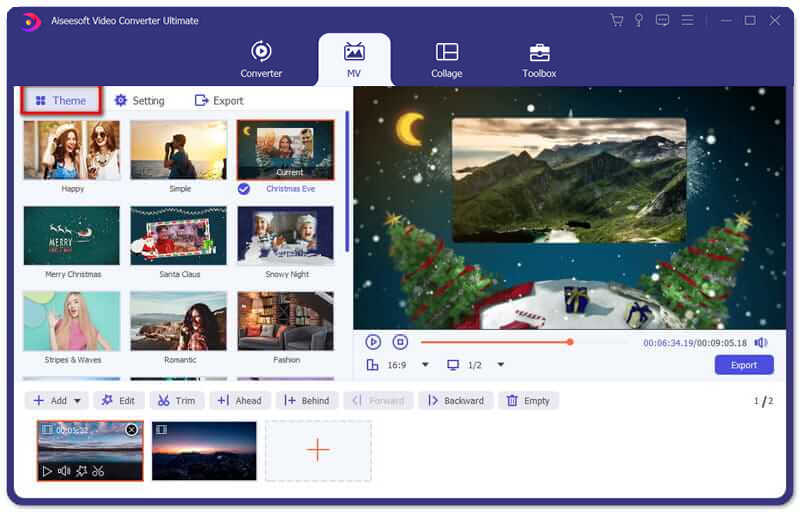
Step 3: If you are satisfied with the combined 3GP file, you can click the Export button to save the video file. By default, the output format is MP4. Of course, you can also choose the preferred video format according to your requirement.
Deel 3. Veelgestelde vragen over het samenvoegen van 3GP
1. Wat is een 3GP-formaat?
3GP is een multimediabestandsindeling die is ontworpen om gegevensopslag op te slaan. Het wordt veel gebruikt op mobiele apparaten. Wanneer u foto's of video's maakt met uw mobiele telefoon, wordt het bestand meestal opgeslagen in 3GP-indeling. Normaal gesproken wordt 3GP gebruikt op 3G-mobiele telefoons en het kan ook worden afgespeeld op sommige 2G- en 4G-telefoons.
2. Hoe 3GP-bestanden samenvoegen op een smartphone?
Als u 3GP-bestanden op een iPhone of Android-telefoon wilt samenvoegen, kunt u Video Merger gebruiken voor een Android-telefoon, VivaVideo voor een iPhone, of andere toepassingen downloaden om de video's te combineren. Maar wanneer u de 3GP-bestanden als film wilt samenvoegen, moet u nog steeds een professionele videofusie gebruiken.
3. Kan ik 3GP-video's combineren met audiobestanden?
Ja. Maar u kunt de audiobestanden niet gebruiken als achtergrond voor 3GP-video. Of u nu twee bestanden wilt combineren of de audio als achtergrond van een 3GP-video wilt gebruiken, de professionele 3GP-combiner zou uw keuze moeten zijn.
Gevolgtrekking
When you need to merge 3GP video files on your mobile devices into one video file, you can learn 2 efficient methods from this article. You can merge 3GP free online by using Free Online Video Joiner. If you need to edit and put some special effects in your video, Video Converter Ultimate should be an ideal tool for you. If you have any questions about merge 3GP files, you can feel free to contact us.
-
 Top 3 gratis manieren om FLV naar 3GP te converteren op Windows / Mac
 Kun je FLV-bestanden niet openen op smartphone of tablet? Maak je geen zorgen! Hier delen we drie methoden om FLV naar 3GP te converteren zonder kwaliteit te verliezen voor het spelen op mobiel.
-
 3 Methoden om MP4 probleemloos naar 3GP te converteren
 Wilt u MP4 op een snelle en gemakkelijke manier naar 3GP converteren? Hier zullen we 3 MP4 naar 3GP-converters delen om MP4 naar 3GP te veranderen voor weergave op verschillende mobiele telefoons.
-
 3 beste gratis 3GP-spelers voor computers en mobiel die u moet kennen
 Als je je 3GP-film gemakkelijk wilt afspelen zonder installatie of conversie van videocodecs, kun je in dit artikel meer lezen over de 3 beste 3GP-spelers op Windows, Mac, Android en iPhone.
