


 Video Converter Ultimate
 Scherm opnemer
 Videoreparatie
[Volledige beoordeling] 5 nieuwste MP3-snijders beschikbaar op Windows/Mac/online
We willen vaak het audiobestand dat we beluisteren inkorten en het als ringtone instellen, zodat alleen het belangrijkste gedeelte wordt benadrukt of om overbodige details uit het geluid te verwijderen. Hoewel er op alle platforms allerlei cutters beschikbaar zijn, zijn sommige daarvan niet betrouwbaar. Daarom presenteren we je vandaag de cutters die we op de markt hebben gevonden en die je wél kunt vertrouwen, omdat we al deze tools zelf hebben getest om te garanderen dat ze vrij zijn van malware en betrouwbaar werken. Voordat we ze hebben geselecteerd, hanteren we een strenge, hoge standaard voor gebruikers die een degelijke cutter nodig hebben. Om je browsen op internet zo vlot mogelijk te laten verlopen, hebben we hieronder de vijf MP3‑cutters opgenomen die volgens ons klaar zijn voor de taak om elk audioformaat te knippen.

Deel 1. 2 Offline MP3-snijdersoftware Windows & Mac
1. Video Converter Ultimate - Beste MP3-snijder [Sterk aanbevolen]
De beste audio‑MP3‑cutter in deze lijst is de Video Converter Ultimate, waarmee gebruikers moeiteloos elk audiobestand kunnen knippen. Met behulp van deze ultieme tool kun je het geluid trimmen om ongewenste audio te verwijderen, meerdere uitgeknipte audiobestanden samenvoegen tot één bestand en het volume verhogen als je vindt dat het geluid wat zacht is. Bovendien biedt deze software een razendsnel proces terwijl de originele geluidskwaliteit behouden blijft.
In tegenstelling tot andere snijplotters ondersteunt deze tool een breed spectrum aan formaten, niet alleen MP3 maar ook FLAC, M4R, M4A, OGG, MKA, WAV, WMA en meer, en inderdaad, je audiobestand wordt hier ondersteund om te worden geknipt. Misschien weet u niet hoe u uw audiobestand moet knippen en op dit moment voor uw behoeften moet gebruiken. Vandaag is je geluksdag, want we zullen je leren hoe je de MP3-snijder en ringtone-maker gratis kunt gebruiken door de onderstaande tutorial te volgen.
Stap 1. Download de audiocutter op je desktop door op de downloadknop hieronder te klikken. Kies of je Windows of Mac gebruikt, installeer de software meteen en start deze. Vergeet niet dat je eerst vertrouwd moet raken met de interface van de tool, zodat het makkelijker is om de volgende stappen te volgen.
Gratis downloadVoor Windows 7 of nieuwerVeilige download
Gratis downloadVoor MacOS 10.7 of nieuwerVeilige download
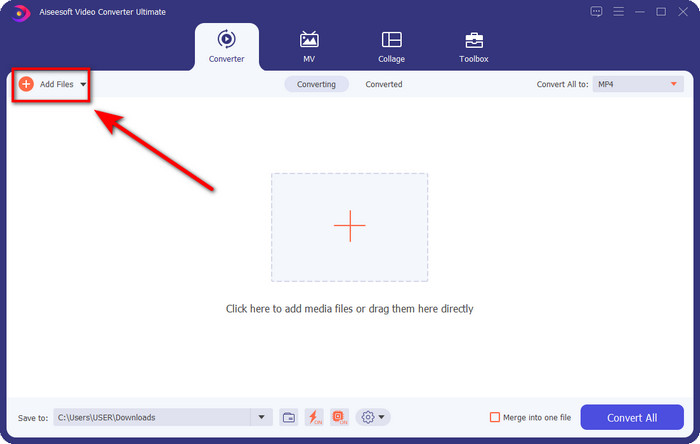
Stap 2. Sleep het audiobestand dat je wilt knippen naar de interface, of klik op Add Files en zoek het audiobestand op in de map op je computer die wordt weergegeven. Klik op Open om door te gaan naar de volgende stap.
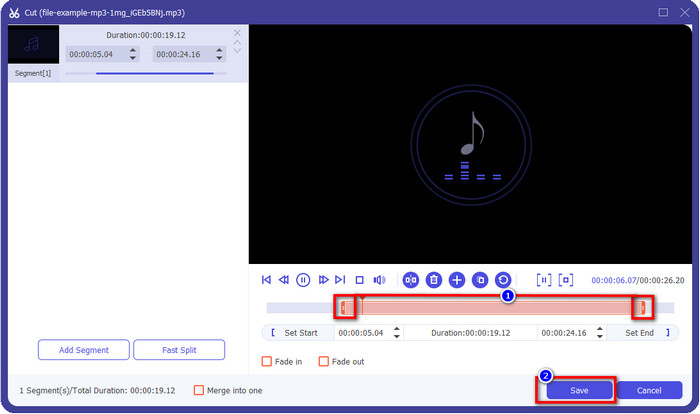
Stap 3. Nadat je het audiobestand hebt ingevoegd, is het tijd om op de schaarachtige knop te klikken. Sleep de play‑in en play‑out naar de gewenste lengte van de audio. Onthoud dat alleen de audio die tussen play‑in en play‑out is gemarkeerd, behouden blijft. Druk vervolgens op Save om de audio te knippen.
Optioneel. Moet je audio harder worden? Klik in dat geval op de toverstaf, stel de volumeschuif in door deze omhoog te slepen en druk op OK om op te slaan.
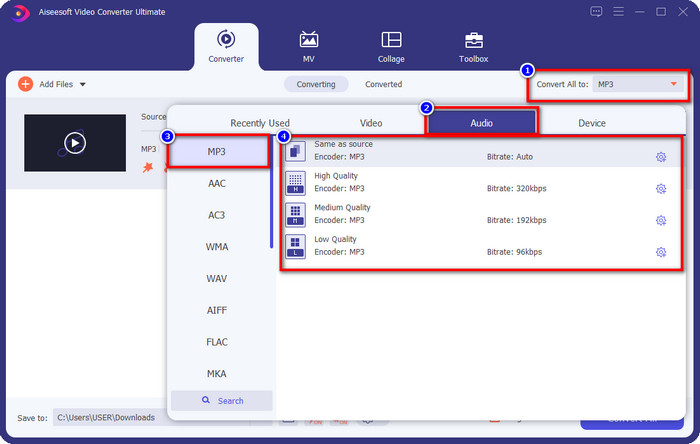
Stap 4. Ga naar Convert All to, Audio en stel het formaat in op MP3. Hoewel je niet echt converteert, moet je er toch voor zorgen dat onder Convert All to de naam MP3 staat en niet een ander formaat, om te voorkomen dat het bestand naar een ander formaat wordt omgezet.
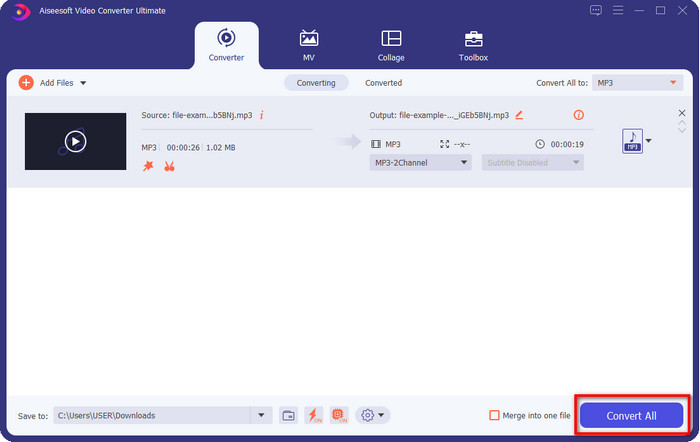
Stap 5. Door op Convert All te klikken, begint het opslaan van de geknipte audio. Je hebt nu je audioclip met de beste gratis MP3‑cutter, zo eenvoudig is het.
Voordelen
- Het kan uw audio zo snel mogelijk knippen en in minder dan een seconde verwerken.
- Er zijn geavanceerde functies beschikbaar om het volumevermogen te verbeteren.
- Het ondersteunt alle besturingssystemen zoals Windows of Mac.
- Het samenvoegen van meerdere audiobestanden is mogelijk met de audiofusie van deze tool.
Nadelen
- Aanschaf van de tool is nodig.
2. Durf
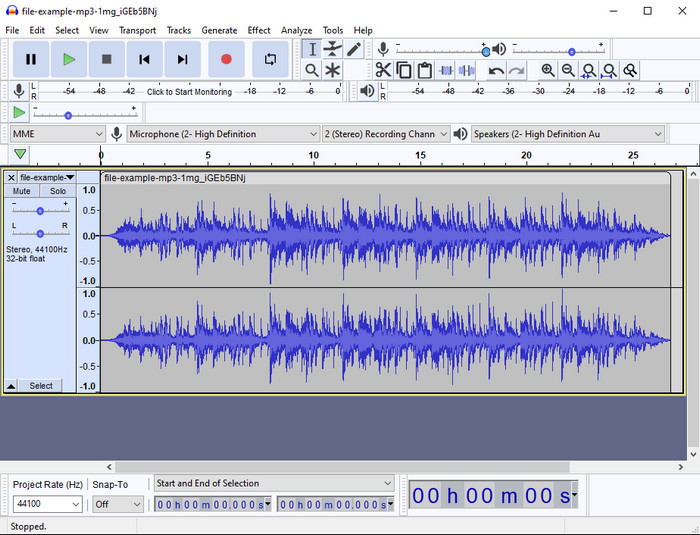
Audacity biedt al jaren professionele bewerkingsfuncties voor audio. Deze app is gratis te downloaden en biedt gebruikers de mogelijkheid om meerdere sporen te mixen. Het staat erom bekend dat podcasters het gebruiken om eenvoudig podcasts op te nemen en te bewerken. Sommige functies zijn echter lastig te begrijpen, vooral als je niet gewend bent aan gespecialiseerde software zoals deze.
Hoewel je nog steeds kunt leren hoe je het moet gebruiken, zal het tijd kosten om het volledige potentieel van deze MP3-audiotrimmer te benutten, en voor het snijden van audio kun je eerlijk zeggen dat het onmiddellijk en moeiteloos snijdt als je het nodig hebt.
Voordelen
- Gratis te downloaden in alle programma's zoals Windows en Mac.
- Er zijn geavanceerde en professionele audio-editors beschikbaar om uw audio geweldig te laten klinken.
- Het is het beste voor het opnemen van podcasts en meer.
Nadelen
- Veel concurrenten bieden een gebruiksvriendelijke gebruikersinterface.
- Niet de beste keuze voor beginners voor een onmiddellijk resultaat van knippen en andere bewerkingsdoeleinden.
- Sommige rapporten laten zien dat je gegevens worden verzameld als je deze tool gebruikt, maar daar is nog geen sterk bewijs voor.
Deel 2. 3 Toegankelijke online MP3-snijders op het web
1. mp3cut.net
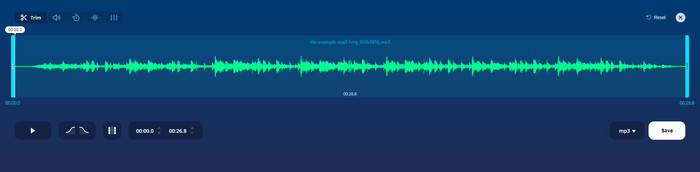
Je zou mp3cut.net kunnen gebruiken als je een online MP3-snijder nodig hebt voor de klus. Nadat u het bestand in deze online cutter heeft geüpload, kunt u nu het geluid dat u op uw audiobestand wilt tekenen verwijderen. Bovendien heeft de tool ook enkele kleine bewerkingsfuncties om de snelheid en toonhoogte van de audio te wijzigen als dat nodig is.
Hoewel het dit soort mogelijkheden heeft, crasht het hulpprogramma meestal en kan het de audio niet afspelen om te luisteren als u het correct knipt. Dus om het opnieuw te gebruiken, moet u uw browser vernieuwen en de aanpassing die u deed helemaal opnieuw herhalen.
Voordelen
- Gebruiksvriendelijk en toegankelijk via internet.
- Op punt, functies om u te helpen audio te knippen.
- Basisbewerkingsfuncties zijn beschikbaar.
Nadelen
- Het heeft advertenties op de webinterface.
- Soms crasht het en moet het opnieuw worden geladen om het te gebruiken.
2. audiotrimmer.com
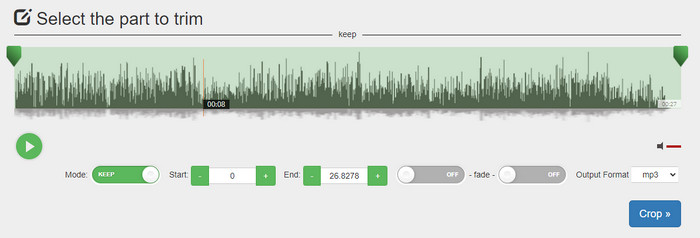
Een andere gratis online MP3‑cutter is audiotrimmer.com. Deze tool biedt eenvoudige en makkelijk te begrijpen trimfuncties; alle functies van deze tool zijn to the point. Hiermee kun je kiezen of je een deel van de audio wilt behouden of verwijderen. Ook heeft het, net als de andere hier genoemde trimmers, een fade‑in‑ en fade‑out‑effect. Toen wij echter probeerden de fade‑in‑ en fade‑out‑effecten te gebruiken, werkten ze niet; er werden geen extra effecten aan onze audio toegevoegd. Maar als je alleen eenvoudig wilt knippen, is dit een webtool die je zeker moet proberen.
Voordelen
- Gratis en beschikbaar in alle browsers om toegang te krijgen.
- Makkelijk te gebruiken om audio in te korten.
- Het heeft fade-in en out effecten.
Nadelen
- Fade-in en out werken niet goed.
- Er zijn veel vervelende advertenties als u ze opent. Pas dus op dat u er niet op klikt.
3. Clideo

Een van de beste online MP3‑cutters en ‑joiners die je kunt gebruiken is Clideo. De meeste gebruikers vinden deze tool prettig en geven er de voorkeur aan vanwege de bewerkingsmogelijkheden. Bovendien kun je ook fade‑in en fade‑out aan je audiobestand toevoegen als je dat nodig hebt. Maar nadat we het hadden geëxporteerd en beluisterd, bleek dat er geen fade‑in en fade‑out aan ons audiobestand was toegevoegd. We stuitten op één klein probleem met deze tool: het uploaden en downloaden van bestanden. In tegenstelling tot de eerstgenoemde tool duurt het uploaden van audio in deze cutter langer en het is ons soms zelfs niet gelukt om het audiobestand te uploaden vanwege onbekende redenen.
Hoewel we wat problemen tegenkomen, is het nog steeds de beste snijplotter online, en het is ook veilig om te gebruiken.
Voordelen
- Beste online snijder online.
- Professionele gebruikersinterface.
- Makkelijk te gebruiken.
Nadelen
- Het proces van uploaden en downloaden kost te veel tijd.
- Fade in en out werkt maar niet goed.
Deel 3. Veelgestelde vragen over de MP3-snijders
Wat is de beste MP3-trimmer op Mac?
FVC Video Converter Ultimate is ook beschikbaar op de Mac. Dus als je audio op een Mac moet trimmen, kun je het beste de ultieme tool downloaden om je audiobestand op de juiste manier te verwerken. Deze ultieme tool is niet alleen uitstekend voor het knippen van je audio, maar je kunt het geluid ook verbeteren door het te boosten. Bovendien komt de ultieme tool te hulp als je hulp nodig hebt bij converteren, samenvoegen, synchroniseren van audio, enzovoort. Wil je meer weten over de ultieme tool, lees dan de bovenstaande toelichting.
Vermindert het trimmen van de audio de grootte ervan?
De bestandsgrootte van de audio wordt kleiner nadat u deze hebt bijgesneden. Toen we het originele audiobestand vergeleken met het geknipte bestand, zagen we enkele hoogteverschillen. Het betekent dus dat hoe korter het audiobestand is, hoe kleiner de grootte, maar als uw audiobestand erg lang is, verwacht dan dat de grootte ook aanzienlijk is.
Kan ik Audacity gebruiken om meerdere audio's samen te voegen?
Ja, dat kan. Audacity ondersteunt het samenvoegen van meerdere audiotracks tot één bestand. Het is echter lastig, vooral als je geen duidelijke handleiding hebt om te volgen. Dus als je audio in Audacity wilt samenvoegen, kun je op deze link klikken en het daar leren.
Gevolgtrekking
De hier gepresenteerde MP3‑cutters hebben al aan de normen voldaan die we hebben opgesteld om je alleen de beste trimmer te bieden. Dit artikel laat zien hoe belangrijk het is om de juiste en passende cutter te kiezen op basis van je behoeften. Hoewel de hier genoemde trimmers dezelfde functie vervullen, biedt de FVC Video Converter Ultimate een veel efficiëntere manier om audio te knippen. Volgens ons onderzoek overtreft de ultieme tool alle standaarden die we hebben vastgesteld. Dus als je de beste cutter bij de hand wilt hebben, is dit de beste keuze van alle cutters die op de markt verkrijgbaar zijn. Te mooi om waar te zijn? Dan kun je de tool het beste downloaden en er zelf mee aan de slag gaan.
-
 Nummers online knippen en samenvoegen - 4 beste manieren die u moet weten
 Als je online nummers wilt knippen en samenvoegen om een muziekstuk te maken, kun je meer te weten komen over de 4 beste online tools om de nummers te knippen en bestanden uit het artikel te combineren.
-
 Ontdek de beste MP4-trimmer met procedure en informatie
 Wil je leren hoe je video's kunt knippen zoals de vloggers die je bekijkt? Lees dan dit bericht verder om te weten welke MP4-trimmers je kunt gebruiken.
-
 MP3-speler downloaden – 10 beste gratis MP3-muziekspelers van 2025
 Wat is de beste mp3-muziekspeler? Hoe zet ik muziek op een mp3-speler? Hoe kan ik de mp3-muziekspeler downloaden? Dit bericht geeft je een gedetailleerd overzicht van de 10 beste gratis mp3-spelers voor Windows-pc en Mac.
