


 Video Converter Ultimate
 Scherm opnemer
 Videoreparatie
 Beveiligde download
Gemakkelijke manieren om Coub-watermerk online en offline te verwijderen
Coub is een website die wordt gebruikt om online video’s te delen. Het is een populaire site waar gebruikers video’s tot tien seconden kunnen maken en delen. In tegenstelling tot GIF’s hebben Coub‑video’s geluid van hoge kwaliteit, waardoor ze bij veel mensen populair zijn. Wanneer je echter video’s van Coub opslaat of downloadt, bevat de video een watermerk. Als je het Coub‑watermerk wilt verwijderen, heb je dus een hulpmiddel nodig dat watermerken kan weghalen. In dit artikel laten we je de beste tools zien waarmee je eenvoudig Coub‑watermerken kunt verwijderen uit je video’s.

Deel 1. 4 manieren om Coub-watermerk te verwijderen
Veel mensen zijn nu geïnteresseerd in het online bekijken en downloaden van Coub-video's. Maar wanneer u video's van coub downloadt, bevat deze een watermerk. Op deze vier eenvoudige manieren weet u hoe u het Coub-watermerk kunt verwijderen.
FVC Video Converter Ultimate
FVC Video Converter Ultimate is een desktopapplicatie die elk watermerk uit je video’s kan verwijderen. Deze tool is gebruiksvriendelijk omdat hij een eenvoudige interface heeft en makkelijk te downloaden is. Bovendien zul je geen problemen hebben met de bestandsindelingen die worden ondersteund, want hij ondersteunt tal van formaten, zoals MP4, MKV, AVI, MOV, M4V, WEBM, FLV en meer dan 1000 andere formaten.
Het heeft ook geavanceerde bewerkingsfuncties, waaronder een media-metadata-editor, videofusie, videocompressor en meer uit de toolbox. En wanneer u het watermerk uit uw video verwijdert, kunt u de grootte van het verwijdergebied instellen. U ziet ook een voorbeeldvideo van uw bestand, zodat u de uitvoer van uw video kunt controleren. Als u deze converter wilt gebruiken om het Coub-watermerk te verwijderen, volgt u de onderstaande stappen.
Stap 1. Download FVC Video Converter Ultimate op je desktop door op de knop Downloaden hieronder te klikken. Volg het installatieproces en start vervolgens de app.
Gratis downloadVoor Windows 7 of nieuwerVeilige download
Gratis downloadVoor MacOS 10.7 of nieuwerVeilige download
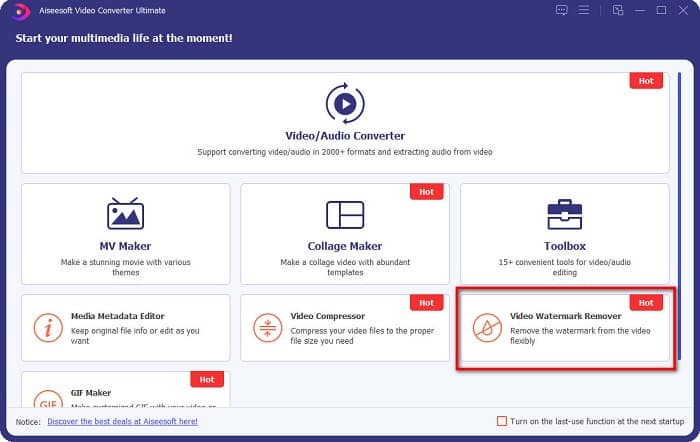
Stap 2. Ga daarna in de eerste interface van de software naar Video Watermark Remover. Als je het daar niet ziet, klik je op de Toolbox.
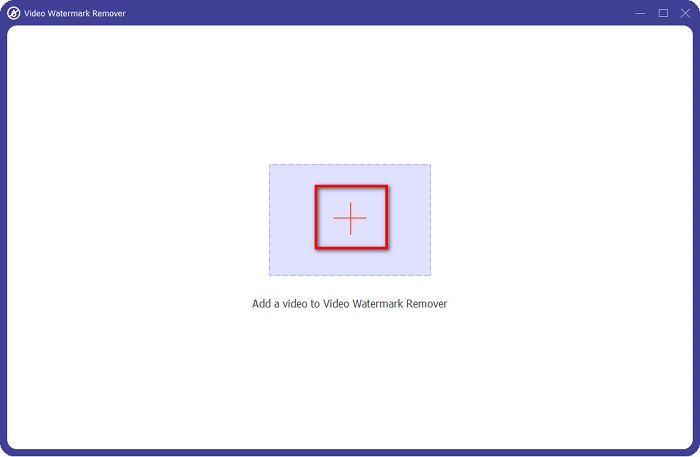
Stap 3. Klik op de knop met het +-teken om in de volgende interface de Coub‑video te uploaden. Je computerbestanden worden geopend; selecteer de video en klik op Openen.
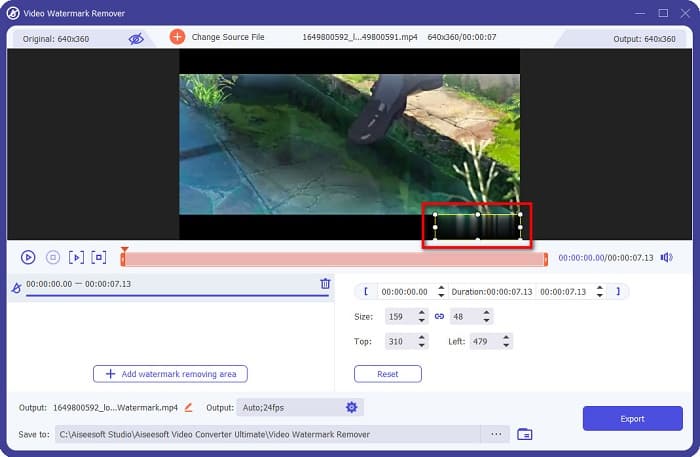
Stap 4. Klik vervolgens op de knop Add watermark removing area, zodat het verwijderingsgebied verschijnt. Verplaats daarna het vak van het verwijderingsgebied naar het Coub‑watermerk. Je ziet dat het door jou gekozen gebied wordt vervaagd.
Stap 5. Klik ten slotte op de knop Export om het Coub‑watermerk te verwijderen; je uitvoerbestand wordt automatisch opgeslagen in de mappen op je computer.

Makkelijk, toch? Door de eenvoudige stappen hierboven te volgen, kun je het Coub‑watermerk uit je video verwijderen. Klik hier om te leren hoe je het TikTok‑watermerk verwijdert.
Hitpaw Watermerk Verwijderaar
Hitpaw Watermark Remover is een populaire, te downloaden watermerkverwijderaar waarmee je eenvoudig het Coub‑watermerk uit je video kunt verwijderen. Als je een Coub‑video zonder watermerk wilt hebben, kun je deze tool gebruiken om het weg te halen. Bovendien heeft deze tool een eenvoudige gebruikersinterface, waardoor hij erg gebruiksvriendelijk is.
U kunt ook gemakkelijk een watermerk op een bepaald deel van de video verwijderen door de schuifregelaars te verplaatsen. Bovendien zorgt het voor een gladde vulling bij het verwijderen van het watermerk. Het is ook gratis te downloaden op bijna alle media-apparaten.
Stap 1. Download eerst de Hitpaw Watermark Remover, volg het installatieproces en start de app.
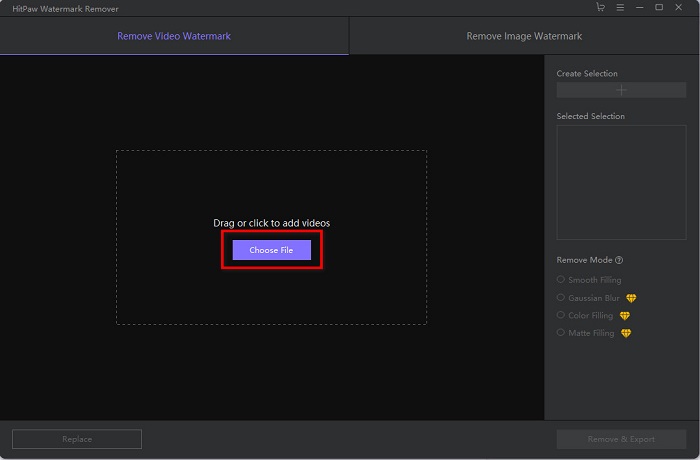
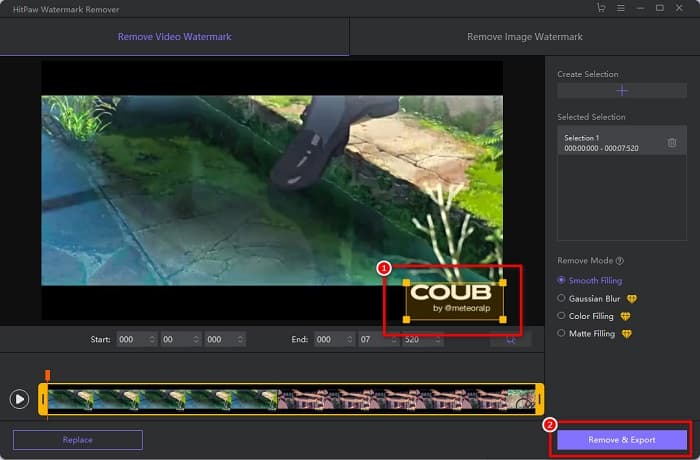
Stap 2. Klik vervolgens op de knop Choose File in de hoofdinterface van de software om je Coub‑video te uploaden. Je computerbestanden worden geopend, waar je je Coub‑video kunt selecteren en openen.
Stap 3. Verplaats het verwijderingsgebied naar het Coub‑watermerk en klik daarna op de knop Remove & Export rechtsonder in de interface om het watermerk permanent te verwijderen.
Media.io
Media.io is een online watermerkverwijderaar voor video’s. Met deze online tool kun je watermerken verwijderen, zoals logo’s, tekst en stempels. Als je voor het eerst een watermerkverwijderaar gebruikt, zul je geen moeite hebben met deze online tool, omdat hij heel eenvoudig te gebruiken is. Bovendien ondersteunt hij de meest gangbare videoformaten, zoals MP4, MKV, AVI, FLV, MOV en meer. Je kunt ook videobestanden kiezen uit je Dropbox, Google Drive en YouTube. Daarnaast is hij veilig in gebruik en gratis. Media.io is toegankelijk in alle webbrowsers, waaronder Google, Firefox en Safari.
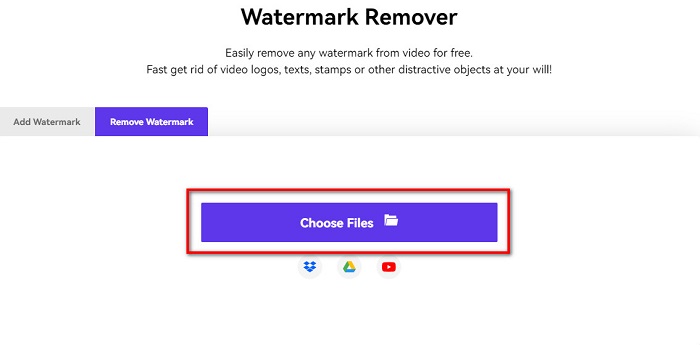
Stap 1. Zoek in de browser die je gebruikt naar Media.io en ga naar hun webpagina. Klik in de hoofdinterface van de software op de knop Choose Files.
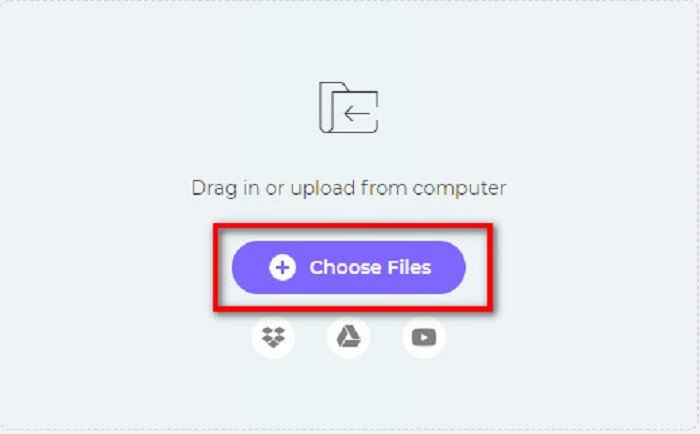
Stap 2. Er verschijnt een nieuwe interface waarin je op de knop Choose Files klikt of je Coub‑video naar de interface van de software sleept. Wacht tot je video is geüpload en ga dan verder met de volgende stap.
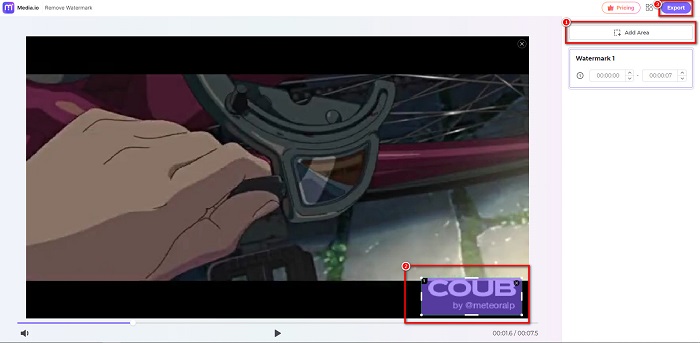
Stap 3. Klik vervolgens op Add Area in de linkerhoek van de interface en verplaats het verwijderingsgebied naar het Coub‑watermerk. Klik op de knop Export om het watermerk te verwijderen; je bestand wordt automatisch op je apparaat opgeslagen. Je kunt deze methode ook gebruiken om het watermerk uit andere video’s te verwijderen.
BeeCut
BeeCut is een andere manier om Coub‑watermerken online te verwijderen. Deze tool is erg handig, omdat je niets op je apparaat hoeft te downloaden. Bovendien is hij gratis en veilig in gebruik. Interessant is dat deze tool tal van bestandsformaten ondersteunt, waaronder MP4, AVI, MKV, FLV en andere gangbare formaten.
Bovendien is het een beginnersvriendelijke tool omdat het een eenvoudig te bedienen gebruikersinterface heeft. U kunt echter een traag bedrijfsproces ervaren wanneer uw internetverbinding traag is omdat deze afhankelijk is van internet. Volg de eenvoudige gids hieronder om het coub-watermerk te verwijderen met BeeCut.
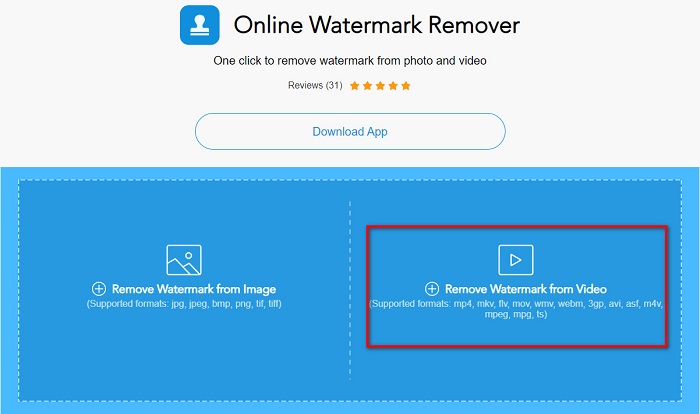
Stap 1. Zoek BeeCut in je browser en klik vervolgens op Remove Watermark from Video in de hoofdinterface van de software. Upload je video door deze vanuit je computerbestanden te openen.
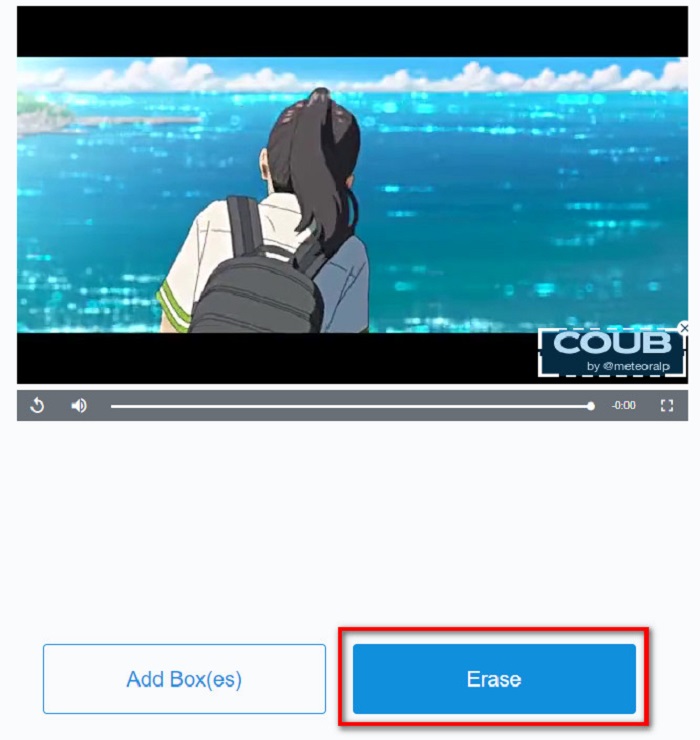
Stap 2. Verplaats in de volgende interface het verwijderingsgebied naar het Coub‑watermerk dat je wilt verwijderen. En als je nog andere watermerken, logo’s of stempels in je video hebt, kun je een extra verwijdervak toevoegen door op Add Box(es) te klikken.
Stap 3. Klik tot slot op de knop Erase om het Coub‑watermerk uit je video te verwijderen. Je ziet je uitvoerbestand in je computerfolders.
Deel 2. Veelgestelde vragen over het verwijderen van Coub-watermerk
Kun je coub-video's zonder watermerk krijgen?
Helaas zijn er geen specifieke manieren of tools om een coub-video zonder watermerk te downloaden. Watermerkverwijderaars helpen je echter om een coub-video zonder watermerk te maken.
Verkleint het verwijderen van het watermerk de bestandsgrootte van je video?
Nee. Als u het watermerk van uw video verwijdert, heeft dit geen invloed op de bestandsgrootte van uw video.
Waarom is het watermerkgebied wazig nadat u het hebt verwijderd?
Een vervaging van het watermerkgebied dat u hebt verwijderd, want dat is hoe de tools het watermerk op uw afbeeldingen of video's verwijderen.
Gevolgtrekking
Het verwijderen van een Coub‑watermerk uit video’s klinkt misschien ingewikkeld. Maar met de hierboven genoemde tools kun je eenvoudig Coub‑watermerken verwijderen uit je video. Wil je echter een watermerkverwijderaar gebruiken die snel werkt en veel functies biedt, download dan FVC Video Converter Ultimate.
-
 4 beste manieren om het watermerk uit GIF te verwijderen [Online & Offline]
 Wilt u het watermerk van GIF verwijderen? Met de tool in dit artikel leert u de verschillende stijlen met de verschillende watermerkverwijderaars die beschikbaar zijn op uw platform.
-
 Uitstekende Photobucket Watermark Remover online en offline
 Leer hoe u het Photobucket-watermerk van uw foto's kunt verwijderen met deze geweldige Photobucket-watermerkverwijderaar. Lees dit artikel om de manieren te leren.
-
 Eenvoudig watermerk uit PDF verwijderen met eenvoudige stappen
 Verwijder Watermark uit PDF door deze eenvoudige stappen te volgen. Leer hoe u gemakkelijk watermerken uit uw PDF-bestand kunt verwijderen met deze geweldige tools.
